
- Streaming Products
- BD-DVD products
- Store
- Useful Articles
- support
Share this article!


Many users have asked on sites like Yahoo! Answers about the problem: "When I record a Netflix video, the screen just goes black and only the audio plays." This is a very frustrating issue for users who want to enjoy the recorded content later. So why does this happen?
This article will explain in detail why Netflix screen recordings are black and how to fix it effectively. We'll also introduce a reliable way to record Netflix videos. Please read to the end.
Related Posts:
Why does the screen go black when recording Netflix? There are various possible reasons for this, including DRM protection, cache accumulation, and temporary device or server issues. To help you understand, we've compiled the most common reasons why Netflix screen recording can cause a black screen. Please refer to the table below.
| cause | Common symptoms | How to check | Solution |
| DRM protection | Only audio is recorded | Comparing the Netflix playback screen and the preview screen of the recording software | Use a tool that can remove DRM protection |
| Cache Accumulation | Recording is stuttering and goes black | Check your device's storage capacity | Clear the Netflix app cache |
| Temporary device/server malfunction | The screen suddenly goes black while recording | Check if the terminal/server is working properly | Restart your device |
| Hardware acceleration related | GPU usage is extremely high | Check if hardware acceleration is enabled | Disable hardware acceleration |
| Recording software capture method | Only certain windows go black | Try recording with different capture methods | Change capture method |
To prevent unauthorized use of music and video data, content distributed on Netflix is subject to strict Digital Rights Management (DRM). DRM is a technology that prevents users from copying or saving content through unofficial means, such as screen recording or audio recording.
The main reason why the screen goes black when you try to record Netflix is likely due to this DRM protection mechanism.
In principle, if you want to save DRM-protected content like this, you must use Netflix's official download function. However, even if you save it using the official function, the data will be in a proprietary encrypted format and cannot be moved or edited freely. Furthermore, playback is limited to within the Netflix app.
If you want to manage and save content freely, you can use video conversion and saving software that supports DRM protection. For example, "TuneFab VideOne Netflix Downloader" or "StreamByte for VideoExamples of software include:
Netflix content has Digital Rights Management protection, which can cause the screen to go black when recording. However, there are other possible reasons for this.
In the article above, we've detailed the main reasons why your screen may go black when recording Netflix.Cache accumulation or temporary malfunction of the operating environmentIn addition, the most common and likely cause is that Netflix's DRM protection blocks direct capture by recording software. So, is there a way to prevent the black screen when recording and save the content?
So, to avoid this problem and effectively bypass Netflix's DRM protection, we will introduce a trick called " StreamByte for VideoThis software is a powerful video downloader that can download Netflix videos.Remove DRM protectionNot only can you download videos, but you can also save them in lossless quality in formats like MP4, MKV, and MOV. What's more, it can process at up to 8x faster speeds, so even a few minutes of 1080p content can be downloaded in just a few minutes, saving you a lot of time. This way, downloaded Netflix videos are saved permanently and can be enjoyed offline anytime.
100% safe and virus free
100% safe and virus free
Why StreamByte for Video is recommended
Here, "StreamByte for VideoWe will explain how to use it to easily download Netflix videos.
step 1"StreamByte for Video"Log inAfter that, the main interface will show you some popular streaming services, including Netflix.NetflixSelect
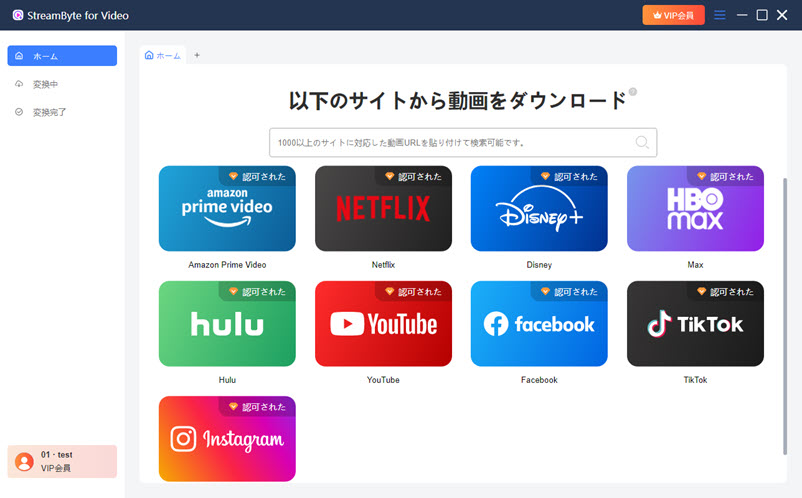
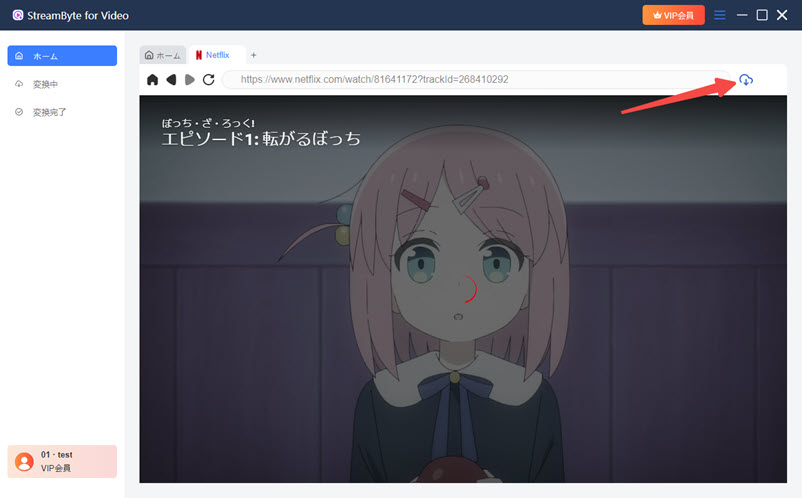
Step 2Search for the video you want to save, and when you find the Netflix video you want to save, click the icon in the top right corner.
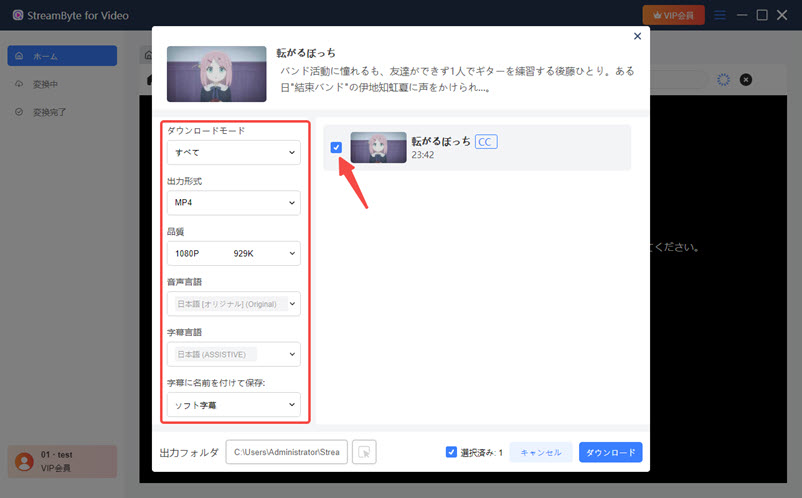
Step 3You can change the output format, audio, subtitles and other settings of the Netflix video you want to download according to your convenience.
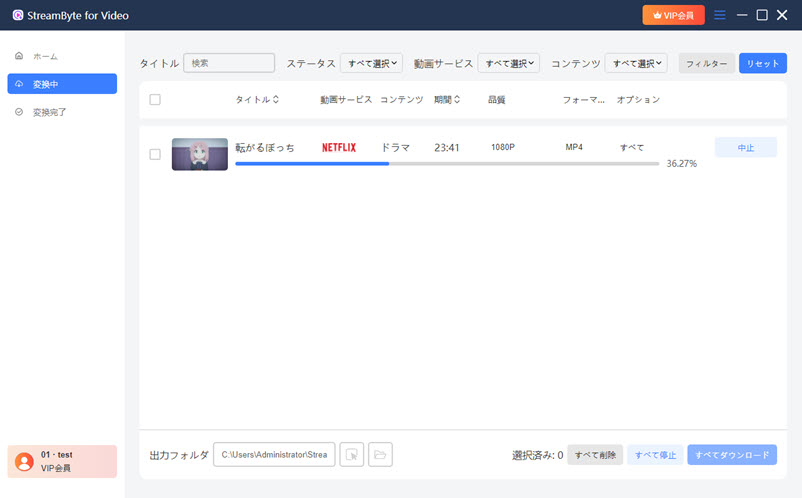
Step 4, after changing the settings,Click the Download button on the bottom rightClick to start downloading the video. You can see the download progress on the "Conversion in progress" screen. Once the download is complete, the video will automatically move to the "Conversion completed" screen.
"StreamByte for VideoBy using ", you won't be bound by Netflix's DRM protection restrictions. Its DRM protection removal function completely avoids the black screen problem that occurs when recording Netflix screen, allowing you to save Netflix videos without restrictions. In addition, this software has a simple and easy-to-use interface, so even beginners can easily download Netflix videos and watch them offline, allowing you to enjoy your favorite titles freely. If you want to save as many Netflix videos as you want, we recommend "StreamByte for Video"Please try ".
100% safe and virus free
100% safe and virus free
Netflix content is DRM-protected, so when you try to record it, the video may not be recorded and only the audio may be recorded. DRM protection is a mechanism that encrypts the video to protect the copyright of the content, and as a result, it blocks screen captures using recording software.
If you want to save Netflix content, you should use "StreamByte for VideoWe recommend using a dedicated video downloader that supports DRM removal, such as ".
When trying to record Netflix content using the iPhone's screen recording feature, the screen will remain black, just like on other devices such as PCs. This is because Netflix content is copyright protected and cannot be recorded due to iOS specifications. This is not limited to iPhones; similar restrictions exist on many smartphones and tablets.
Strictly speaking, recording Netflix content is considered illegal, as all content streamed on Netflix is subject to strict copyright protection and cannot be saved in any way other than the officially provided methods.
However, as long as the use is within the scope of personal use, there are generally few cases in which legal liability will be held. However, if you use the recorded content for commercial purposes or publish or distribute it on the Internet, it is highly likely to constitute copyright infringement. Please note that copyright handling differs by country and region, so we recommend that you check the relevant laws and regulations of your country or region to determine actual legality.
Generally, when recording Netflix using PC screen recording software or a smartphone's screen recording function, the screen may turn black or audio may not be recorded due to Netflix's copyright protection. However, Netflix is rarely notified of this behavior, and recording itself is not often detected. However, please be aware that publishing or distributing recorded videos without permission may constitute copyright infringement.
Even on smartphones, Netflix content is DRM-protected, so even if you try to record the Netflix screen using your smartphone's recording function, you still can't avoid the problem of "Netflix screen recording is black." If you want to record Netflix and watch it on your smartphone, you need a dedicated video downloader that can remove DRM protection.StreamByte for VideoWe recommend using "Netflix." This software allows you to download and save Netflix content, and the saved videos will not have a black screen issue. You can also transfer and watch them on other devices, such as smartphones.
In this article, we will first explain in detail the main reasons why the video goes black when recording your Netflix screen. In addition to cache accumulation and problems caused by the device you are using, the most common and likely cause is Netflix's DRM protection. As a solution, we will introduce "StreamByte for Video"is.
This software's powerful DRM protection removal function completely solves the black screen issue when recording Netflix.Save Netflix content in popular formats like MP4In addition, the image quality is maintained almost without degradation, satisfying even the most discerning users. This means you can enjoy downloaded Netflix videos offline anytime, anywhere, without worrying about viewing time limits or device restrictions.
"StreamByte for Video" offers a free trial version, so if you're having trouble with your Netflix screen recordings going completely black, feel free to give it a try!
100% safe and virus free
100% safe and virus free
Born in Tokyo in 1997. After graduating from a university in London, he worked at a major IT media company, writing articles about video streaming services, video downloaders, and digital content.More than 3 years of experience in editing, proofreading, and writing directionThe articles he has worked on have garnered over 5 million page views, and he is well-known for producing content that is carefully crafted from the reader's perspective.
Currently, as an editor and web writer at StreamByte, he works on creating articles that help users solve their problems, focusing on information related to video streaming services and downloads, with the aim of being "user-oriented, easy to understand, and immediately useful."
Read more articles together
Experts in supporting offline viewing of streaming video services
Subscribe to StreamByteCopyright © 2026 StreamByte. All rights reserved.



Get the latest news, product upgrades, information, guides, discounts and more about StreamByte.
Please enter a valid email address.










 English
  Japanese
  Chinese (traditional)
  German