
- Online video downloader
- Streaming Products
- BD-DVD products
- Store
- Useful Articles
- support
Share this article!


On the internet, we see many people who are experiencing problems downloading Amazon Prime Video content and are seeking solutions. Downloading videos is incredibly convenient because you can watch them anytime, anywhere, but the inability to actually download them can be a major source of stress.
This article will explain in detail the reasons why you might be unable to download Amazon Prime Video content, and provide specific solutions. Furthermore, we'll also share a secret trick to completely resolve the problem of not being able to download Amazon Prime Video. Please read to the end.
Related Posts:
Amazon Prime Video's download function is primarily a service for Prime members. Therefore, you cannot download content unless you are a Prime member. Furthermore, even if you have downloaded content, you may no longer be able to play it if certain conditions are no longer met, such as your membership expiring.
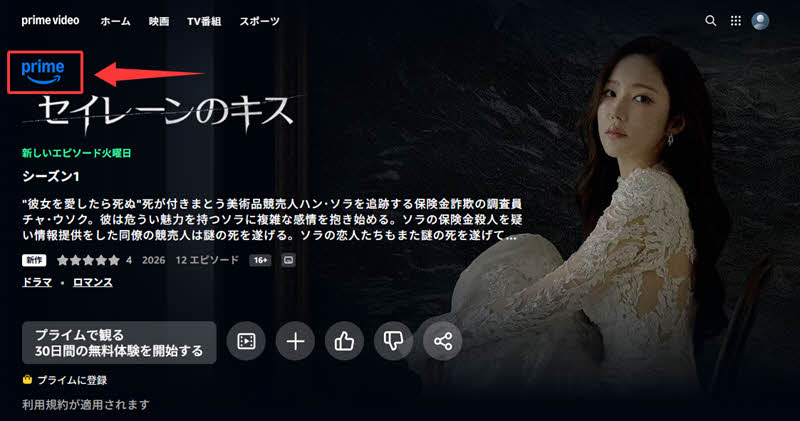
Solution: Below the logo in the upper left corner of the Amazon official website"Prime"Please check your Prime membership status by seeing if it is displayed as such. If your membership has expired, please renew it. Also, if you share an account with family members, please check if Prime membership benefits are being shared correctly.

The stability of your internet connection also significantly impacts Amazon Prime Video downloads. If your Wi-Fi or mobile data connection is unstable, downloads may stop midway or fail to start. As a result, downloads may take a long time, or in the worst case, may not be possible at all.
SolutionFirst, try switching to a network with a stable connection. If your Wi-Fi signal is weak, moving to a location with a better signal, such as near your router, can also be effective. Also, using a VPN may prevent you from connecting properly to Amazon Prime Video servers. In that case, please turn off your VPN and try again.
To ensure the app functions correctly and to download content, your smartphone or tablet needs sufficient free storage space. If storage space is insufficient, downloads may stop midway, or Amazon Prime may...VideoNot only can this prevent downloads, but it can also cause unstable behavior such as apps crashing.
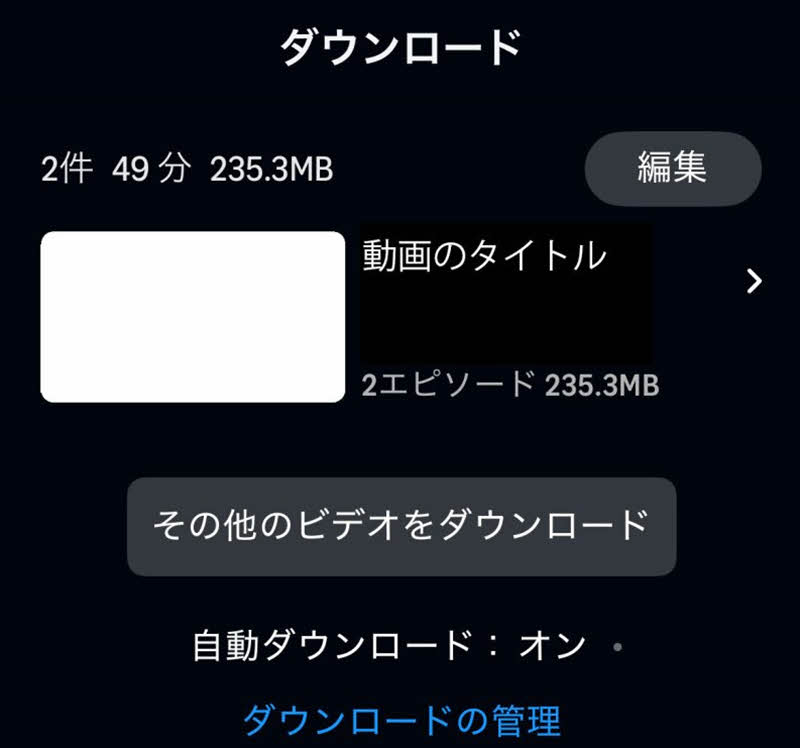
SolutionAs a guideline, it is recommended to have at least 1GB of free space for apps to run and download. You can increase your free space by deleting unnecessary photos and videos, and apps that you haven't used for a long time. It is also effective to individually delete Amazon Prime Videos that you have already watched and other unnecessary downloaded data from the "Downloads" page.
If you are using an older version of the Amazon Prime Video app or your device's operating system, you may not be able to use newly added features, and some functions, including the download function, may not work properly. This is because older versions may not be able to keep up with changes in service specifications and security updates.
SolutionPlease try updating the app from your device's official app store, updating your device's operating system, and then launching the app again to see if you can download it. Also, if your device is past its manufacturer's support period, you may not be able to update to the latest OS. In that case, please consider trying it on another available device.
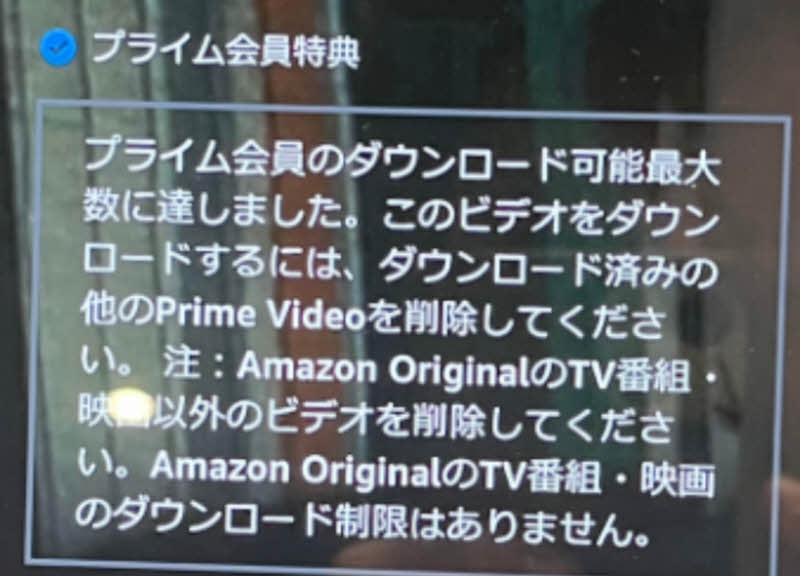
Amazon Prime Video has limits on the number of titles you can download with one account and the number of devices you can register (maximum 25 titles per account, and you can save them on up to 2 devices simultaneously). If you have reached the limit, when you try to download, you will see a message saying "You have reached the download limit available with your Prime membership," and you will not be able to download Amazon Prime Video.
SolutionIf you have reached the maximum number of devices, please find and delete any unnecessary devices you are not currently using from the "Registered Devices" list in your account settings. If you have reached the maximum number of downloads, please delete any content you have already watched or unregister a device on a different device and try downloading again.
Not all Amazon Prime Video titles are available for download; some are not included with Prime. If you select an inapplicable title, the download button may not appear, or an error message may be displayed when you attempt to download it, preventing you from saving it.
SolutionPlease check in advance whether the title is eligible for Prime. Prime eligible titles will have a "Prime" mark displayed, so choose titles with this mark to download. Also, please note that even eligible titles may not be available for download in some regions or on certain devices.
Some titles available on Amazon Prime Video may only be downloadable in specific countries or regions due to regional licensing restrictions. Therefore, the download function may not be available if you are outside the service area.
SolutionPlease check if your current location is within the Amazon Prime Video service area. If you are temporarily outside the service area, such as while traveling abroad, please try again within the service area, such as in Japan.
The above explains in detail the main reasons why you might not be able to download Amazon Prime Video and how to deal with them. However, in reality, various other factors can be involved in causing download problems. So, is there a fundamental solution that can solve all of these problems at once?
Therefore, here's a secret trick that can completely solve the problem of not being able to download Amazon Prime Video:StreamByte for VideoI will introduce this software. With this software, you can use Amazon Prime VideoRemove DRM protectionFurthermore, it allows you to save videos in common video formats such as MP4. This bypasses various download and playback restrictions imposed by Amazon, thus avoiding the majority of download failures. In addition, it features a built-in web player, allowing you to download videos smoothly with an almost identical user experience to that of the official website. For those who want to fundamentally solve the problem of being unable to download Amazon Prime Video, this is undoubtedly one of the best options.
StreamByte for Video
This is a video downloader that supports major streaming services such as Netflix, Amazon Prime, and YouTube. You can save and enjoy your favorite videos with high image quality up to 8K and Dolby Atmos audio.
"Why we recommend StreamByte for Video"
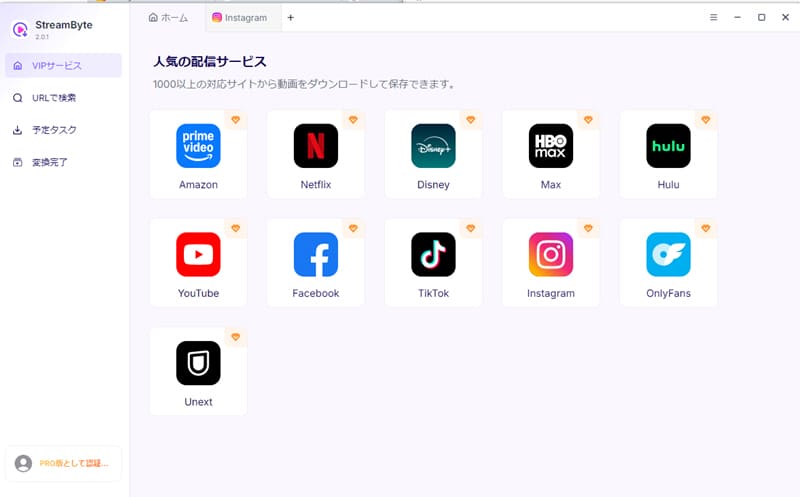
step 1Once you log in to "StreamByte for Video," major streaming services, including Amazon, will be displayed on the main screen. Please select "Amazon Prime Video" from the list.
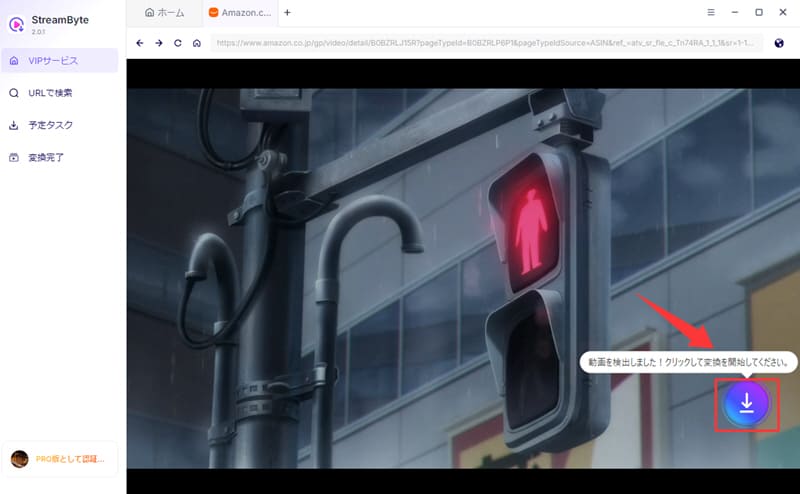
Step 2After logging into your account, open the page of the video you want to download. The software will automatically analyze the video, and the download icon will become active. Clicking this icon will add the video to your download list.
Step 3On the download settings screen, you can configure the output format, audio, subtitles, and other settings to your liking.
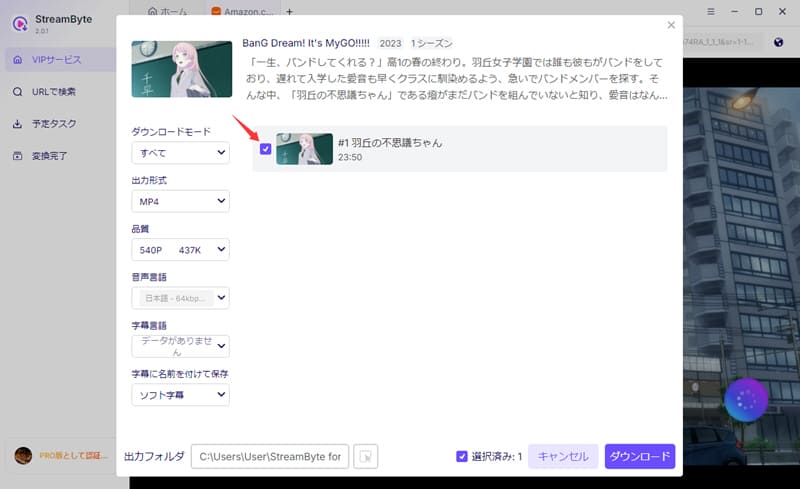
Step 4Finally, clicking the "Download" button will start the video download. You can check the progress on the "Scheduled Tasks" screen. This will allow you to download the video.Save Amazon Prime Video permanently to your computer.can.
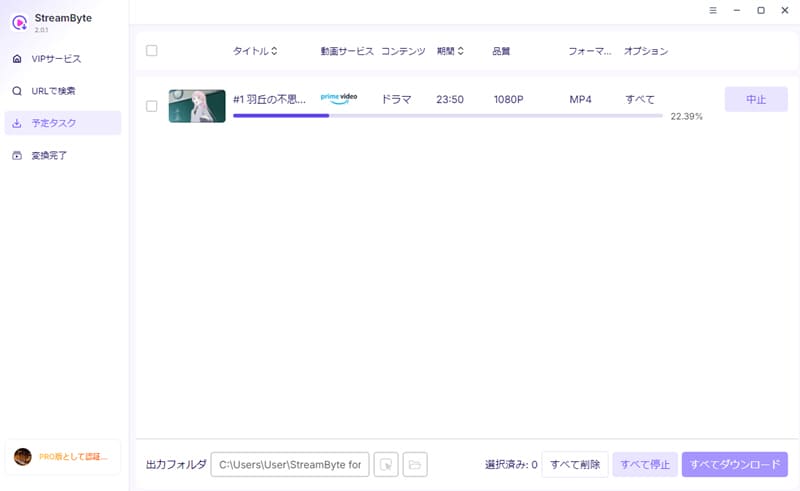
"StreamByte for VideoUsing this software, you can download and save Amazon Prime Video in just a few steps. Because it bypasses various download and playback restrictions imposed by Amazon, it prevents the vast majority of download failures. Even for those who have repeatedly failed to download videos in the past, this software boasts a very high success rate.
Furthermore, even when downloading large amounts of content at once, failures are extremely rare. In addition, the user interface is designed to be simple and easy to understand, so even beginners can quickly save their favorite Amazon Prime Video content without any trouble.
100% safe, virus-free
100% safe, virus-free
Downloading content protected by DRM, such as that on Amazon Prime Video, by removing the protection is illegal. However, if you use the content solely for personal learning purposes and do not redistribute or use it commercially, you will generally not be held liable. Nevertheless, copyright issues are often in a gray area, so ultimately, you should make your decision based on the actual laws and regulations in your area.
Amazon Prime Videos saved using Amazon Prime's official download function are generally protected by DRM. Therefore, the videos are saved in an encrypted state in the app's storage. Because these video files are managed using a proprietary encryption format, they cannot be directly extracted and played from a folder like regular video files.
If you want to freely change the save location,StreamByte for VideoAnother method is to use a dedicated video downloader that supports DRM protection, such as [mention specific downloader name], to save Amazon Prime Video in a common video format such as MP4.
The required storage space varies depending on the length and quality of the video, but a one-hour video is roughly 0.5GB to 2GB. Downloading in high quality will require more storage space, so be sure to check the available storage on your device beforehand. Note that the Amazon Prime Video app allows you to select the quality during download, so if you want to save space, you can choose standard quality to reduce storage consumption.
This article first explained in detail the main reasons why you might not be able to download Amazon Prime Video and how to deal with them. However, because the causes are so diverse, many people are still struggling to determine which one applies to them and are unable to resolve the issue. Therefore, this article will introduce a secret trick to thoroughly solve the problem of not being able to download Amazon Prime Video:StreamByte for Video" was introduced.
This software allows you to bypass various download restrictions on Amazon Prime.Save as a general-purpose video format such as MP4.It is possible to do so. The success rate is extremely high, over 99%, and even when downloading dozens of videos at once, failures are extremely rare. Furthermore, the powerful DRM protection removal function makes saved Amazon Prime Videos virtually permanent. Even after your Amazon Prime membership expires, you can freely enjoy your downloaded content anytime, anywhere.
"StreamByte for VideoWe offer a free trial version, so if you want to solve the problem of not being able to download Amazon Prime Video videos all at once, why not give it a try?
100% safe, virus-free
100% safe, virus-free
Born in Tokyo in 1997. After graduating from a university in London, he worked at a major IT media company, writing articles about video streaming services, video downloaders, and digital content.More than 3 years of experience in editing, proofreading, and writing directionThe articles he has worked on have garnered over 5 million page views, and he is well-known for producing content that is carefully crafted from the reader's perspective.
Currently, as an editor and web writer at StreamByte, he works on creating articles that help users solve their problems, focusing on information related to video streaming services and downloads, with the aim of being "user-oriented, easy to understand, and immediately useful."
Read more articles together
Experts in supporting offline viewing of streaming video services
Subscribe to StreamByteCopyright © 2026 StreamByte. All rights reserved.



Get the latest news, product upgrades, information, guides, discounts and more about StreamByte.
Please enter a valid email address.

A highly capable video downloader:
StreamByte for Video
Even beginners can rest assured! You can try saving videos for free first!







 English
  Japanese
  Chinese (traditional)
  German