
- Online video downloader
- Streaming Products
- BD-DVD products
- Store
- Useful Articles
- support
Share this article!


Downloading Amazon Prime Video to your PC allows you to watch videos without worrying about data usage while commuting, on business trips, or traveling. However, official PC downloads require the use of the Prime Video app; even if you can play videos in a browser, you cannot directly save the video files from Chrome or Safari.
Furthermore, videos downloaded through the official app have viewing expiration dates, device restrictions, and save location restrictions. Many users are confused, saying things like, "I saved it to my PC, but now I can't watch it," "I don't know where it's saved," or "The download button doesn't appear."
This article outlines the official methods for downloading Amazon Prime Video to your PC, the limitations of the official app, and the reasons why downloads might fail. It also introduces a permanent storage method for those who want more freedom in managing their videos on their PC.
Related Posts:
Conclusion: Can I download Prime Video to my PC?
In short, you can download Amazon Prime Video to your PC. However, you generally need to use the Prime Video app for Windows or Mac. You cannot directly download videos to your PC for offline storage using only browsers such as Chrome, Safari, or Microsoft Edge.
For short offline viewing sessions, the download function of the official PC app is sufficient. However, if you want to save Prime Video as an MP4 file on your PC, manage subtitle files separately, or play content locally without worrying about streaming end dates or viewing deadlines,How to permanently save videos using a video downloaderThese are the options.
First, I'll explain how to download videos to your PC using Amazon Prime Video's official features. This method is the easiest for short offline viewing sessions or if you only want to save a few videos before traveling.
| item | Points to check in the official app |
| Windows | I used the Prime Video app from the Microsoft Store. Supported OS for the latest features: Windows 10 Version 19041.0 or later |
| Mac | Using the Mac version of the Prime Video app Supported OS for the latest features: macOS Big Sur 11.4 or later |
| browser | Playback is possible, but direct download of the video is not. |
| What you need | Amazon account, Prime Video app, stable internet connection |
| Save destination | The Windows version allows you to choose the save location. However, USB drives are not recommended. |
| Target works | Only videos with a download button on the product page are included. |
To download Amazon Prime Video on your PC, you generally need the Prime Video app. On Windows, install the Prime Video app from the Microsoft Store and sign in with your Amazon account. You can also watch offline on a Mac using the Prime Video app, but the available features and save locations may vary depending on the app version and OS environment.
Also, it's important to note that not all videos display a download button. Even for titles included in the unlimited viewing plan, downloads may not be possible depending on the distribution region, contract details, and rights conditions for each individual title.
| Verification Items | Content |
| Verification date | May 6, 2026 |
| PC environment | Windows 11 Pro |
| CPU | Intel Core i7 class |
| memory | 16GB |
| Internet connection | Wired LAN / Download speed approximately 200Mbps |
| Apps used | Microsoft Store version of the Prime Video app |
| Test video | One movie that is 1 hour and 50 minutes long. |
| Image quality settings | Highest quality: Full HD (1080p) |
| Storage format | Save within the app |
| Storage time for a 2-hour movie | Approximately 7 minutes |
step 1Then launch the Amazon Prime Video app that is installed on your PC.
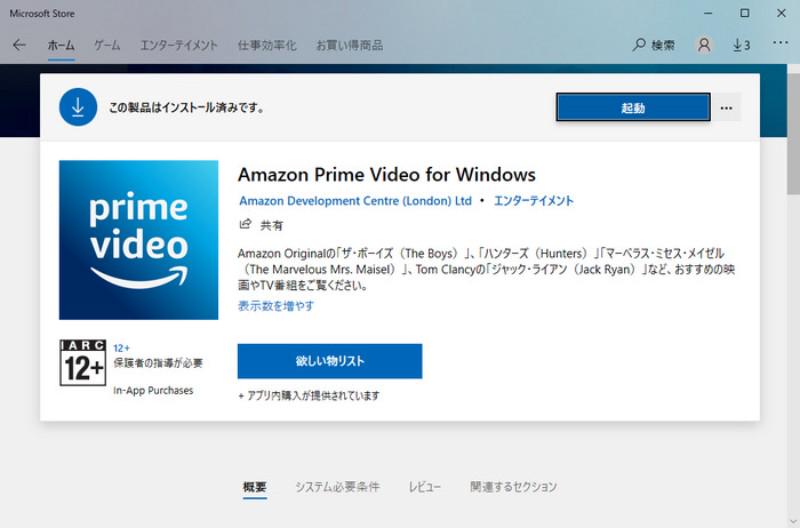
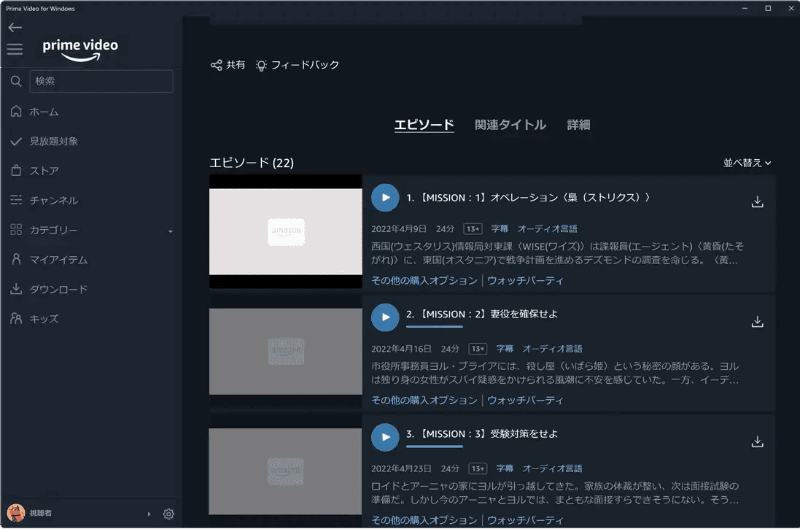
Step 2Search for the movie, drama, anime, etc. you want to download in the search bar on the left side of the app screen. Open the title's page and check if the download button is displayed. When you press the download button, you may be able to select the video quality and audio language depending on the title.
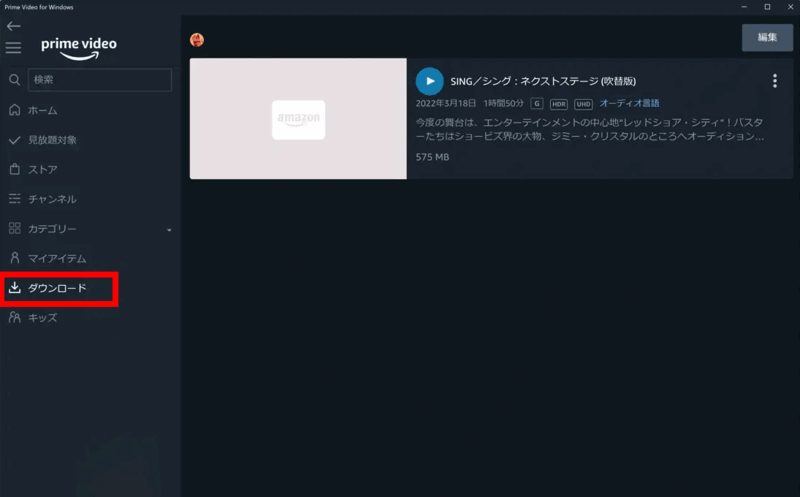
Step 3Once the download is complete, you can view the downloaded video by clicking the "Download" tab in the app. You can play the video directly in the app and watch it offline.
The official app's download feature is convenient, but it has several important limitations; in reality, it's a feature for temporary offline playback within the app.
Amazon Prime download restrictions
The download function in the Prime Video app does not allow you to save as many titles as you want to your PC. There is a limit of 25 videos that can be downloaded per account. If you have already saved many titles on your smartphone or tablet, you may not be able to download any more on your PC because you have reached the limit.
Also, if you use multiple devices with the same Amazon account, you need to check which device has which titles saved on it. This is especially important if you want to save movies and TV shows all at once before a trip or business trip, as you don't want to get a "download unavailable" message at the last minute. It's a good idea to delete titles you've finished watching beforehand.
The viewing period for videos downloaded from Amazon Prime Video varies depending on the type of content.
| Types of Amazon Prime Video | Viewing period | Verification date | Points to note |
| Prime member exclusive titles | Typically, viewing begins within 30 days of download. After playback begins, viewing usually finishes within 48 hours. | Viewing may become unavailable after the streaming service ends or after canceling your Prime membership. | |
| Rental titles | Watch within the rental period after the rental period begins. | You need to check the rental conditions displayed on the product page. | |
| Purchased works | Generally available for long-term viewing. | Restrictions may apply due to changes in playback environment, number of devices, or distribution rights. | |
| Prime Video Channel content | Often, you can only watch it if you are a channel subscriber. | After canceling your channel subscription, you will no longer be able to watch downloaded content. |
In particular, Prime member-exclusive content is linked to your Prime membership status and streaming availability, even if you save it in the official app. Content that has finished streaming, is no longer included in the membership benefits, or is available after you cancel your Prime membership may become unplayable even if you have downloaded it.
Videos downloaded to your PC using the official Prime Video app are protected by DRM, a type of copyright protection. Therefore, even though they are saved on your PC, you cannot use them freely like regular MP4 videos. Officially downloaded videos have the following restrictions:
In short, the Amazon Prime Video app's download function is for "temporarily saving videos to your PC and watching them within the Prime Video app." If you want to organize videos as files on your PC, watch them with other playback software or devices, or manage subtitle files together,Remove DRM protection from Amazon Prime VideoYou need to save it.
In short, the Amazon Prime Video app's download function is for "temporarily saving videos to your PC and watching them within the Prime Video app." If you want to organize videos as files on your PC, watch them with other playback software or devices, or manage subtitle files together,Remove DRM protection from Amazon Prime VideoYou need to save it.
Have you ever wanted to download Amazon Prime Video to your PC to enjoy it offline, but found the official app inconvenient due to various restrictions, such as viewing time limits and device limitations?
"StreamByte for Video" allows you to download unlimited Prime Video videos to your PC without worrying about these restrictions.DRM protection can also be removedIt can convert the videos to MP4, MKV, or MOV formats, so they can be played on any device or player other than the official app.
You can continue to watch downloaded videos even after canceling your Prime membership, and you can save them permanently on your PC to enjoy whenever you want. This is a download tool that we highly recommend to those who want to enjoy offline viewing more freely and comfortably.
StreamByte for Video
This is a video downloader that supports major streaming services such as Netflix, Amazon Prime, and YouTube. You can save and enjoy your favorite videos with high image quality up to 8K and Dolby Atmos audio.
Key features of StreamByte for Video
Here, we present the results of our test using StreamByte for Video to save videos from Amazon Prime Video.
| Verification Items | Content |
| Verification date | May 6, 2026 |
| PC environment | Windows 11 Pro |
| CPU | Intel Core i7 class |
| memory | 16GB |
| Internet connection | Wired LAN / Download speed approximately 200Mbps |
| Software used | StreamByte for Video |
| Test video | One movie that is 1 hour and 50 minutes long. |
| Output Format | MP4 |
| Output image quality | Full HD (1080p) |
| Download time | Approximately 6 minutes |
| Playback after saving | Playable with VLC and the standard Windows player. Can be transferred to a smartphone or tablet for playback. |
Based on my own testing, downloading a 1 hour and 50 minute movie in Full HD (1080p) quality as an MP4 file using "StreamByte for Video" on a Windows 11 Pro environment took approximately 6 minutes.
A major advantage of Amazon Prime Video is that videos saved in MP4 format can be played on most media players and transferred to devices such as smartphones, tablets, and USB drives. This is recommended for those who want to efficiently download Amazon Prime Video content and manage their videos without being restricted by viewing deadlines.
step 1,first,"StreamByte for VideoInstall it on your PC. Windows and Mac versions are available, so choose the version that matches your PC. After installation, launch the software, select Amazon Prime Video as the download platform, and log in to your Amazon Prime account.
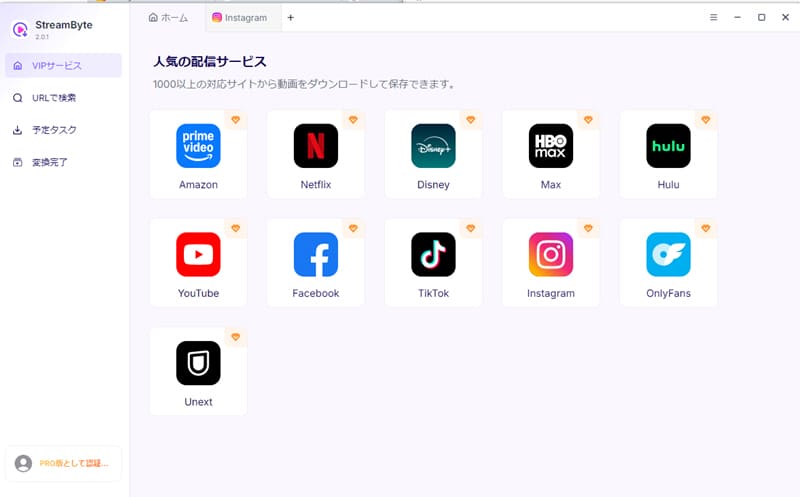
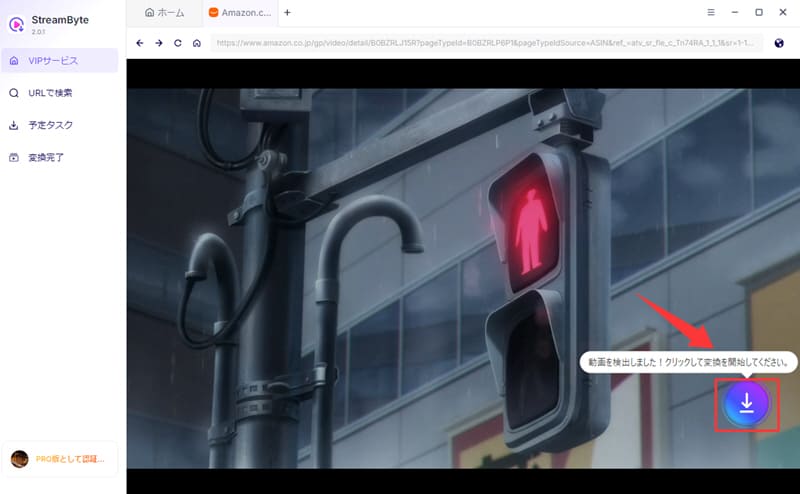
Step 2First, search for and select the Amazon Prime movie or TV show you want to download, then click the blue download button to analyze the video.
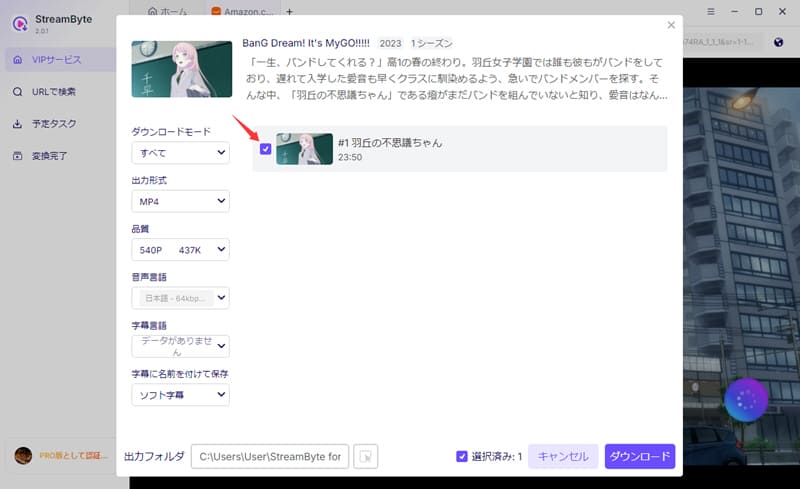
Step 3After analysis, for dramas and anime, you can select the episodes you want to download to your PC. If you want to save multiple episodes at once, using the batch selection function is efficient. You can also choose the output format, output quality, and audio track/subtitle settings as needed.
Step 4Once you've finished the settings, click the Download button at the bottom right to start downloading. After the download is complete, the video will be added to the "Converted" tab.
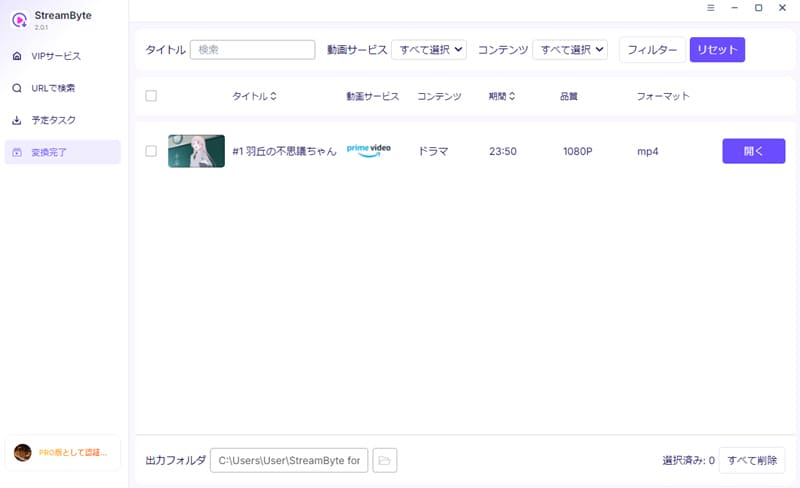
"StreamByte for Video" has an intuitive interface and simple operation, so anyone can easily download videos. Also, if you save it in MP4 format, you can play it for free on various devices such as smartphones and tablets. If you are having trouble with the download limit of Amazon Prime Video, please give it a try!
100% safe, virus-free
100% safe, virus-free
This article introduced two methods for downloading Amazon Prime Video to your PC: temporarily saving it using the official app and permanently saving it to your PC using "StreamByte for Video." Which method is better depends on your usage.
| Comparison items | Official Prime Video app | StreamByte for Video |
| Supported OS | Windows 10 Version 19041.0 or later macOS Big Sur 11.4 or later |
Windows 7 or later (64-bit) macOS 10.14 or later |
| Save in browser | Not possible, app required | Operated using the built-in browser within the dedicated software. |
| Storage format | Save within the app | MP4 / MKV / MOV etc. |
| Save subtitle file | Not possible | Possible |
| Audio Track Selection | Depending on the work, | Depending on the work, |
| Storage destination management | Windows allows you to select this option. Mac users can check it in the settings screen. | You can easily manage the destination folder yourself. |
| Playback after saving | Only available within the Prime Video app | Playable on most standard players. |
| Viewing period | Normally 30 days / 48 hours after playback | Unlimited |
| After the broadcast ends | Normal viewing will no longer be possible. | Saved videos can be played. |
| Viewing after cancellation | Basically not possible | Saved videos can be played. |
| Recommended uses | Offline viewing for a short period only | Save and watch your favorite videos permanently on your PC. |
Who is the Amazon Prime Video official app suitable for?
The official app is ideal for those who want to temporarily save Amazon Prime Video content without using third-party software. For example, if you only want to save a few videos before a weekend trip, watch them on your smartphone or PC during your commute, or simply want to play them offline for a short period, the official app is perfectly suitable.
However, downloaded videos are DRM protected and cannot be saved as regular video files. Therefore, Amazon Prime videos can only be played within the app, have a viewing period, and become unplayable after the distribution ends or after canceling your subscription.
Who is "StreamByte for Video" suitable for?
"StreamByte for Video" is ideal for those who want to manage Amazon Prime Video as files on their PC. It supports MP4/MKV/MOV saving, audio track selection, subtitle saving, and batch downloads, effectively addressing the shortcomings of the official app.
This is especially recommended for the following people:
If you leave the default settings for videos downloaded using the PC version of the Amazon Prime Video app, they will be saved in a hidden folder.
For Windows:
defaultAmazon Prime Video storage locationThe following folders:
C:\Users\username\AppData\Local\Packages\AmazonVideo.PrimeVideo_pwbj9vvecjh7j\LocalState\Downloads
The save location can be changed from the app settings.
On a Mac:
The default save location isFinder > Go > DownloadsIt's a folder.
If you can't find the destination folder
Videos downloaded from Amazon Prime Video typically have a set storage period and viewing period. Downloaded Prime member-exclusive content has a 30-day storage period after download and a 48-hour viewing period after playback begins. For rental titles, please check the conditions displayed on the title page. After the storage or viewing period expires, you will need to download the video again to watch it offline.
If you are troubled by these limitations,StreamByte for VideoWe recommend using a dedicated software such as ". If you save Prime Video videos to your PC,You can play it offline anytime, anywhere without worrying about viewing deadlines.You can still enjoy it even after canceling your membership,Perfect for those who want to keep their favorite videos on their PC foreveris.
Unable to download videos from Amazon Prime VideoIn that case, the following causes are possible:
• Videos not available for download:Some movies and TV shows are not available for download and cannot be downloaded from the app.
• Maximum number of videos that can be downloaded:You can download up to 25 videos per Amazon account. (Original videos are not included in this limit.)
• Limits on the number of devices that can download:You can download to up to one device with one Amazon account.2 unitsIf you want to download it on another device, you'll need to delete the download on the old device.
• If you are not an Amazon Prime member:If you are not an Amazon Prime member, you will not be able to use the download feature. This also applies if your free trial period has expired.
• Unstable network environment:If your Wi-Fi or Internet connection is unstable, the download may stop midway or fail. Please use a stable connection.
• Amazon Prime Video geo-restrictions: Some videos are only available for download in certain regions. If you're traveling abroad or using a VPN, you may not be able to download them.
• Expired videos: Videos whose distribution period has ended can no longer be viewed even if they have been downloaded.
• If an error code is displayed: If a download error occurs, check the error code and check the Amazon support page for detailed causes and solutions.
If you have checked these points and the problem persists, try restarting or reinstalling the app.
Yes, you can officially download Amazon Prime Video content to your PC. However, you need to use the Amazon Prime Video app instead of saving directly from your browser. Install the Prime Video app from the Microsoft Store or App Store, log in with your Amazon account, and then look for the download button on the content page.
Please note that not all works are available for download. Download availability varies depending on the work, country/region, and contract type. If the download button is not displayed, the work cannot be downloaded.
Even if you try to record Amazon Prime Video using PC screen recording software,The screen goes blackThis can happen. This is because, due to the protection features of the video streaming service or the playback environment, only the video portion is not recorded properly.
Furthermore, recording takes the same amount of time as real-time playback. A two-hour movie will require approximately two hours to record. Recording may also fail if a notification sound plays or the PC goes to sleep midway through. Therefore, if you want to save the video with stable image quality, subtitles, and audio, it is more practical to use video saving software than to record it.
Videos downloaded through the official app are linked to your Prime Video viewing permissions. If a Prime member-exclusive title is no longer available for streaming, you may no longer be able to watch it even if you have downloaded it. Also, if you cancel your Prime membership or Prime Video membership, you will no longer be able to watch any titles that you have not rented or purchased.
Therefore, downloading the official app is only intended for temporary offline viewing. If you want to permanently save and manage your favorite videos on your PC without limitations,StreamByte for VideoPlease consider saving the video using a dedicated video downloader like the one mentioned above.
So far, we have introduced two ways to download Amazon Prime Video videos to your PC. The first method, using the official app's download function, allows you to save videos to your PC. However, this method has limitations on the number of videos you can download and the viewing period, and saved videos can only be played on the official Amazon app. Therefore, it is not suitable for those who want to freely enjoy videos offline.
If you want to save Amazon Prime Video videos to your PC more conveniently,StreamByte for VideoWe recommend using "Amazon Prime Video Downloader". With this software, you can download all Amazon Prime Video videos unlimitedly, remove DRM protection, and convert them to MP4, MKV, and MOV formats. Downloaded videos can be viewed freely on PCs and smartphones regardless of the expiration date of your Amazon Prime membership, making it ideal for those who want to store them for a long time.
The software is offered for a free trial, so if you want to watch Amazon Prime Video comfortably offline without worrying about download limits, be sure to give StreamByte for Video a try.
100% safe, virus-free
100% safe, virus-free
Born in Tokyo in 1997. After graduating from a university in London, he worked at a major IT media company, writing articles about video streaming services, video downloaders, and digital content.More than 3 years of experience in editing, proofreading, and writing directionThe articles he has worked on have garnered over 5 million page views, and he is well-known for producing content that is carefully crafted from the reader's perspective.
Currently, as an editor and web writer at StreamByte, he works on creating articles that help users solve their problems, focusing on information related to video streaming services and downloads, with the aim of being "user-oriented, easy to understand, and immediately useful."
Read more articles together


Experts in supporting offline viewing of streaming video services
Subscribe to StreamByteCopyright © 2026 StreamByte. All rights reserved.



Get the latest news, product upgrades, information, guides, discounts and more about StreamByte.
Please enter a valid email address.

A highly capable video downloader:
StreamByte for Video
Even beginners can rest assured! You can try saving videos for free first!







 English
  Japanese
  Chinese (traditional)
  German