





Registration successful!
Download Amazon Prime Video in just 3 steps
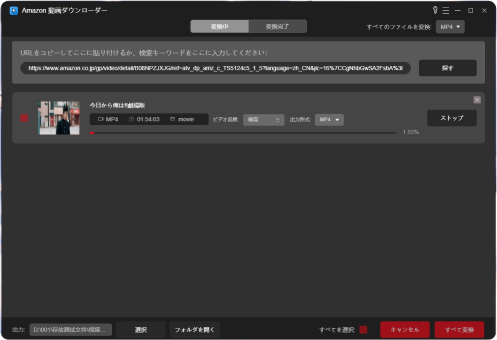
Search for the video you want to save
Launch the software, log in to your Amazon account, copy and paste the video URL in your browser, or enter the video title in the search field and click the search button.
Check the video and set the output
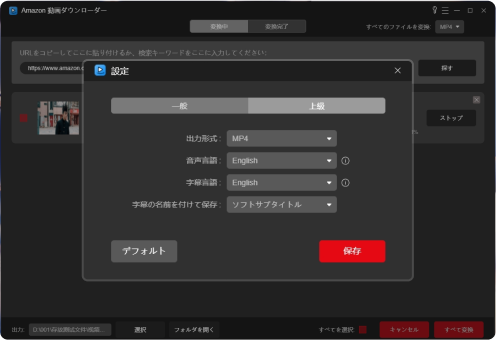
After checking the information of the searched video, add it to the download list with the button on the bottom right. Then, in the download list, you can set the output format, subtitles, language, etc. of the video.
Download Video
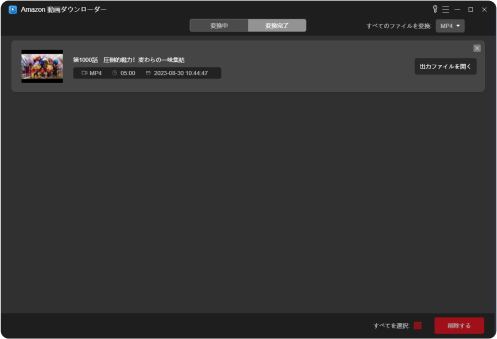
Once the settings are done, check all or individual videos and click "Convert".
step 1
Search for the video you want to save
Launch the software, log in to your Amazon account, copy and paste the video URL in your browser, or enter the video title in the search field and click the search button.
Step 2
Check the video and set the output
After checking the information of the searched video, add it to the download list with the button on the bottom right. Then, in the download list, you can set the output format, subtitles, language, etc. of the video.
Step 3
Download Video
Once the settings are done, check all or individual videos and click "Convert".
Product Questions


Is StreamByte Amazon video downloader free to use?
StreamByte Amazon Video Downloader offers a limited 30-day free trial. Please note that you can only download the first 5 minutes of the video during the free trial period. If you like the product after checking its features and specifications, you can upgrade the free trial version to the full version. This will allow you to use it comfortably.
Do I need to install Amazon Prime Video?
No. Our StreamByte Amazon video downloader pops up a web browser where you can log in to your Amazon account and then search for videos on Prime Video just like you would in any other browser like Chrome.
How to register for StreamByte Amazon video downloader?
After you successfully purchase the product, you will be shown a page with your registration code, or we will send you an order information email. You can use the registration email and registration code provided in the email to register by clicking the key icon in the upper right corner of the software.
What should I do if I need to reinstall the system or software, or change my computer model?
In these cases, you can simply re-download and install the software from the official website. However, you will need to reset your registration code. Don't worry, just send us a request to reset it via our support email.「support@streambyte.jp」Once sent to you, we will reset your registration code and once complete, you will be able to successfully register your product via your original registration email and registration code.
If you have any questions,User Center Please contact us.
 English
  Japanese
  Chinese (traditional)
  German