
- Streaming Products
- BD-DVD products
- Store
- Useful Articles
- support
Share this article!


Bilibili is one of the most popular video sharing sites, offering a large amount of high-quality content. Many people want to download these videos to watch offline, but many don't know how. This article will explain various methods for downloading Bilibili videos, including a method for downloading them all at once in high quality. Please read to the end.
Related Posts:
The official bilibili app has a feature that allows you to save videos to your device for offline playback, making it possible to download and watch a large amount of content. However, some works, such as movies and dramas, may not be available for download due to copyright restrictions. The official features are free to use, and a major advantage is that the commentary (bullet comments) can still be displayed even during offline playback.
Furthermore, videos saved via the app are managed in an encrypted state on your PC or smartphone, so playback is basically limited to within the app and cannot be freely moved or played on other players. In addition, even free members can use the download function, but there are limitations such as a maximum video quality of 1080P and only one video being saved at a time.
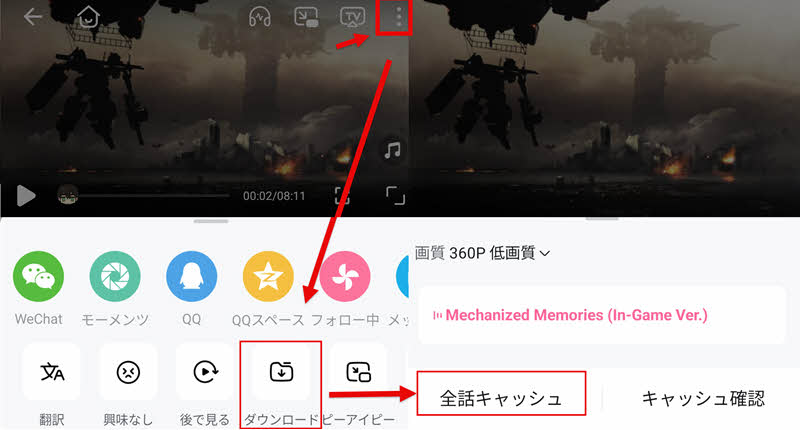
Below, we will explain the basic steps for downloading videos using the official bilibili app.
Step 1After logging into your account, find the video you want to download.
Step 2Tap the "⁝" button in the upper right corner, and select "Download" from the menu that appears.
Step 3After selecting the image quality and the content you want to download,"All episodes cached"Tap it. After a short wait, the Bilibili video download will be complete.
Besides the official download function, there are other ways to download Bilibili videos using online sites. Using this method may allow you to bypass download restrictions, and you can save the videos to your computer or other local environment for free management and editing.
However, many video download sites are riddled with advertisements, have unstable download processes, and raise security concerns. Therefore, caution is necessary when using them. Here, we introduce three relatively popular online sites that support downloading Bilibili videos.
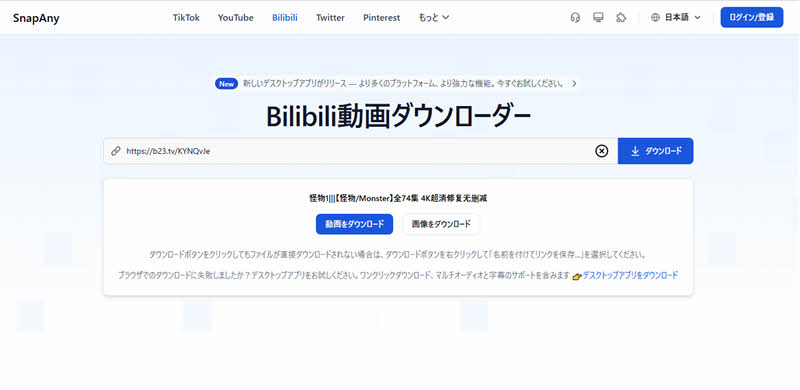
Official website: https://snapany.com/ja/bilibili
SnapAny is a browser-based video download tool that supports various video sharing sites, including Bilibili. Simply enter the URL of the Bilibili video you want to save to start the download, making it convenient for easily saving Bilibili videos. Another feature is that it has fewer advertisements compared to many other online sites, resulting in a relatively comfortable user experience.
However, it does not support multi-episode videos from Bilibili, and you cannot download them all at once. Furthermore, there is no function to select the video quality when saving, so please be aware of this.
Advantages:
Cons:
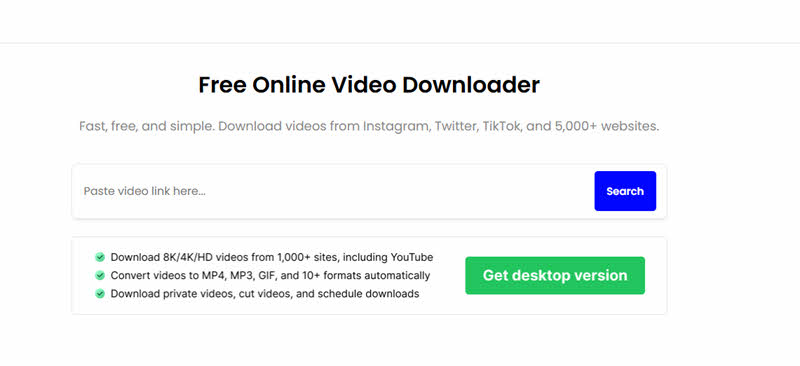
Official website: https://videodownloader.so/bilibili-video-downloader
VideoDownloader.so is an online video download site that supports multiple platforms, including Bilibili, Instagram, and TikTok. Simply enter the video URL, and it will analyze the content and convert and save it in over 10 formats, including MP4, MP3, and GIF. It also features multiple quality options, from low to high resolution, allowing users to download videos with settings suitable for their needs.
However, since this site's interface is not available in Japanese, it may be a little difficult to use for those who are not comfortable with English. Also, there may be cases where link parsing fails or a "video not found" message appears, preventing downloads, so please be aware of this.
Advantages:
Cons:
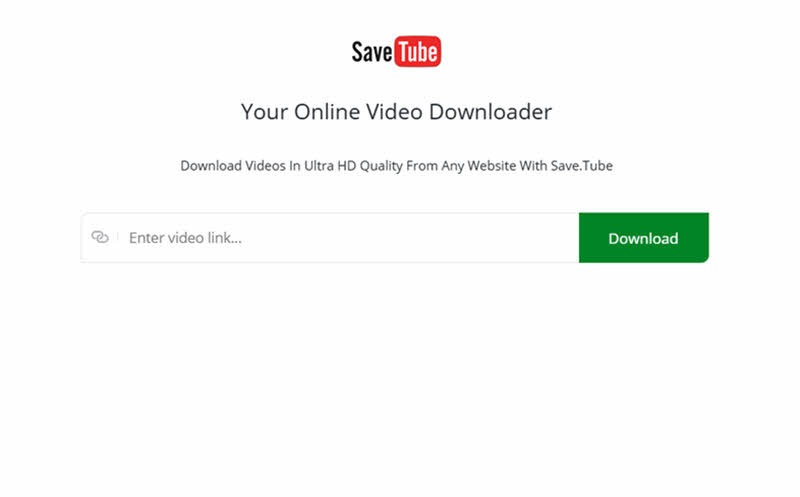
Official website: https://save.tube/
SaveTube is an online video download tool that supports many video sharing sites, including YouTube and Bilibili. Simply enter the URL of the video page to retrieve the content, making it easy to save Bilibili videos and watch them offline. Furthermore, in addition to downloading videos, it can also extract only the audio data or save the video as a video file without audio, offering flexible use depending on your needs.
However, when using the service, many advertisements may be displayed on the page, and the success rate of URL analysis is not very high, which may affect the user experience. Furthermore, download speeds can be unstable, and depending on the length of the video, it may take more than ten minutes to complete, so please be aware of this.
Advantages:
Cons:
The above article introduced two methods for downloading Bilibili videos: using the official function and downloading them from online sites. However, the former has the drawback of not being able to download much content and making it difficult to freely move and manage videos. The latter, on the other hand, has the problem of being plagued by advertisements and lacking stability.
Therefore, a dedicated software that can download Bilibili videos in bulk with high quality and a high success rate is available.StreamByte for VideoLet me introduce you to this software. With this software, you can save Bilibili videos to your computer in common formats such as MP4, and move and manage them freely. In addition, the interface is simple and easy to use, and no ads are displayed, so you don't have to worry about being bothered by pop-up ads that are common on online sites. For those who want to download Bilibili videos in high quality, this is truly one of the best options.
StreamByte for Video
This is a video downloader that supports major streaming services such as Netflix, Amazon Prime, and YouTube. You can save and enjoy your favorite videos with high image quality up to 8K and Dolby Atmos audio.
Why StreamByte for Video is recommended
Here, "StreamByte for VideoThis explains how to use [the tool/method] to easily download videos from Bilibili.
Points to note when downloading
While "StreamByte for Video" has a built-in browser function, currently, unlike other video streaming services, Bilibili does not allow direct link analysis and downloading via this built-in browser. To prevent analysis errors, please use the URL analysis function to download videos.
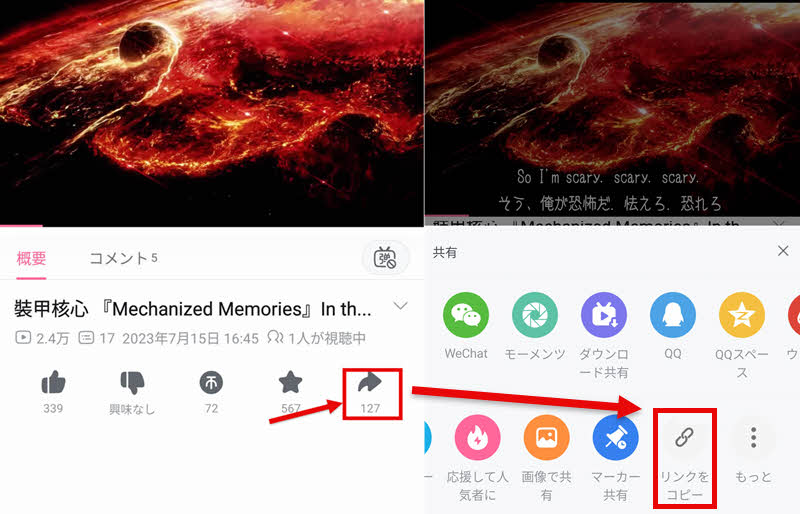
step 1I found the video I wanted to download on Bilibili,Share buttonTap,"Copy link"Tap
Step 2After logging into "StreamByte for Video," paste the copied link into the search bar and analyze it. When pasting, please delete the copied title and leave only the link.
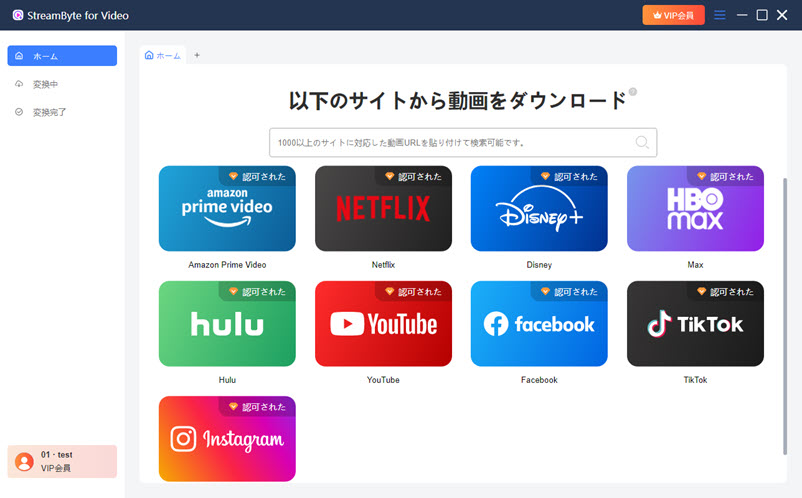
Step 3You can change the output format, audio, subtitles, and other settings of the Bilibili video you want to download to your liking.
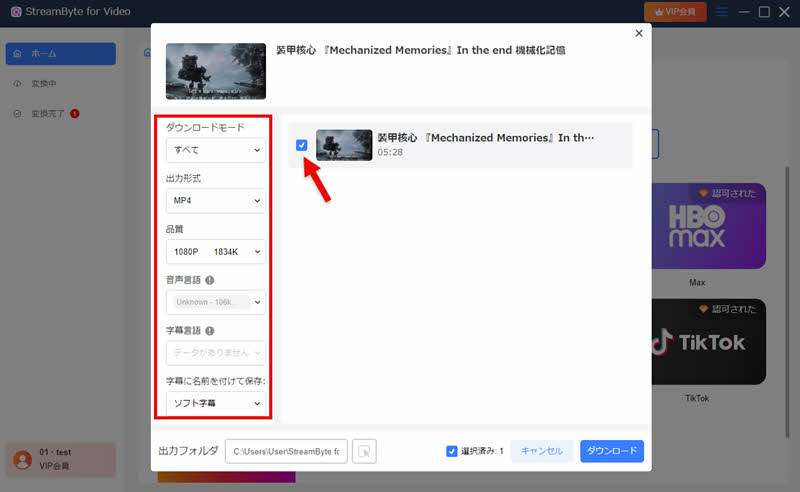
Step 4After changing the settings, click the "Download" button in the bottom right corner to start downloading the video. You can check the download progress on the "Converting" screen. Once the download is complete, the video will automatically move to the "Conversion Complete" screen.
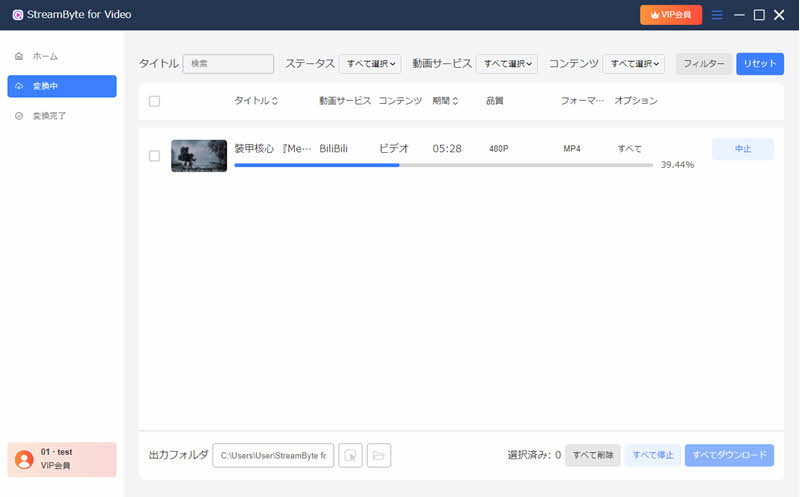
"StreamByte for VideoUsing this service, you can download videos at up to 8 times faster speeds and save Bilibili videos in high quality with virtually no loss of quality. If your network environment is stable, even a 5-minute video at the highest 1080p resolution can be downloaded in just over ten seconds. Furthermore, the interface is simple and easy to understand, so even beginners can quickly get used to using it. If you are thinking of downloading Bilibili videos, then you should definitely try this service.StreamByte for Video"Please try ".
100% safe and virus free
100% safe and virus free
To help you better understand the differences between each Bilibili video download method, we have summarized the advantages and disadvantages of each method in the table below. Please refer to it.
| Official Features | Online site | StreamByte for Video | |
| Video management and editing | Not possible | Possible | Possible |
| Download Limit | can be | none | none |
| Download speed | usually | slow | Up to 8 times faster |
| success rate | expensive | Unstable | expensive |
| advertisement | none | can be | none |
| image quality | Up to 1080p | Image quality is degraded. | Lossless |
| Safety | expensive | low | expensive |
| Recommendation | ★★★★ | ★★★ | ★★★★★ |
As you can see from the comparison in the table, for users who simply watch Bilibili videos on their smartphones and don't need to manage or edit them, we recommend using the official download function. On the other hand, for those who want to manage and edit videos, or who want to easily download one or two videos, downloading from an online site is suitable. However, if you want to manage and edit Bilibili videos, as well as play them offline in high quality without restrictions, then...StreamByte for Video" is the best option.
While the official download function is generally stable, it has certain limitations, such as the number of downloads, and you cannot freely manage or edit saved videos. On the other hand, online sites may not have such restrictions, but they may have problems such as unstable success rates, low security, and excessive advertising.
In response to that,StreamByte for VideoThis service allows you to freely save Bilibili videos in common formats such as MP4, and also manage and edit downloaded videos. Furthermore, it is safe to use in terms of security and download success rate, and does not display annoying advertisements.
Therefore, for those who want to download Bilibili videos,StreamByte for VideoThis can be considered a more convenient and practical option.
100% safe and virus free
100% safe and virus free
Bilibili is a major video-sharing site in China, and the site itself is generally safe. However, if you use other online sites to download Bilibili videos, you may encounter many advertisements, suspicious links, or requests for personal information. If you want to save videos that cannot be saved using the official download function,StreamByte for VideoWe recommend using highly secure, dedicated software such as [mention specific software example here].
Video quality may be limited by the uploader's settings, viewing environment, and download tools used. If the uploaded video itself does not support high quality, it cannot be saved in high quality. Also, on Bilibili, the highest quality, such as 4K, is often limited to paid members, and free users may only be able to use up to 1080p.
Due to copyright and distribution agreements, some Bilibili videos may have regional restrictions. Therefore, they may not be viewable from Japan or other countries. In such cases, you may be able to play them by connecting to a network in a region where viewing is possible using a VPN.
In addition to the methods introduced in this article, you can also download Bilibili videos using Chrome extensions such as "bilibili Video Download Assistant" and "Video DownloadHelper." By installing the appropriate extension from the Chrome Web Store, you can easily save Bilibili videos using the extension's functions.
However, extensions are susceptible to changes in Bilibili's specifications and may suddenly become unavailable for download. If you prioritize higher stability and success rate,StreamByte for VideoWe recommend using specialized software such as "[...]."
This article has provided a detailed explanation of various methods for downloading Bilibili videos, from official features to online sites. However, the official features have drawbacks, such as the inability to download some videos and difficulty in editing and managing them. On the other hand, online sites have problems such as being full of advertisements, unstable operation, and a high failure rate.
Therefore, we recommend "StreamByte for Video," a dedicated software that allows you to download Bilibili videos in high quality in bulk. Using this software, you can download Bilibili videos in 1080p high quality all at once. Simply enter the video URL, and you can easily save Bilibili videos in common formats such as MP4, making later management and editing smooth. Furthermore, even a 1080p video of about 5 minutes can be downloaded in just over ten seconds, resulting in significant time savings.
"StreamByte for Video"forFree trialWe also offer a solution for downloading Bilibili videos in high quality all at once, so if you want to download them all at once, please give it a try.
100% safe and virus free
100% safe and virus free
Born in Tokyo in 1997. After graduating from a university in London, he worked at a major IT media company, writing articles about video streaming services, video downloaders, and digital content.More than 3 years of experience in editing, proofreading, and writing directionThe articles he has worked on have garnered over 5 million page views, and he is well-known for producing content that is carefully crafted from the reader's perspective.
Currently, as an editor and web writer at StreamByte, he works on creating articles that help users solve their problems, focusing on information related to video streaming services and downloads, with the aim of being "user-oriented, easy to understand, and immediately useful."
Read more articles together


Experts in supporting offline viewing of streaming video services
Subscribe to StreamByteCopyright © 2026 StreamByte. All rights reserved.



Get the latest news, product upgrades, information, guides, discounts and more about StreamByte.
Please enter a valid email address.





 English
  Japanese
  Chinese (traditional)
  German