
- Streaming Products
- BD-DVD products
- Store
- Useful Articles
- support
Share this article!


ABEMA Video is a well-known video streaming service in Japan, offering a wide variety of attractive content. Many people want to save ABEMA videos so they can watch them offline anytime, anywhere. Therefore, extracting and saving ABEMA video URLs is a very effective method. However, many people don't know how to do this.
This article will explain in detail how to extract and save URLs from ABEMA videos. In addition to manual methods, we will also introduce methods for automatically extracting and saving URLs, so please read to the end.
Related Posts:
Many people extract and save the URLs of ABEMA videos because the download function in the official ABEMA app has several limitations. By extracting and saving the URLs, you can bypass these limitations and download videos more comfortably to enjoy them offline.
The main limitations of the current official ABEMA download function are as follows. If you want to watch videos whenever you like without worrying about these limitations, it is convenient to extract and save the URL of the ABEMA video.
If you want to extract and save the URL of an ABEMA video, the easiest and most recommended method is to use dedicated video download software.StreamByte for Video"is.
This software automatically extracts ABEMA video URLs, analyzes them through its built-in web player, and allows for batch downloads. Saved videos are permanently stored without ABEMA's official download or playback restrictions, allowing you to watch them anytime, anywhere.
Furthermore, compared to the official download function, it allows you to download multiple videos simultaneously, saving you a significant amount of time. The operation is intuitive and easy to understand, making it possible for even beginners to quickly extract and save ABEMA video URLs. For those who want to save videos easily and efficiently,StreamByte for Video" is undoubtedly the best choice.
StreamByte for Video
This is a video downloader that supports major streaming services such as Netflix, Amazon Prime, and YouTube. You can save and enjoy your favorite videos with high image quality up to 8K and Dolby Atmos audio.
"Why we recommend StreamByte for Video"
Here, "StreamByte for VideoThis explains how to use [the specified method] to automatically extract and save ABEMA video URLs.
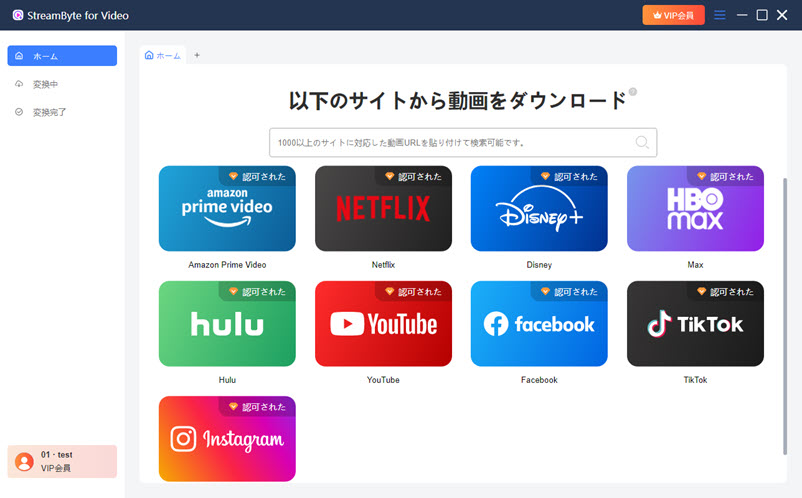
step 1"StreamByte for Video"RegistrationAfter that, type "abema.tv" into a new tab. This will allow you to access ABEMA from the built-in web browser and log in to your account.
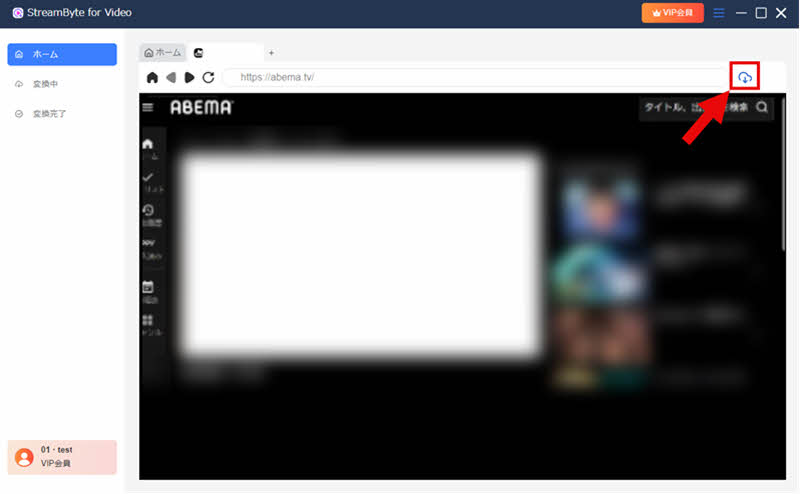
Step 2After logging into your ABEMA account, find the video you want to save and click the icon in the upper right corner to add it to the download list. The program will then automatically extract and analyze the URL of the ABEMA video.
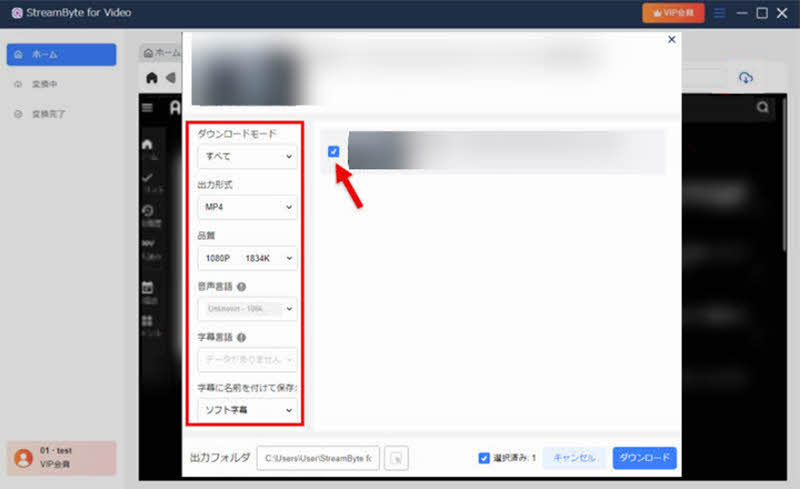
Step 3If necessary, change the settings for the video output format, audio, subtitles, etc., and click in the bottom right corner."download"Click the button.
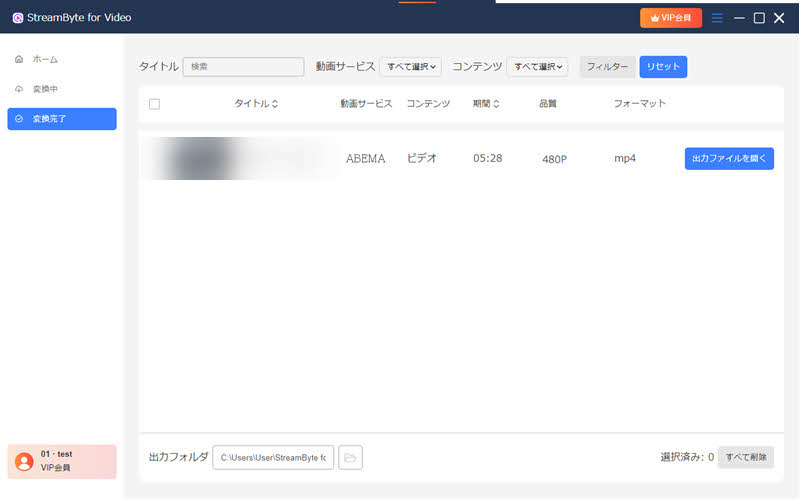
Step 4The download progress is"Converting"You can check it on the screen. Once the download is complete, the video will automatically move to the "Conversion Complete" screen, and you can immediately check the saved ABEMA video. This allows you to automatically extract and save the URL of the ABEMA video.
"StreamByte for VideoIf you use ", you can get powerfulDRM protection removalThis feature automatically extracts and saves URLs for ABEMA videos. It's easy and intuitive to use, making it ideal even for those who dislike complex operations. Saved videos are permanently stored, allowing you to continue watching them even if your subscription ends or the video distribution ceases. Furthermore, they can be played on other devices or via USB without any issues, allowing you to enjoy them freely.
100% safe and virus free
100% safe and virus free
Having introduced a method for automatically extracting and saving ABEMA video URLs, I will now explain how to manually extract and save them. These methods involve several steps and are more suitable for advanced users than beginners.
Among these methods, the relatively simplest is using browser extensions for Google Chrome, Firefox, or Edge. Here, we will show you how to extract ABEMA video URLs using an extension, with Google Chrome as an example.
step 1Open Google Chrome and go to the Chrome Web Store"Video DownloadHelper"Search for and install it.
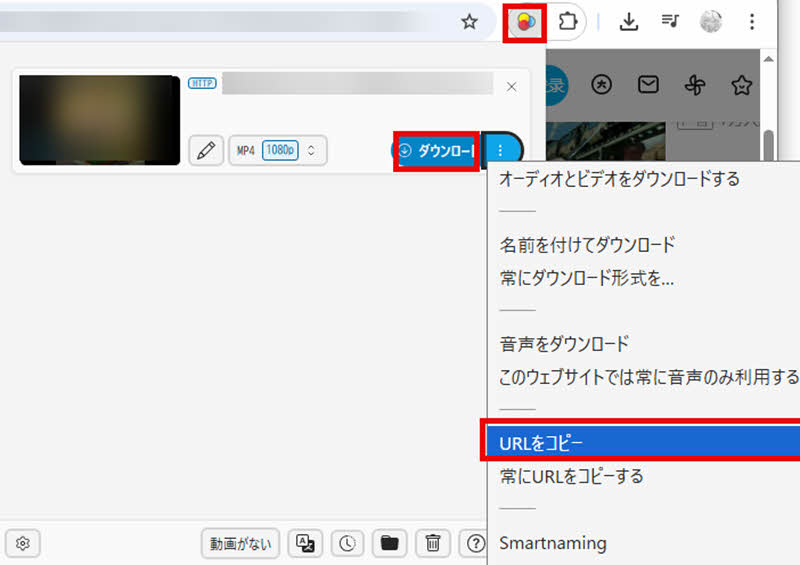
Step 2Play the ABEMA video you want to save, and click "Video DownloadHelper" which will appear in the upper right corner of your browser.Click the iconI will.
Step 3The extension automatically parses the video URL. To the right of the displayed video item...Click "︙" and copy the URL.—I will do so. After that,"Download" buttonClicking this will extract and save the URL of the Abema video.
It may be possible to obtain the streaming URL of ABEMA videos by utilizing the developer tools built into your browser. This method analyzes the data transmitted during video playback to identify the URL. However, please note that it is not always possible to obtain the URL for all videos, and extraction may fail depending on the content due to encryption or protection.
The following describes the basic steps using your browser's developer tools.
step 1Open ABEMA in a browser such as Google Chrome and play the target video."F12"Press a key to display the developer tools.
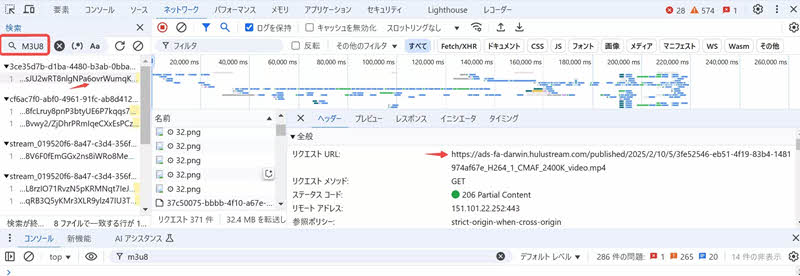
Step 2, at the top of the developer tools"Network"Select the tab and, while the video is playing, enter in the search bar."m3u8"Enter that. Then, a list of related items will be displayed.
Step 3Click on the displayed ".m3u8" file item, and in the details panel on the right..."Headers"from"Request URL"By checking and copying this, you can obtain the video streaming URL.
Step 4The acquired URL can be saved using open-source tools such as FFmpeg. If you want to do it more easily,StreamByte for VideoUsing specialized software with URL analysis capabilities, such as [software name], is one option.
Besides extracting and saving ABEMA video URLs on a computer, there's also a method using a smartphone. However, to extract and save ABEMA video URLs on a smartphone, you'll need to use a dedicated tool such as "m3u8 loader," "iCap," or "Clipbox+."
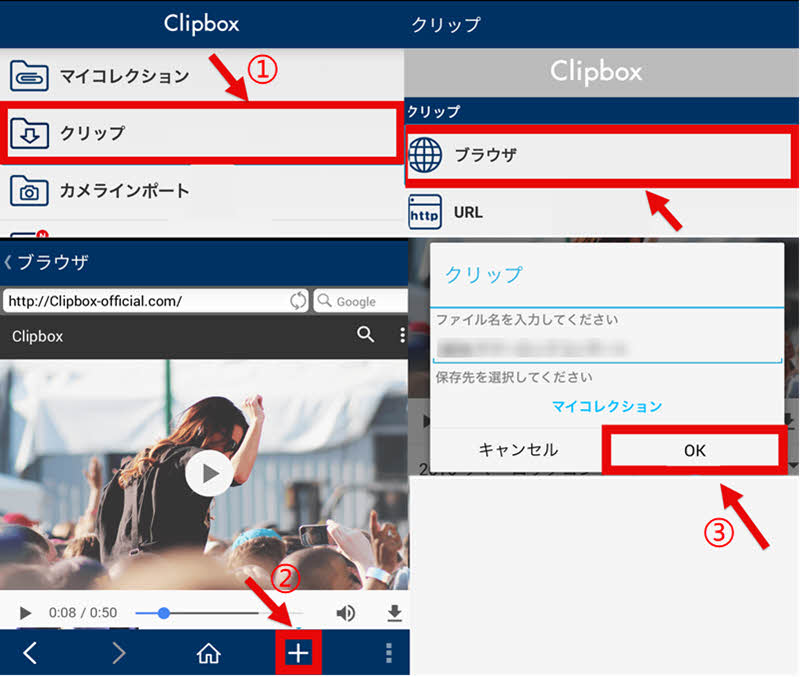
Among them, "Clipbox+" is compatible with both iOS and Android, making it highly versatile and relatively easy to use. Therefore, using "Clipbox+" as an example, we will explain how to extract and save ABEMA video URLs on your smartphone. The specific steps are as follows:
step 1Install the "Clipbox+" app from the App Store or Google Play. After launching the app,"Clip" → "Browser"Select this option and access the ABEMA official website.
Step 2To download a video, open the page and tap the "+" button at the bottom of the screen. From the menu that appears...Copy URLSelect this option and copy the URL of the video page.
Step 3,again"search"Return to the screen,URLSelect the tab. Paste the copied URL."search"Tap it. Select the save location and press "OK" to start the download.
Videos downloaded from ABEMA includeDRM protectionBecause of DRM, playback is basically limited to within the app. Therefore, you cannot save it directly to an SD card and play it externally. If you want to save it to an SD card and play it freely, you will need dedicated software that supports DRM removal.StreamByte for VideoUsing this tool, you can convert videos to a common format such as MP4 before transferring them to an SD card.
Extracting and saving URLs of ABEMA videos is generally illegal. However, copyright issues are in a gray area, and if you only watch the saved videos for personal use and do not redistribute or use them commercially, you are generally unlikely to be held liable. Nevertheless, it is recommended to ultimately comply with the laws and regulations of your local area.
Most ABEMA videos are protected by copyright and have mechanisms in place to prevent illegal copying. Therefore, if you try to save ABEMA videos using screen recording software, it is very common for the video to appear completely black or for the recording to fail completely.
Due to these limitations, saving ABEMA videos by screen recording is not very stable or practical. If you want to save ABEMA videos, it is more recommended to use a method that extracts and saves the video's URL rather than relying on screen recording, as this will result in a higher success rate and better image quality.
This article first briefly introduces the benefits of extracting and saving ABEMA video URLs, and then explains in detail both how to automatically extract and save ABEMA video URLs and how to do it manually. Since the manual operation is somewhat complex, we recommend that beginners use dedicated video download software.StreamByte for Video" is recommended.
This software automates the entire process from URL extraction to saving ABEMA videos, eliminating the need for additional programs or operations. This significantly lowers the barrier to extracting and saving ABEMA video URLs. Furthermore, it features a built-in web player, allowing for smooth viewing with an experience similar to the official app, saving you the trouble of navigating between pages.
"StreamByte for Video"forFree trialWe also have a tool available, so if you want to extract and save the URLs of ABEMA videos, please give it a try.
100% safe and virus free
100% safe and virus free
Born in Tokyo in 1997. After graduating from a university in London, he worked at a major IT media company, writing articles about video streaming services, video downloaders, and digital content.More than 3 years of experience in editing, proofreading, and writing directionThe articles he has worked on have garnered over 5 million page views, and he is well-known for producing content that is carefully crafted from the reader's perspective.
Currently, as an editor and web writer at StreamByte, he works on creating articles that help users solve their problems, focusing on information related to video streaming services and downloads, with the aim of being "user-oriented, easy to understand, and immediately useful."
Read more articles together

Experts in supporting offline viewing of streaming video services
Subscribe to StreamByteCopyright © 2026 StreamByte. All rights reserved.



Get the latest news, product upgrades, information, guides, discounts and more about StreamByte.
Please enter a valid email address.





 English
  Japanese
  Chinese (traditional)
  German