
- Streaming Products
- BD-DVD products
- Store
- Useful Articles
- support
Share this article!


Hulu is one of the most popular video streaming services, offering a wide variety of engaging content. Therefore, many people want to save Hulu videos for offline viewing. In such cases, extracting and saving the URL of a Hulu video is a viable method. However, extracting Hulu URLs can be difficult and challenging for many users.
This article will explain in detail, in an easy-to-understand way for beginners, how to extract and save Hulu video URLs. Furthermore, we will also introduce a method for saving Hulu videos without extracting the URL, so please read to the end.

Related Posts:
Why do so many people want to extract and save the URLs of Hulu videos? Because, compared to Hulu's official download function, extracting and saving URLs offers greater flexibility and allows for use without being restricted by various playback and download limitations. Hulu's official download function has the following main limitations:
Because of these limitations, if you want to save and manage videos more freely, you often choose to extract and save the URL of the Hulu video. The main advantages are as follows:
There are several ways to save Hulu videos, but most of them are a bit difficult for beginners to use. Furthermore, even if you manage to extract the Hulu video URL, additional steps may be required before you can actually save it. Therefore, we'll introduce software that allows you to save Hulu videos without extracting the URL.StreamByte for Video"We would like to introduce you to "
With this software, you don't need to use additional extensions or open separate pages; in just a few steps...Save Hulu videos in a common format such as MP4.Yes, it's possible. This is because the built-in web player has a mechanism that automatically extracts and saves the URL of Hulu videos. Therefore, it's easy to use even for beginners who are unfamiliar with the operation, and it's a strong option for those who have trouble extracting and saving Hulu video URLs themselves.
100% safe and virus free
100% safe and virus free
Why StreamByte for Video is recommended
Here, "StreamByte for VideoThis explains how to use [this tool] to easily analyze and save Hulu video URLs.
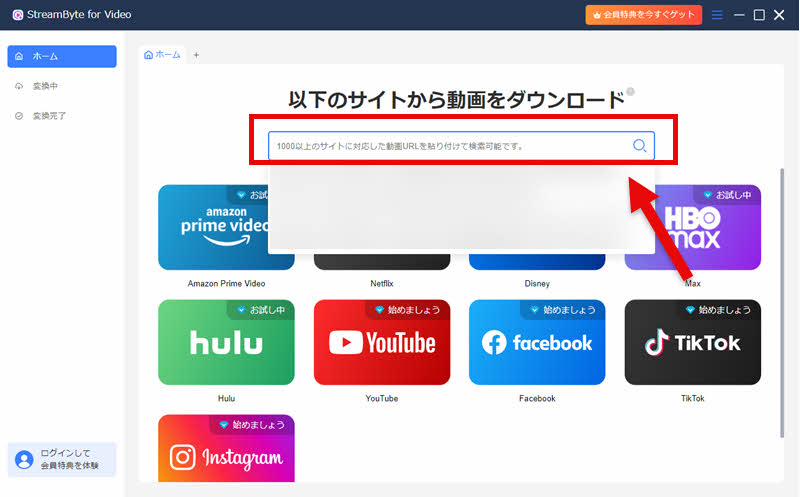
step 1"StreamByte for Video"RegistrationAfter that, select Hulu on the software's main screen and log in to your Hulu account.
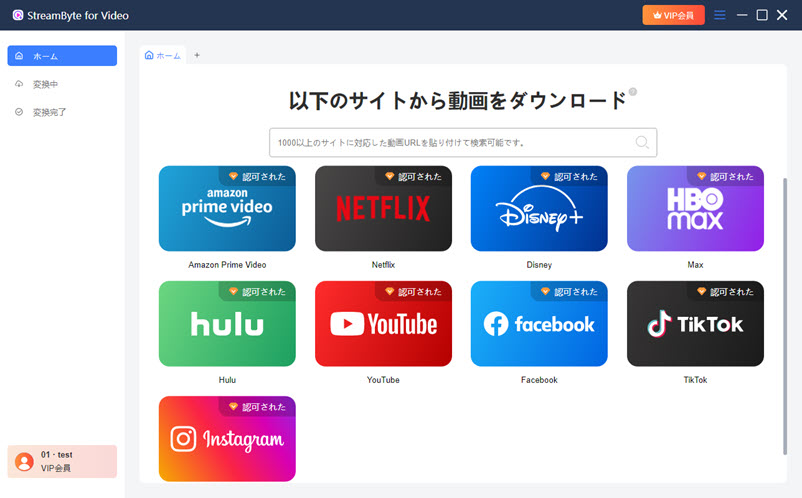
Step 2After logging into Hulu, search for the video you want to save.

Step 3Once you find the video you want to save, click the icon in the upper right corner to add it to the download list. The program will then automatically extract and analyze the video's URL.

Step 4If necessary, change the settings for the video output format, audio, subtitles, etc., and click in the bottom right corner."download"Click the button.
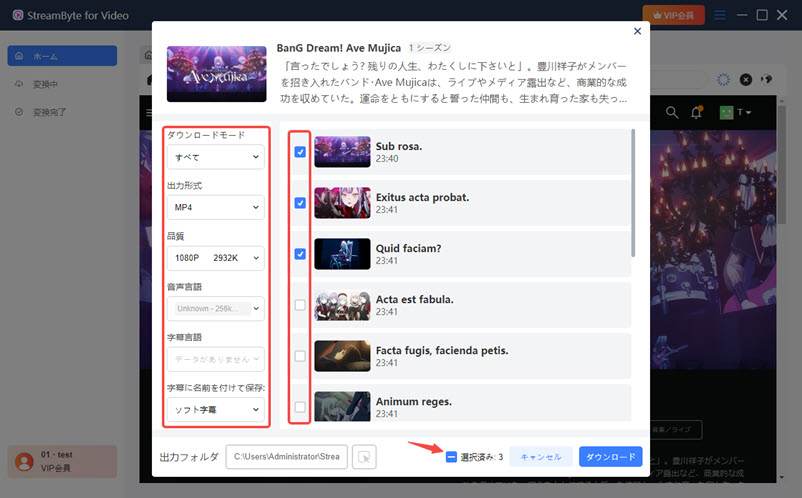
Step 5The download progress is"Converting"You can check it on the screen. Once the download is complete, the video will automatically"Conversion complete"You can then go to the screen and immediately view your saved Hulu videos.

"StreamByte for VideoUsing this software, you can easily extract and save Hulu video URLs thanks to its DRM protection removal function. Furthermore, the software's interface is completely ad-free, ensuring a comfortable user experience. It also supports outputting Hulu videos in lossless formats such as MP4, MKV, and MOV without any loss of quality. This allows you to enjoy your saved Hulu videos anywhere, on various devices. If you want to extract and save Hulu videos, please give it a try.
100% safe and virus free
100% safe and virus free
One method to extract the URL of a Hulu video is to use the developer tools of your web browser. This method allows you to identify the URL of the video stream. However, this method may fail to extract the URL for some videos. Also, Hulu videos...DRM protectionBecause of the restrictions in place, even if you manage to obtain the URL, you may not be able to save it directly.
This section explains how to extract Hulu video URLs using your web browser's developer tools.
step 1Then, play the Hulu video you want to save using a browser such as Google Chrome.
Step 2, keyboard"F12"Press a key to open the developer tools, then select from the top menu."Network"Click the tab.
Step 3While the video is playing, enter "m3u8" in the search bar, and the list will appear.".m3u8"Click on the item.
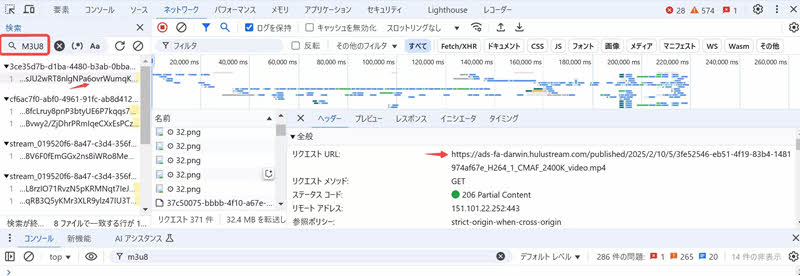
In addition to the method using the web browser's developer tools mentioned above, there is also a method to extract Hulu video URLs using browser extensions for Google Chrome, Firefox, Edge, etc. This method requires a bit more preparation beforehand, but it is relatively easier to use compared to the method using the web browser's developer tools.
Here, we'll show you how to extract Hulu video URLs using extensions, with Google Chrome as an example.
step 1First, open Google Chrome and go to the Chrome Web Store."Link Grabber"Search for and install it.
Step 2Play the Hulu video you want to save, and then click on the extension."Link Grabber"Click the button
Step 3All URL links on that page will be displayed in a new tab that opens automatically.
Step 4Enter "hulu" in the search bar at the top to narrow down the results to related links.
Step 5Once you find the URL of the Hulu video you want to save, click in the upper right corner."Copy"Click the button to copy the URL.
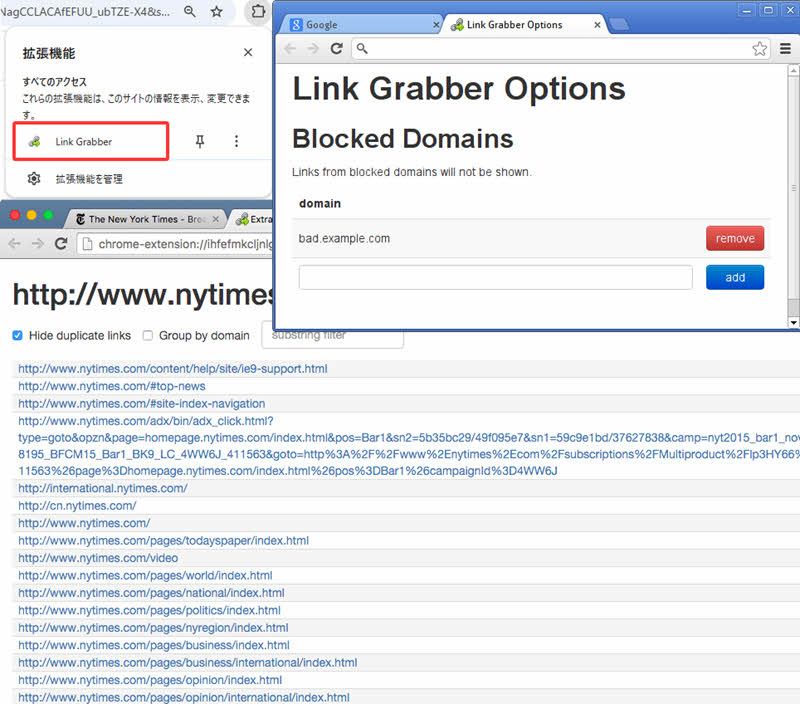
Even if you only have an iPhone and can't use a computer, it may be possible to extract the URL of a Hulu video using only your iPhone. While there is no official way to directly extract Hulu video URLs on an iPhone, you may be able to find the URL by using an app called "HTML Viewer Q".
This guide explains how to extract and save Hulu video URLs using only an iPhone.
step 1First, on the App Store"HTML Viewer Q"Search for and install it.
Step 2To extract the URL, open the page of the Hulu video you want to view, tap the "</>" icon in the upper left corner, and you can view the URL.
Step 3On the displayed source code screen, tap the search icon in the upper left corner and enter in the search field."m3u8"Enter:
Step 4When the description containing "m3u8" is highlighted in yellow, select and copy the URL portion from "http" to "m3u8". This will allow you to extract and save the m3u8 URL on your iPhone.

The above explains in detail how to manually extract the URL of a Hulu video. Once you have obtained the URL of the Hulu video using these methods, you are ready to save the video. All that remains is to use that URL to save the video.
To actually save Hulu videos, you will need to use a separate tool. A relatively common method is:"Live Stream Downloader" or "Video DownloadHelper" There are methods to save videos from extracted URLs using browser extensions such as [example browser extensions].
However, many users are unfamiliar with browser extensions and often encounter various problems with their settings and usage. In such cases, the software mentioned earlier that allows you to save Hulu video URLs without extracting them is useful.StreamByte for VideoWe recommend using "[this service]".
This software not only allows you to save videos without manually extracting URLs, but it also has a function to analyze URLs and save videos automatically. Simply paste the extracted URL into the software, and it will automatically analyze the video information and allow you to easily download it.
100% safe and virus free
100% safe and virus free
Because Hulu videos are protected by copyright, extracting and saving URLs is not always legal. Generally, it may not be a problem if it is for private use such as personal learning or viewing, but publishing or redistributing the saved content may violate copyright law. Also, legal treatment varies by region, so please check the relevant laws in your area before actually using it.
Generally, if operations such as URL extraction or saving are performed, it cannot be ruled out that the system may record the usage. However, this does not necessarily mean that Hulu will be immediately notified. In any case, it is important to use the service within appropriate limits, not to redistribute saved content, and to avoid excessive operations or unnatural use.
Unfortunately, there is currently no generally accepted method to directly extract and save Hulu video URLs on Android devices. If you want to play Hulu videos offline on Android, you will need to use the dedicated video downloader introduced in this article.StreamByte for VideoOne possible method is to use [this method] to save the video in a general-purpose format such as MP4 beforehand, and then transfer it to the Android device.
Unfortunately, Hulu's official features do not allow you to save videos directly to your PC. Hulu's download function is limited to saving within the app on smartphones and tablets, and cannot save directly to a PC. Therefore, if you want to save videos to your PC and manage them offline,StreamByte for VideoUsing dedicated video download software such as [mention specific software name] or browser extensions is recommended.
Not all content on Hulu is available for download. This is mainly due to content distribution agreements and copyright restrictions. Therefore, depending on regional restrictions and distribution licenses, some Hulu titles may be available for download while others are not. In addition, live streams and some special content may not be available for download due to differences in distribution formats.
This article first explained the advantages of extracting and saving Hulu video URLs, and then introduced various methods for manually extracting and saving Hulu video URLs. However, many of these methods are somewhat difficult for beginners. Therefore, we will introduce software that can save Hulu video URLs without extracting them.StreamByte for Video" was introduced.
This software has a built-in web player, eliminating the need for complex manual extraction. It automatically recognizes and saves Hulu video URLs, significantly reducing working time. Furthermore, it features a simple interface that's easy for beginners to understand, allowing you to easily complete the process of extracting and saving Hulu video URLs in just a few steps.
"StreamByte for VideoWe offer a free trial version, so if you want to extract and save Hulu video URLs, please feel free to try it out!
100% safe and virus free
100% safe and virus free
Born in Tokyo in 1997. After graduating from a university in London, he worked at a major IT media company, writing articles about video streaming services, video downloaders, and digital content.More than 3 years of experience in editing, proofreading, and writing directionThe articles he has worked on have garnered over 5 million page views, and he is well-known for producing content that is carefully crafted from the reader's perspective.
Currently, as an editor and web writer at StreamByte, he works on creating articles that help users solve their problems, focusing on information related to video streaming services and downloads, with the aim of being "user-oriented, easy to understand, and immediately useful."
Read more articles together



Experts in supporting offline viewing of streaming video services
Subscribe to StreamByteCopyright © 2026 StreamByte. All rights reserved.



Get the latest news, product upgrades, information, guides, discounts and more about StreamByte.
Please enter a valid email address.





 English
  Japanese
  Chinese (traditional)
  German