
- Online video downloader
- Streaming Products
- BD-DVD products
- Store
- Useful Articles
- support
Share this article!


Hulu is a video streaming service that offers many popular and high-quality titles, and many users want to download and save its videos in MP4 format. Saving them as MP4 allows you to watch them offline anytime you like. This article will explain in detail how to download and save Hulu videos in MP4 format, making it easy to understand even for beginners. Please read to the end.

Related Posts:
Why do so many users want to download Hulu videos in MP4 format? The reason is that Hulu's official download function has several limitations, making it difficult to freely enjoy saved videos. The main limitations include the following:
Downloading Hulu videos in MP4 format bypasses most of these restrictions, allowing you to enjoy videos more freely and comfortably. Saved videos can be played on various devices, and you can watch your favorite shows offline anytime without worrying about viewing deadlines or playback environment limitations. The main benefits are as follows:
For those who want to download Hulu videos in MP4 format, the best recommendation is the dedicated video downloader "StreamByte for VideoThis software features powerful DRM protection, allowing you to save Hulu videos in common formats such as MP4 while bypassing the various limitations of the official Hulu download function mentioned above.
Videos saved in MP4 format can be managed freely without relying on the Hulu app and can be played on various devices such as smartphones, tablets, TVs, and PCs. Furthermore, you can save your favorite titles as a local library, allowing for comfortable viewing even in environments without an internet connection.

StreamByte for Video
This is a video downloader that supports major streaming services such as Netflix, Amazon Prime, and YouTube. You can save and enjoy your favorite videos with high image quality up to 8K and Dolby Atmos audio.
"Why we recommend StreamByte for Video"
Here, "StreamByte for VideoThis explains how to easily download Hulu videos in MP4 format using [this method].
step 1"StreamByte for Video"Log inThen, major streaming services, including Hulu, will be displayed on the main interface. Select Hulu from the list.
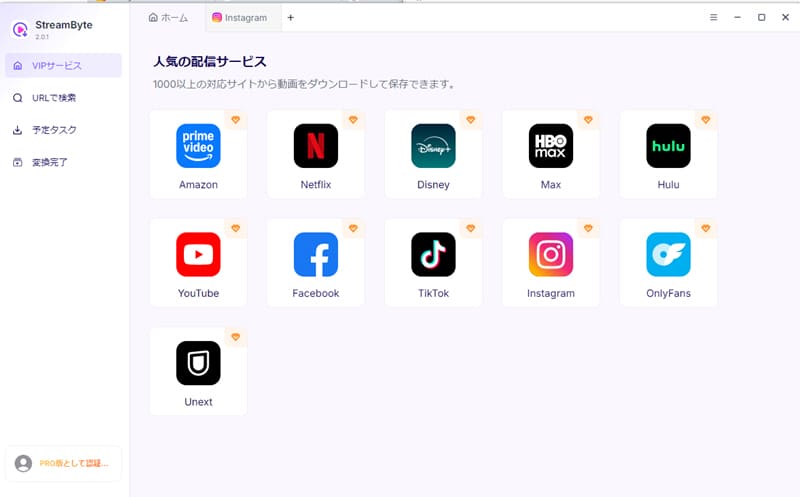
Step 2After accessing the Hulu official website using the built-in browser, click the "Log inClick the button to log in to your Hulu account.

Step 3To download Hulu videos as MP4 files, first open the page of the video you want to save. The software will then automatically analyze the video, and the download icon will become active.
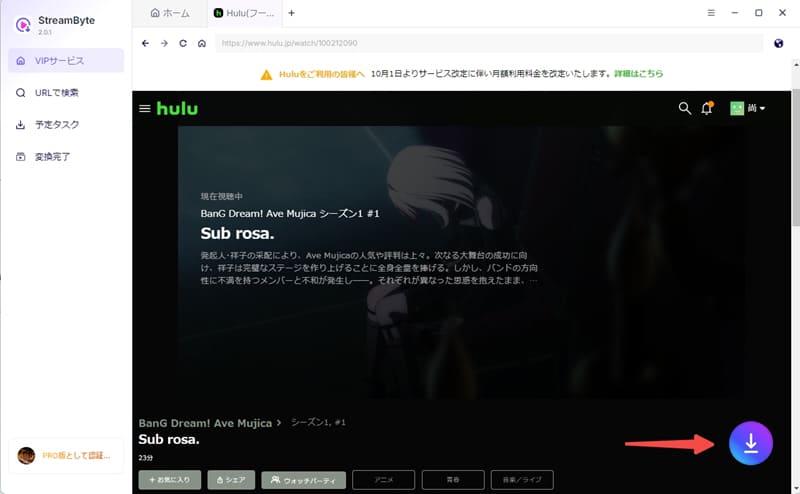
Step 4,Cloud IconClick to select MP4 as the output format to download Hulu videos to MP4. You can also change settings such as audio and subtitles to your liking.
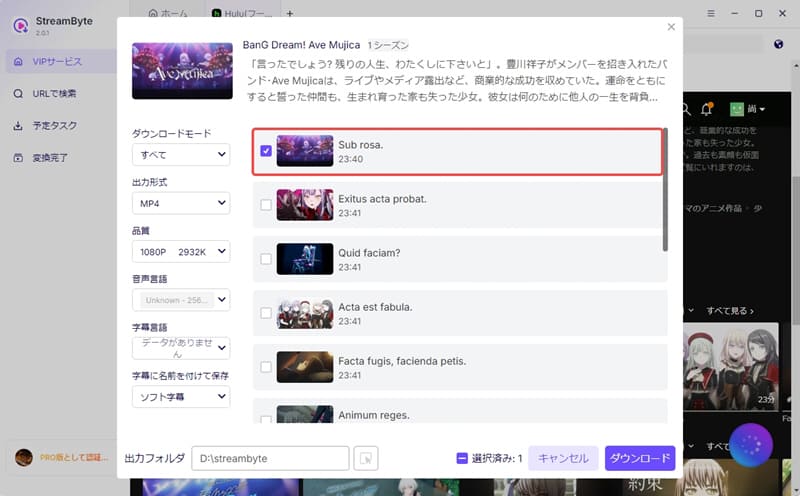
Step 5Finally, you can download the video by clicking the "Download" button. You can check the download progress on the "Scheduled Tasks" screen. Once the download is complete,Save Hulu videosYes, and you can play it offline without limits.

With this software, you can do it with just the simple steps described above.Download Hulu videos in MP4 formatYes, you can. This eliminates the need to worry about various download restrictions on Hulu, allowing you to save videos locally and watch them anytime you want. Furthermore, the built-in web player and high-definition saving function provide an offline viewing experience close to official playback. The user interface is simple and easy to understand, so even beginners can quickly get the hang of it.
100% safe, virus-free
100% safe, virus-free
Using online sites is another way to save Hulu videos in MP4 format. The biggest advantage of this method is that you don't need to install any special software; you can use it simply by pasting the video's URL.
However, online sites often have unstable download success rates and analysis speeds, and some sites may display a lot of advertisements or raise security concerns. Furthermore, many services do not support Hulu video's DRM protection, which can prevent successful downloads. Please exercise caution when using these services.
Here, we'll show you how to save Hulu videos in MP4 format using an online site, "PasteDownload Hulu Video Downloader," as an example.
step 1First, access Hulu and open the page of the video you want to save. Then, copy the URL of the video page from your browser's address bar.
Step 2Go to PasteDownload Hulu Video Downloader and paste the copied URL into the input field. Then,"Download" buttonClick to analyze video information.
Step 3Once the available output formats are displayed, select MP4 format."Cloud Download" buttonClick here. If the analysis is successful, you can save the Hulu video in MP4 format.

In addition to the method of downloading Hulu videos to MP4 as described above, there is also a method of saving Hulu videos in MP4 format using recording software. However, since many videos distributed on Hulu are protected by DRM, the screen may turn black or the video may not be recorded properly during recording. Also, recording takes as long as the playback time of the video, so it is not very efficient. Therefore, if you want to save Hulu videos reliably, it is recommended to use the aforementioned video downloader that supports DRM removal.StreamByte for VideoWe recommend using ".
Here, we will use the free recording software "OBS Studio" as an example.Record Hulu videosHere's how to save it in MP4 format.
step 1Launch OBS Studio,From the "Source" section, click the "+" button and select "Screen Capture".Add the following: Select the Hulu playback screen to record, adjust the audio settings and recording range, and then change the save format to MP4 in the output settings.
Step 2Play the video you want to record on Hulu, and once you're ready, use OBS Studio."Start Recording" buttonClick to start recording.
Step 3Once the video recording is complete,"Stop recording" buttonClick the button. The recorded video will be saved as an MP4 file in the previously set save folder.

Generally, downloading Hulu videos as MP4 files does not directly notify the service provider. However, redistributing or commercially using the saved content, or making an unusually large number of downloads in a short period of time, may be considered a violation of the terms of service. As a result, you may receive a warning notice or have your account temporarily restricted. Therefore, it is important to keep your usage within appropriate limits.
Hulu videos saved in MP4 format have no viewing time limit. MP4 is a highly versatile video format, and once saved, it can be freely played on various media players. Therefore, you can watch them offline anytime without being affected by viewing time limits or playback restrictions imposed by DRM protection.
Currently, there is no official way to download Hulu videos in MP4 format to your smartphone using the Hulu official app. This is because videos saved through the Hulu app are protected by DRM, and downloaded content is in a proprietary encrypted format.
Therefore, if you want to save Hulu videos as MP4 files on your smartphone, you will need a DRM-protected file.StreamByte for VideoThe most common method is to first convert the file to MP4 format on a PC and then transfer it to a smartphone.
This article introduced various methods for saving Hulu videos in MP4 format using online sites and screen recording. However, these methods can be difficult to use, unstable, or carry risks.StreamByte for VideoUsing this method, you can download Hulu videos in MP4 format more easily and reliably.
This software allows you to remove DRM protection from Hulu videos and save them as high-quality MP4 files. Furthermore, it supports high-speed downloads, allowing for comfortable offline viewing. Its simple and intuitive interface makes it easy for even beginners to use. It has also undergone safety certifications, ensuring peace of mind.
"StreamByte for Video"forFree trial versionIt's also available. If you want to download Hulu videos as MP4 files, please feel free to download the software and try it out.
100% safe, virus-free
100% safe, virus-free
Born in Tokyo in 1997. After graduating from a university in London, he worked at a major IT media company, writing articles about video streaming services, video downloaders, and digital content.More than 3 years of experience in editing, proofreading, and writing directionThe articles he has worked on have garnered over 5 million page views, and he is well-known for producing content that is carefully crafted from the reader's perspective.
Currently, as an editor and web writer at StreamByte, he works on creating articles that help users solve their problems, focusing on information related to video streaming services and downloads, with the aim of being "user-oriented, easy to understand, and immediately useful."
Read more articles together



Experts in supporting offline viewing of streaming video services
Subscribe to StreamByteCopyright © 2026 StreamByte. All rights reserved.



Get the latest news, product upgrades, information, guides, discounts and more about StreamByte.
Please enter a valid email address.

A highly capable video downloader:
StreamByte for Video
Even beginners can rest assured! You can try saving videos for free first!







 English
  Japanese
  Chinese (traditional)
  German