
- Streaming Products
- BD-DVD products
- Store
- Useful Articles
- support
Share this article!


DMM is a streaming service that offers a wide variety of content across many genres, boasting a diverse and appealing selection of titles. Many people want to watch and save this interesting content offline. Among the methods for doing so, DMM's screen recording is frequently used as a convenient and easy option, but many users encounter the problem of the screen turning completely black when they actually try to record.
So why does DMM's screen recording result in a black screen? This article will explain the cause in detail, and will also introduce solutions and little tricks to avoid a completely black screen, so please read to the end.
Related Posts:
The most common and typical reason why the screen goes completely black when recording from DMM is that the copyright protection mechanism is at work.
As a video streaming service, DMM employs strict digital rights management technology to prevent unauthorized copying and reproduction of its content. This DRM protection prevents videos from being directly captured by standard screen recording software. As a result, recordings may result in a black screen with only the audio being recorded.
Furthermore, it's important to note that this type of protection is linked to factors such as the presence or absence of hardware acceleration and the browser being used, meaning that even with the same recording method, the results may differ depending on the environment.
While DRM protection was explained as the main cause above, this doesn't apply to all cases. In reality, incorrect settings in the recording software or differences in the PC environment can also affect the recording, resulting in a black screen instead of a proper video. Therefore, understanding these other factors will make it easier to pinpoint the cause. Please refer to the table below to see if there is a case that closely matches your situation.
| cause | Common symptoms | How to check | Solution |
| Cache Accumulation | The recording is choppy and the screen goes completely black. | Check your device's storage capacity | Clear your browser cache |
| Hardware acceleration related | GPU usage is extremely high | Check if hardware acceleration is enabled | Disable hardware acceleration |
| Temporary device/server malfunction | The screen suddenly goes black while recording | Check if the terminal/server is working properly | Restart your device |
| Recording software capture method | Only certain windows go black | Try recording with different capture methods | Change capture method |
As mentioned in the article above, the most common and likely reason for a black screen during DMM screen recording is DRM protection. DRM protection prevents direct capture of videos by standard screen recording software, resulting in the black screen issue during DMM screen recording. So, is this problem unavoidable?
Actually, there is a dedicated video conversion and saving software that can remove DRM protection.StreamByte for VideoUsing this software, you can completely avoid the problem of the screen going black when recording DMM content. Thanks to its powerful DRM removal function, you can save DMM content in common video formats such as MP4. Furthermore, it supports downloads at up to 8x speed, significantly reducing screen recording waiting times. If your internet connection is stable, a 5-minute video can be saved in just over ten seconds.

StreamByte for Video
This is a video downloader that supports major streaming services such as Netflix, Amazon Prime, and YouTube. You can save and enjoy your favorite videos with high image quality up to 8K and Dolby Atmos audio.
Why StreamByte for Video is recommended
Here, "StreamByte for VideoThis explains how to use [this method] to save DMM videos.
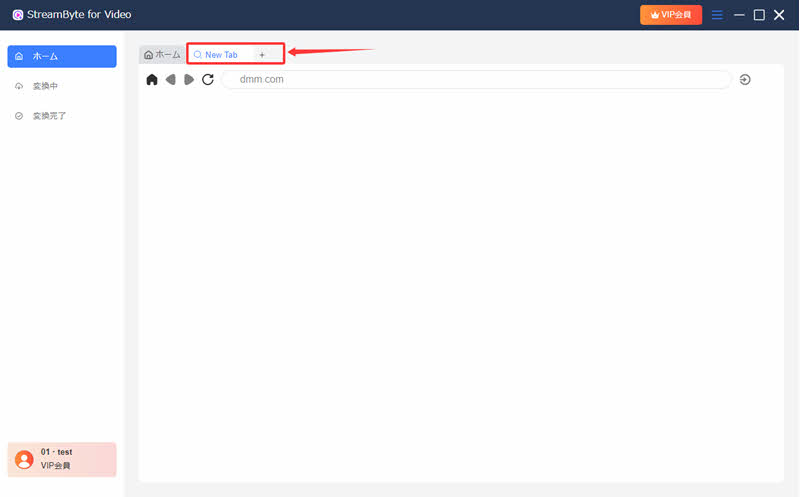
step 1"StreamByte for Video"RegistrationAfter that, in a new tab of the built-in web browser,dmm.comEnter "[text]". Then, access DMM from the built-in web browser and log in to your account.
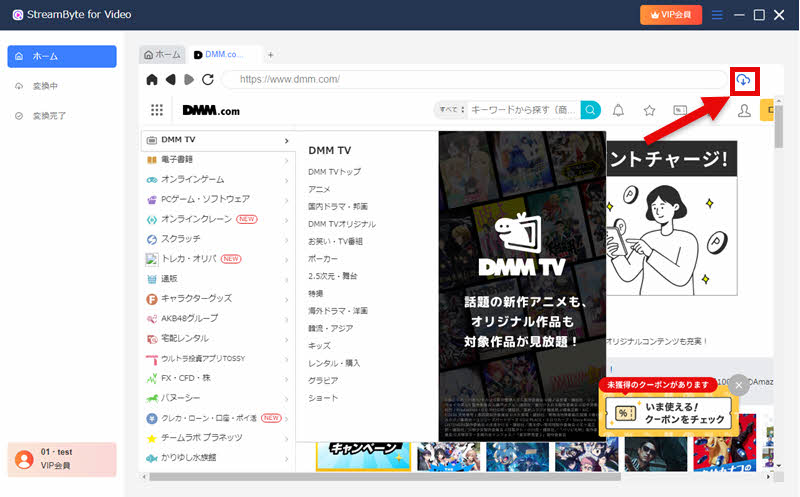
Step 2After logging into your account, find the video you want to save, and then click in the upper right corner of the screen.iconClick to add it to your download list.
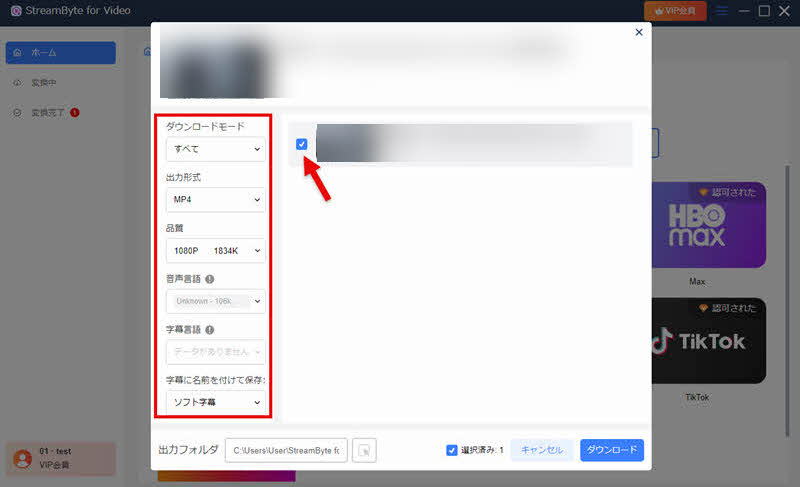
Step 3If necessary, adjust the settings for the video output format, audio, subtitles, etc., in the bottom right corner."download"Click the button.
Step 4You can check the download progress on the "Converting" screen. Once the download is complete, the video will automatically move to the "Conversion Complete" screen, and you can immediately check the saved DMM video. This avoids the problem of the screen turning black when recording DMM videos and allows you to save videos to your computer.
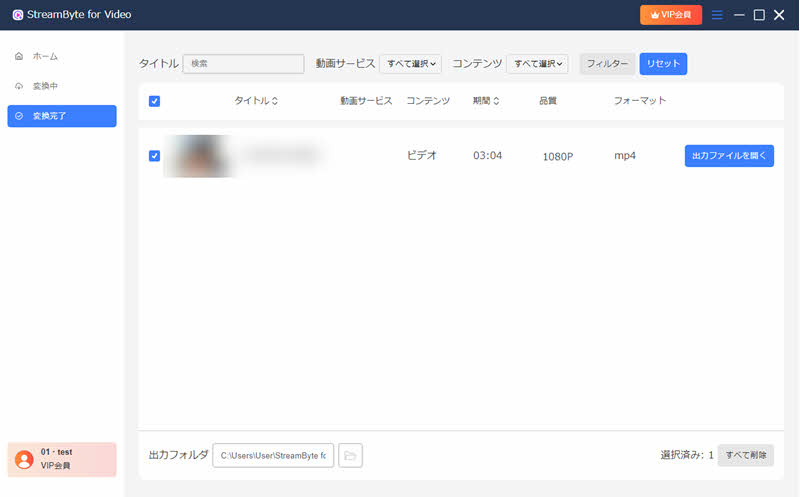
"StreamByte for VideoIf you use "",Remove DRM protectionThis software allows you to save DMM videos in common formats such as MP4, avoiding the problem of the screen going black when recording DMM videos. Compared to screen recording, it offers a significant advantage in saving time while maintaining high image quality. Furthermore, this software is very easy to use, even for beginners. If you want to save DMM videos efficiently and safely, please give it a try.
100% safe and virus free
100% safe and virus free
Recording DMM content is illegal under copyright law. Recording itself constitutes unauthorized copying of copyrighted content and is prohibited regardless of whether it is for commercial or non-commercial purposes. However, it is said that legal action is rarely taken if the purpose is viewing for personal use. However, copyright laws and regulations vary from country to country and region to region, so ultimately you must comply with the laws of your area. Also, be sure to check DMM's terms of service before using their services.
Generally, recording DMM content using the screen recording function of a regular PC or smartphone does not notify DMM of the recording itself. In other words, it is very unlikely that a user will be directly found out that they are recording with normal recording. However, please note that publishing or distributing the recorded video without permission constitutes copyright infringement and may lead to legal problems.
The reason why only audio is recorded when you record DMM content is because DMM content is protected by DRM. As a result, screen recording software cannot properly capture the video, and only the audio is recorded. If you want to save DMM videos reliably, instead of using screen recording software,StreamByte for VideoWe recommend using a dedicated video downloader that supports DRM removal, such as the one mentioned above.
The same phenomenon of the screen turning black occurs even when using the standard screen recording function on iPhones and Android devices. This is because DMM's content is protected by copyright and, according to the specifications of iOS and Android, is not eligible for screen recording.
On the other hand, if you take a picture of the screen directly using your smartphone, you won't encounter these restrictions, and the screen won't turn black. However, this method significantly degrades image quality and diminishes the immersive viewing experience, so it's not highly recommended for those who want to watch content offline in high quality.
This article explains in detail the main reasons why the screen goes black when recording your DMM screen. While various factors can contribute, such as the recording software's capture method and cache accumulation, a particularly significant cause is DRM protection. As a way to fundamentally resolve these issues,StreamByte for VideoWe introduced a solution using "[this method]".
This software allows you to easily remove the DRM protection on DMM videos and save your favorite videos. Saved videos can be viewed anytime, anywhere, eliminating the worry of the screen going black during DMM screen recording. Furthermore, unlike typical screen recordings, it saves videos in high-definition 1080p, which is a major advantage. This enables a comfortable, high-quality viewing experience even offline, meeting the needs of many users.
"StreamByte for VideoWe offer a free trial version, so if you're experiencing the problem of your DMM screen recording showing a black screen, please feel free to try it out!
100% safe and virus free
100% safe and virus free
Born in Tokyo in 1997. After graduating from a university in London, he worked at a major IT media company, writing articles about video streaming services, video downloaders, and digital content.More than 3 years of experience in editing, proofreading, and writing directionThe articles he has worked on have garnered over 5 million page views, and he is well-known for producing content that is carefully crafted from the reader's perspective.
Currently, as an editor and web writer at StreamByte, he works on creating articles that help users solve their problems, focusing on information related to video streaming services and downloads, with the aim of being "user-oriented, easy to understand, and immediately useful."
Read more articles together


Experts in supporting offline viewing of streaming video services
Subscribe to StreamByteCopyright © 2026 StreamByte. All rights reserved.



Get the latest news, product upgrades, information, guides, discounts and more about StreamByte.
Please enter a valid email address.





 English
  Japanese
  Chinese (traditional)
  German