
- Online video downloader
- Streaming Products
- BD-DVD products
- Store
- Useful Articles
- support
Share this article!


Questions like, "I don't know how to delete my Hulu account. Please tell me how!" are frequently seen on sites like Yahoo! Answers. Many users want to delete their Hulu account for various reasons, such as it not suiting them, being too expensive, not using it often, or wanting to switch to another video streaming service. However, many are troubled because they don't know how to do so. Furthermore, many people don't understand the difference between canceling a subscription, deleting an account, and deleting a profile.
This article provides a detailed explanation of how to delete your Hulu account, including important points to keep in mind. Finally, we'll reveal a trick to continue watching Hulu videos even after deletion. Please read to the end.

Related Posts:
Hulu's "cancellation," "account deletion," and "profile deletion" are all different procedures and are often confused by many users. To make the differences clearer, we have summarized the main differences in the table below. Please refer to it.
| item | Cancellation | Account deletion | Delete Profile |
| role | Stop billing | Deleting the account itself | Delete profile |
| Login availability | Possible | Not possible | Owner accounts are possible. |
| Viewing history | retained | Deleted | Delete only the relevant profile. |
| Suitable person | People who want to temporarily suspend their use | People who don't use it at all | People who want to delete only the profiles of family members |
If you're planning to delete your Hulu account, there are a few things you should check beforehand to ensure a smooth deletion process.
If you still have an active Hulu subscription, you will see a message saying "Account cannot be deleted," and you will not be able to proceed with the deletion process. Therefore, before attempting to delete your account, you must first complete the cancellation process and confirm that your subscription period has ended. Note that the cancellation method varies depending on your payment method, so for details, please refer to the Hulu official website.Cancellation methods by payment methodPlease refer to the page.

Hulu may manage multiple profiles as a family account. If you delete a Hulu account in this state, all associated profiles and viewing history will also be deleted. Therefore, if other family members are using the account, it is recommended that you check the scope of the impact beforehand and, if necessary, back up the data or inform them to stop using it.

Hulu tickets are prepaid tickets that can be easily purchased at convenience stores, online shops, and other locations. If you have unused Hulu tickets, the remaining usage period will be forfeited if you delete your account, even if it is still within the validity period. Once a Hulu account is deleted, it cannot be recovered, so if you have unused tickets, it is safest to use them up before deleting your Hulu account. To avoid wasting them, be sure to check the remaining period of your Hulu tickets beforehand.

Deleting your Hulu account will have various impacts on your usage history and data. Understanding these beforehand can help you avoid unexpected problems after deletion. We recommend that you carefully review the following information before proceeding with the deletion process.
| Deleted items | All information | Free trial | Paid fees | Saved video |
| What will happen? | Deleted | not available | No refund will be given. | Not playable |
| influence | Even if you create a new account with the same personal information, this information will not be carried over. | Even if you re-subscribe to the Hulu unlimited viewing service, the free trial will not apply. | Fees already paid are non-refundable. | Purchased content will become unavailable for viewing, and videos that have already been downloaded and saved will also become unplayable. |
If you want to manually delete your Hulu account, you can do so through the Hulu app. Before you begin, make sure you have already canceled your Hulu subscription. Once you have confirmed this, you can delete your Hulu account from the app by following the steps below.
step 1Launch the Hulu app, and click the bottom right corner of the screen."account"Select
Step 2,"account settings"Open it,"Request account deletion"Select
Step 3A notice will be displayed, so please check the contents and if you agree,"Delete"Select

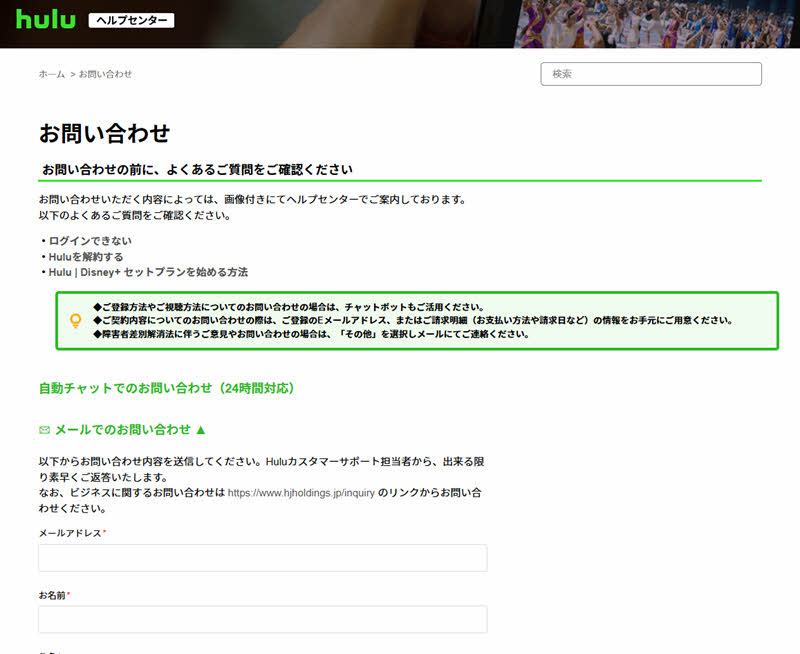
In addition to deleting your Hulu account through the app, you can also request account deletion through customer support via the contact page on the official Hulu website. When deleting your account through customer support, be sure to enter the correct email address. Entering incorrect information may prevent you from deleting your Hulu account. Now, let's explain in detail how to delete your Hulu account through customer support.
step 1HuluContact pageAccess and"Inquiries via email"Click
Step 2Enter your customer information,"service"Select the appropriate item from the options below.
Step 3From "Category""Delete account"Select the option, fill in the required information, and click "Submit".
Even after trying the Hulu account deletion methods described above, you may still be unable to delete your account. Below, we have summarized the main possible causes and solutions to help resolve the issue.
The above explains in detail how to delete your Hulu account, points to note, and the effects that will occur after deletion. However, if you delete your Hulu account, you will no longer be able to watch content on Hulu, and videos that you have already saved will also become unplayable. Therefore, this time, as a workaround that will allow you to play saved videos even after deleting your Hulu account,StreamByte for VideoI will introduce "[this]".
This software can be used to watch Hulu videosEasily remove DRM protectionIt is possible to permanently save videos. Even after deleting your account, you can enjoy your saved Hulu videos anytime, anywhere. Furthermore, it supports download speeds of up to 8 times faster, and if you have a stable network environment, a 20-minute 1080p video can be downloaded in just about 1 minute. It also features a built-in web player and an intuitive, easy-to-use interface, providing users with a viewing experience just like the official service.

StreamByte for Video
This is a video downloader that supports major streaming services such as Netflix, Amazon Prime, and YouTube. You can save and enjoy your favorite videos with high image quality up to 8K and Dolby Atmos audio.
Why StreamByte for Video is recommended
Here, "StreamByte for VideoThis explains how to use [this method] to easily save Hulu content in high definition.
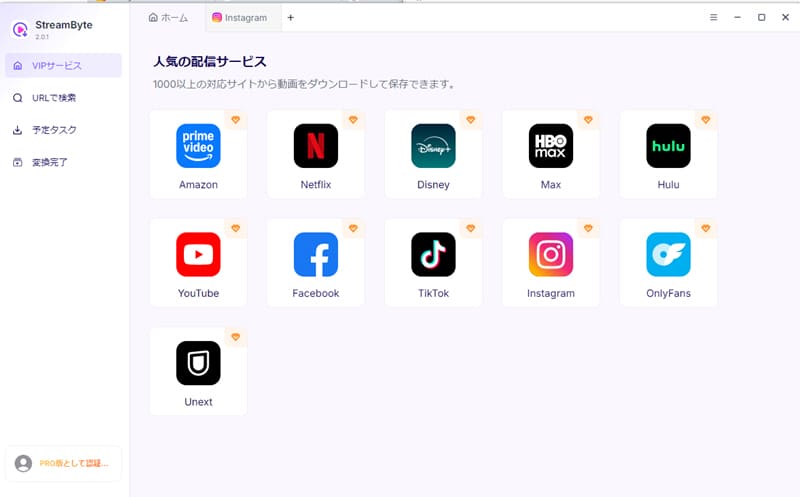
step 1Launch "StreamByte for Video" and log in to your account. If you don't have an account, please register. Then, select Hulu from the multiple video streaming services that are displayed.
Step 2Then, the Hulu login screen will appear, so enter your account information.Log inAfter logging in, use the built-in player's search function to find the Hulu video you want to save.

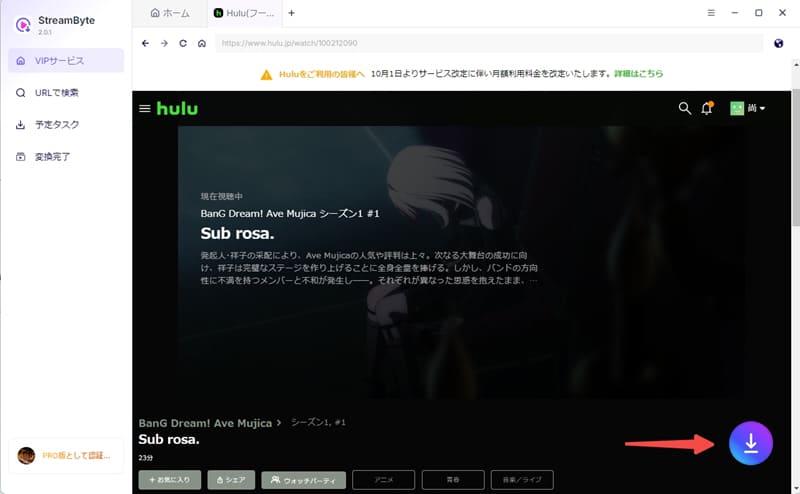
Step 3Once you find the video you want to save, the download button will appear on the screen.Click the iconThen, add the video to your download list.
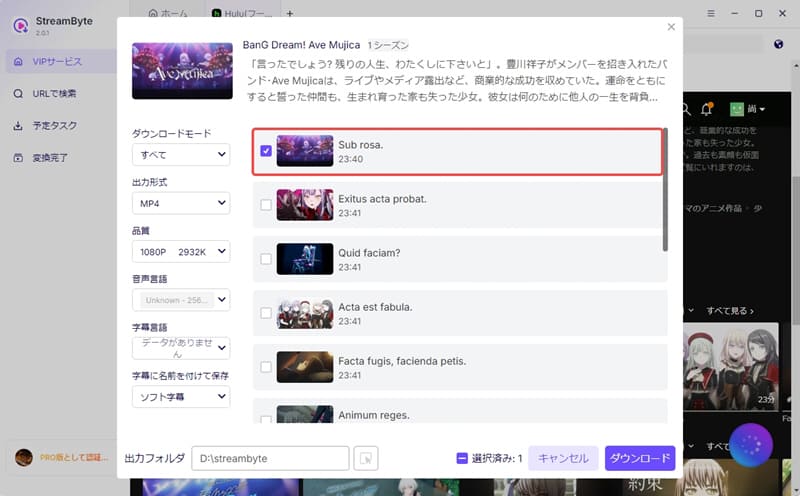
Step 4Then, adjust the settings such as output format, audio track, and subtitles as needed. Once the settings are complete, click in the bottom right corner of the screen."download"Click the button, Saving Hulu videosStarting now.
Step 5You can check the download progress in real time on the "Scheduled Tasks" tab. Once the process is complete, the video will automatically move to the "Conversion Complete" tab, and you can immediately check the saved Hulu video. This makes it possible to permanently save Hulu videos to your PC.

"StreamByte for VideoBy using this service, you can permanently save Hulu videos directly without being affected by Hulu's various download restrictions. This means you can continue to enjoy your saved videos even after deleting your Hulu account. Furthermore, the saved videos are virtually lossless and support high-definition output up to 8K, meeting the needs of those who prioritize image quality. If you want to play saved videos even after deleting your Hulu account, please give it a try.
100% safe, virus-free
100% safe, virus-free
Even after deleting your Hulu account, you can re-register using the same email address. However, if you completely delete your account, that email address will be treated as a "new user." Therefore, your past viewing history, favorites list, and other data will not be carried over and cannot be recovered.
Deleting your Hulu account will prevent you from watching videos. After account deletion, all your viewing history, favorites list, downloaded content, etc., will be deleted, and you will no longer be able to log in to the service. If you want to watch Hulu videos after deletion, you will need to download dedicated video download software beforehand.StreamByte for VideoYou can also use [this method] to save videos.
If you're trying to delete your Hulu account, the most likely reason is that your subscription is still active. In this case, please complete the cancellation process first, and then try again after your subscription period has ended. Also, if your network environment is unstable, the buttons may not display correctly. Therefore, please also check if your internet connection is stable.
This article provides a detailed explanation of the preparations you should make before deleting your Hulu account, as well as the specific deletion method and the consequences that may occur after deletion. It also explains how to avoid the inconvenience of not being able to watch videos after account deletion by using a tool that allows you to save videos in advance.StreamByte for Video" was introduced.
This software allows you to save content without being affected by Hulu video DRM restrictions, and you can play videos offline even after deleting your account. Videos saved in this way are permanently stored and are not affected by various download or playback restrictions. Furthermore, it supports high-definition output up to 8K, so even those who prioritize image quality can enjoy a comfortable viewing experience.
"StreamByte for VideoA free trial version is also available, so if you want to continue enjoying videos even after deleting your Hulu account, please give it a try!
100% safe, virus-free
100% safe, virus-free
Born in Tokyo in 1997. After graduating from a university in London, he worked at a major IT media company, writing articles about video streaming services, video downloaders, and digital content.More than 3 years of experience in editing, proofreading, and writing directionThe articles he has worked on have garnered over 5 million page views, and he is well-known for producing content that is carefully crafted from the reader's perspective.
Currently, as an editor and web writer at StreamByte, he works on creating articles that help users solve their problems, focusing on information related to video streaming services and downloads, with the aim of being "user-oriented, easy to understand, and immediately useful."
Read more articles together



Experts in supporting offline viewing of streaming video services
Subscribe to StreamByteCopyright © 2026 StreamByte. All rights reserved.



Get the latest news, product upgrades, information, guides, discounts and more about StreamByte.
Please enter a valid email address.

A highly capable video downloader:
StreamByte for Video
Even beginners can rest assured! You can try saving videos for free first!







 English
  Japanese
  Chinese (traditional)
  German