
- Streaming Products
- BD-DVD products
- Store
- Useful Articles
- support
Share this article!


Are you having trouble downloading your favorite videos in M3U8 format when you want to enjoy them offline? Streaming in M3U8 format is becoming the norm for video streaming sites, educational content, and news videos in Japan, and there are an increasing number of cases where you can't download and save videos as they are using traditional methods.
For those of you who are having trouble downloading M3U8, this article provides a thorough explanation of the basics of M3U8, as well as three methods for downloading it: dedicated download software, browser extensions, and online websites. If you're looking to save M3U8 videos as easily and safely as possible, be sure to read to the end.
Related Posts:
M3U8 is a playlist format file used in HLS (HTTP Live Streaming), a streaming distribution technology developed by Apple Inc. Unlike actual video files (such as MP4), M3U8 acts like a table of contents, describing the location and playback order of multiple small video segment files (usually in TS format) that divide a video into small pieces.
| item | explanation |
| HLS | It consists of two types of files: M3U8 files and TS segment files, and is a technology for stable delivery and playback of streaming video. |
| M3U8 | A playlist file that compiles metadata such as the playback order, playback time, and image quality information of video segments in text format. |
| TS files | A video segment file of a few seconds in length that contains the actual video data |
During streaming playback, the necessary TS files are loaded and played in order while referencing this M3U8 file, ensuring an uninterrupted viewing experience.
The reasons why M3U8 format videos are difficult to save using regular download tools are as follows:
The video is split: The entire video is not a single file, but is split into hundreds or even thousands of small TS files, and it is not practical to download them one by one and join them manually.
Playlist FormatThe M3U8 file itself is a table of contents and does not contain any video data. Download tools must perform advanced processing to parse this table of contents and collect and combine all the TS files.
Security and DRM: Many video streaming services hide M3U8 URLs or encrypt them with DRM (Digital Rights Management) to prevent unauthorized downloads.
To solve these problems and easily save M3U8 format videos as a single actual video file such as MP4/MKV/MOV, a dedicated tool that can analyze and combine M3U8 is required.
There are three main ways to download M3U8 videos. It's important to understand the characteristics of each method and choose the one that best suits your needs and environment.
| How to download M3U8 | Representative | merit | Disadvantages | Recommended users |
| Dedicated download software | StreamByte for Video | High stability, high image quality and high speed, batch conversion and saving, DRM compatible, high security | Paid software (free trial available), installation required | Those who want high image quality and stability, and those who want to store large amounts of data |
| Browser extensions | Video Download Helper | Free and easy to use, all done in your browser | Unavailable on some sites, frequent outages, unstable, and prone to low image quality | For those who prioritize ease of use and those who want to save only simple videos |
| Online site | AnyConv | No software installation required, completely free | Too many ads, high security risks, and video quality is prone to degradation | Those who want to try it for free and don't care about security |
Below we will explain in detail how to download each M3U8.
If you want to eliminate the problems of unstable downloading M3U8 videos, poor image quality, and complicated operation, and save videos at the highest quality, quickly, and safely, we recommend the dedicatedVideo download software"StreamByte for Video" is the best solution.
"StreamByte for Video" is professional software specialized in downloading various streaming videos, including videos in M3U8 format. It is compatible with both Windows and macOS and supports lossless output to MP4, MKV, and MOV formats. With GPU acceleration technology and batch download functionality, it can quickly and efficiently download large amounts of HLS format .m3u8 videos, significantly reducing waiting time.

StreamByte for Video
This is a video downloader that supports major streaming services such as Netflix, Amazon Prime, and YouTube. You can save and enjoy your favorite videos with high image quality up to 8K and Dolby Atmos audio.
StreamByte for Video: What You Should Know
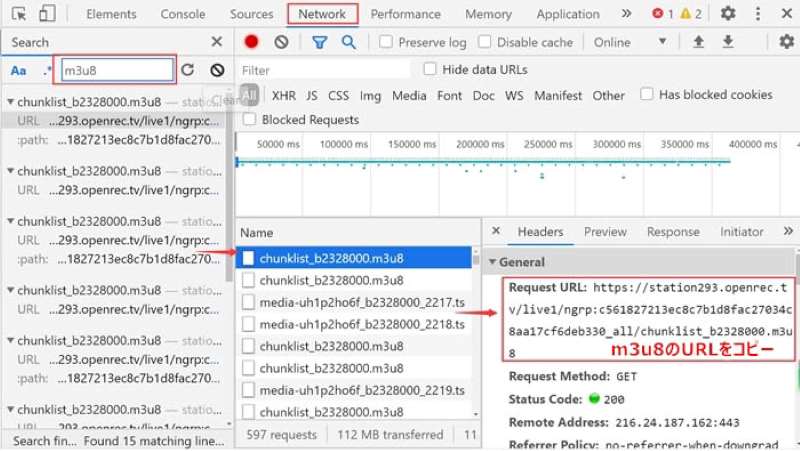
step 1, extract and copy the URL of the M3U8 file.
Supplement: How to extract M3U8 video URL
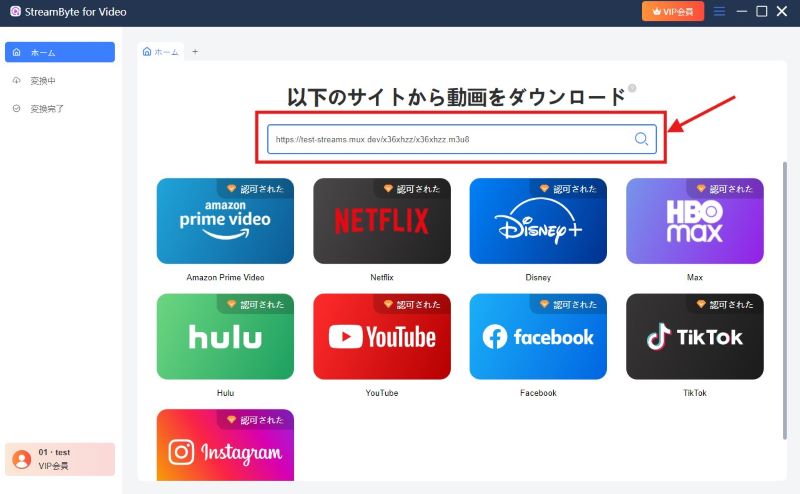
Step 2"StreamByte for VideoDownload and install the app on your computer and launch it. Paste the URL of the M3U8 video you copied into the search box in the center of the screen and the video will be automatically analyzed.
100% safe and virus free
100% safe and virus free
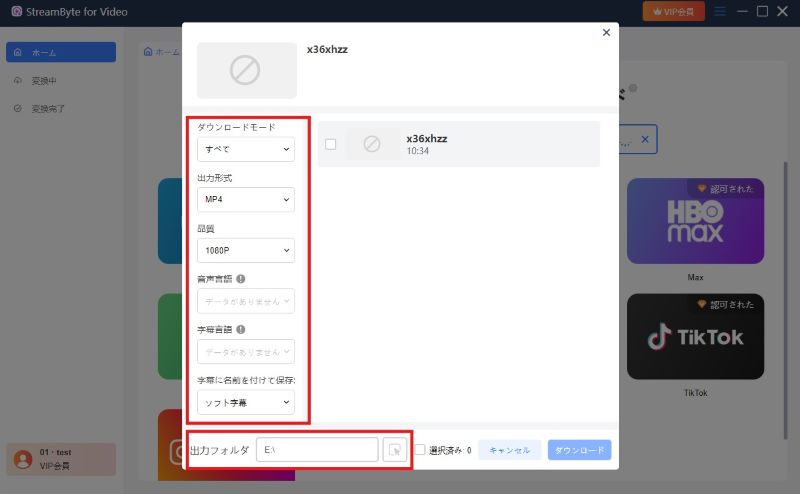
Step 3After analyzing the video, the settings screen will appear. You can customize the download mode, output quality, output format, and save location of the M3U8 video. Three download modes are available: "Audio only," "Subtitles only," and "All." You can choose the output format from MP4, MKV, or MOV.
Step 4Once you've completed all the output settings, click the "Download" button at the bottom right to start converting and downloading the M3U8 video. StreamByte for Video will then analyze the M3U8 file, quickly collect and combine all the TS files, and save them to your PC as a video file in MP4 or other formats.
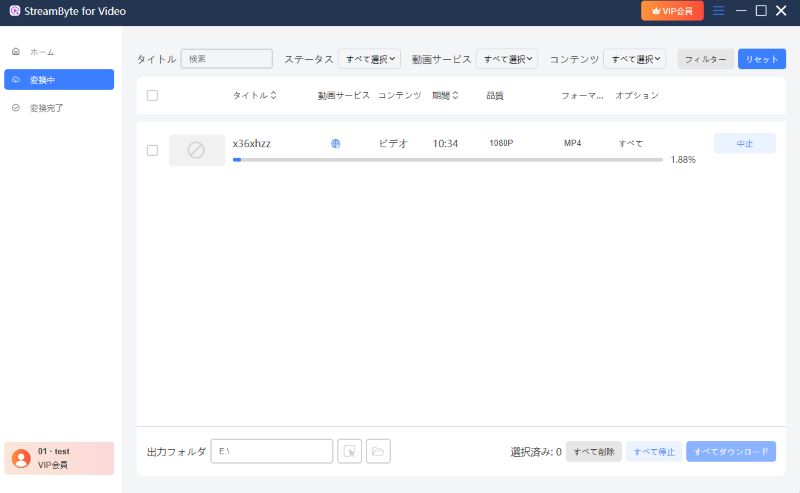
With these simple steps, you can download M3U8 videos in MP4 format by simply copying and pasting the URL.NetflixIt supports downloading videos from various streaming services such as Amazon Prime, Disney+, HBO, and Hulu.Removes DRM protectionThe biggest appeal of this tool is that it allows you to save videos with simple operations. Downloaded M3U8 videos can be freely transferred to smartphones or tablets, and viewed on any player.
"StreamByte for Video" offers a 14-day free trial. Try out the high speed and stability of M3U8 video downloads on your own PC.
100% safe and virus free
100% safe and virus free
For those looking for a simpler solution, you can also use a browser extension. This allows you to download M3U8 videos directly from browsers like Chrome and Firefox. However, please note that this method is vulnerable to changes in the site's specifications and may suddenly become unusable.
A popular tool for downloading M3U8 videos using a browser extension is "Video DownloadHelper." It has been a favorite of Firefox users for many years, and a Chrome version is also available.
From here, we will explain how to install the browser extension called "Video DownloadHelper" and the steps to download M3U8 videos (using Chrome as an example).
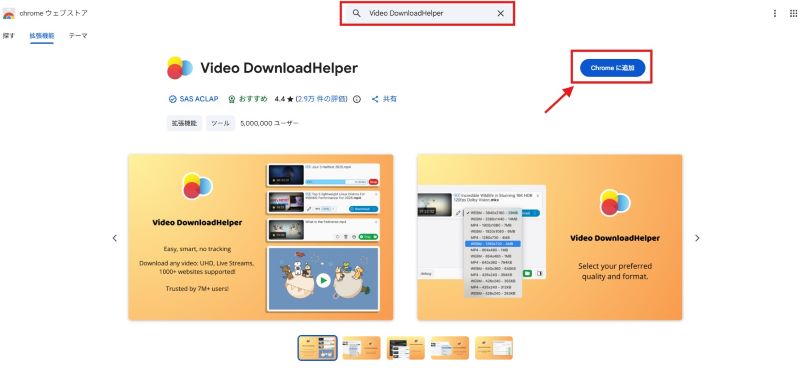
step 1Go to the Chrome Web Store and search for "Video DownloadHelper" in the search box. Click "Add to Chrome" to add the extension. Click the pin icon to pin it to your toolbar.
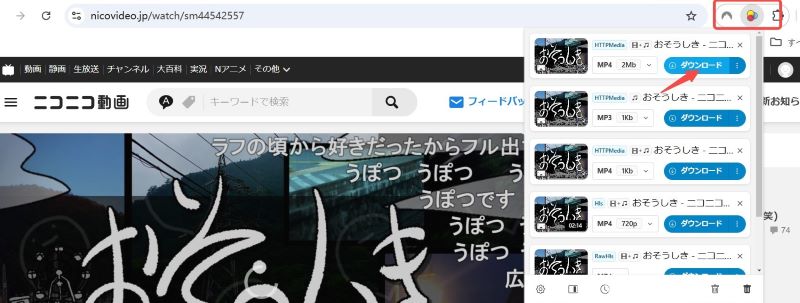
Step 2Play the M3U8 video you want to download. Once the video is detected, the "Video DownloadHelper" icon in the top right corner of your browser will turn colored.
Step 3Click the extension icon, and a list of downloadable M3U8 videos will appear. Select the resolution and output format, then click "Download" to start downloading the M3U8.
Advantages:
Cons:
"Video DownloadHelper" supports not only M3U8 but also various other streaming formats. However, with M3U8 format, there have been reports of watermarks being added after download, or videos not being joined properly. Also, downloads often fail with streaming services that use complex encryption or authentication.
If you want to download M3U8 videos more stably, try "StreamByte for Video" is the best choice. It also has a powerful DRM protection removal function, so you can safely obtain encrypted M3U8 videos.
100% safe and virus free
100% safe and virus free
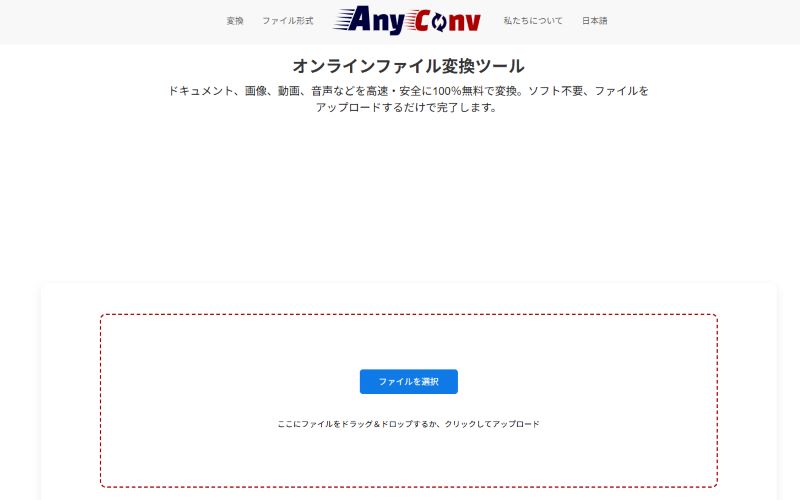
For those who want to avoid installing software or browser extensions, or who just want to download a short video, there are websites like "AnyCov" that will convert M3U8 files to MP4 and download them online. This method is recommended for those who have M3U8 video files.
step 1Go to the official AnyCov website, click "Choose File" and add your M3U8 file.
Step 2Select MP4 and click "Convert". Now you can convert M3U8 file to MP4 and download it.
Advantages:
Cons:
The online site requires no installation and allows you to easily convert M3U8 files to MP4 and other popular formats for download. However, the service can be unstable, causing videos to stop midway. Downloaded videos tend to be of poor quality, and there are also security concerns.
For those who want to save videos that are being distributed or who value video quality and safety, we recommend the specialized video download software "StreamByte for VideoA better way would be to download M3U8 using "
100% safe and virus free
100% safe and virus free
When considering downloading M3U8 videos, users in Japan, in particular, should be aware of security and copyright issues.
In particular, when using online sites or free software of unknown origin, you should be aware of the following security risks.
Viral infection: Some M3U8 video download tools disguise themselves as download software or websites and try to install malware or spyware on your PC.
Personal information leak: Malicious software and websites may steal personal information and passwords stored on your computer.
"StreamByte for VideoThese security risks can be significantly reduced by choosing software that has a proven track record and is distributed on the official website, such as
The copyright of M3U8 content belongs to the creator. Reposting or selling downloaded M3U8 videos commercially without permission is a violation of copyright law. Please comply with copyright law and only save M3U8 videos for personal viewing purposes.
Also, please be aware that under Japanese copyright law, downloading content that you know has been illegally uploaded is illegal, even for personal use.
M3U8 files alone cannot be played offline. M3U8 format files are not the actual video, but merely a "table of contents" or "playlist" that shows the location of the video on the Internet. Therefore, even if you download only the M3U8 file, the video data cannot be loaded without an Internet connection, and playback is not possible.
To watch videos offline, you need to obtain all the TS video files referenced by the M3U8 file, then combine and convert them into a single generic video file such as MP4.StreamByte for VideoBy using specialized video download software such as ", you can automatically process video and audio together, and after saving it, you can play it on your PC or smartphone even without an internet connection.
This article introduces a dedicated video downloader, browser extension, and online site that can convert M3U8 videos to the highly compatible MP4 format for download. Saving videos in MP4 format allows you to play them on both iPhones and Android phones.
If you are looking for software to download M3U8 videos on Mac, try "StreamByte for VideoThis software is available for both Windows and Mac, and even Mac users can enjoy 8x faster download speeds and save M3U8 videos in formats like MP4, MOV, and MKV while maintaining high-quality video up to 8K.
100% safe and virus free
100% safe and virus free
Downloading M3U8 requires downloading a large number of TS video segment files, so if your network is unstable, your connection may be interrupted. If this happens, try improving your network environment. For example, try switching to a wired LAN instead of Wi-Fi, and try downloading again in a more stable environment.
This article introduces three methods for downloading M3U8 videos: dedicated software, Chrome/Firefox browser extensions, and online websites. However, due to the unique nature of the M3U8 format, extensions and online websites can be unstable and the video quality can be poor. Furthermore, there are security risks, such as virus infection and personal information leaks.
If you are worried about downloads stopping midway, poor image quality, or security issues, we recommend "StreamByte for VideoPlease consider using ". This software allows you to convert M3U8 videos to common formats such as MP4 and download them with simple operations. While maintaining the original quality, GPU acceleration technology allows you to save multiple videos seamlessly and quickly, improving your work efficiency.
Download the free trial version of "StreamByte for Video" now and experience its stability and high-quality video storage!
100% safe and virus free
100% safe and virus free
Born in Tokyo in 1997. After graduating from a university in London, he worked at a major IT media company, writing articles about video streaming services, video downloaders, and digital content.More than 3 years of experience in editing, proofreading, and writing directionThe articles he has worked on have garnered over 5 million page views, and he is well-known for producing content that is carefully crafted from the reader's perspective.
Currently, as an editor and web writer at StreamByte, he works on creating articles that help users solve their problems, focusing on information related to video streaming services and downloads, with the aim of being "user-oriented, easy to understand, and immediately useful."
Read more articles together


Experts in supporting offline viewing of streaming video services
Subscribe to StreamByteCopyright © 2026 StreamByte. All rights reserved.



Get the latest news, product upgrades, information, guides, discounts and more about StreamByte.
Please enter a valid email address.










 English
  Japanese
  Chinese (traditional)
  German