
- Online video downloader
- Streaming Products
- BD-DVD products
- Store
- Useful Articles
- support
Share this article!


Many people want to download and save streaming videos to watch offline. Have you ever experienced problems like "I want to watch my favorite videos offline," "I'm worried about exceeding my data limit," or "I found out my video was deleted"? Streaming services like Netflix, Amazon Prime, Disney+, YouTube, HBO, and Hulu are convenient, but they also have the drawback of making offline viewing difficult.
Even if you download a video using the official app, it can only be played within the app and cannot be transferred to other devices. Furthermore, if a video is removed from the streaming service, in most cases, downloaded videos will also become unplayable.
In this article,How to download and save streaming videosThis will explain it in an easy-to-understand way.Windows/Mac/Android/iPhoneWe will introduce procedures for each device. These can be used in various situations, such as watching while traveling, saving before the service ends, and backups, so please refer to them.
Related Posts:
YouTube, Netflix, Hulu, and other popular streaming video services are available. Connecting to a Wi-Fi or mobile data network allows you to stream your favorite videos from these services. While "streaming" is convenient because it allows you to watch videos in real time, it can consume a lot of data. On the other hand, "downloading" videos in advance allows you to watch them offline at any time, and does not consume data even if you play them repeatedly.
The main differences between "streaming" and "downloading" are as follows:
| Comparison items | Streaming | download |
| Offline playback | Not possible | Possible |
| playback speed | Depends on the communication environment | Instant playback |
| Video transfer and editing | Not possible | Yes (if DRM is removed) |
| Free storage space | Unnecessary | need |
| Playback Restrictions | There are regional and plan restrictions | Without Restrictions |
| Data consumption | need | Only occurs during download |
As you can see from this comparison table, if you download and save streaming videos, you can watch them offline anytime, anywhere, without being limited by your playback environment. Although downloading incurs data usage, repeated playback does not incur data usage, so if you watch the same video multiple times, it can save data compared to streaming. Furthermore, you can freely convert, copy, and edit saved videos.
So, what methods are available for downloading and saving streaming videos?
Currently, numerous video streaming services, including Amazon Prime and Netflix, as well as YouTube, Niconico Video, AbemaTV, Twitch, SHOWROOM, and WOWOW On Demand, utilize streaming technology. However, this comes with risks, such as interrupted playback due to poor internet connection or the inability to watch videos again if they are deleted.
Due to these circumstances, more and more people are thinking, "I want to save streaming videos and watch them offline whenever I want." The methods to meet this need can be mainly divided into the following two categories.
Method 1:Download and save streaming videos
Method 2:Record and save streaming videos (PC and smartphone)
Method 3:Save streaming videos with a browser extension
In this article, we will explain in detail how to download or record streaming videos and save them using a PC or smartphone. If you have a video you want to save, please read to the end!
The easiest way to download and save streaming videos is to use dedicated download software, which allows you to save them in high quality. Here, we will introduce some representative software that can download streaming videos in high quality: StreamByte for VideoI will introduce "[this]".
"StreamByte for Video" is a high-performance download software that supports over 1,000 streaming video distribution and sharing services, including Netflix, Amazon Prime, Disney+, YouTube, HBO, and Hulu.
Even in places with unstable internet connections, you can use the high-speed download function, up to 8x faster, to save videos in advance and watch them smoothly. It supports up to 8K image quality and lossless sound quality, and can be saved in MP4, MKV, and MOV formats without degradation. It also allows you to select and retain multilingual audio tracks and subtitles, meeting all your needs.
The ability to search and download directly from the official web player,Supports saving DRM protected videosYou can freely enjoy your favorite works.
Download "StreamByte for Video" now, which is compatible with both Windows and Mac, and start enjoying comfortable offline viewing!
StreamByte for Video
This is a video downloader that supports major streaming services such as Netflix, Amazon Prime, and YouTube. You can save and enjoy your favorite videos with high image quality up to 8K and Dolby Atmos audio.
What makes StreamByte for Video great?
"StreamByte for Video" allows you to easily download streaming videos in just 5 steps. " allows you to easily download streaming videos in just 4 steps.
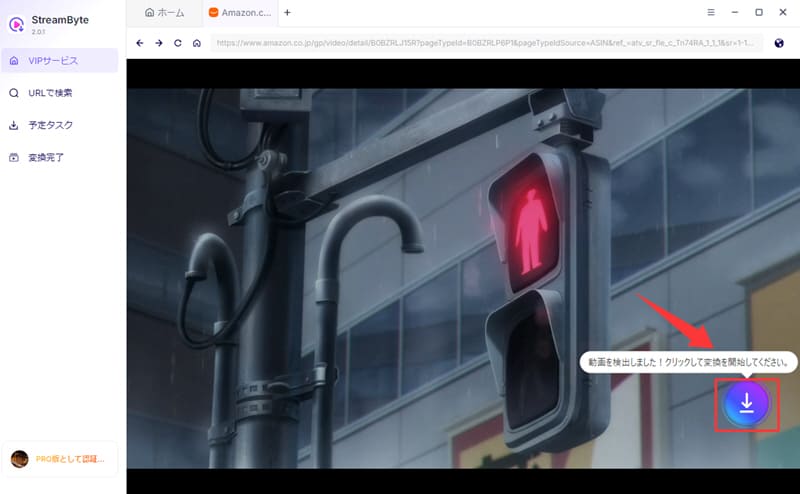
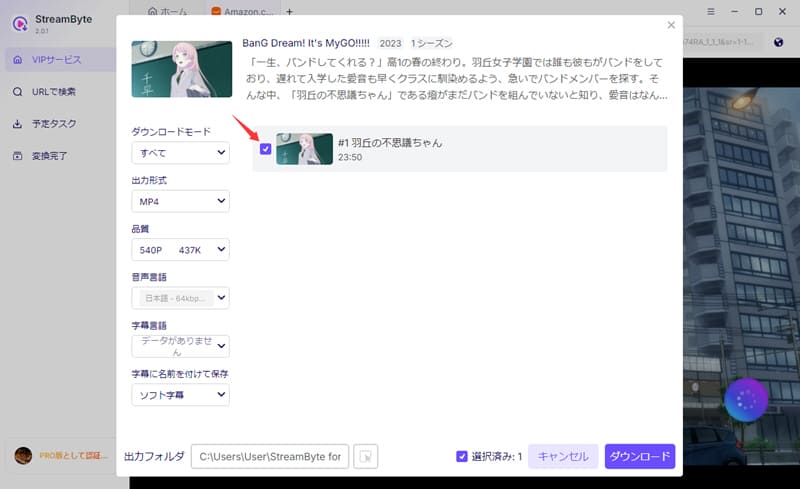
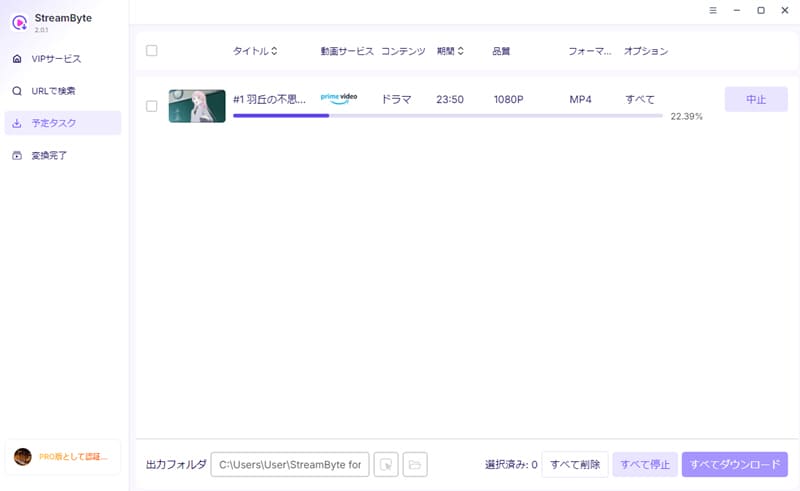
Step 1: Choose a video service and log in
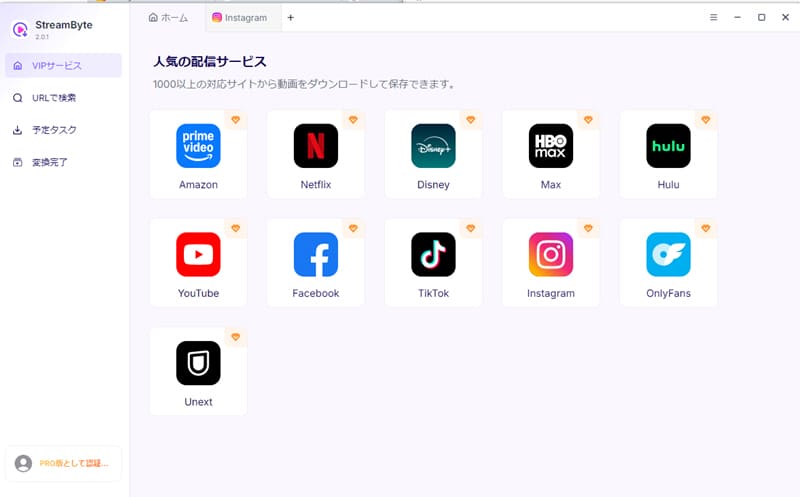
Once you log in to StreamByte for Video, the main interface will display popular streaming services (Amazon Prime, Netflix, Disney+, HBO, Hulu, YouTube, etc.) Select the service you want to download from.
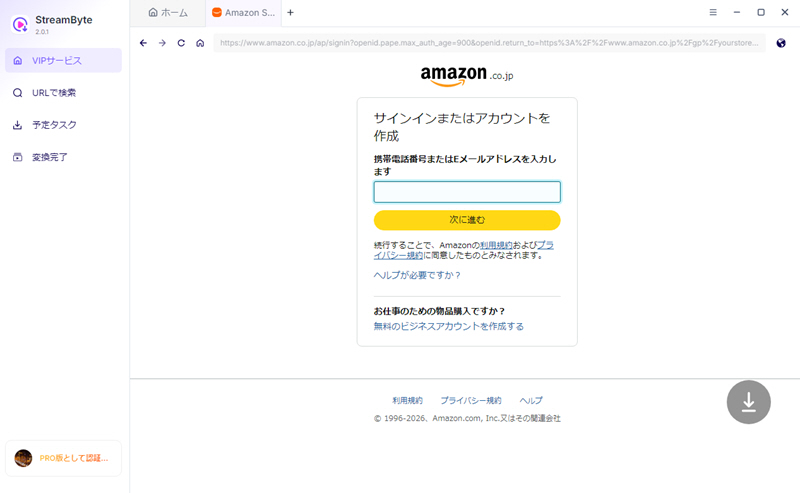
Step 2: Log in to your video service account (we'll use Amazon Prime as an example here)
If you are not logged in, you may not be able to retrieve the video correctly or the download may fail. Please log in to your account in advance. In the case of Amazon Prime, please select Japan as the country/region.
Step 3: Select the video you want to download
Once you find a streaming video you want to save, click the download icon in the top right and select the episode you want to save.
Step 4. Adjust output settings
By default, this software selects "Download all mode," "MP4 output format," and "soft subtitles." These output settings can be freely changed to suit your preferences. You can also freely select the audio and subtitle language, and specify the output folder.
Step 5: Download streaming videos
Once you have checked the video and output settings, click the blue "Download" button in the lower right corner of the screen to start saving. You can check the download progress in real time on the "Scheduled Tasks" tab screen.
"StreamByte for VideoWith its intuitive and user-friendly interface, even beginners can easily access Netflix, Amazon Prime, Disney+, Hulu, and more.Download and watch videos from HBO Max and other services freely.You can.
Try this software for free now and experience its ease of use, as it allows you to easily create a comfortable offline viewing environment!
100% safe, virus-free
100% safe, virus-free
Another way to save streaming video is to use screen recording software to record and save the video directly.
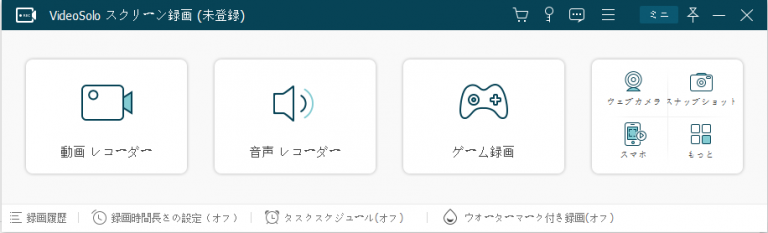
So I would like to recommend:VideoSolo Screen Recorder"is.
VideoSolo Screen Recorder is an ideal tool for you to easily record streaming videos and important moments. It can smoothly record your PC screen without any audio lag or watermark, and also supports simultaneous recording of microphone audio, system audio and webcam.
It also has real-time drawing, annotation and screenshot functions, and is great for recording gameplay, allowing you to capture high-quality, smooth footage.
It is compatible with both Windows and Mac and has a proven track record of adoption in companies, so it is also recommended for those considering using it in the workplace.
However, there are a few things to keep in mind when recording and saving streaming videos.
Screen recording has some disadvantages. First, if the video you want to record is long, it will take the same amount of time to record. Also, you cannot do other operations while recording, and there is a risk that the recording will be interrupted or fail due to external influences (most recording software does not have a resume function).
Please note that on some streaming sites, recording may be blocked by copyright protection technology, causing the screen to turn completely black and making it impossible to record.
If recording fails in this way,We recommend the "How to download and save streaming videos" method mentioned above.
You can watch it comfortably even offline.StreamByte for Video" Try it now.
100% safe, virus-free
100% safe, virus-free
Even if you try to save streaming videos on an iPhone or Android smartphone, the number of compatible apps is very limited due to copyright protection.
Therefore, the most common methods for recording on smartphones are using the device's built-in screen recording function or third-party apps.
On iPhone, just open the Control Center and tap the "Screen Recording" icon to start recording. On Android, just swipe down from the top of the screen and tap "Screen Recording" or "Screen Record" to start recording.
If you want to avoid these restrictions, you can use the "StreamByte for Video" is recommended.
This software is ideal for PC viewing and is compatible with over 1,000 video streaming and sharing services. It supports high-speed downloads at up to 8x speed, saving in up to 8K resolution, and outputting in MP4, MKV, and MOV formats. Videos with subtitles can also be easily saved, allowing for comfortable offline viewing in high quality. Downloaded videos are DRM-free, so you can easily transfer them to your iPhone, iPad, or Android device.
One way to save streaming videos is to use extensions for Chrome or Firefox. These extensions work directly within the browser without installing any additional software, allowing you to easily download and save streaming videos.
Videos that are normally difficult to download can be easily saved using these extensions.
The following are typical extension functions:
Video DownloadHelper – A popular extension that supports many streaming sites and allows you to download videos with just a few clicks.
Video Downloader Professional: Easily save videos from the web and choose the output format and resolution.
YouTube Video Downloader: A YouTube extension that also supports downloading multiple videos at once.
Saving streaming video is very easy with Chrome and FireFox extensions.
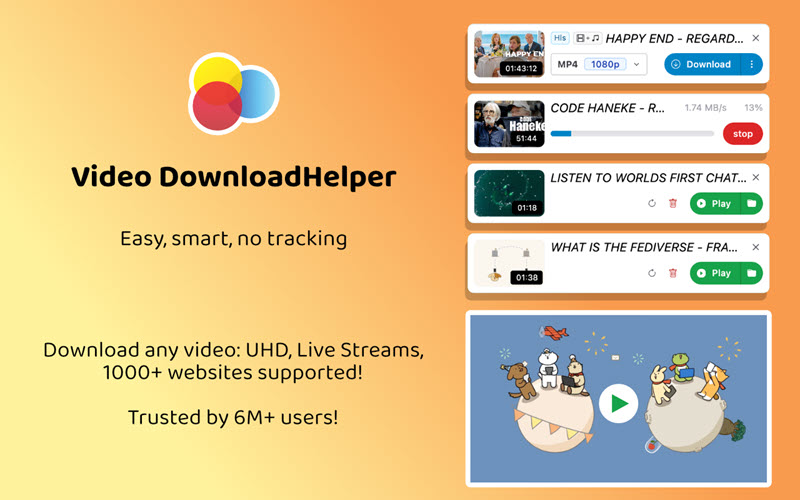
No complicated operations are required, making it easy for anyone to save streaming videos. While these extensions have free versions, upgrading to a paid version may be necessary for advanced features or to save higher-quality videos.
Chrome and Firefox extensions are a convenient way to download content, but they also have the following limitations:
For those who want to bypass these restrictions and download and save streaming videos more comfortably, there is a PC/smartphone compatible option:StreamByte for Video" is recommended. It supports over 1,000 streaming services, including YouTube, Netflix, and Amazon Prime, and allows you to quickly save videos in bulk. It also supports downloads in up to 8K quality, providing high convenience that cannot be obtained with browser extensions.
If you feel that you can't save streaming videos as you want with the extension, it's worth trying "StreamByte for Video". Try it now and enjoy saving streaming videos comfortably!
100% safe, virus-free
100% safe, virus-free
The main ways to save videos from streaming services like YouTube, Amazon Prime Video, and Netflix are to use tools like video downloaders, recording software, and browser extensions. Each method has its own features and caveats, so choose the method that best suits your needs and environment.
Each method for downloading, recording, and saving streaming videos has its own characteristics and points to note, so it's important to choose the best method depending on your purpose and environment.
| How to save streaming | Features | Points to note | Suitable person |
| Video download software | Download videos from streaming services directly to your PC Can save in high quality up to 8K Subtitle and audio track selection available Remove DRM protection and freely convert, copy, and edit videos |
The free trial has some limitations, and you must upgrade to the paid version to use advanced features. | For those who want to save in high quality For those who want to watch it offline multiple times For those who want to save videos with subtitles For those who want to save all the works in a series together. |
| Recording software | Most videos can be recorded without DRM protection | It takes a long time to record a long video. Notifications and ads tend to interrupt recording Possible degradation of video quality Risk of screen blocking due to copyright protection |
For those who want to save videos temporarily For those who want to save videos that cannot be downloaded. For those who want to use it for simple record-keeping purposes |
| Browser extensions | No software installation required, easy to use Selectable streaming video resolution and output format |
Difficult to use in parallel with other applications Dangerous extensions that contain viruses and malware Download speeds may be slow and image quality may be poor. |
For those who want to store things easily and quickly For those who do not want to install software For those who only need to save videos easily |
While recording software is a convenient tool for saving video, it is susceptible to network connection issues and is prone to interruptions or failures. It also has a high risk of degrading image and sound quality, and some copyright protection technologies may block the screen. While Chrome browser extensions are available, they often have security concerns and limited functionality.
As this comparison shows, to save streaming videos in high quality and stably, a dedicated method is required.Video download softwareUsing this method is the most efficient and recommended approach. In particular, the highly functional "StreamByte for Video" allows you to download streaming videos in batches at up to 8K resolution and up to 8x speed, remove DRM protection, and convert and save them in formats such as MP4/MOV/MKV without loss of quality. It supports over 1,000 streaming video services, including YouTube, Hulu, Netflix, Amazon Prime Video, and Disney+, meeting the diverse needs of users.
please" StreamByte for VideoDownload " for free and experience high-performance, high-quality streaming video downloads!
100% safe, virus-free
100% safe, virus-free
Here we will introduce some frequently asked questions about recording and saving streaming videos. Please use it as a reference.
Whether recording and saving streaming videos is illegal is determined based on copyright law. Generally, saving or copying copyrighted content without the permission of the rights holder may constitute copyright infringement. In addition, knowingly downloading or recording "illegally uploaded content," as well as sharing its URL or using it for commercial purposes, may also be considered illegal.
On the other hand, if you use the download function officially provided by the service or have permission from the rights holder, there is no problem. To avoid legal trouble, you should refrain from doing anything beyond the scope of personal use, such as sharing the saved video with many people or using it for commercial purposes.
Saved streaming videos are saved in common video formats such as MP4, MKV, and MOV, so they can be played without any problems using the standard playback functions on Windows, Mac, and smartphone devices.
For example, you can play it directly with "Movies & TV" on Windows, or "QuickTime Player" on Mac. You can also easily watch it on your smartphone with the standard video app on iPhone or the gallery app on Android.
However, some players may not support certain formats, so if you can't play the video, you can use free playback software such as "VLC Media Player". Also, if you want to play videos with subtitles or high-definition videos, you can watch them comfortably by using a high-performance player.
In conclusion, screen recording of streaming videos may be illegal under certain circumstances. Recording and saving illegally uploaded videos, knowing that they are illegal, may constitute copyright infringement. Furthermore, even for private use, recording while circumventing copyright protection technology (DRM) carries the risk of being considered illegal. Moreover, selling recorded videos or distributing them without permission on social media, etc., is a clear violation of copyright law.
Basically, even if you record and save streaming video, the distribution service is not notified of the action in real time. Therefore, many users save videos for their own personal use.
However, some video streaming services, such as Netflix, use DRM (digital rights management) technology and behavioral detection algorithms, and may issue warnings in the event of unauthorized access or abnormal use of APIs.
Screen recording may be difficult to detect, but depending on the system, the image may be displayed black during recording or the recording itself may be blocked, so always proceed at your own risk.
"Streaming" is a method of playing videos in real time over the Internet, and is characterized by the fact that you can watch them instantly without having to wait for them to download. However, since they are not usually saved to your device, they cannot be played offline.
On the other hand, "download" allows you to save video content to your device and play it offline anywhere without worrying about data usage. Although it requires storage space, once downloaded and saved, you are less likely to be subject to regional restrictions and can enjoy stable video quality regardless of your network environment.
Streaming is great for the latest episodes and live broadcasts, but if you're commuting to work or school or somewhere with an unstable connection, it's best to download the content to your home Wi-Fi beforehand and play it on the go.
This article discusses three methods for saving streaming videos: downloading, recording, and using browser extensions. It's important to choose the method that best suits your needs and environment.
Chrome and Firefox extensions are convenient, but they may only support a limited number of sites, or may have limitations on download speed and image quality. Recording is also an effective method, but it can be time-consuming and there is a risk of failure and deterioration of image quality. For this reason, we recommend "StreamByte for Video" is recommended.
StreamByte for Video is a leading software that supports high-quality, high-speed downloads, making it ideal for those who want to efficiently save streaming videos. It supports over 1000 streaming services, including Netflix, Amazon Prime, Disney+, YouTube, HBO, and Hulu, and allows for batch downloads at up to 8x speed and 8K resolution. It also supports saving videos with subtitles and lossless output to MP4/MKV/MOV formats, meeting a wide range of needs.
If you want to easily save streaming videos in high quality, please try "StreamByte for Video"!
100% safe, virus-free
100% safe, virus-free
Born in Tokyo in 1997. After graduating from a university in London, he worked at a major IT media company, writing articles about video streaming services, video downloaders, and digital content.More than 3 years of experience in editing, proofreading, and writing directionThe articles he has worked on have garnered over 5 million page views, and he is well-known for producing content that is carefully crafted from the reader's perspective.
Currently, as an editor and web writer at StreamByte, he works on creating articles that help users solve their problems, focusing on information related to video streaming services and downloads, with the aim of being "user-oriented, easy to understand, and immediately useful."
Read more articles together

Experts in supporting offline viewing of streaming video services
Subscribe to StreamByteCopyright © 2026 StreamByte. All rights reserved.



Get the latest news, product upgrades, information, guides, discounts and more about StreamByte.
Please enter a valid email address.

A highly capable video downloader:
StreamByte for Video
Even beginners can rest assured! You can try saving videos for free first!







 English
  Japanese
  Chinese (traditional)
  German