
- Online video downloader
- Streaming Products
- BD-DVD products
- Store
- Useful Articles
- support
Share this article!


While Netflix offers an official download function, it has various limitations, such as storage periods and viewing deadlines. Therefore, many users utilize dedicated downloaders like MovPilot Netflix Video Downloader. However, many people are unfamiliar with the functionality, security, and actual reputation of MovPilot Netflix Video Downloader.
This article thoroughly examines the features, safety, and reputation of MovPilot Netflix Video Downloader, and also introduces recommended alternative software. Please read to the end.
Related Posts:
MovPilot Netflix Video Downloader is a downloader specifically for Netflix videos. It allows you to easily download Netflix movies and TV shows in HD.MP4/MKVIt allows you to save content in various formats and enjoy it without restrictions on any device. It's an extremely useful tool for those frustrated by the limitations of the official Netflix download feature. Here's a summary of its main features.
Key Features of MovPilot Netflix Video Downloader
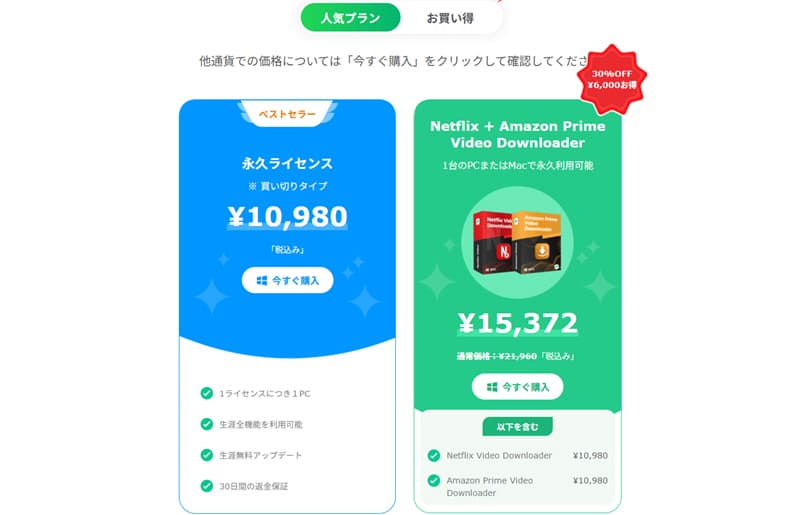
Currently, MovPilot Netflix Video Downloader supports both free and paid versions. The free version only allows downloading the first 6 minutes, while the paid version allows saving the full video.Perpetual license systemAs of June 2026, the price is 10,980 yen. Please note that it can only be used on one PC at a time.
Many people are concerned about the safety of MovPilot Netflix Video Downloader. This software is generally designed with safety in mind, and it is said that a certain level of security testing has been performed. In fact, when I used it, no warnings about danger were displayed by antivirus software such as Norton, Kaspersky, and McAfee. Furthermore, no advertisements that forcibly redirect to external sites were observed during use. Therefore, overall, MovPilot Netflix Video Downloader is safe.It is safe in theory.This can be evaluated as follows.
After confirming the safety of MovPilot Netflix Video Downloader, let's take a detailed look at how to actually use it. Following the steps below will allow you to operate it smoothly even if it's your first time.
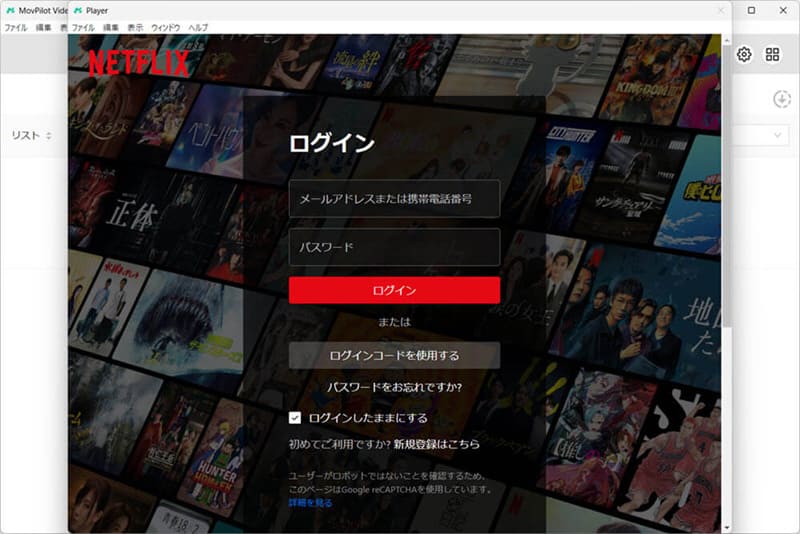
step 1First, install and launch MovPilot Netflix Video Downloader on your computer. After launching, use your Netflix account...Log inPlease do.
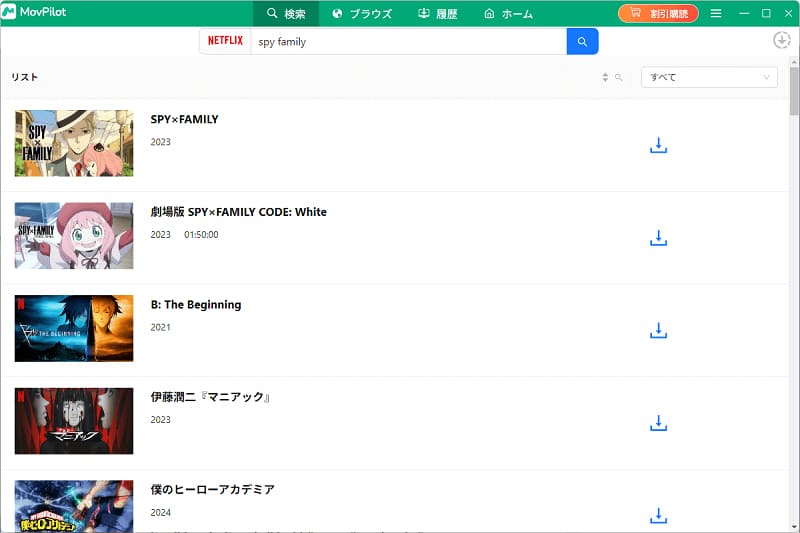
Step 2Next, the movies and TV shows you want to downloadCopy the URL- Paste it into the address bar, or enter the title in the search bar.Search iconClick
Step 3Click the gear icon in the upper right corner of the screen to configure settings such as output format, audio, subtitle language, and subtitle type.
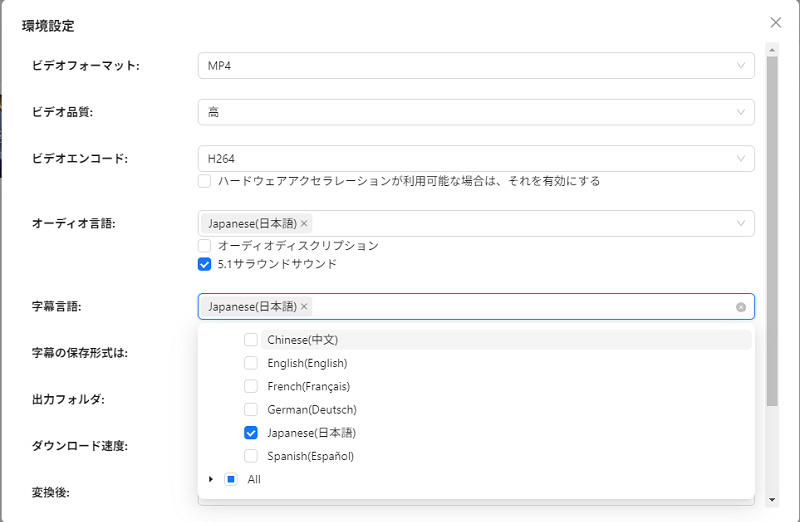
Step 4,lastly,Download iconWhen you press it, it will display in the specified formatNetflix videos saved to my computerIt will be done.
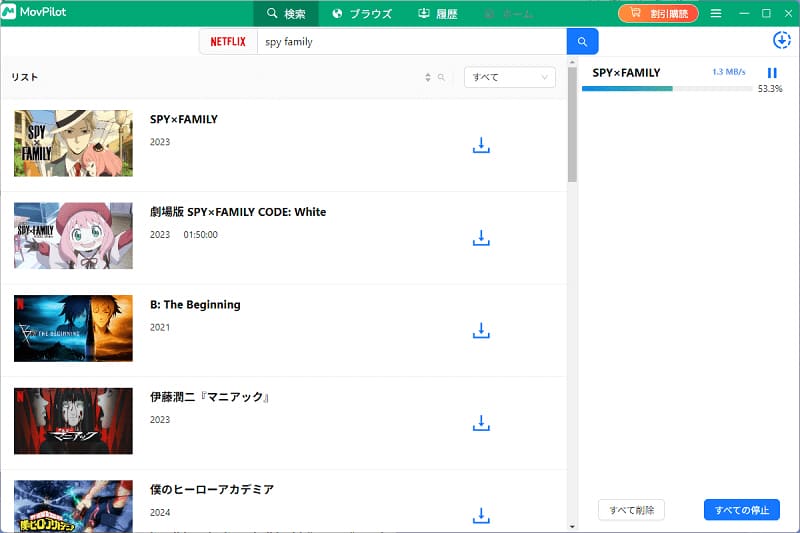
When I actually used MovPilot Netflix Video Downloader, I found the operation to be very simple and easy to understand, and I was able to save Netflix videos simply by using the built-in browser. Since it requires almost no complicated settings, it's a major advantage that even beginners can use it without any trouble. I felt it was a user-friendly tool for anyone who wants to easily download Netflix videos.
On the other hand, there are a few things that are bothersome during use. In particular, the supported image quality is limited to a maximum of 1080p, and the progress bar sometimes stops midway through the download.Unable to download Netflix videosThe presence of a case does affect the actual usability. Users who prioritize stability and high-quality image storage may find it somewhat lacking.
Overall, MovPilot Netflix Video Downloader is a user-friendly software suitable for beginners who prioritize ease of use. However, users who prioritize image quality and download stability should consider these points before purchasing.
For those considering purchasing MovPilot Netflix Video Downloader, user reviews are an important factor in making a purchase decision. Trustpilot, a major international review site, has received over 200 reviews, with a rating of 3.9 out of 5 stars. While it has garnered a certain level of support overall, there are also some voices calling for improvements.
Therefore, in this section, we will summarize the advantages and disadvantages of MovPilot Netflix Video Downloader based on actual user reviews, and introduce particularly helpful evaluations.
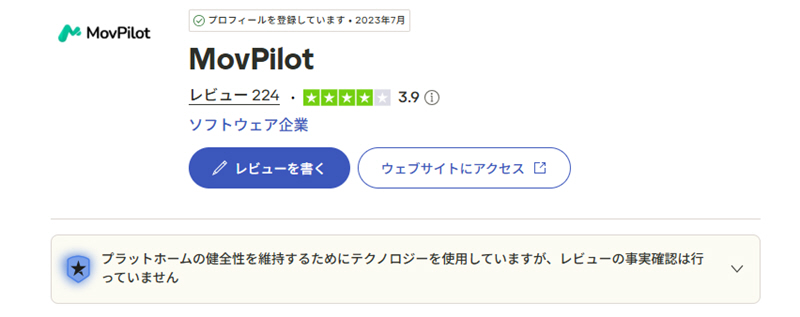
Based on the reviews above, the positive feedback for MovPilot Netflix Video Downloader focused on its ease of use, user-friendliness, and helpful customer support. On the other hand, negative reviews frequently cited issues such as downloads stopping midway, slow customer support, and dissatisfaction with the refund process.
What's particularly noteworthy is that in both positive and negative reviews,The download stops midway.The issue mentioned is that this problem occurs. This aligns with the author's actual experience as described above, and it may be a relatively common bug. Therefore, when considering using MovPilot Netflix Video Downloader, it is recommended to consider not only ease of use but also stability before deciding to install it.
As mentioned above, MovPilot Netflix Video Downloader is easy to use and simple to operate,There are issues with download stability.This point concerns me. So, are there any alternative software programs that can circumvent this problem without compromising the existing functionality?
Therefore, I would like to recommend the dedicated video downloader "StreamByte for VideoThis software maintains user-friendly operation even for beginners while achieving a high download success rate and stability. Even when saving dozens of videos at once, problems such as the progress stopping, which were seen with MovPilot, rarely occur. Furthermore, it can save Netflix videos in up to 8K resolution if they are compatible, making it extremely convenient for users who prioritize high-definition viewing.
StreamByte for Video
This is a video downloader that supports major streaming services such as Netflix, Amazon Prime, and YouTube. You can save and enjoy your favorite videos with high image quality up to 8K and Dolby Atmos audio.
"Why we recommend StreamByte for Video"
Here, "StreamByte for VideoThis explains how to use [this method] to easily save Netflix videos.
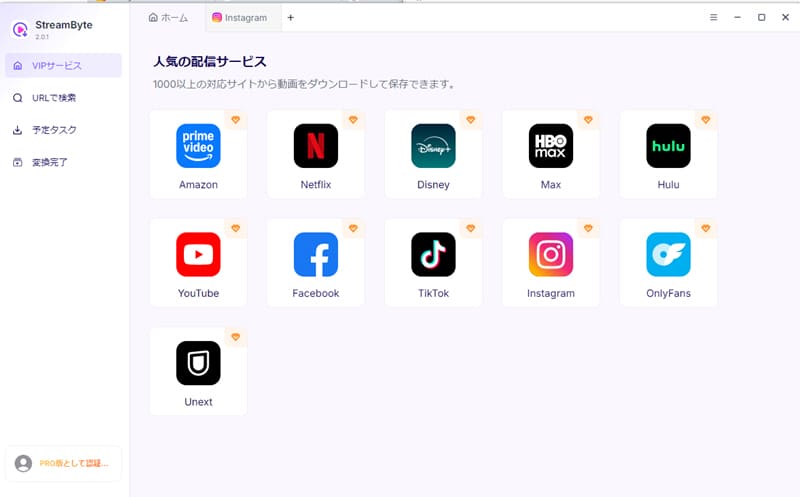
step 1"StreamByte for Video"RegistrationAfter that, popular video streaming services, including Netflix, will be displayed on the main screen. Select "Netflix" from the list.
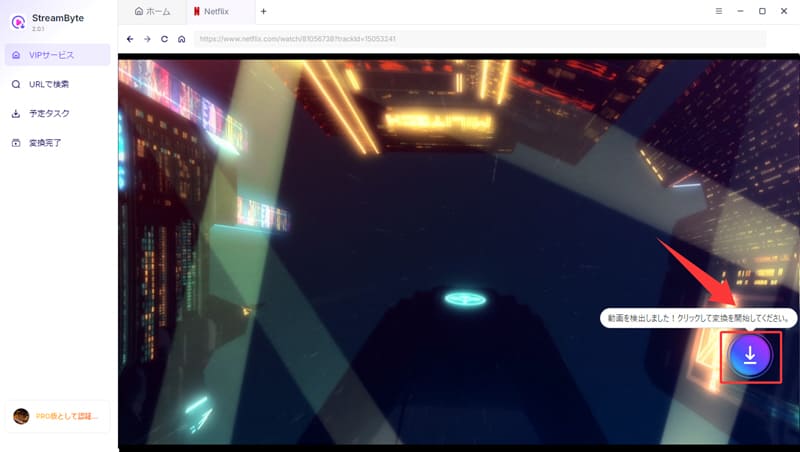
Step 2After logging into your Netflix account, search for the video you want to save. Open the playback page of the title you want to download, and on the screen...Download iconPlease click here.
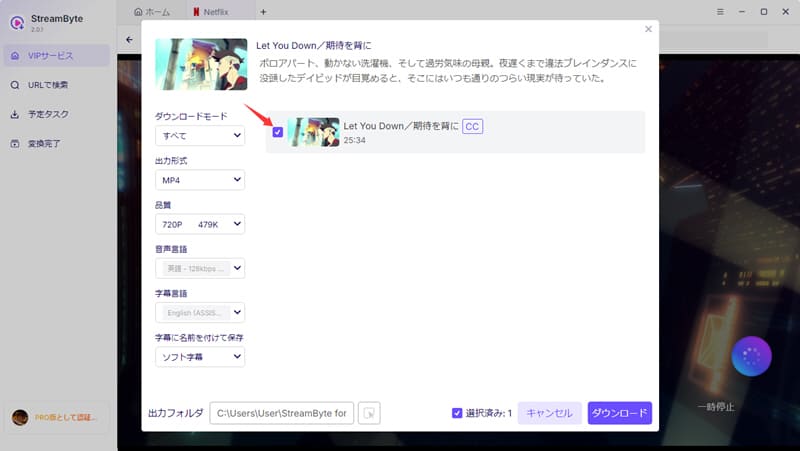
Step 3Then, set the output format, audio, subtitles, etc. of the Netflix video you want to download as needed.
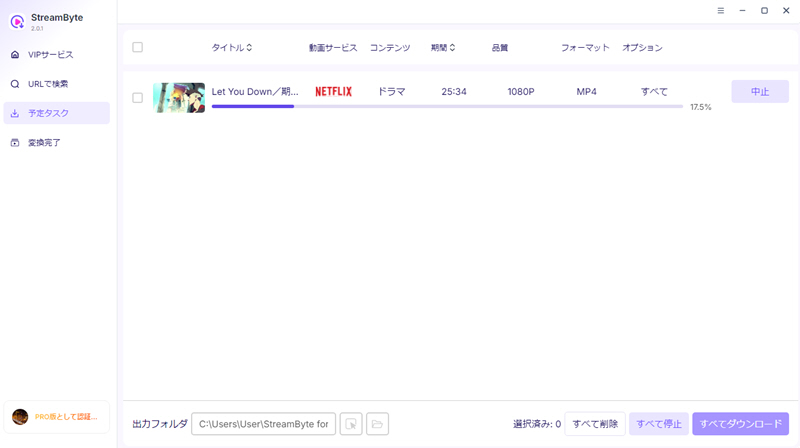
Step 4Once the setup is complete, click in the bottom right corner."Download" buttonClick to start downloading the video. The download progress will be displayed as follows:"Scheduled Tasks" screenYou can check it there. Once the download is complete, the video will automatically"Conversion complete"This will take you to the next screen. This will allow you to save Netflix videos to your computer.
"StreamByte for VideoUsing this tool, you can easily download Netflix videos by following the steps above.DRM protection removalThis feature allows you to save Netflix videos without worrying about restrictions. Furthermore, it boasts stable download performance at up to 8x speed, significantly reducing download times. For example, a 20-minute 1080p video can be downloaded in just a few minutes. For those who are frustrated by downloads stopping midway or freezing,StreamByte for VideoThis is a strong option for a more comfortable user experience.
100% safe, virus-free
100% safe, virus-free
| Conversion tool | StreamByte for Video | MovPilot Netflix Video Downloader |
| Built-in web player | 〇 | 〇 |
| Supported services | Netflix, Amazon Prime, and video streaming and sharing services such as TikTok | Netflix only |
| Output Format | MP4, MKV, MOV | MP4, MKV |
| Output format (audio) | MP3, M4A, FLAC, WAV | Non-changeable |
| Maximum image quality | Based on the original video (up to 8K) | 1080p |
| Conversion speed | Up to 8x speed | standard |
| Download Stability | expensive | low |
| success rate | expensive | standard |
As can be seen from the comparison table above, compared to "MovPilot Netflix Video Downloader" which is specifically for Netflix, StreamByte for VideoIt supports multiple video streaming and sharing services, including Netflix, Amazon Prime Video, and TikTok.
Furthermore, it supports high-definition saving up to 8K resolution, and offers a wide range of output formats, including MP4, MKV, and MOV for video, and MP3, M4A, FLAC, and WAV for audio. In addition, it boasts high-speed downloads up to 8x faster, high download stability, and an excellent success rate, allowing for a more convenient video saving experience.
Therefore, considering the richness of its features, the breadth of its coverage, and its ease of use,StreamByte for VideoThis would be considered a better option than MovPilot Netflix Video Downloader.
100% safe, virus-free
100% safe, virus-free
Unfortunately, MovPilot Netflix Video Downloader is a downloader specifically for Netflix and does not currently support other video streaming services. If you want to download videos from services other than Netflix, you will need separate software. In that case, you will need software that supports major video streaming services, including Netflix.StreamByte for VideoUsing this feature is convenient because it allows you to save videos in bulk quickly and reliably.
Saving Netflix videos using MovPilot Netflix Video Downloader is considered a legal gray area due to copyright infringement. However, if the videos are used for personal viewing or learning purposes and not redistributed or used commercially, it is generally unlikely that you will be held liable. Specific handling procedures must comply with the laws and regulations of your local area.
MovPilot Netflix Video Downloader supports Visa, Eurocard, Mastercard, Discover, American Express, JCB, and other payment methods, and you can purchase the product through Avangate, Digital River, and PayPal. However, available payment methods may vary by region. Please check the official website or product purchase page for details.
This article provides a brief introduction to MovPilot Netflix Video Downloader, followed by a detailed review of its features, security, and reputation. The results show that while it has many convenient features, it also has several drawbacks, such as limitations on download format and video quality. Therefore, as a superior alternative to MovPilot Netflix Video Downloader, we recommend...StreamByte for Video" was introduced.
This software allows you to download videos from six major streaming video platforms, including Netflix, Amazon Prime Video, Disney+, YouTube, HBO, and Hulu, all at once. Its high-speed download speed and high success rate/stability ensure a comfortable viewing experience. Furthermore, while MovPilot Netflix Video Downloader only supports up to HD 1080P, this software allows you to download Netflix videos in their original quality.Up to 4K resolutionIt can also be saved in this format. It can truly be called a superior alternative software.
"StreamByte for VideoA 14-day free trial is available, so if you want to easily download Netflix videos, we recommend you try it out first!
100% safe, virus-free
100% safe, virus-free
Born in Tokyo in 1997. After graduating from a university in London, he worked at a major IT media company, writing articles about video streaming services, video downloaders, and digital content.More than 3 years of experience in editing, proofreading, and writing directionThe articles he has worked on have garnered over 5 million page views, and he is well-known for producing content that is carefully crafted from the reader's perspective.
Currently, as an editor and web writer at StreamByte, he works on creating articles that help users solve their problems, focusing on information related to video streaming services and downloads, with the aim of being "user-oriented, easy to understand, and immediately useful."
Read more articles together
Experts in supporting offline viewing of streaming video services
Subscribe to StreamByteCopyright © 2026 StreamByte. All rights reserved.



Get the latest news, product upgrades, information, guides, discounts and more about StreamByte.
Please enter a valid email address.

A highly capable video downloader:
StreamByte for Video
Even beginners can rest assured! You can try saving videos for free first!







 English
  Japanese
  Chinese (traditional)
  German