
- Online video downloader
- Streaming Products
- BD-DVD products
- Store
- Useful Articles
- support
Share this article!


On the internet, you can find a variety of questions and concerns about NoteBurner Amazon Video Downloader. While this software is a convenient tool for downloading Amazon Prime Video, there are still many aspects that are not fully understood, and there are many voices expressing anxiety and interest.
In this article, we will thoroughly examine NoteBurner Amazon Video Downloader from the perspectives of its features, usage, and reputation. Furthermore, we will also introduce recommended alternative software at the end, so please read to the end.
Related Posts:
NoteBurner Amazon Video Downloader is a video download software provided by NoteBurner specifically for Amazon Prime Video. It allows you to save movies, TV shows, anime, and other content streamed on Amazon Prime Video. This software is characterized by its balance of ease of use and functionality, and its main features are as follows:
Features of NoteBurner Amazon Video Downloader
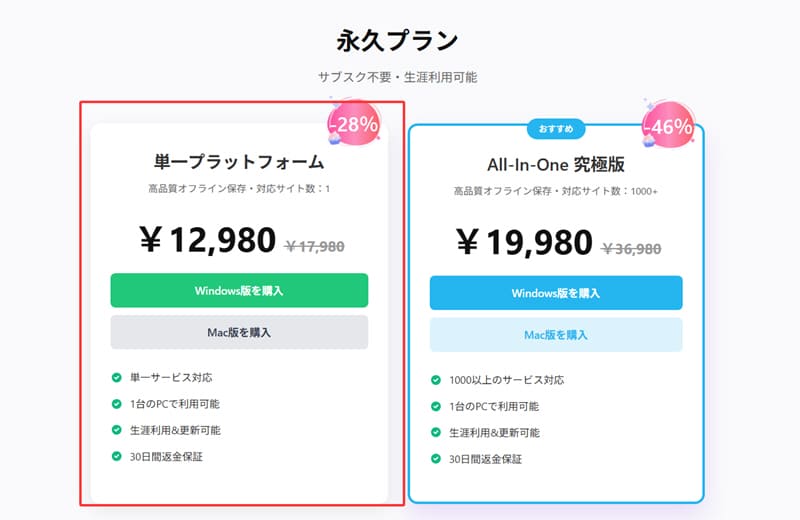
Currently, NoteBurner Amazon Video Downloader has both a free and a paid version. The free version only allows you to download the first 5 minutes of a video, while the paid version offers all features. The paid version usually costs 17,980 yen, but discounts are often available, so we recommend checking the latest price on the official website's purchase page.
After providing an overview of NoteBurner Amazon Video Downloader, we will explain how to use it. This software features a built-in browser, allowing you to perform all operations from searching to downloading within a single program. It operates smoothly, and its interface is simple and easy to understand. Specific usage instructions are as follows:
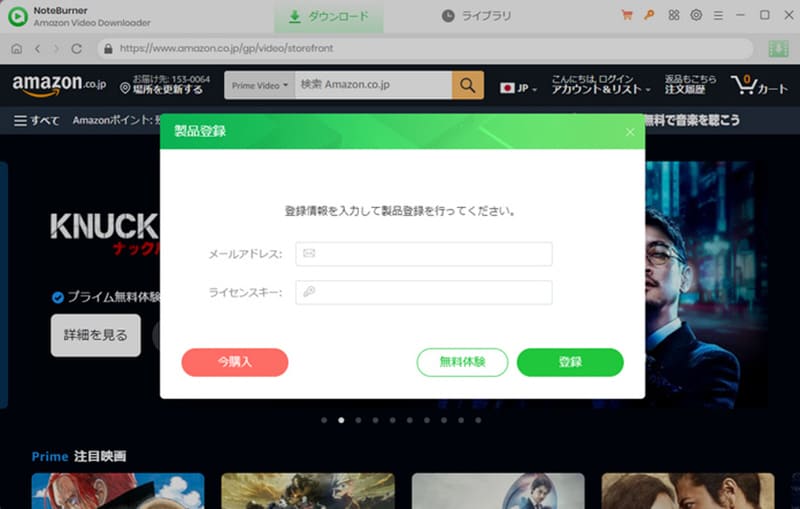
step 1First, click on the red key icon in the upper right corner of the screen, or"Menu" buttonClick [this button], select "Product Registration" to open the registration screen, and then register your product.
Step 2Enter the name of the video you want to download into the search box and search. Open the page of the video that matches, and in the bottom right corner...Green download buttonClick
*You will need to log in to your Amazon account the first time you use this service.
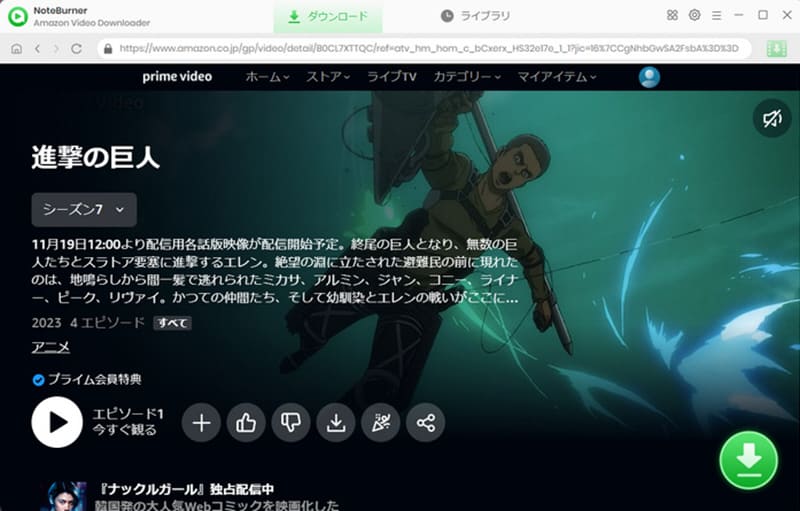
Step 3After selecting the season and episode, clicking "Download" will automatically download the selected Amazon video. The "Advanced Download" button allows you to customize the video quality, audio track, and subtitle settings.
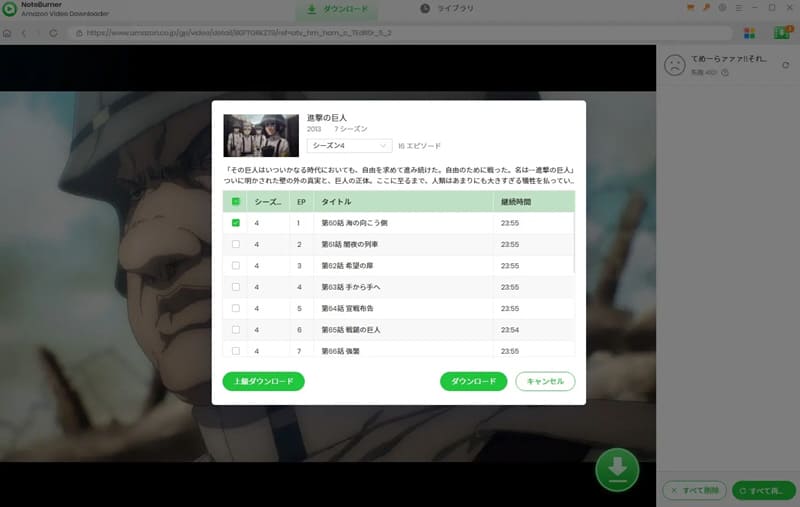
Step 4Once the download is successful, you can find the downloaded Amazon Prime Video videos in your library.
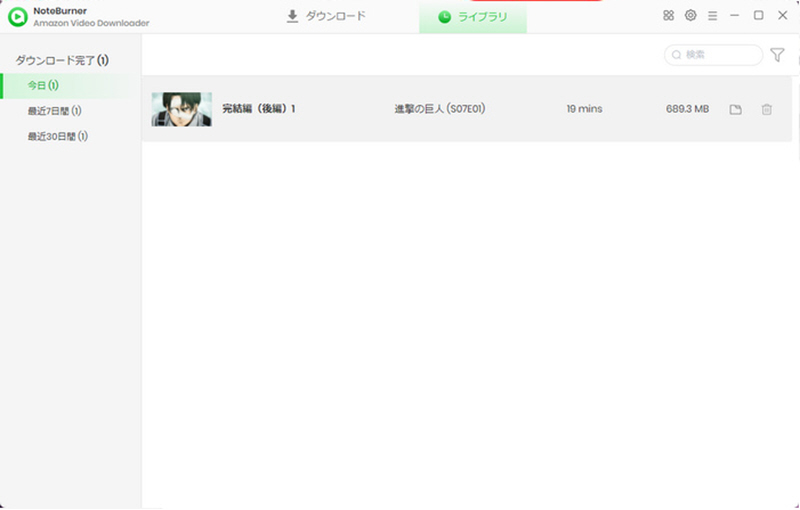
After explaining how to use NoteBurner Amazon Video Downloader, we'll look at reviews from actual users. Here, we'll introduce particularly helpful reviews based on various review sites and user feedback.
On Trustpilot, a major international review site, the product has received over 300 reviews and has earned a relatively high rating of 4.3 out of 5 stars. Overall, the proportion of positive reviews is high, indicating that it has gained a certain level of support from many users. Next, we will introduce some of the actual user reviews.
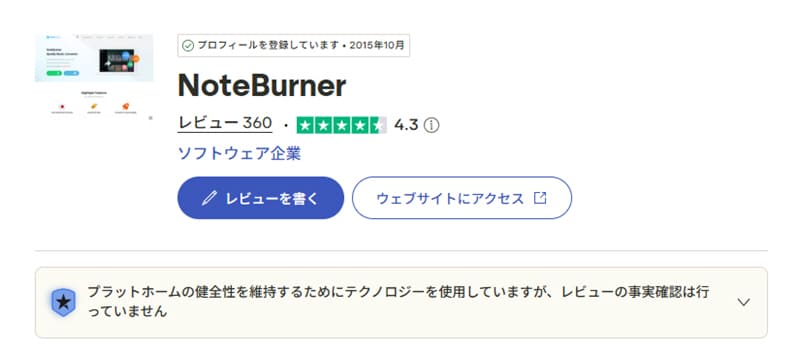
These reviews show that many users appreciate NoteBurner Amazon Video Downloader's ease of use and excellent customer support. However, some users also point out issues such as slow performance after updates, loading problems, and subscription restrictions.
From my own experience using it, the operation is indeed simple, and basic video downloads seem to go smoothly. However, there are cases where the download process stops midway or the analysis fails, so it's not always stable. Overall, while it excels in ease of use, it's a software that still has room for improvement in terms of stability.
After actually using NoteBurner Amazon Video Downloader and reviewing numerous user reviews, it appears that while this software offers a certain level of ease of use as an Amazon Video Downloader, it also has some shortcomings. So, are there any alternative software programs that offer similar functionality while being more stable and efficient?
Therefore, I would like to recommend a professional video download software:StreamByte for VideoThis software supports not only Amazon Prime Video but also major video streaming services such as Netflix and YouTube, and allows you to download multiple videos at once.
Furthermore, it features a built-in web player and a simple, intuitive interface, allowing even beginners to start using it immediately. Its download performance is also highly stable, rarely experiencing failures or interruptions even when processing dozens of videos at once, making it a highly efficient tool.
StreamByte for Video
This is a video downloader that supports major streaming services such as Netflix, Amazon Prime, and YouTube. You can save and enjoy your favorite videos with high image quality up to 8K and Dolby Atmos audio.
"Why we recommend StreamByte for Video"
Here, we will use "StreamByte for Video".Save Amazon Prime VideoHere's how to do it.
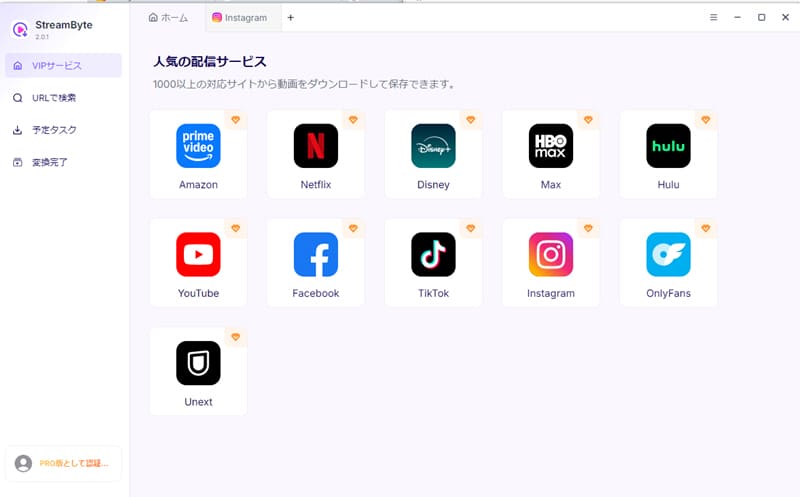
step 1Once you register for "StreamByte for Video," major video streaming services, including Amazon, will be displayed in a list on your home screen. Select "Amazon Prime Video" from that list.
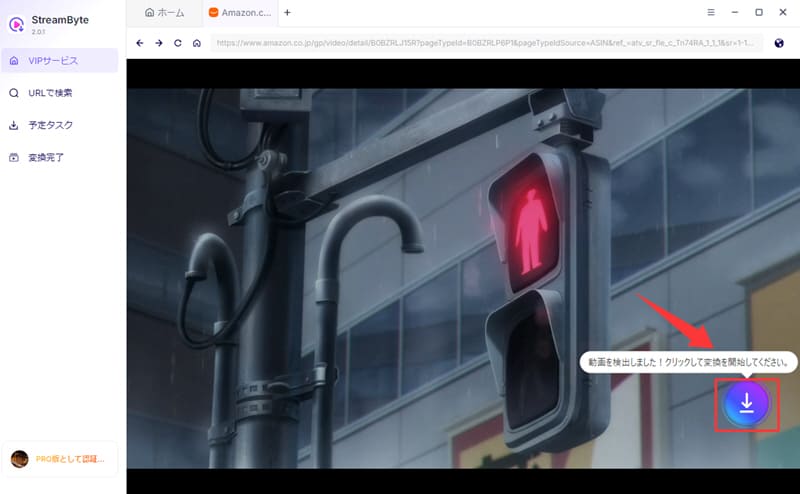
Step 2With your Amazon accountLog inNext, when you open the page of the video you want to download, the software will automatically analyze the video. Once the analysis is complete, the download icon will become active, and clicking it will add the video to your download list.
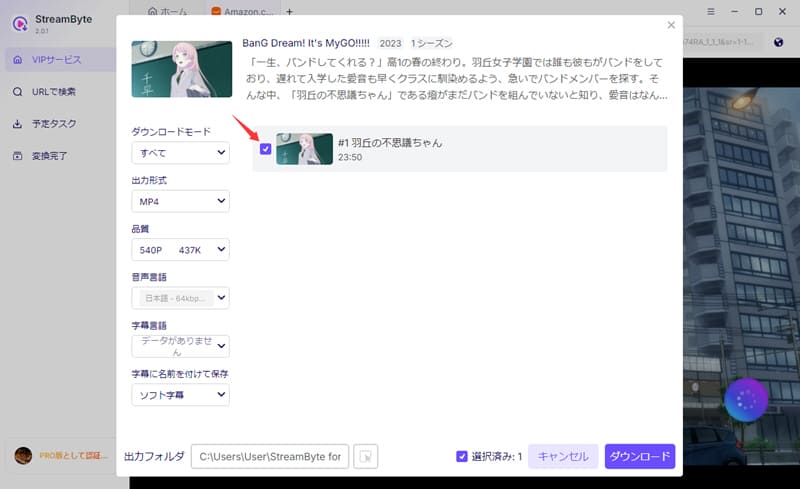
Step 3Then, on the download settings screen that appears, select and adjust the output format, audio, subtitles, etc. as needed. After that, click in the bottom right corner.downloadClicking this will start the process.
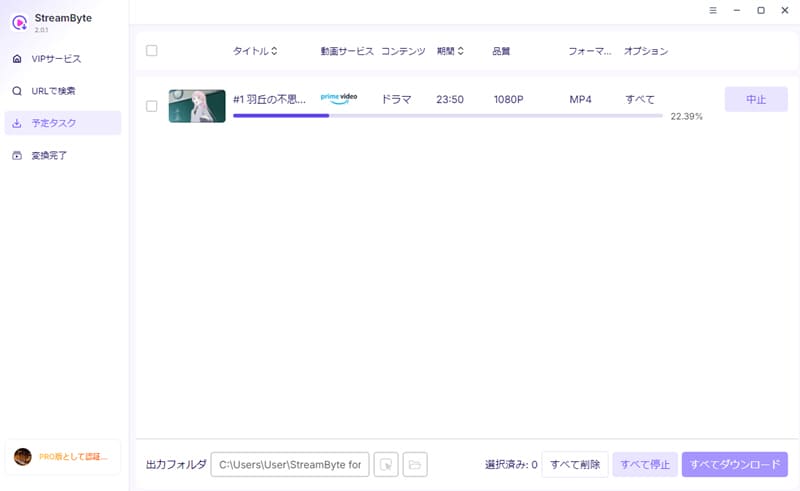
Step 4The progress of the video is"Scheduled Tasks" screenYou can check it there. If you wait a while, you will be able to save Amazon Prime Video to your computer.
"StreamByte for VideoBy using this, you can access the features applied to Amazon Prime Video.Remove DRM protectionFurthermore, it allows you to save video content in common formats such as MP4. In addition, if the original video supports it, it also supports saving in up to 4K resolution, making it a major advantage for offline viewing while maintaining high image quality. Moreover, it boasts stable download speeds and a high success rate, allowing for smooth processing even when downloading multiple videos at once, significantly reducing waiting times and the stress of download failures.
100% safe, virus-free
100% safe, virus-free
| Conversion tool | NoteBurner Amazon Video Downloader | StreamByte for Video |
| Built-in web player | 〇 | 〇 |
| Supported services | Amazon Prime Video only | Video streaming and sharing services such as Netflix, Amazon Prime Video, and YouTube |
| Output Format | MP4, MKV | MP4, MKV, MOV |
| Output format (audio) | M4A, AC3 | MP3, M4A, FLAC, WAV |
| Maximum image quality | 1080p | Based on the original video (up to 8K) |
| Conversion speed | standard | Up to 8x speed |
| Download Stability | low | expensive |
| success rate | standard | expensive |
As can be seen from the comparison table above, both products have built-in web players and are easy to use, making them intuitive even for beginners. However, "StreamByte for Video" supports a larger number of video streaming services and offers superior flexibility in terms of output formats and image quality. Therefore, its ability to meet a wider range of needs is a major strength.
Furthermore, StreamByte for Video excels in download speed and stability, providing a fast and reliable download experience. Its high download success rate is another notable feature.
Looking at all of the above,StreamByte for VideoThis product can be considered a superior alternative to "NoteBurner Amazon Video Downloader." If you are looking for an alternative software, this is a very strong option.
Our testing revealed that no threat warnings were detected by common antivirus software such as Norton while using NoteBurner Amazon Video Downloader. Furthermore, the software does not display advertisements, suggesting a high level of basic security. However, to avoid security risks, it is crucial to always download from the official website. Obtaining the software from unauthorized sources may result in unexpected risks.
NoteBurner Amazon Video Downloader is download software specifically for Amazon Prime Video and does not generally support other video streaming services. Therefore, if you want to save videos from platforms other than Amazon Prime Video, you will need software that supports multiple major video streaming services such as Amazon Prime Video, Netflix, and YouTube.StreamByte for Video" is recommended.
The reason you can only download the first 5 minutes of a video is because the free version of NoteBurner Amazon Video Downloader has a download time limit. The free version only allows saving up to 5 minutes of video. To save the full video, you need to purchase the paid version. After purchase, you can remove the limitations of the trial version by registering your license key from the menu button in the upper right corner of the program.
This article provides a detailed explanation of NoteBurner Amazon Video Downloader, covering aspects such as usage, security, and features. It also summarizes its advantages and disadvantages based on actual user experience and evaluations. Overall, while it's easy to use and operate, it has some limitations in terms of download quality and supported resolutions.
Therefore, the recommended alternative software is "StreamByte for VideoThis software supports saving Amazon videos up to 4K resolution, compared to NoteBurner Amazon Video Downloader's maximum of 1080p, and also supports a wider range of video and audio output formats. Its ability to meet diverse needs is a major strength. In addition, it offers high download stability, with fewer instances of interruptions or failures, resulting in a smoother and more comfortable saving experience.
"StreamByte for VideoA free trial is available, so if you want to easily download videos from Amazon Prime Video, please feel free to download and try it out!
100% safe, virus-free
100% safe, virus-free
Born in Tokyo in 1997. After graduating from a university in London, he worked at a major IT media company, writing articles about video streaming services, video downloaders, and digital content.More than 3 years of experience in editing, proofreading, and writing directionThe articles he has worked on have garnered over 5 million page views, and he is well-known for producing content that is carefully crafted from the reader's perspective.
Currently, as an editor and web writer at StreamByte, he works on creating articles that help users solve their problems, focusing on information related to video streaming services and downloads, with the aim of being "user-oriented, easy to understand, and immediately useful."
Read more articles together
Experts in supporting offline viewing of streaming video services
Subscribe to StreamByteCopyright © 2026 StreamByte. All rights reserved.



Get the latest news, product upgrades, information, guides, discounts and more about StreamByte.
Please enter a valid email address.

A highly capable video downloader:
StreamByte for Video
Even beginners can rest assured! You can try saving videos for free first!







 English
  Japanese
  Chinese (traditional)
  German