





Many people probably want to download and save videos from Amazon Prime Video. While the official app has a download function, there are restrictions such as viewing and storage periods, so you can't enjoy videos freely for a long time.
For example, after downloading, videos are stored for a maximum of 30 days, and once playback begins, they must be watched within 48 hours. Furthermore, DRM protection prevents saved videos from being transferred to other devices, and viewing is limited to within the app. Due to these restrictions, many people wish they could permanently save videos.
This article will clearly explain how to download Amazon Prime Video videos to your PC or smartphone and save them without worrying about restrictions. If you want to watch them freely even in an offline environment, please refer to this article.
How to download Amazon Prime Video to your PC (latest and unlimited)
Latest ranking of free video download software! The best free download software recommendations
- What happens when the Amazon Prime Video download period ends?
- How to download Amazon Prime Video videos to your PC and save them permanently.
- How to download Amazon Prime Video videos to your smartphone and keep them forever
- How to download and save videos from Amazon Prime Video and other sites.
- Frequently Asked Questions about Downloading Amazon Prime Video
- summary
What happens when the Amazon Prime Video download period ends?
As you may already know, videos downloaded from the Amazon Prime app can only be stored on your device for 30 days. Also, once the limited-time distribution ends, the downloaded video will no longer be available for viewing. The storage period may vary depending on the work, but usually it will expire after 30 days and you will need to download it again.
And once you start watching the downloaded Amazon Prime video, you must finish watching it within 48 hours, otherwise the saved Amazon Prime video will be invalidated.
To get rid of these restrictions and download your favorite videos to enjoy at your leisure, here are some ways to permanently save Amazon Prime videos to your computer or smartphone.
How to download Amazon Prime Video videos to your PC and save them permanently.
As mentioned above, there are various restrictions on videos downloaded from Amazon Prime Video due to DRM protection. And if you cancel your Amazon Prime subscription, the downloaded videos will be automatically deleted and will no longer be playable.
In order to avoid the restrictions on the official download function, you will need special software that can remove the DRM protection on Amazon Prime."StreamByte Amazon Video Downloader"is a powerful software specialized in downloading Amazon Prime Video. With this software, you can download Amazon Prime videos at high speed in the versatile MP4, MKV or MOV format with full HD 1080P high quality. By converting to a DRM-free format, there are no download restrictions, you can transfer the downloaded video to any device and save it forever, and you can continue to watch it even after canceling your subscription. There is also a free trial version, so please try it out!
You can permanently save videos of Amazon Prime, anime, dramas, programs, etc. in MP4 format.
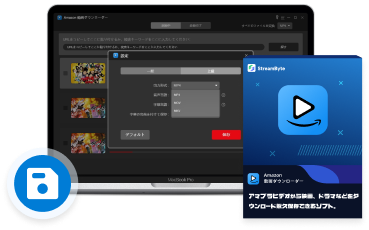
- High-speed download of movies, anime, and dramas from Amazon Prime Video worldwide
- You can save Amazon Prime videos in high quality up to 1080P!
- Supports MP4, MKV, MOV output formats
- Permanent storage possible! You can watch downloaded videos even after canceling your subscription
- You can download all episodes of a series at once from Prime Video.
- Supports hardsub, internal and external subtitles
- Conversion completed in just a few steps! Easy for beginners
Note that "StreamByte Amazon Video Downloader" is a download tool specifically designed for Amazon Prime Video, allowing you to save movies, dramas, variety shows, and other content from Amazon to your PC in high quality. However, it is only compatible with Amazon's video streaming service. If you wish to save videos from other streaming video distribution and sharing services such as Netflix, Disney+, Hulu, YouTube, and PornHub, please use the multi-functional version that supports multiple video distribution sites.StreamByte for VideoWe recommend using "[this service]".
Steps to download Amazon Prime Video using "StreamByte Amazon Video Downloader"
"StreamByte Amazon Video Downloader"We will explain the steps to use this to download videos from Amazon Prime Video and save them permanently on your computer.
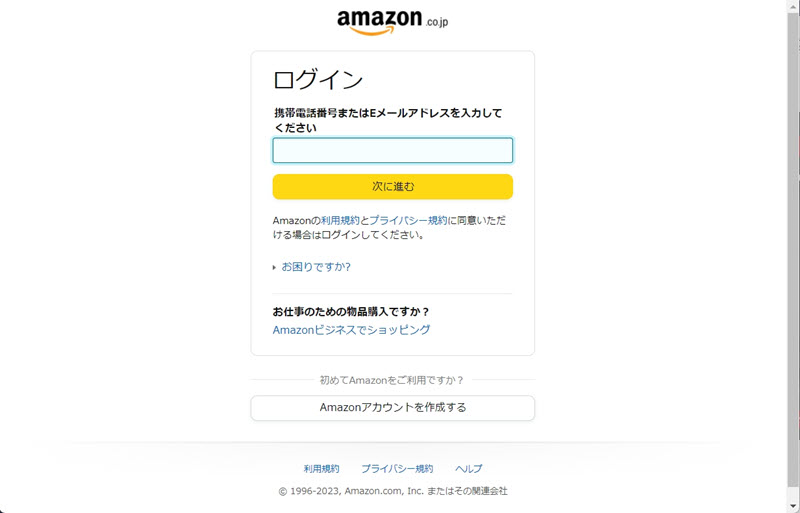
step 1,Launch the software and sign in with your Amazon Prime account.
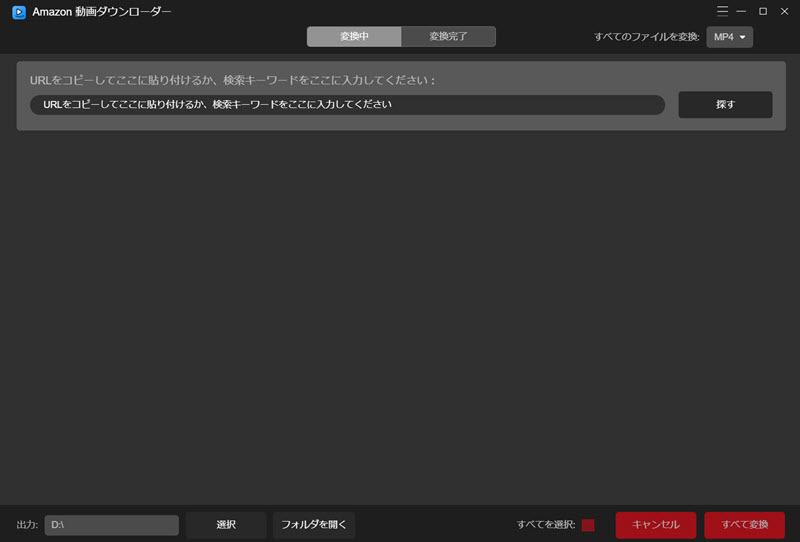
Step 2,Enter the name of the Amazon Prime video you want to download in the search bar or paste the URL of the show or movie you want to download.
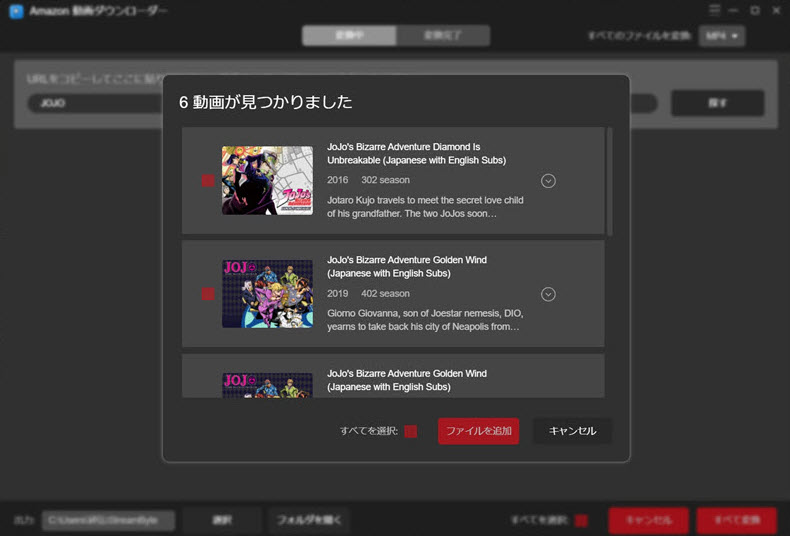
Step 3,Check the titles you like and click the red "Add File" button to add them to the conversion list. Tap the down arrow icon on the right side of the title to check the synopsis of each title.
Step 4,You can customize the output format and output folder of the video on the conversion list screen. You can also select the video format at once by clicking "Convert all files" on the top right.
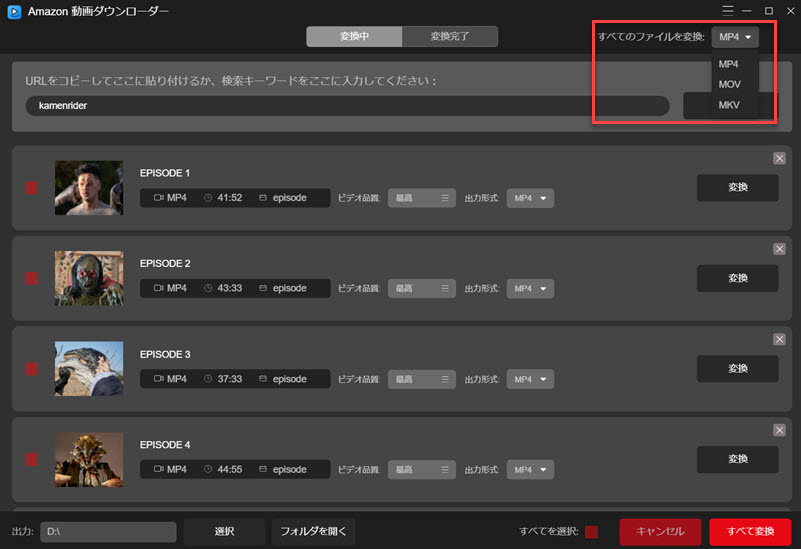
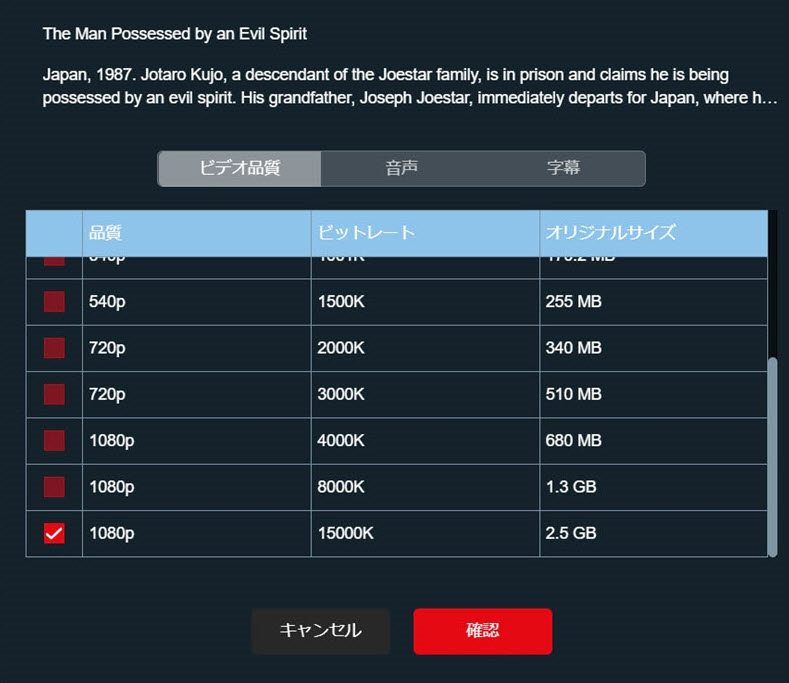
Step 5,Click the three lines on the top right corner to open the settings window where you can select the subtitle language, audio language and subtitle save format. Then click "Best" under "Video Quality" on the right side of the video to set the output quality and subtitle language for each video in the pop-up screen.
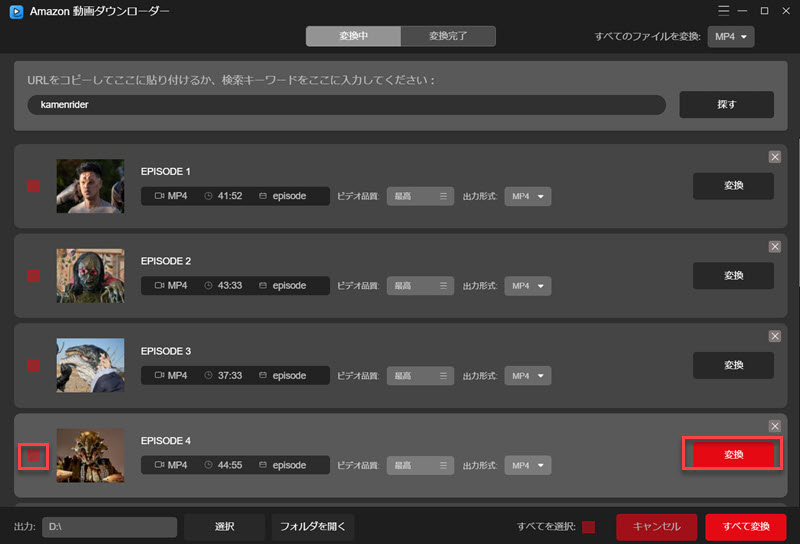
Step 6,After all the settings are done, click "Convert" to start converting Amazon Prime Video. You can check the download progress. After the download is complete, you can check the output folder on the "Conversion Completed" screen.
"StreamByte Amazon Video Downloader"With this, you can convert Amazon Prime Video videos to DRM-free format in just a few steps and save them locally on your PC forever. Not only can you save them in perfect quality without losing image quality, but you can also play the downloaded videos on any device, including Android smartphones and game consoles. It can overcome all the download restrictions mentioned above, making it an essential software for enjoying Amazon Prime Video freely.
How to download Amazon Prime Video videos to your smartphone and keep them forever
If you save Amazon Prime Video videos in DRM-free MP4 format, you can transfer them to your iPhone or Android smartphone and watch them forever. There are various ways to transfer video files, including using a USB cable, Bluetooth, a data transfer app, or cloud storage.
Below, we will introduce the steps to transfer videos from Amazon Prime Video from a computer using an Android smartphone as an example.
step 1,Connect your Android phone to your PC using a USB cable.
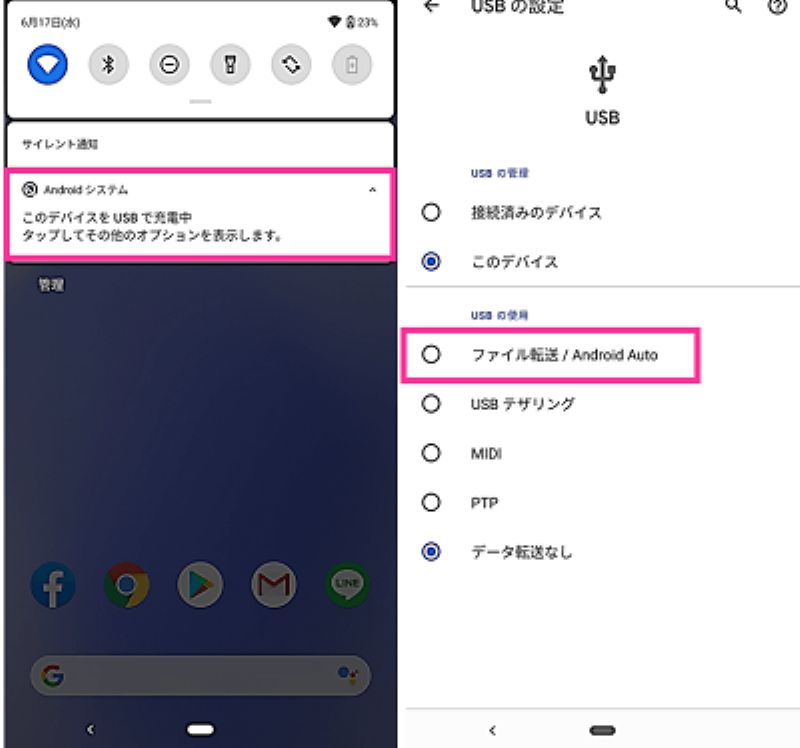
Step 2,On your smartphone, tap "Charging this device via USB" > "Use USB for" > "File Transfer".
Step 3,Open the data transfer window on your computer and move the downloaded Amazon Prime Video video files to begin the transfer process.
How to download and save videos from Amazon Prime Video and other sites.
As mentioned above, the dedicated software "StreamByte Amazon Video DownloaderUsing this method, you can save Amazon Prime Video videos in high quality, but the service is limited to Amazon.NetflixorYouTubeIf you want to download and manage videos from multiple video streaming services, it's convenient to choose a tool that supports a wider range of sites.
The one that can meet such needs isStreamByte for VideoThis software is compatible with multiple video sites, including Amazon Prime Video.I removed the DRM protection from the video.You can convert and save the videos in MP4, MKV, or MOV format. Downloaded videos have no playback restrictions and can be freely viewed on various devices such as smartphones and tablets. Furthermore, you can flexibly adjust the video quality, subtitles, and audio tracks, and it also supports batch downloads, allowing you to save videos efficiently.
For those who frequently use not only Amazon but also other video streaming services, the ability to manage them all in one software program is a significant advantage.
You can permanently save videos of Amazon Prime, anime, dramas, programs, etc. in MP4 format.
Steps to download Amazon Prime Video using "StreamByte for Video"
Here, "StreamByte for VideoThis guide will show you the basic steps to download videos from Amazon Prime Video using [the specified method/tool]. The process is simple and easy even for beginners.
step 1Launch the software and select Amazon Prime Video from the list of services displayed on the main screen. Then, log in to your account.
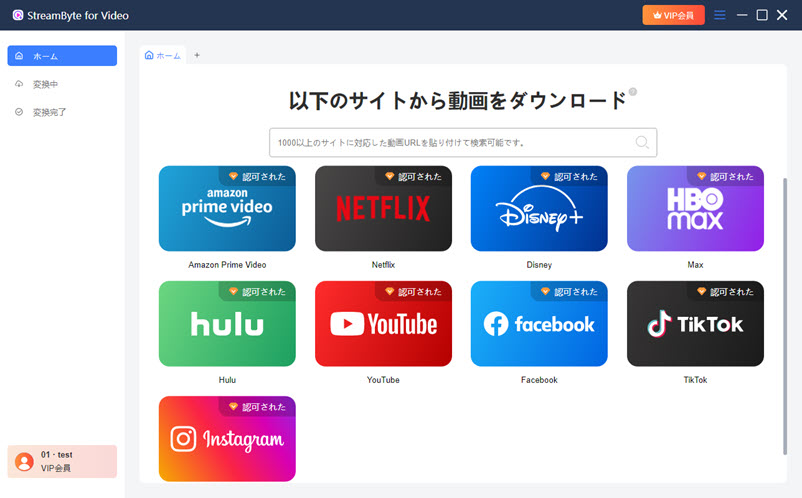
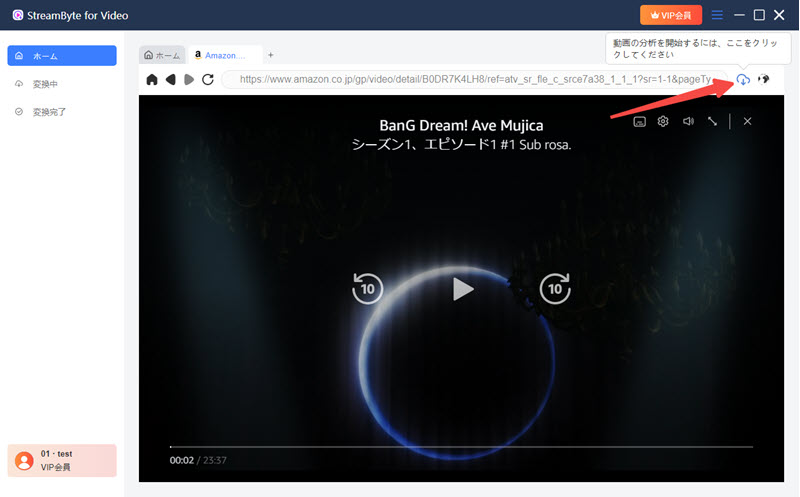
Step 2Search for the movie or TV show you want to download and select the video. Click the icon in the upper right corner to start analyzing the video.
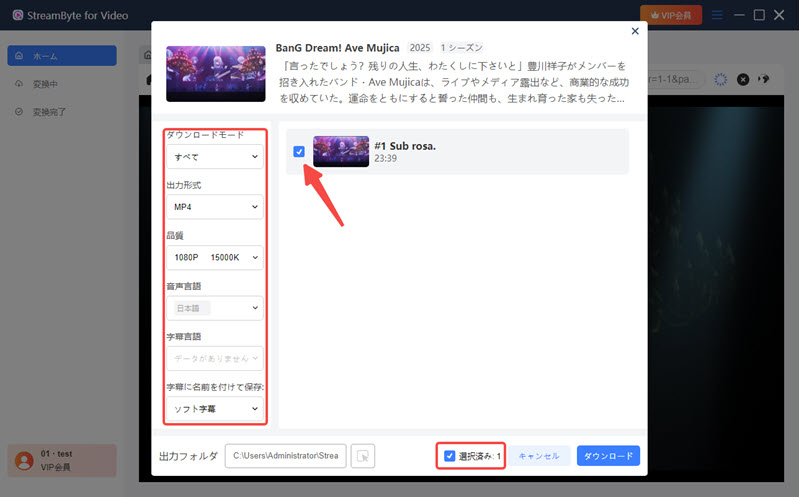
Step 3You can adjust settings such as output format, image quality, audio language, and subtitles as needed.
Step 4Click the "Download" button in the bottom right corner to start saving. After the download is complete, you can check the video in the "Conversion Complete" tab.
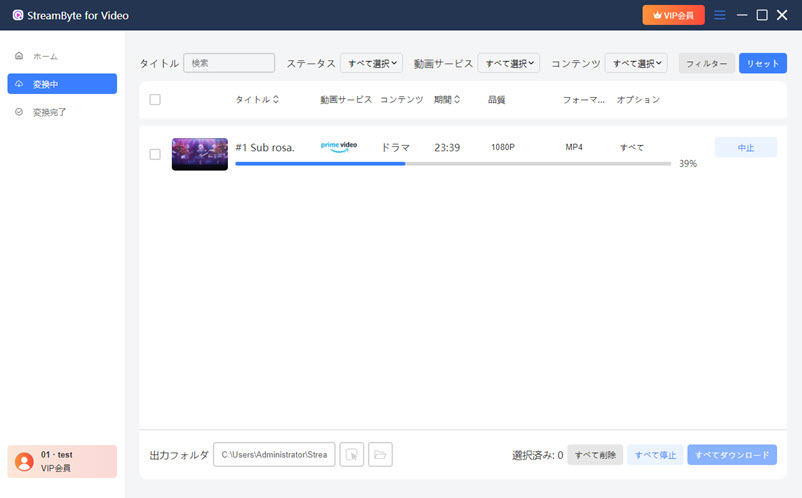
By following the steps above, you can download and save Amazon Prime Video videos to your PC.StreamByte for Video" is a major platform including Disney+, YouTube, HBO, Hulu, Pornhub, etc.Download videos from streaming servicesIt is compatible with [platform name]. There are no playback restrictions, and you can enjoy it freely on various devices, so please try the free trial version first.
Frequently Asked Questions about Downloading Amazon Prime Video
Can I watch videos downloaded from Amazon Prime indefinitely?
No, videos downloaded from Amazon Prime Video are not available for permanent viewing. Typically, downloaded videos are stored for up to 30 days, and once playback begins, a 48-hour viewing period is set. After this period, the video can no longer be played. Also, if the content itself is no longer available for streaming, it will become unavailable for viewing even if it has been downloaded.
What is the download storage period for Amazon Prime Video?
Amazon Prime Video downloads can be saved for up to 30 days if not watched, and for 48 hours after playback begins. Offline viewing is possible within this period, but playback will be lost after the deadline. However, if the content is still available for streaming, you can download and watch it again. Note that re-downloading is not possible after the streaming period ends, so be mindful of when you watch.
Is downloading from Amazon Prime Video illegal?
Using the official app's download function is not illegal. However, when using third-party software, you must comply with the terms of service of each service and relevant laws. Saving videos is strictly limited to personal, private use; sharing, redistribution, and commercial use are prohibited. It is important to use them within appropriate limits, such as promptly deleting them after use.
summary
This article explains how to download and save Amazon Prime Video videos, outlining the steps and precautions for both PCs and smartphones. While the official download function is convenient, it has viewing expiration dates and device restrictions, making it unsuitable for long-term storage.
If you want to save videos without worrying about these restrictions, you can use specialized software to achieve a more flexible viewing environment. In particular, there is software specifically designed for Amazon Prime Video.StreamByte Amazon Video DownloaderUsing this software, you can save videos in high quality, such as MP4, and continue enjoying videos even after canceling your subscription. If you want to watch Amazon Prime Video more comfortably, try the free trial version of the software right away!
Furthermore, for those who use not only Amazon but also other video streaming services, there is a multi-site compatible "StreamByte for VideoBy choosing this option, you can manage and save videos more efficiently. Selecting the optimal tool for your needs greatly expands your freedom to watch videos offline. Try out the free trial versions of the software to find the method that suits you best.
 English
  Japanese
  Chinese (traditional)
  German