
- Online video downloader
- Streaming Products
- BD-DVD products
- Store
- Useful Articles
- support
Share this article!


Nintendo's Switch is loved by many users for its excellent design and high-quality, top-tier titles. However, questions like "Why isn't the Netflix app available?" are frequently seen on Q&A sites. Indeed, the Netflix app is not currently available for the Switch. So, is it truly impossible to enjoy Netflix on the Switch?
This article will answer this question in detail and also introduce a trick for watching Netflix on your Switch that even beginners can try right away. Please read to the end.
Related Posts:
The Switch online store offers a wide variety of games, as well as apps for anime and video streaming services. However, the Netflix app is not included. This is true not only in Japan but also overseas. On the other hand, the Netflix app is available on Sony's PS4 and PS5, which are from the same generation of gaming consoles. So why isn't the Netflix app available on the Switch?
This difference is likely due to Nintendo's corporate policy. Sony, since the PS2 era, has not limited its game consoles to being solely dedicated gaming machines, but has actively expanded their functions as media players, emphasizing uses beyond gaming. Following this trend, the current PlayStation series is also increasingly supporting video streaming apps.
On the other hand, Nintendo has consistently adhered to a design philosophy that centers on the gaming experience. While it uses disc media like the Wii and NDS, it does not support CDs or DVDs. Therefore, the inability to use the Netflix app on the Switch can be seen as part of this corporate concept and policy. Even now, the number of video streaming service apps that support the Switch is limited and very small.
Fun fact: Video streaming services you can watch on Switch
Currently, the Netflix app is not compatible with the Switch, but other major video streaming services are available. Some of the most well-known services are listed below. Using these services, you can enjoy video content other than games on your Switch.
While the Switch doesn't officially offer a Netflix app, it's not impossible to watch content on it. Here, we'll discuss how to enjoy Netflix on the Switch using video download software...StreamByte for Video"We would like to introduce you to "
This software isSave Netflix videos in high-quality MP4 format.This specialized software also has a function to remove DRM protection. Using this function, you can freely move and save videos. Once saved, you can upload the videos to YouTube and watch them through the YouTube app on your Switch.
StreamByte for Video
This is a video downloader that supports major streaming services such as Netflix, Amazon Prime, and YouTube. You can save and enjoy your favorite videos with high image quality up to 8K and Dolby Atmos audio.
Why StreamByte for Video is recommended
Here, "StreamByte for VideoThis explains how to use [the app/service] to easily save Netflix videos and watch them on your Switch.
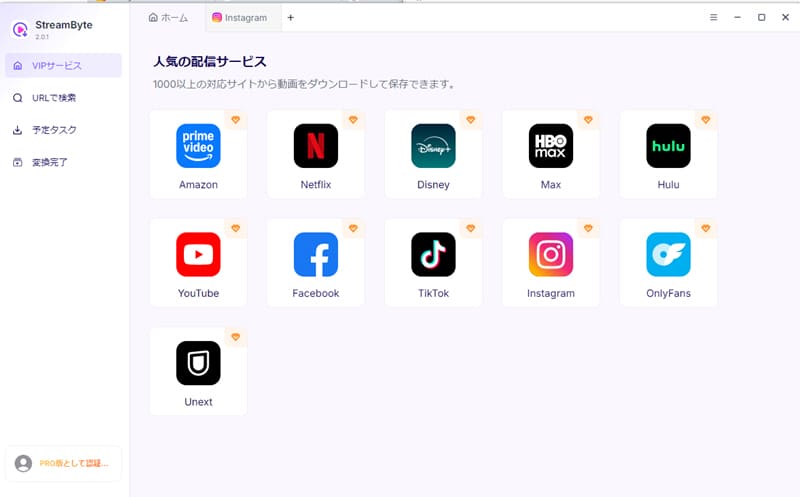
step 1"StreamByte for Video"Log inAfter that, several popular streaming services, including Netflix, will be displayed on the main interface of the software.NetflixSelect
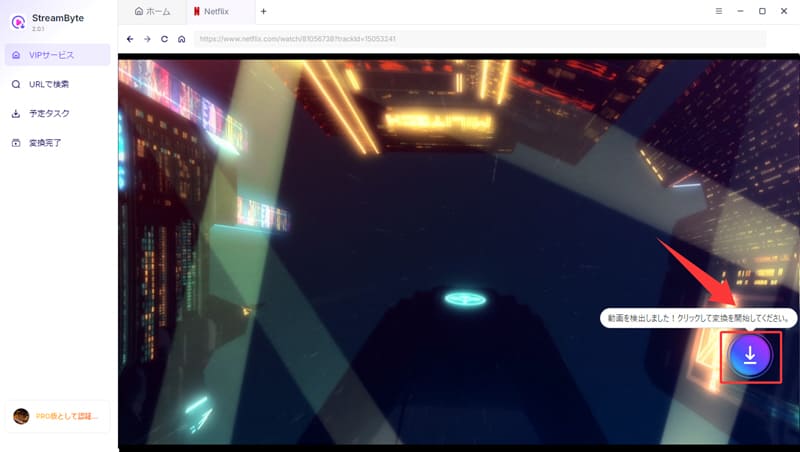
Step 2Search for the video you want to save, and once you find the Netflix video you want to watch on your Switch,Blue Download ConClick
Step 3You can change the output format, audio, subtitles, and other settings of the Netflix videos you want to download to suit your needs.
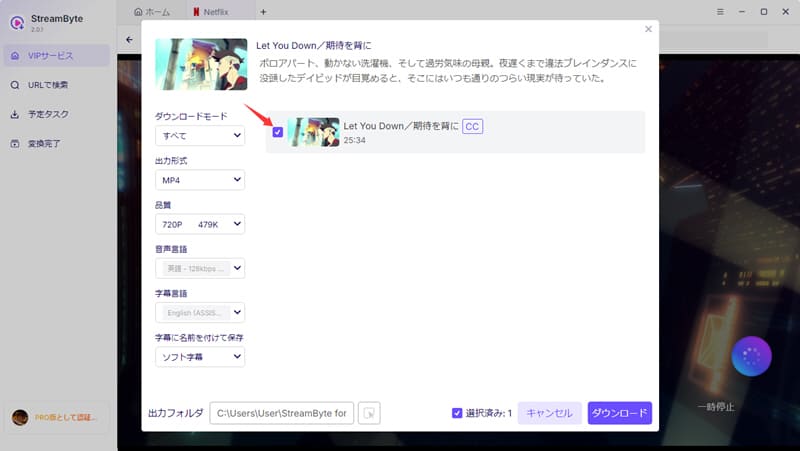
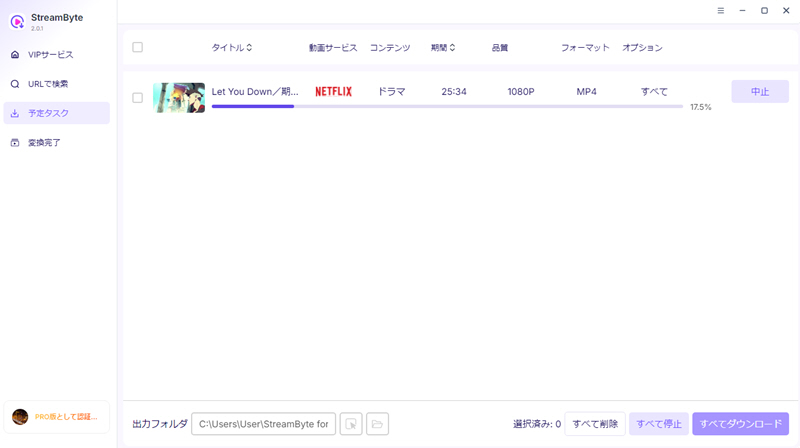
Step 4, after changing the settings,Click the Download button on the bottom rightClicking this will start the video download. You can check the download progress on the "Scheduled Tasks" screen. Once the download is complete, the video will automatically move to the "Conversion Complete" screen. This will allow you toSave Netflix videos to your computercan.
Step 5Then, upload the saved Netflix videos to YouTube. After that, if you install the YouTube app on your Switch, you can play the uploaded Netflix videos through the app.
*For specific instructions, please refer to YouTube's official support page:Watch YouTube on Nintendo Switch
"StreamByte for VideoThis software allows you to save Netflix videos in 1080p high quality in common formats such as MP4. Once saved, you can upload the videos to YouTube and watch them through the YouTube app on your Switch. This software also supports downloads at up to 8x speed, maintaining almost the same quality as the original. For example, a 20-minute 1080p video can be downloaded in just a few minutes. If you're having trouble watching Netflix on your Switch, be sure to try this software.
100% safe, virus-free
100% safe, virus-free
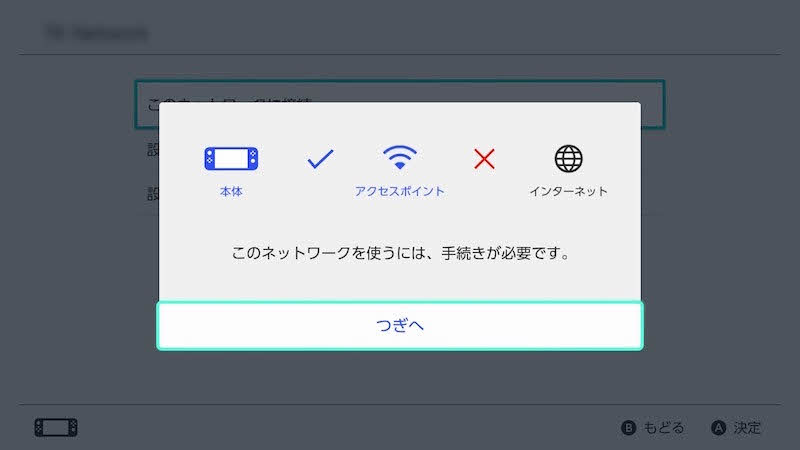
The Switch has a built-in browser function for network authentication and other purposes. While this function cannot be used directly under normal circumstances, it can be enabled by changing the DNS settings.
Specifically, you need to manually change the DNS in the network settings within the Switch's settings and set it to "045.055.142.122". After setting it and reconnecting, a screen called "BrowseDNS" will appear, and you should be able to access the Netflix official website. However, is it actually possible to watch Netflix using this method?
Unfortunately, based on my testing, this method currently only works for simple web pages. It doesn't work properly for video streaming sites like Netflix due to their complex structures. In other words, even if you can access the Netflix site, you'll encounter various error messages and be completely unable to play videos.
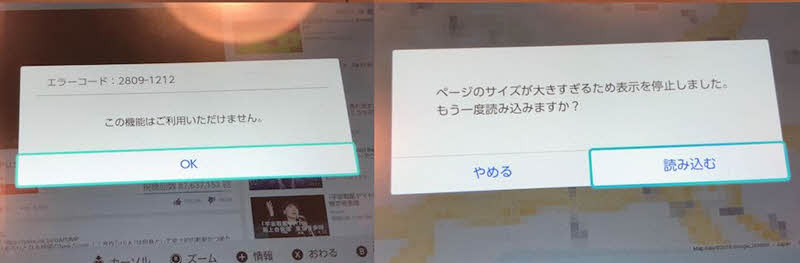
Also, please note that changing your DNS settings in this way may cause errors that prevent you from connecting to the internet. As a result, you may not be able to use the network properly, and you may not be able to use e-shops, etc. Therefore, if you want to enjoy Netflix on your Switch, please use the specialized video download software mentioned earlier.StreamByte for VideoWe recommend using it.
As an alternative to using YouTube, theoretically, if you install Android OS on your Switch, you can install Netflix apps directly from the Google Play Store. However, this method carries several significant risks. Specifically, installing Android OS may erase data on your Switch, potentially rendering it unusable as a gaming console. Therefore, it is recommended to use a dedicated video download software that is easy for beginners to use.StreamByte for VideoWe recommend using ".
There are many ways to enjoy Netflix on a large screen besides the Switch. For example, you can easily watch Netflix using game consoles like PlayStation and Xbox. Furthermore, you can achieve an immersive large-screen experience by utilizing AR/VR devices such as Apple Vision Pro and Meta Quest.
Saved videos cannot be directly transferred to the Switch. For security reasons, the Switch does not support direct playback of video files from external storage, and video functionality is limited to viewing game screenshots and recorded videos in the built-in album. To watch videos, you must use the built-in official app such as YouTube.
If you want to watch Netflix on your Switch, you might consider methods such as installing the Android OS. However, such unofficial methods have certain technical hurdles and also carry a high risk of console malfunction or voiding support, so caution is advised. Therefore, if you want to watch Netflix safely on your Switch, you should use the method described in this article.StreamByte for VideoUsing "[this method]" is a safer option.
In the future, if discussions between Nintendo and Netflix progress, there's a possibility of an official app being released. However, a specific release date has not yet been announced. The recently released Nintendo Switch 2 has more potential for functional expansion, and depending on future updates, Netflix compatibility is not out of the question. While waiting for the official app to be released, it's also a good idea to look forward to future possibilities.
This article first briefly explains why the Netflix app might not work on the Switch. The main reason is likely constraints imposed by the company's concept. For those who want to enjoy Netflix on their Switch, this article will explain why...StreamByte for VideoWe've introduced this secret trick.
This software allows you to powerfullyDRM removal functionYou can save the videos in common formats such as MP4. This means that if you upload the saved Netflix videos to YouTube, you can watch them on your Switch. Also, downloaded videos are saved quickly and maintain the original image quality to the fullest extent, so you can enjoy a comfortable viewing experience when using Netflix on your Switch.
"StreamByte for VideoA free trial version is available, so if you want to enjoy Netflix on your Switch, please feel free to try it out.
100% safe, virus-free
100% safe, virus-free
Born in Tokyo in 1997. After graduating from a university in London, he worked at a major IT media company, writing articles about video streaming services, video downloaders, and digital content.More than 3 years of experience in editing, proofreading, and writing directionThe articles he has worked on have garnered over 5 million page views, and he is well-known for producing content that is carefully crafted from the reader's perspective.
Currently, as an editor and web writer at StreamByte, he works on creating articles that help users solve their problems, focusing on information related to video streaming services and downloads, with the aim of being "user-oriented, easy to understand, and immediately useful."
Read more articles together
Experts in supporting offline viewing of streaming video services
Subscribe to StreamByteCopyright © 2026 StreamByte. All rights reserved.



Get the latest news, product upgrades, information, guides, discounts and more about StreamByte.
Please enter a valid email address.

A highly capable video downloader:
StreamByte for Video
Even beginners can rest assured! You can try saving videos for free first!






 English
  Japanese
  Chinese (traditional)
  German