





Amazon Prime Video is one of the benefits of Amazon Prime membership, and contains videos from various categories from all over the world, but when using it on a computer, there are various restrictions on downloading, so streaming is the main way to watch. To download Amazon Prime Video on your computer and watch it offline, you can refer to the two methods introduced below. In this article, we will introduce how to download videos with restrictions through the PC version of the Amazon Prime Video app, and how to download them using a dedicated downloader that can break through the download restrictions.
How to download the latest and unlimited Amazon Prime Video to your PC
Latest ranking of free video download software! The best free download software recommendations
- Things you should know before downloading Amazon Prime Video to your PC
- How to download videos to your PC using the Amazon Prime Video PC app (restrictions apply to saving and playback)
- How to download videos to your PC using Amazon Prime Video Downloader [Unlimited and permanent storage]
- Official App vs StreamByte: The Best Way to Download Amazon Prime Video to PC?
- Questions about downloading Amazon Prime Video
- summary
🎉For those who want to support more video streaming services:
The "StreamByte Amazon Video Downloader" introduced in this article is exclusive to Amazon, but the newly released"StreamByte for Video"It also supports major services such as Netflix, Disney+, and Hulu! If you want to save videos from more sites, be sure to check it out.
Things you should know before downloading Amazon Prime Video to your PC
To use Amazon Prime Video's download feature on your computer, you'll need to install the official PC app. Amazon currently offers a PC app that's compatible with Windows 10/11 and macOS 11.4 or later, allowing you to download Amazon Prime videos for offline viewing.
Things to note when downloading Amazon Prime Video using the PC app
You can download Amazon Prime Video on your computer using the official app, but there are some limitations. Before using the official download function, we recommend that you check the following functional limitations and precautions.
- App usage restrictions: You may not be able to download the app from your browser. Also, if your computer's OS is outdated, you may not be able to use the app.
- Restrictions on eligible worksDepending on your region or contract status, there may be some titles that are not eligible for saving and the download button will not be displayed.
- Viewing period: The video must be watched within 30 days of downloading and within 48 hours of starting playback (conditions vary depending on the work and region).
- DRM Protection RestrictionsDownloaded videos are stored in a proprietary encrypted format and cannot be copied, moved, or played outside the app.
- Prime membership required: If you cancel your Amazon Prime subscription, you will no longer be able to watch downloaded videos.
- Ad-supported plan limitationsStarting in April 2025, Amazon Prime Video will introduce an ad-supported plan, which will include ads in downloaded videos. An additional fee will be required to play videos without ads.
The download feature on Amazon Prime Video is only for temporary storage; you do not own the video file itself. Also, you need an Amazon Prime membership to watch downloaded videos. Please note that if you cancel your Prime membership, you will no longer be able to watch downloaded videos.
How to reliably download Amazon Prime Video on PC?
Amazon Prime Video is offered through an official PC app that makes it easy to download videos, but there are various restrictions, such as viewing and saving limits and DRM protection restrictions.
To avoid these restrictions and save videos from Amazon Prime to your PC,StreamByte Amazon Video Downloader" is recommended. It can remove DRM protection, download your favorite videos in high quality and at high speed, save them permanently to your PC, and play and move them without limit.
- Amazon Prime Video videos downloaded to your PC can be played without any viewing or storage time limit.
- You can still enjoy downloaded videos even if you cancel your Amazon Prime membership.
- Transfer saved Amazon Prime video files to other devices without DRM restrictions
Please download and try out "StreamByte Amazon Video Downloader" for free!
How to download videos to your PC using the Amazon Prime Video PC app (restrictions apply to saving and playback)
The first way to download Amazon Prime Video to your computer is to use the download function of the official Amazon Prime Video PC app. The download procedure after installing the app on your computer is as follows.
step 1. First, install the Amazon Prime Video app from the Microsoft Store if you're using Windows, or from the Mac App Store if you're using macOS. Then launch the installed Amazon Prime Video app.
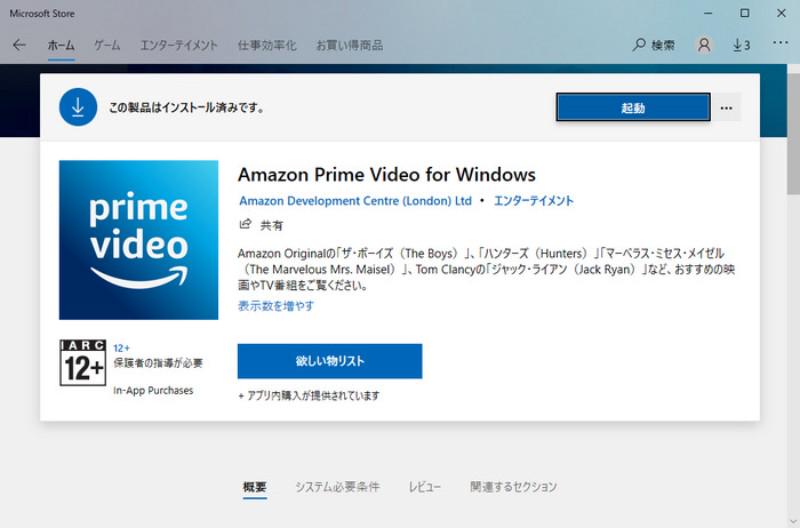
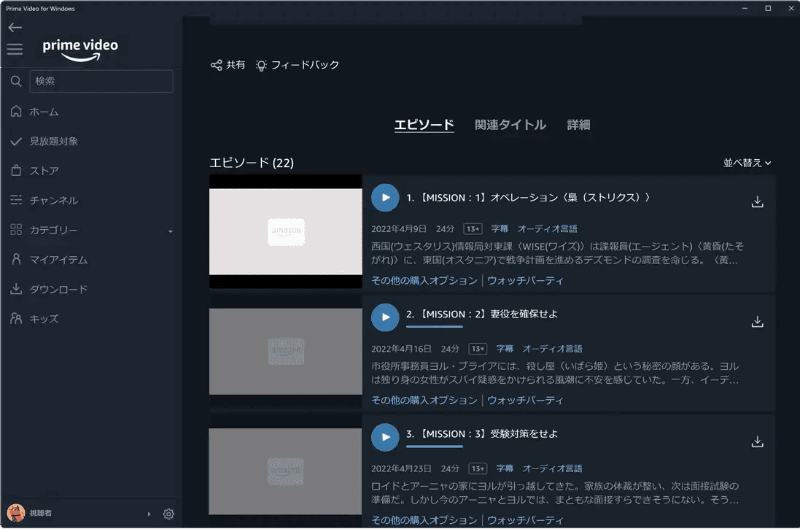
Step 2. Launch the Amazon Prime Video app and search for the movie or TV show you want to download to your PC in the search bar on the left side of the screen. Click the download icon next to the title in the search results to begin the download.
Step 3. Once the video has finished downloading, you can click the "Downloads" tab in the app to view the downloaded video or play it within the app.
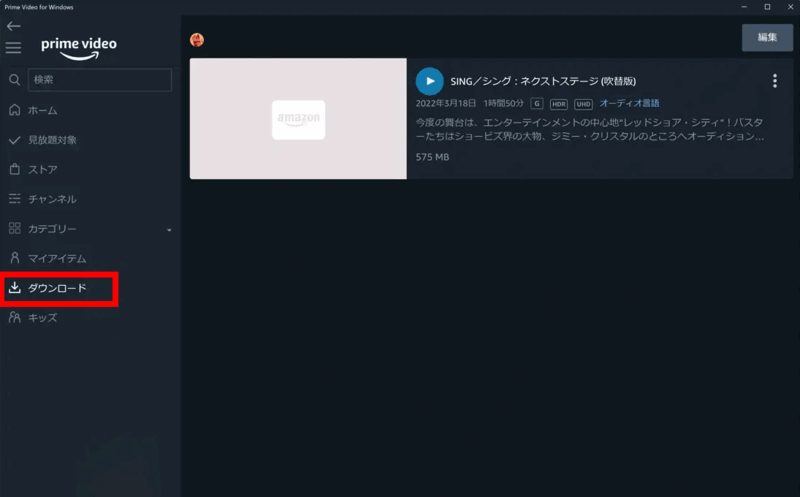
Please note that videos downloaded using the official Amazon Prime Video PC app cannot be played on media players other than the app.
Tips: What is Amazon Prime Video Auto Download and Auto Delete?
The official Amazon Prime Video app has automatic download and automatic deletion features. Automatic download means that the next episode will be automatically downloaded once you finish watching an episode. Automatic deletion means that the episode will be automatically deleted once you finish watching a downloaded video.
Here's how to set it up: On the settings screen of the Amazon Prime Video app, select "Streaming/Downloads" and turn on "Automatic Downloads" or "Delete Watched Episodes."
Videos downloaded using the official Amazon Prime Video PC app have a viewing limit and cannot be played on media players or other devices other than the app. Furthermore, if you cancel your Amazon Prime subscription, you will no longer be able to watch videos you have already downloaded.
As a way to solve these limitations, the following sectionStreamByte Amazon Video DownloaderWe'll show you how to download Amazon Prime videos in high quality and at high speed using "Download". If you want to enjoy your favorite videos freely without worrying about the limitations of official features, be sure to check this out.
How to download videos to your PC using Amazon Prime Video Downloader [Unlimited and permanent storage]
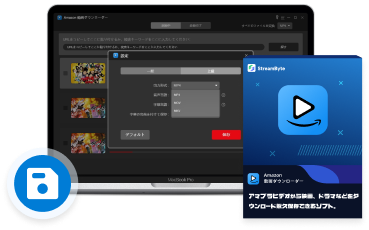
"StreamByte Amazon Video Downloader" is a downloader that allows you to download videos on Amazon Prime Video in MP4, MOV, and MKV in high quality. It is compatible with both Windows and Mac, and does not require the Amazon Prime Video app to be installed on your computer in advance.
Videos downloaded with "StreamByte Amazon Video Downloader" have no storage or viewing period, and can be saved and viewed forever after downloading. In addition, by removing the DRM protection on Amazon Prime Video videos, you can transfer them to devices such as smartphones and smart TVs and play them freely. The software also offers a 30-day free trial that allows you to experience all the features, so please try it out.
"StreamByte Amazon Video Downloader" is a download tool designed exclusively for Amazon Prime Video, which allows you to save movies, dramas, variety shows, etc. on Amazon in high quality to your PC. However, the only video distribution service that supports it is Amazon.
If you want to save videos from other streaming video distribution and sharing services such as Netflix, Disney+, Hulu, YouTube, and PornHub, you can use the multi-functional version "StreamByte for VideoWe recommend using " . Since you can manage multiple services at once with one software, you can freely download and save a wider range of videos.
StreamByte Amazon Video Downloader Features:
- You can output the video in MP4, MKV, or MOV format. You can download it in high quality up to 1080p Full HD.
- You can download specific episodes or download the entire season at once.
- You can select the audio and subtitle tracks for the videos you download.
- It supports three types of subtitle embedding methods: "Soft Subtitle", "Hardcoded Subtitle" and "External Subtitle".
- You can permanently save videos on Amazon Prime, including dramas, movies, anime, and programs, so you can watch them freely without worrying about the viewing period.
How to download Amazon Prime videos to your PC using StreamByte Amazon video downloader
from now,"StreamByte Amazon Video DownloaderWe will show you the steps with images to use this app to download your favorite dramas, movies, and anime from Amazon Prime Video to your PC in file formats such as MP4.
step 1. Launch the "StreamByte Amazon Video Downloader" software and sign in to your Amazon Prime account.
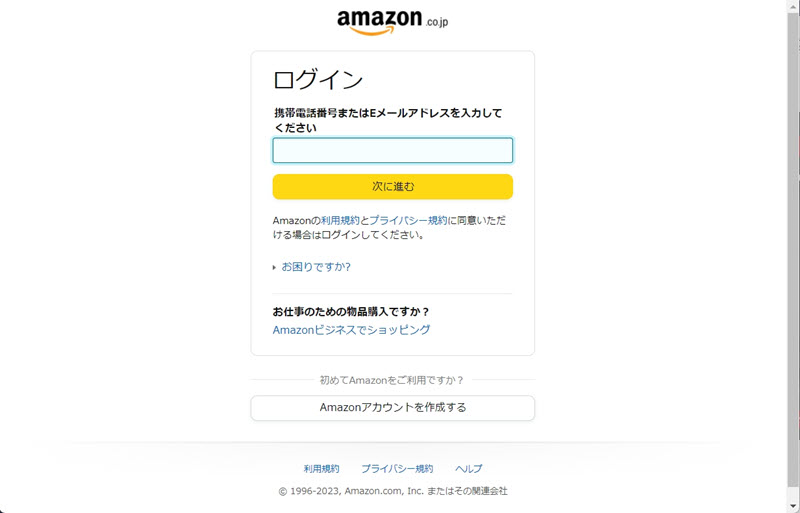
Step 2. Enter the name of the Amazon Prime Video title you want to download in the search field, or copy and paste the title's URL to search.
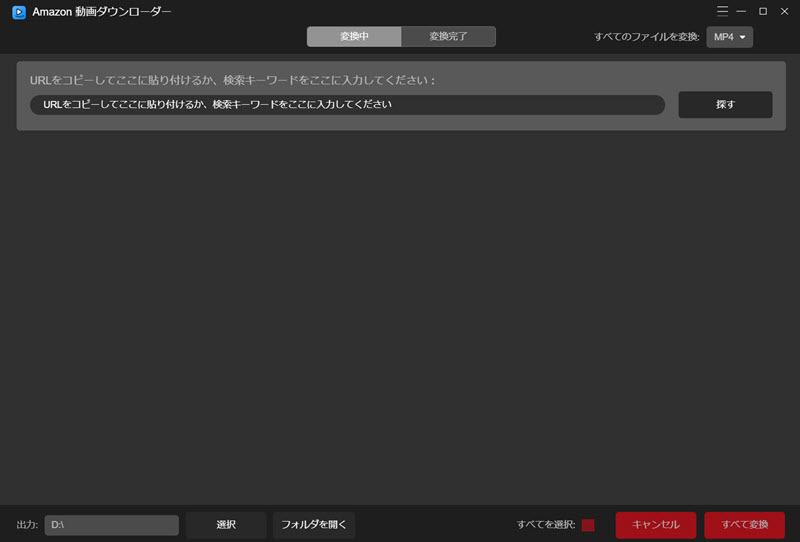
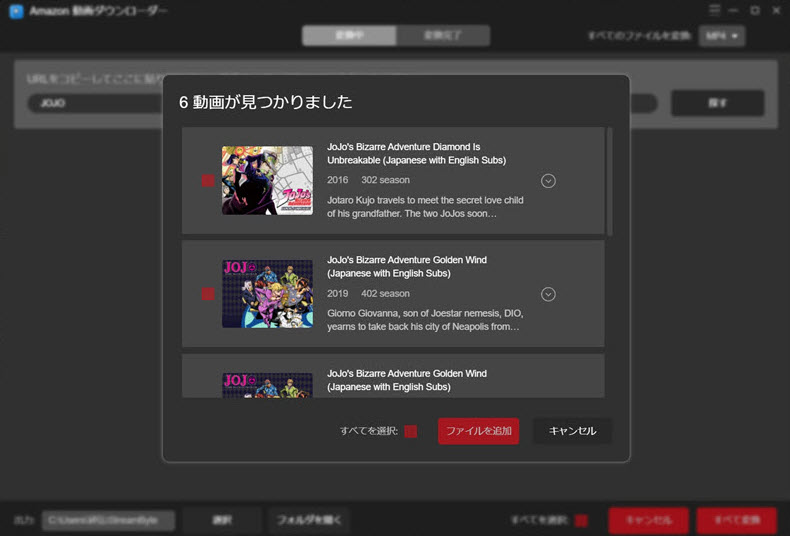
Step 3. From the search results, check the title you want to download and click "Add File" to add it to your download list.
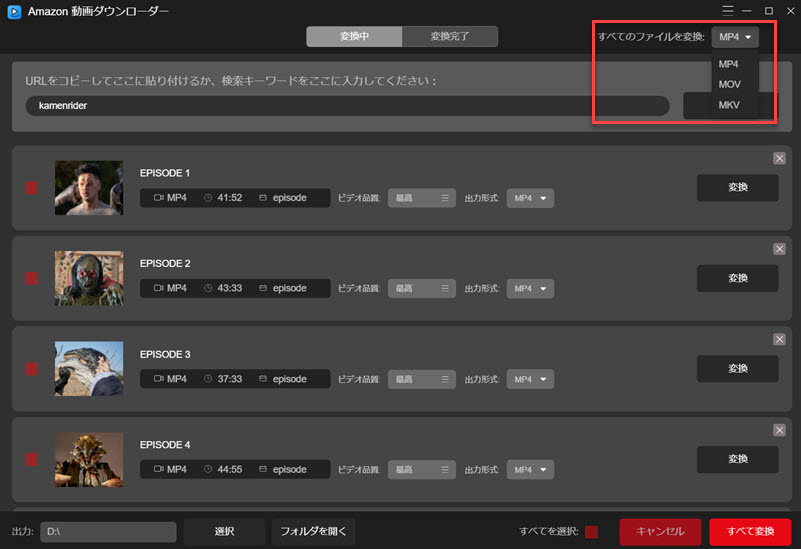
Step 4. In the download list, you can set the output format of the videos individually or collectively from MP4, MOV, and MKV. Here you can also select the output quality of the videos.
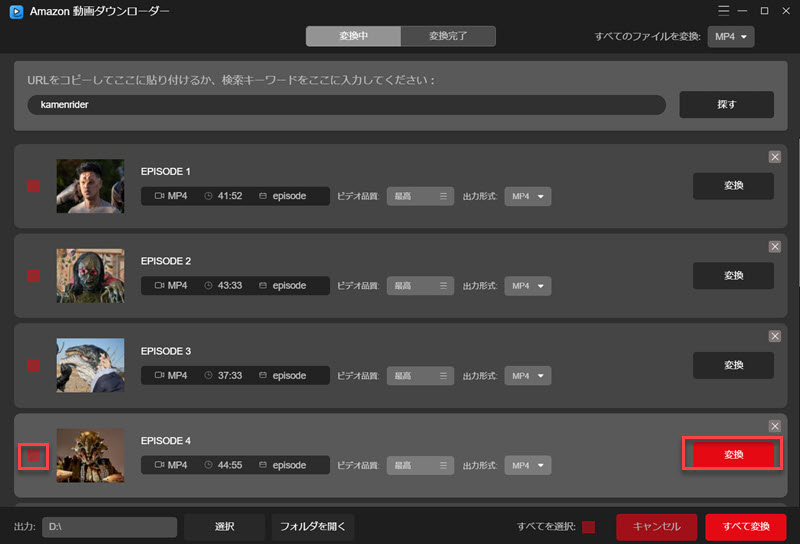
Step 5. Click "Convert" corresponding to the work to download it individually, or check the works you want to download and click "Convert All" to download them all at once.
Step 6. Please wait a moment until the video download is complete. Once the download is complete, you can open the specified save location and play the downloaded video, or transfer it to a device such as a smartphone and play it.
As you can see, with just a few simple steps, you can save your favorite videos on Amazon Prime Video to your computer and play them freely without device or viewing period restrictions. If you want to download unlimited Amazon Prime videos in high quality, please check out "StreamByte Amazon Video Downloader" Please try.
Official App vs StreamByte: The Best Way to Download Amazon Prime Video to PC?
Above we have introduced two methods: the Amazon Prime Video PC app and StreamByte Amazon Video Downloader. For those who are unsure which to choose, we have compiled a comparison table below to help you decide.
| Comparison items | Amazon Prime Video PC app | StreamByte Amazon Video Downloader |
|---|---|---|
| Supported OS | Windows 10/11, macOS 11.4 or later | Windows 11/10/8.1/8/7, macOS 10.11 and later |
| Output Format | Encryption format | MP4, MKV, MOV |
| DRM protection | DRM protection and playback restrictions | Remove DRM and save videos without playback restrictions |
| Save subtitles | Built-in type | Can be saved as an SRT file |
| Viewing period | 30 Days | Unlimited |
| playback environment | Plays only within the app | Playable on any player or device |
| Number of downloads | Up to 25 per account | Unlimited |
| Batch Processing | Manual download required for each episode | Download the entire season at once |
The biggest advantage of downloading videos using the official Amazon Prime Video PC app is its convenience, but due to DRM protection, downloaded videos are saved in a proprietary encrypted format, which means there are many restrictions, such as viewing time limits and playback devices.
On the other hand, with StreamByte Amazon Video Downloader, you can remove the DRM from Amazon Prime Video, download videos in formats such as MP4, MKV, and MOV, and save them permanently to your computer. There are no restrictions on how you can save or play the downloaded videos, and you can play them freely on an external media player or transfer them to your smartphone or tablet.
If you want to download Amazon Prime Video videos to your PC and enjoy them comfortably without any restrictions,StreamByte Amazon Video Downloader" is the best way to do it. Download the software for free now and try out its powerful features.
Questions about downloading Amazon Prime Video
There are many other questions about downloading Amazon Prime Video, but before concluding this article, let me answer the three most frequently asked questions below.
Where are the videos downloaded from Amazon Prime stored?
When you download videos using the Amazon Prime app on your computer, if you do not change the initial settings, the download destination will be a hidden folder."C:\Users\username\AppData\Local\Packages\AmazonVideo.PrimeVideo_pwbj9vvecjh7j\LocalState\Downloads"The files will be saved in a folder named. You can change the save location in the app's settings.
How long can I watch Amazon Prime downloads?
Downloaded Amazon Prime Video has a storage period of 30 days after download and a viewing period of 48 hours after playback begins. After the storage period or viewing period has expired, you will need to download the same video again to watch it offline.
If you want to download Amazon Prime Video videos without a viewing time limit and play them anytime, anywhere, we recommend the professional video download software "StreamByte Amazon Video Downloader" introduced in this article. With this software, you can permanently save Amazon Prime Video videos in formats such as MP4, MOV, and MKV, and you can continue to watch them freely even after the 30 days have passed or if you cancel your membership.
If you want to download Amazon Prime Video videos without a viewing time limit and watch them anytime, anywhere, we recommend the professional video download software introduced in this article. With this software, you can permanently save Amazon Prime Video videos in a common format such as MP4, and you can watch them freely even after the 30 days have passed or if you cancel your membership.
Why can't I download Amazon Prime Video?
There are several possible reasons why you cannot download Amazon Prime Video. Common reasons include insufficient free space on the device, an unstable network environment, etc. If an error code is displayed on the screen, please check the cause corresponding to the error code.
There are several possible reasons why you may not be able to download Amazon Prime Video.
Exceeding the device limit
How do I share Amazon Prime Video?
Amazon Prime Video allows simultaneous playback and download on up to two devices with one account. This means you can easily enjoy videos by simply logging in on different devices. But what if you want to share Amazon Prime Video on more than two devices?
In conclusion,StreamByte Amazon Video DownloaderThere is a way to do this using third-party software such as ". This software can remove DRM protection, allowing you to share and play videos downloaded with one Amazon Prime account on any device. Videos downloaded with one Amazon Prime account can be shared and played on any device.
summary
So far, we have introduced two ways to download videos from Amazon Prime Video to your computer. The first method, which uses the download function of the official PC app, allows you to download videos from Amazon Prime Video, but it is not recommended for those who want to watch Amazon Prime Video offline more freely, as there are restrictions on the number of titles that can be downloaded and the viewing period. To break through all of the restrictions of the app and freely download and play videos on Amazon Prime Video, you will need to use the dedicated software "StreamByte Amazon Video DownloaderWe strongly recommend using ".
With a single use of StreamByte Amazon Video Downloader, you can download your favorite Amazon Prime Video movies, dramas, anime, and more to your PC for permanent storage. With its powerful DRM removal function, you can convert videos to MP4, MOV, MKV, and other formats, allowing you to freely share, transfer, and play downloaded videos without restrictions.
First"StreamByte Amazon Video DownloaderDownload " for free and try out the experience of saving Prime Video videos on your PC.





 English
  Japanese
  Chinese (traditional)
  German