
- Online video downloader
- Streaming Products
- BD-DVD products
- Store
- Useful Articles
- support
Share this article!


Netflix supports double-speed playback and is available on browsers, Android devices, iPhones, iPads, and other devices. However, double-speed playback is not available on the TV app, game console apps, mobile mirroring, or the browser version with ad-supported plans.
Many people, even those subscribed to Netflix, find it difficult to find time to watch content in their busy daily lives. For those who want to make the most of their limited time, Netflix's fast-forward playback feature is incredibly convenient. However, many people don't know how to use fast-forward playback on their devices.
This article will explain in detail how to comfortably play Netflix videos at double speed on various devices, and will also introduce convenient tools for freely playing Netflix videos at double speed. Please read to the end.

Related Posts:
Netflix is a highly popular video streaming service that offers a wealth of high-quality content. It also features convenient functions such as fast-forward playback.
The fast-forward function is especially suitable for those with limited viewing time or those who find slow-paced content unsatisfying, as it allows you to improve viewing efficiency by adjusting the playback speed. Increasing the playback speed saves time, while decreasing it allows you to carefully examine the details. To meet these various needs, Netflix offers the following five playback speed settings.
Currently, the only devices that support double-speed playback are PCs, smartphones, and tablets. If you want to use double-speed playback on other devices such as TVs, please refer to the following:StreamByte for VideoYou can also save videos using specialized tools such as [tool name] and adjust the playback speed.
Playing Netflix content at double speed offers the significant advantage of saving time, making it a very convenient feature, especially for those who are busy and have difficulty finding time to watch. However, there are also some unavoidable drawbacks to double-speed playback. Taking these points into consideration, this article clearly summarizes the advantages and disadvantages of playing Netflix content at double speed. Please use this as a reference to decide whether or not to use double-speed playback based on your own viewing style and purpose.
Advantages:
Cons:
Netflix's fast-forward playback feature isn't available on all devices, and the specific requirements vary depending on the device. Therefore, before explaining how to play Netflix content at double speed on each device, we've summarized the differences and points to note in the table below.
| Terminal | smartphone | tv set | computer | Game console |
| Official double-speed playback availability | Possible | Not possible | Possible | Not possible |
| maximum speed | 1.5x | - | 1.5x | - |
| Points to note | Available via app and browser (some limitations apply to ad-supported plans). | Not available on TV apps | Browser compatible (Some limitations apply to plans with ads.) |
not available |
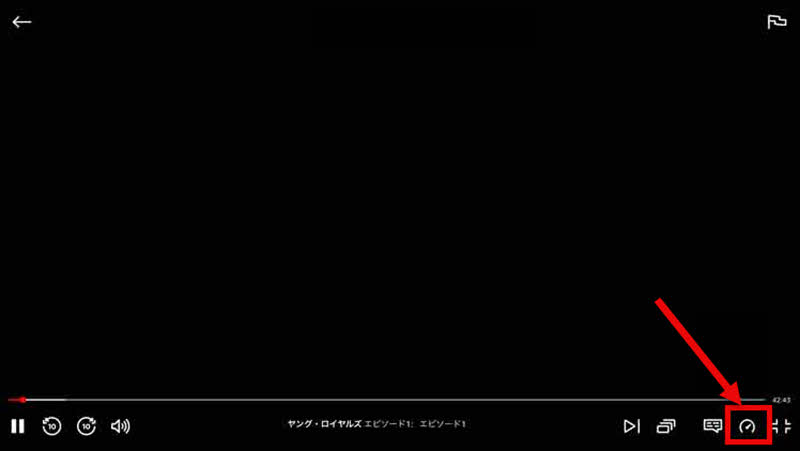
Netflix's official website includes a built-in fast-forward function for playing content. Therefore, if you want to play Netflix at double speed on your computer, simply access the Netflix website through your browser and use the "Playback Speed" button on the playback screen. Here's a detailed explanation of how to play Netflix at double speed on your computer.
step 1Go to the Netflix official website and log in with your account.
Step 2To watch a video, play it and display the playback controls. Then, click the "Playback Speed" icon in the bottom right corner.
Step 3By selecting your preferred playback speed from 0.5x to 1.5x, you can play Netflix at double speed on your computer.
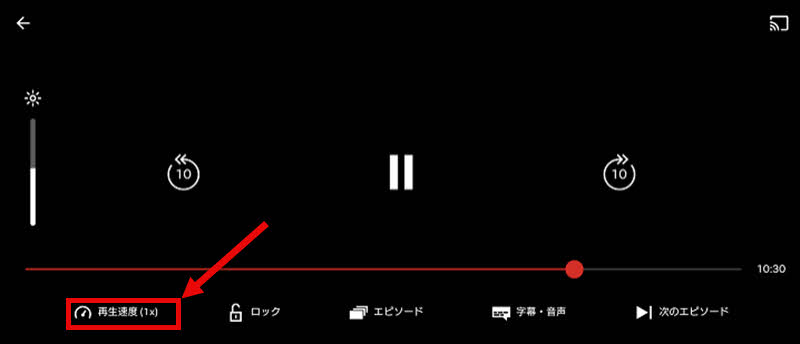
The Netflix app has a built-in fast-forward function on both iPhones and Android smartphones. Therefore, if you want to play Netflix at double speed on your smartphone, you can easily do so by simply using the "Playback Speed" button on the playback screen. The following explains the specific steps.
step 1First, launch the Netflix app. If you haven't already installed it, please install it from the App Store or Google Play.
Step 2Play the video you want to watch, then tap the screen to display the playback controls.
Step 3, in the lower left corner of the screen"Playback speed" buttonTapping this allows you to adjust the playback speed from 0.5x to 1.5x. Now you can play Netflix at double speed on your smartphone.
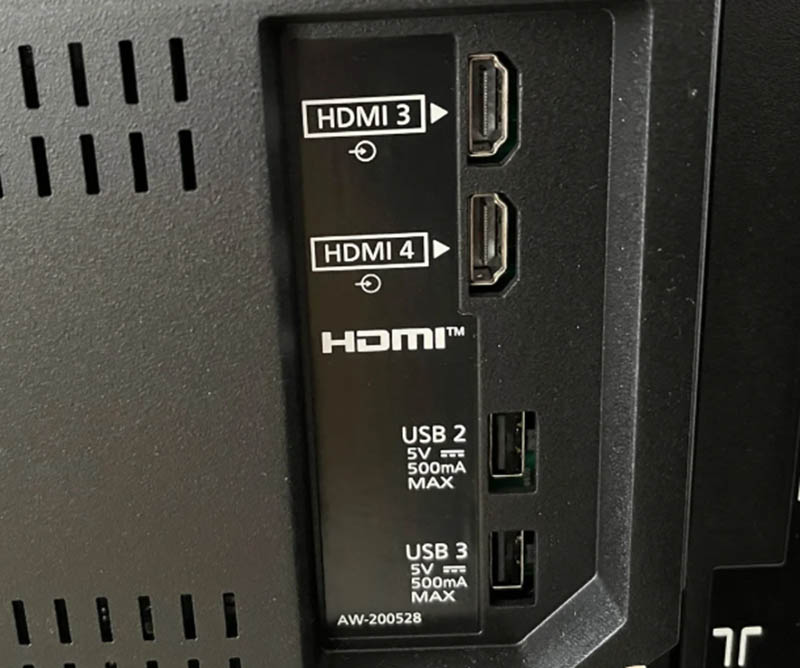
Unfortunately, while many smart TVs support the Netflix app, they currently do not offer a feature to play content at double speed on TVs. Therefore, if you want to play Netflix at double speed on your TV, you will need to connect a device that supports double-speed playback, such as a smartphone or computer, to your TV using an HDMI cable and mirror the screen of that device.
First, as preparation, locate the HDMI port on the back or side of your TV and decide which port you will use. Then, prepare an HDMI cable and a device that can play Netflix at double speed. Once you are ready, follow the steps below.
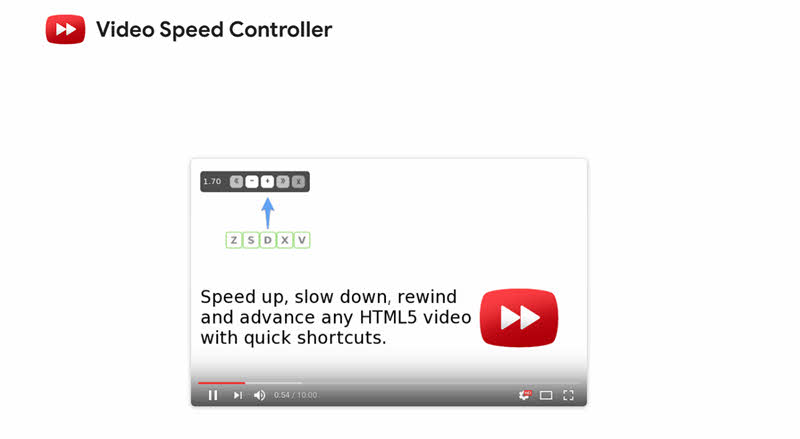
When watching Netflix in a browser, you might find the official playback speed insufficient. In such cases, you can use the Chrome extension "Video Speed Controller" to adjust the playback speed more precisely. Here's how to use the extension to play Netflix at double speed.
We've previously explained how to play Netflix videos at double speed on various devices, but most methods, excluding extensions, are limited to the five playback speeds provided by Netflix. Furthermore, due to network conditions, stuttering and audio lag can frequently occur during double-speed playback. Therefore, we'll introduce a convenient tool for more freely playing Netflix videos at double speed:StreamByte for VideoI will introduce "[this]".
This software is a powerful professional video download tool.DRM protection removalIt has the functionality to save Netflix videos in common formats such as MP4. This means that downloaded videos can be accessed anytime, anywhere, regardless of your internet connection.Play Netflix videos offline- You will be able to edit and move files.
Furthermore, with locally saved videos, you can adjust the playback speed more freely, allowing you to achieve playback at your preferred speed. It supports high-speed downloads while maintaining high image quality and outputting with virtually no loss of quality, so you can comfortably watch videos at double speed without worrying about a drop in picture quality.
StreamByte for Video
This is a video downloader that supports major streaming services such as Netflix, Amazon Prime, and YouTube. You can save and enjoy your favorite videos with high image quality up to 8K and Dolby Atmos audio.
Why StreamByte for Video is recommended
Here, "StreamByte for VideoThis explains how to use [this method] to easily download Netflix videos.
step 1"StreamByte for Video"Log inAfter that, several popular streaming services, including Netflix, will be displayed on the main interface. Select Netflix on the software's main screen.
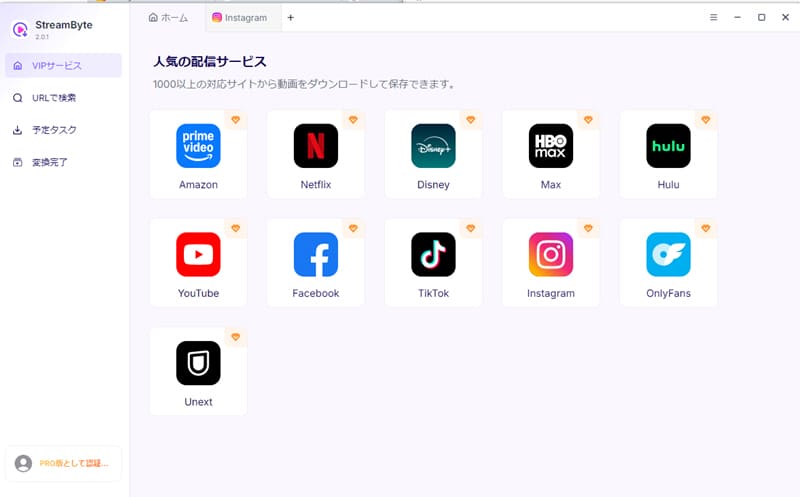
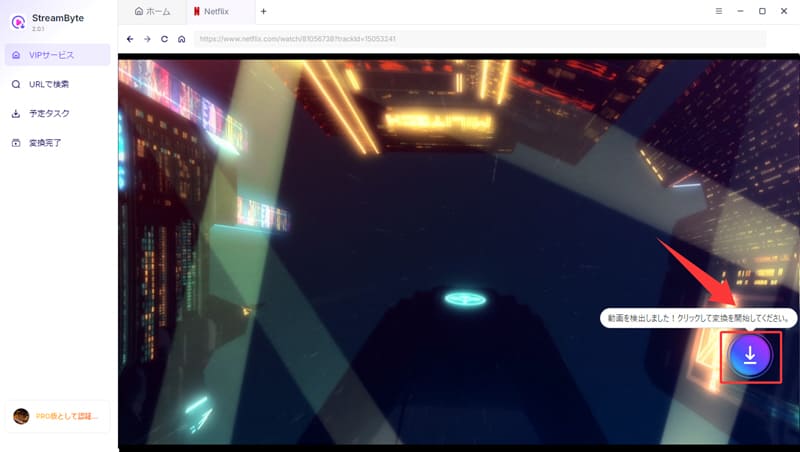
Step 2After logging into your Netflix account, find the video you want to save.Download iconClick here. You can also paste the video URL and search.
Step 3You can set the output format, audio, subtitles, etc., of the downloaded video according to your needs.
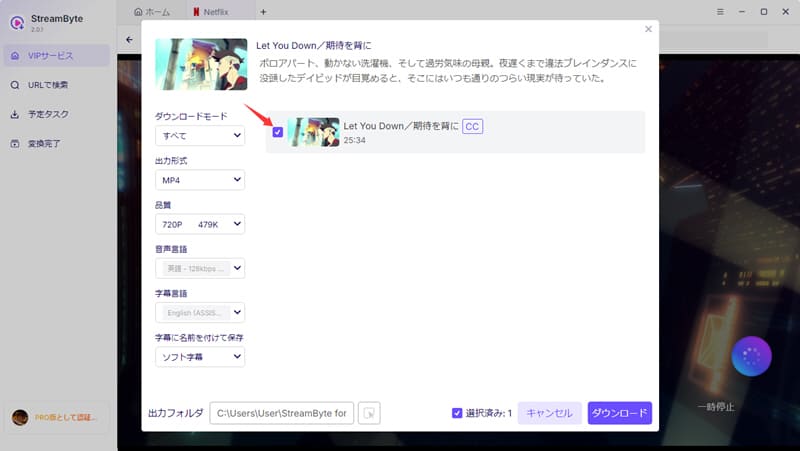
Step 4Once the setup is complete, click in the bottom right corner."Download" buttonClicking will start the download. The progress will be..."Scheduled tasks"You can check it on the screen. Once the download is complete, you'll be able to play Netflix videos at double speed more freely, regardless of your internet connection.
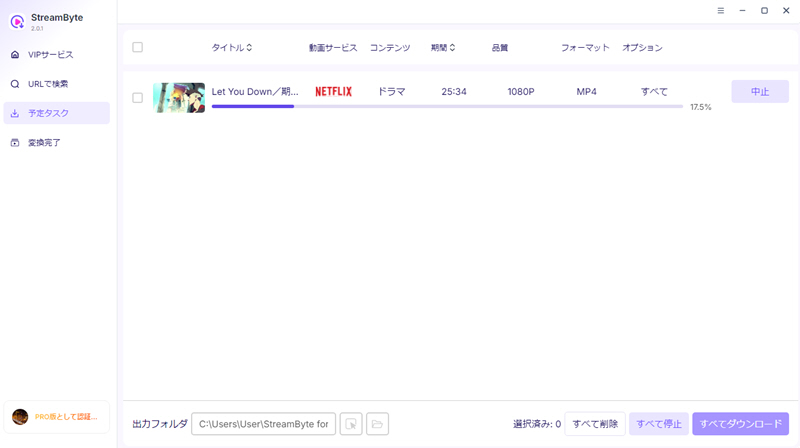
"StreamByte for VideoIf you use "", Save Netflix videos to your computerYes, it is possible. This allows for more freedom in double-speed playback without being subject to various restrictions on downloading and playback. Furthermore, since saved videos are not subject to DRM protection restrictions, they can be freely moved and edited, and can even be transferred to a TV for viewing without relying on an HDMI connection.
In addition, offline playback is less affected by network conditions, significantly reducing stuttering and glitches during playback. This creates an environment where Netflix videos can be played more stably and comfortably at double speed.
100% safe, virus-free
100% safe, virus-free
You can watch videos on gaming consoles like the PS5 and Switch using the Netflix app downloaded from the eShop. However, the Netflix app for gaming consoles like the PS5 and Xbox does not offer a fast-forward function. Similar to the TV app, viewing is primarily at standard speed.
Currently, Netflix's official playback speed feature only supports up to 1.5x speed. Therefore, playback at speeds higher than 1.5x is not possible using only the official feature. However, using browser extensions such as "Video Speed Controller" allows for playback at speeds higher than 1.5x. Also, specialized video download software...StreamByte for VideoBy using this to save the video locally, you can also change the playback speed more freely.
There are several possible reasons why the picture quality might suddenly drop when playing content at double speed on Netflix. The most likely reason is that because double-speed playback processes more data in a shorter time, if your network speed can't keep up, the system automatically lowers the picture quality without stopping playback. This is normal behavior, so please don't worry.
In such cases, you can either lower the video quality during playback, orStreamByte for VideoWe recommend using specialized video download software such as [software name] to save the video locally and then playing it at double speed from there.
Playing Netflix videos at double speed doesn't change the total data usage for the entire title. However, the data consumption per unit of time may increase with double-speed playback. Therefore, for the same viewing time, the amount of data consumed within that time may be higher compared to normal speed playback.
If the fast-forward icon isn't showing up on Netflix, there could be several reasons.
First, please check if your device supports double-speed playback. Depending on your device and viewing environment, the double-speed playback function itself may not be supported. Also, double-speed playback is restricted in the browser version of the ad-supported plan, so the icon may not be displayed. Furthermore, it may not be displayed if your app or browser version is outdated, or due to a temporary glitch.
This article explained Netflix's fast-forward playback function and introduced how to play videos on various devices such as PCs, smartphones, and TVs. However, Netflix's official fast-forward playback is limited to a maximum of 1.5x speed, and it may not be possible to directly play videos at double speed on a TV. Therefore, as a tool that can help you freely play Netflix videos at double speed,StreamByte for Video" was introduced.
This tool allows you to save Netflix content locally in common formats such as MP4, thanks to its DRM removal function. This makes it possible to freely move and manage these videos and transfer them to any device. Furthermore, it allows for more flexible adjustment of various settings, including double-speed playback, and enables you to freely play Netflix videos at double speed without being limited to the previous maximum of 1.5x speed.
"StreamByte for VideoWe offer a free trial version, so if you want to play Netflix at double speed more freely, please take this opportunity to try it out.
100% safe, virus-free
100% safe, virus-free
Born in Tokyo in 1997. After graduating from a university in London, he worked at a major IT media company, writing articles about video streaming services, video downloaders, and digital content.More than 3 years of experience in editing, proofreading, and writing directionThe articles he has worked on have garnered over 5 million page views, and he is well-known for producing content that is carefully crafted from the reader's perspective.
Currently, as an editor and web writer at StreamByte, he works on creating articles that help users solve their problems, focusing on information related to video streaming services and downloads, with the aim of being "user-oriented, easy to understand, and immediately useful."
Experts in supporting offline viewing of streaming video services
Subscribe to StreamByteCopyright © 2026 StreamByte. All rights reserved.



Get the latest news, product upgrades, information, guides, discounts and more about StreamByte.
Please enter a valid email address.

A highly capable video downloader:
StreamByte for Video
Even beginners can rest assured! You can try saving videos for free first!







 English
  Japanese
  Chinese (traditional)
  German