
- Online video downloader
- Streaming Products
- BD-DVD products
- Store
- Useful Articles
- support
Share this article!


Netflix is a highly popular video streaming service loved by many users. However, many people struggle with how to download Netflix videos on their Macs. There are times when you want to watch videos offline, such as on an airplane or while traveling, where network access is unavailable. This article will explain in detail whether it is possible to download Netflix videos on a Mac, and will also introduce some secret tricks to download Netflix videos. Please read to the end.

Related Posts:
Many Mac users are curious about whether they can officially download Netflix videos on their Macs. However, the conclusion is that there is currently no official download method available for Macs.
The reason is simple: Netflix does not offer a dedicated desktop app for Mac, and offline playback and downloads are primarily supported only on mobile devices such as smartphones and tablets. Therefore, it is not officially possible to download and save Netflix videos directly on a Mac.
While it's not officially possible to download Netflix videos on a Mac, there are ways to save Netflix videos on a Mac. Therefore, I recommend the Mac-specific downloader "StreamByte for Video"is.
This software is a specialized tool that allows you to download Netflix videos in bulk on your Mac without needing any other tools or devices. It features a built-in web player, allowing you to search and play Netflix videos directly within the software, providing a comfortable user experience similar to the official app. Furthermore, it boasts an impressive 99% download success rate, meaning you can download dozens of videos at once with virtually no risk of failure.

StreamByte for Video
This is a video downloader that supports major streaming services such as Netflix, Amazon Prime, and YouTube. You can save and enjoy your favorite videos with high image quality up to 8K and Dolby Atmos audio.
Why StreamByte for Video is recommended
Here, "StreamByte for VideoThis explains how to use [this method] to easily download Netflix videos on your Mac.
step 1,To "StreamByte for Video"Log inAfter that, the main interface will show you some popular streaming services, including Netflix.NetflixSelect
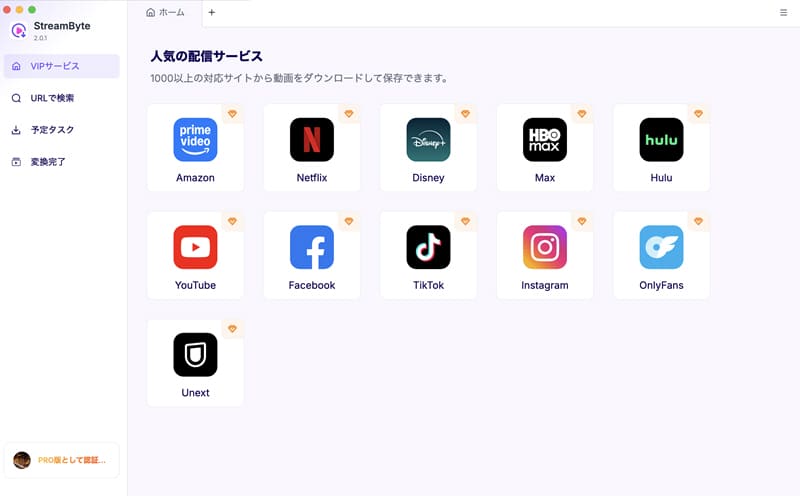
Step 2,Search for the video you want to save, and once you find the Netflix video you want to download on your Mac,Blue download iconClick it. This will add the video to your download list.

Step 3,You can change the output format, audio, subtitles, and other settings of the Netflix video you want to download to suit your needs.
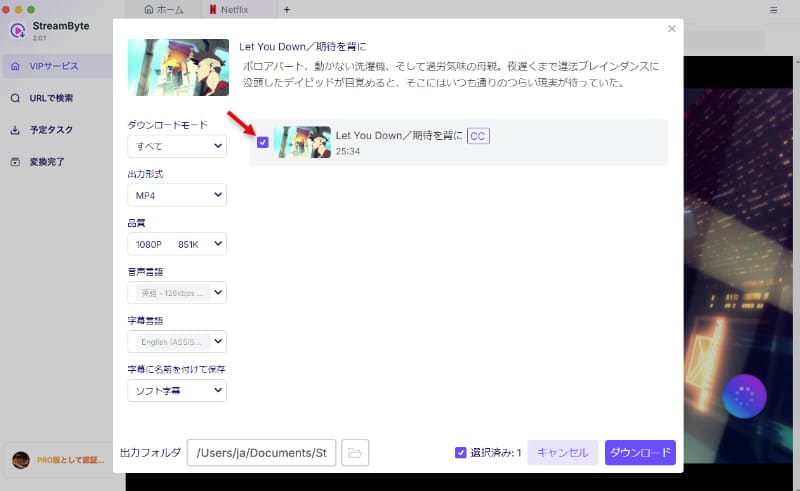
Step 4,After changing the settings,Click the Download button on the bottom rightClicking this button will start the video download. You can check the download progress on the "Scheduled Tasks" screen. Once the download is complete, the video will automatically move to the "Conversion Complete" screen.

This software allows you to freely download Netflix videos on your Mac. Unlike the download function of the official app for iPhones and other devices, you can truly save videos freely on your Mac without worrying about playback or download restrictions. Saved videos can be played even after your Netflix subscription ends, and you can also freely manage and move them. For these reasons, if you want to download Netflix videos on your Mac, you should use the dedicated downloader "StreamByte for Video" is the optimal choice.
100% safe, virus-free
100% safe, virus-free
While you can't officially download Netflix videos directly on a Mac, you can use QuickTime Player to record and save Netflix videos on your Mac. This effectively allows you to watch Netflix videos offline as if you had downloaded them. The specific steps are outlined below.
step 1,Open QuickTime Player from your Mac folder,"New screen recording"Select
Step 2,Play the Netflix video you want to save in your browser, then tap the QuickTime record button to start recording.
Step 3,Once the video finishes, press the record button again to stop recording. This will save the Netflix video to your Mac.
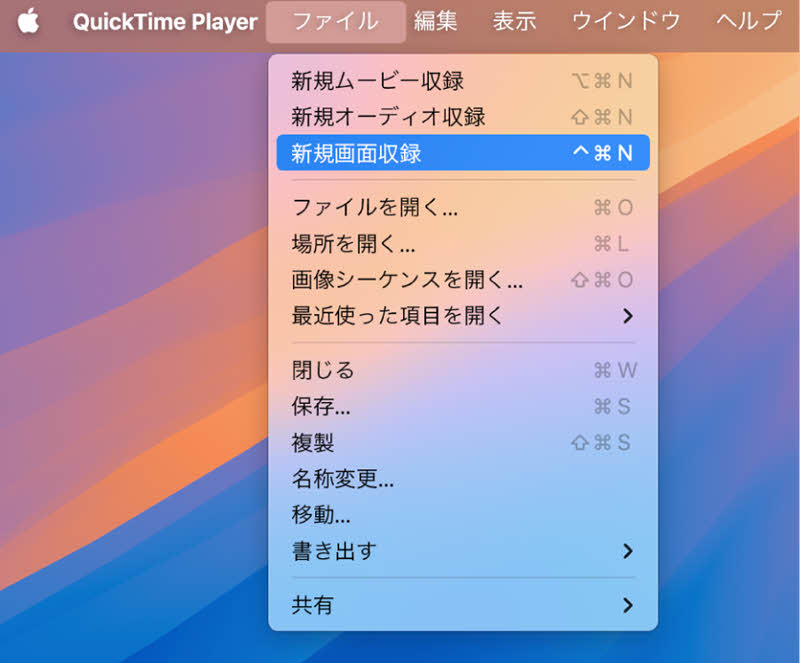
However, Netflix videos are often DRM protected, so QuickTimeEven when recording, the screen sometimes goes completely black.In some cases, only the audio may be saved. Therefore, if you want to be sure to download and save Netflix videos on your Mac,StreamByte for VideoWe recommend using specialized software such as "[...]."
While it's not officially possible to download Netflix videos directly to a Mac, you can download them using the official iPhone app and then stream them from your iPhone to your Mac using AirPlay. This eliminates the need to download them directly to your Mac. The specific steps are outlined below.
step 1,In an offline environment, first enable "Mobile Hotspot" on your iPhone and connect your Mac to that network.
Step 2,After downloading the video you want to play on your Mac using the Netflix app on your iPhone, click the button in the upper left corner of the playback screen.AirPlay iconTap
Step 3,On Mac"System Settings"Open the app,"Allow AirPlay"Select an AirPlay-compatible device from the pop-up menu next to it. You can now stream downloaded Netflix videos on your Mac.
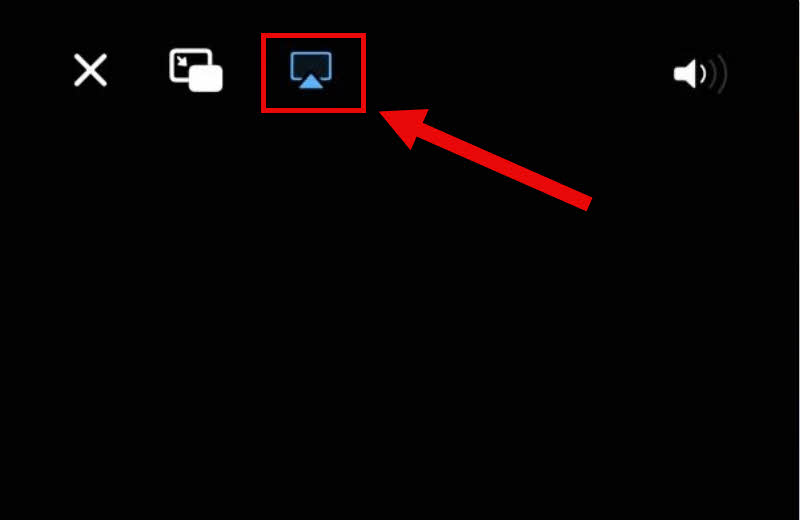
However, when playing Netflix videos downloaded from an iPhone using AirPlay on a Mac, the picture quality and playback stability are heavily dependent on the network environment. In an unstable environment, the picture quality may decrease or playback may be interrupted. Therefore, if you want to watch on a Mac with more stable and high-quality playback, it is still recommended to use specialized video download software.StreamByte for VideoIt's safer to use [this method] to download and play Netflix videos directly on your Mac.
If your QuickTime recording shows a completely black screen, it's often because the content being recorded is DRM-protected. Therefore, you cannot directly record the video. Currently, there is no effective solution; if you want to watch and save Netflix videos on your Mac, we recommend using the official download function or dedicated software mentioned in this article.
Unfortunately, Netflix's official download feature is limited to the iOS and Android apps and is not available on MacBook Air or MacBook Pro. Therefore, Mac users can only watch Netflix by streaming through a web browser such as Google Chrome or Safari.
"StreamByte for VideoThere is no limit to the number of titles you can download with this software. Videos saved with this software are not DRM protected, so you don't have to worry about Netflix's official download limits. Furthermore, you can download multiple titles at once, making it possible to save an unlimited number of Netflix videos.
Netflix videos downloaded using the official feature have an expiration date. When using Netflix's official download feature, the videos are DRM protected and require periodic network connection authentication, thus limiting viewing time. However, as mentioned in the main text,StreamByte for VideoUsing this method, you can bypass these restrictions and even remove DRM to permanently save Netflix videos.
Downloading Netflix videos on a Mac using unofficial methods is illegal. However, if the saved videos are not used commercially or redistributed, and are only for personal viewing, you are unlikely to be held liable. However, copyright is a very sensitive area, so it is recommended that you check the laws and regulations in your area for actual handling.
This article explains in detail why you cannot directly download Netflix videos on a Mac using the official features. It also introduces alternative methods when the official features are unavailable. However, a better option than these methods is the Mac-specific video downloader "StreamByte for Video"is.
This software allows you to easily download Netflix videos on your Mac.Save Netflix videos in a general-purpose format such as MP4.It can maintain high-definition 1080p resolution. Furthermore, it features a built-in web player, providing users with an official-like experience when downloading Netflix videos. The simple and intuitive interface makes it easy for even first-time users to master.
"StreamByte for VideoA free trial version is also available, so if you want to download Netflix videos on your Mac, please give it a try.
100% safe, virus-free
100% safe, virus-free
Born in Tokyo in 1997. After graduating from a university in London, he worked at a major IT media company, writing articles about video streaming services, video downloaders, and digital content.More than 3 years of experience in editing, proofreading, and writing directionThe articles he has worked on have garnered over 5 million page views, and he is well-known for producing content that is carefully crafted from the reader's perspective.
Currently, as an editor and web writer at StreamByte, he works on creating articles that help users solve their problems, focusing on information related to video streaming services and downloads, with the aim of being "user-oriented, easy to understand, and immediately useful."
Read more articles together



Experts in supporting offline viewing of streaming video services
Subscribe to StreamByteCopyright © 2026 StreamByte. All rights reserved.



Get the latest news, product upgrades, information, guides, discounts and more about StreamByte.
Please enter a valid email address.

A highly capable video downloader:
StreamByte for Video
Even beginners can rest assured! You can try saving videos for free first!







 English
  Japanese
  Chinese (traditional)
  German