
- Online video downloader
- Streaming Products
- BD-DVD products
- Store
- Useful Articles
- support
Share this article!


Many people probably want to download only the audio from YouTube videos and save it as an MP3. YouTube has a wealth of educational videos and music content, but saving the entire video can take up a lot of storage space. Especially in offline environments such as during commutes or while out and about, there are many situations where you would like to "save and listen to just the audio." However, YouTube itself does not have a function to download only the audio; it can usually only be saved in video format.
This article will clearly explain how to convert and download the audio from YouTube videos to MP3 format. We will introduce methods and specific steps tailored to your needs, including dedicated software, online sites, browser extensions, and smartphones. If you want to save only the audio from YouTube videos and not the videos themselves, please refer to this article.
Related Posts:
There are several options for downloading only the audio from YouTube videos and saving it as an MP3 file. These mainly fall into four categories: software, online sites, browser extensions, and smartphones, each with its own unique features and usage. Choosing the method that suits you best will allow you to save YouTube audio more efficiently and comfortably. Let's take a quick look at each method for downloading only the audio from YouTube videos.
Characteristics of each method and who they are recommended for
In conclusion, the most recommended method is using software. It allows for high-quality and stable conversion of YouTube audio to MP3, and is easy for beginners to use. Below, we will explain in detail the steps for converting and downloading YouTube video audio to MP3, along with how to use specific tools.
If you want to download the audio from a YouTube video as an MP3 in high quality and with stable performance,StreamByte for VideoWe recommend using [this service]. It has no ads or audio quality restrictions like online sites, and you can smoothly save YouTube audio simply by pasting the URL.
"StreamByte for VideoThis tool allows you to extract and download only the audio from YouTube videos, and supports the selection of multilingual audio tracks and the specification of output formats. It can convert to multiple formats such as MP3, M4A, FLAC, and WAV, allowing for flexible use depending on your needs. Furthermore, it supports YouTube's...Download only the audio of embedded videosIt also supports downloading videos and audio from not only YouTube, but also TikTok, Instagram, and other platforms, allowing you to manage various types of content in one place. Its simple operation makes it easy for even beginners to use, which is a major advantage.
StreamByte for Video
This is a video downloader that supports major streaming services such as Netflix, Amazon Prime, and YouTube. You can save and enjoy your favorite videos with high image quality up to 8K and Dolby Atmos audio.
"Why we recommend StreamByte for Video"
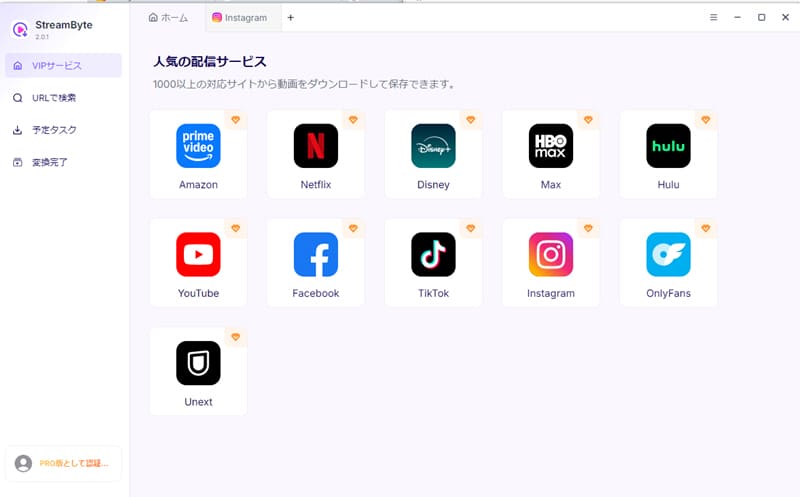
step 1After logging in to StreamByte for Video, you will see several popular streaming services on the main interface, including YouTube. Select the built-in YouTube. Or,YouTubeSimply copy the video URL and paste it into the search bar to convert it to MP3 and save only the audio to your PC.
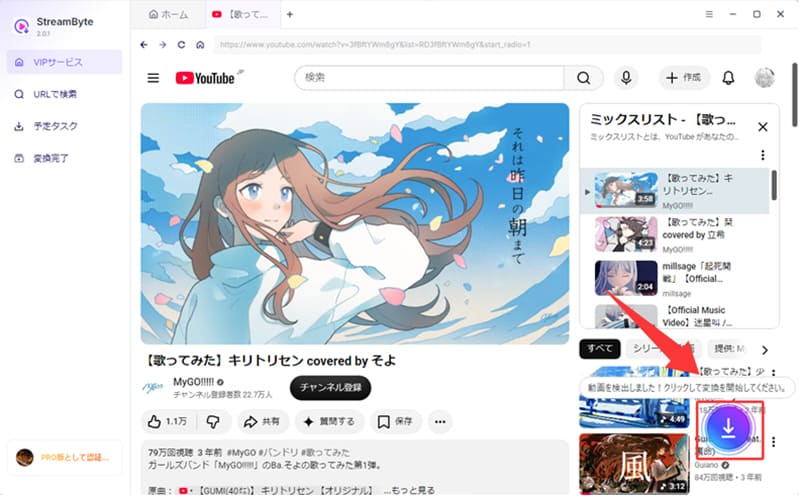
Step 2:Log in to YouTubeWhen you find a video you want to download,Blue download iconClick
Step 3: In download mode, press "Audio onlyYou can also adjust the output format, picture quality, subtitle language, audio language, and other settings.
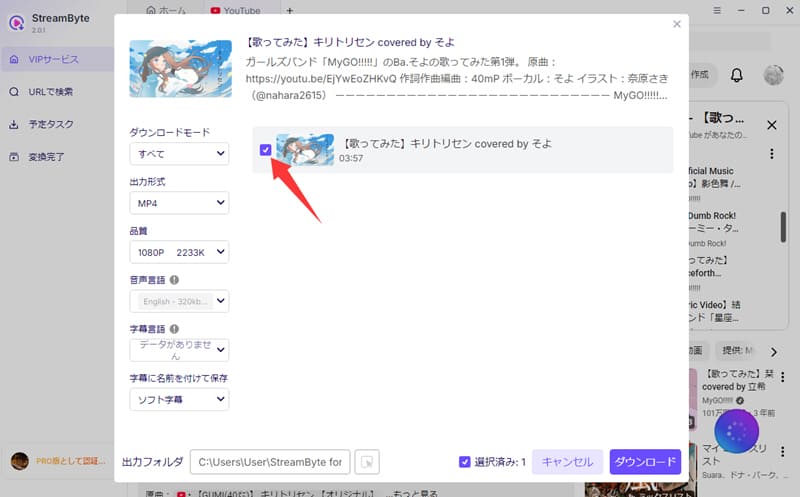
Step 4: When you're done adjusting the settings, tap the blue"Download" buttonClick the button to start downloading YouTube audio.Download progressThis can be checked on the "Scheduled Tasks" screen. Once the download is complete, the audio can be checked on the "Conversion Complete" screen.
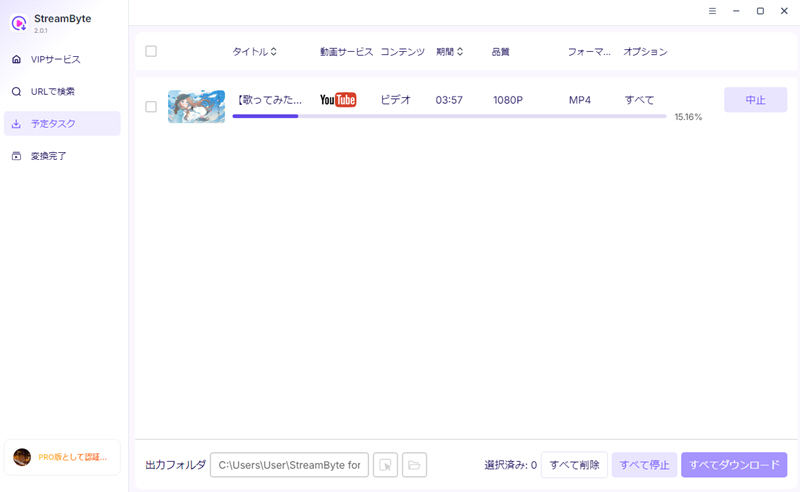
By following these steps, you can download only the audio from YouTube locally.
By using "StreamByte for Video",Output Format, Subtitles and Audio TracksYou can freely adjust settings such as these to enjoy YouTube audio in your preferred format.
Not only can you extract and save only the audio from YouTube,Remove DRM protectionIt also has the ability to download videos at high speeds in high quality up to 8K. In addition, it supports major streaming services such as YouTube, Netflix, and Hulu.Download videos from streaming services"StreamByte for Video" also supportsFree trialare available, so if you're interested, please give it a try.
Want to download songs from YouTube Music?
For those who want to save YouTube videos as audio only, "StreamByte for Video" is recommended. It allows you to easily download YouTube videos in audio format, but unfortunately, it does not support YouTube Music. Meanwhile, due to recent stricter YouTube terms of service, many online download tools for YouTube Music are becoming unusable. Therefore, for users who want to download YouTube Music, we recommend the music-specific software "TopVox All-in-One Music Converter" is recommended.
"TopVox All-in-One Music Converter" allows you to download YouTube Music tracks in high-quality formats such as MP3, M4A, FLAC, and WAV, without needing a YouTube Premium membership. It's easy to use and allows you to download multiple tracks at once. Downloaded music is permanently saved and can be enjoyed on any device, including smartphones and audio players.
If you want to reliably download songs from YouTube Music, try "TopVox All-in-One Music Converter"!
Related Posts:
If you don't want to install the software, you can use the online site.Y2mate" is a free site that allows you to extract only audio from YouTube. You can convert YouTube videos to MP3, AAC, and other formats. You can also320kbpsYou can download the audio and choose the sound quality that suits your needs. What's more, the biggest advantage is that there is no free trial period.Free foreverAvailable in.
"Y2mate" is easy to use, supports high-speed downloads, and allows you to choose the sound quality.
step 1Copy the YouTube video URL and paste it into the Y2mate search bar.
Step 2Click "Start" to analyze the video.
Step 3Select the audio format (such as MP3) and sound quality, then click "Download".
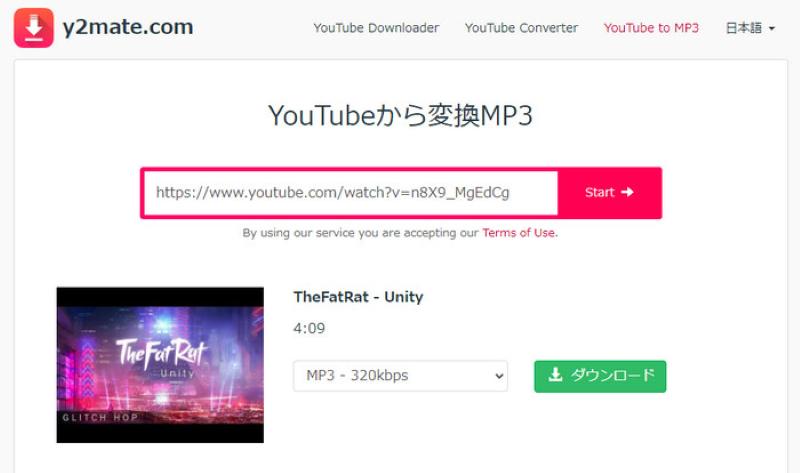
"Y2mate" supports audio up to 320kbps, but the free version may have limitations in sound quality. A paid plan is required for high-quality downloads. Also, clicking the download button may display an advertisement in a new tab, which can be a bit annoying. However, closing the ad immediately will not cause any particular problems.
Please note that the original Y2mate website has already been shut down, and many of the sites currently appearing at the top of search results for "Y2mate" are suspected to be fake sites or mirror sites impersonating the official site. Using these unofficial sites carries the risk of unintended malware infection and leakage of personal information, so caution is advised when using them.
If you are concerned about such restrictions,StreamByte for Video" is recommended. There are no advertisements, it is easy to use, and even beginners can download high-quality audio without stress. It is the best choice for those who place importance on sound quality and want to use it comfortably.
Browser extension "Video Download HelperUsing this tool, you can download audio from YouTube videos directly from your browser without installing any special software. It supports conversion to MP3 and MP4 formats, allowing you to save content from various video sites, including YouTube.
"Video DownloadHelper" is easy to use, and you can download only the audio from YouTube with just two clicks.
step 1:Search for "Video DownloadHelper" in the Firefox extension store and add it.
Step 2: Open the page of the YouTube video you want to download, click the browser extension icon, select the MP3 format from the menu that appears, and tap the "Download" button.
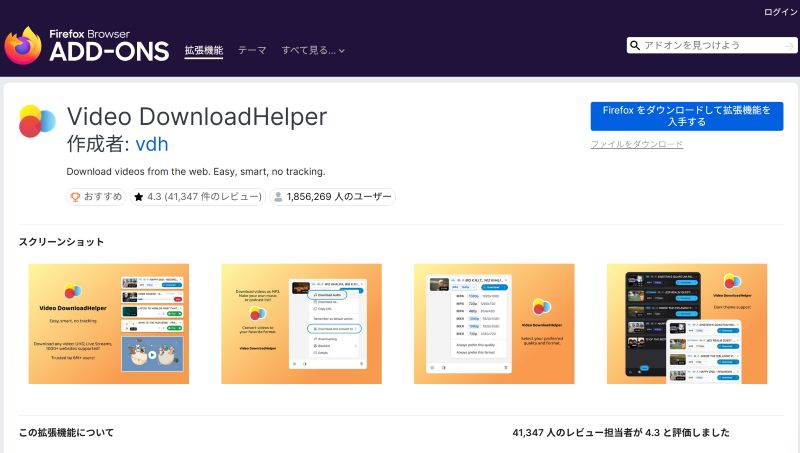
However, "Video DownloadHelper" is currentlyFirefoxIt is only compatible with , and cannot be used with Google Chrome. Also, there are many cases where it fails to detect videos, and it has the disadvantage that the stability of the environment for downloading audio from YouTube cannot be guaranteed.
For Google Chrome users and those looking for a stable YouTube audio download environment,StreamByte for Video" is a great choice for you to download YouTube audio in high quality, consistently and quickly.
If you want to download the audio from YouTube videos on your smartphone, you can use a dedicated app.
Apps like "YTD Video Downloader" allow you to convert and save YouTube videos in MP3 format on Android devices. "YTD Video Downloader" is a simple tool that allows you to extract audio simply by pasting the video's URL, and its ease of use on smartphones is a key feature.
step 1Launch the app and open the download screen.
Step 2Copy the URL of the target video from YouTube and paste it into the app.
Step 3Set the output format to MP3 and execute "Download".
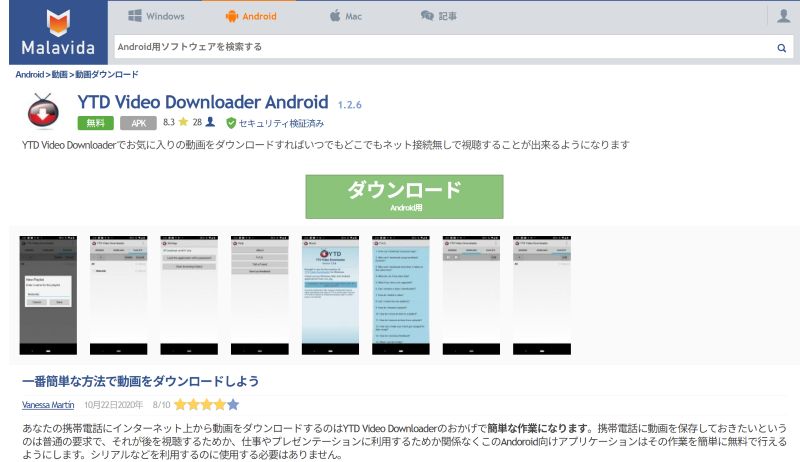
However, such apps may not be available on official app stores, and caution is needed regarding safety and terms of service during installation. Furthermore, they may display advertisements or exhibit unstable operation. Additionally, due to restrictions on app downloads on iPhones, using the same method may be difficult. iPhone users typically use online conversion sites via browsers such as Safari.
The advantage is that it can be easily used on a smartphone, but if you want to download high-quality audio in a more stable environment, you will need dedicated software for your PC.StreamByte for VideoUsing "[this method]" is recommended.
YouTube offers a wealth of content that can be used as audio, including music and educational materials. Downloading and converting only the audio as an MP3 file improves convenience, allowing you to enjoy your favorite audio content even offline.
Compared to video files, MP3 files, which contain only audio, are smaller in size, saving storage space on your device. This is especially advantageous in environments with limited storage capacity, such as smartphones and tablets.
Downloaded audio files can be played even without an internet connection. You can enjoy the content at your convenience, such as during your commute, while exercising, or whenever you like.
While YouTube usually has limitations on background playback, saving it as an MP3 allows you to play it freely on music players and other applications. The ability to enjoy the audio while using other apps is also a convenient feature.
By extracting audio from YouTube videos, you can use it as material for video production and presentations. It's also useful if you want to use it as background music or narration material.
When downloading audio from YouTube videos as MP3s, it's important to consider not only convenience but also safety and usage. Especially when using online sites or apps, understanding a few key points will help you avoid problems and use them safely.
While many tools exist that allow you to download YouTube audio, some may contain suspicious advertisements or unwanted files. When using such tools, it is important to check their reputation and track record and choose a reliable service.
Online sites may display advertisements or other pages during the download process. Clicking on them unintentionally may lead you to unintended websites, so caution is advised during the process.
Generally, you do not need to enter personal information when downloading audio from YouTube. If you are asked for your email address or credit card information, we recommend that you refrain from using the service.
Downloaded audio is intended for personal enjoyment only. Redistribution or commercial use of the content may violate the terms of service and copyright laws, so please be aware of this.
If you prioritize safety and ease of use, choose a service with fewer ads and stable performance.StreamByte for VideoBy choosing a dedicated software like this, you can download YouTube audio with greater peace of mind.
Related Posts:
No, it is not illegal in principle. The act of downloading YouTube audio for personal use is not considered illegal in itself. However, uploading the saved audio to SNS or using it for commercial purposes may result in legal issues. Please use at your own risk.
There are professional video download software and online tools available to convert YouTube videos to MP3. However, all of them have some limitations. If you want to download audio directly from YouTube without limitations, "StreamByte for Video" is the best choice. It has a stable download environment and simple operability, so even beginners can easily save YouTube audio.
The level of security varies greatly from site to site. While some services are trustworthy, others pose a risk of unintended malware infection due to excessive advertising or malicious pop-up ads. Particular caution is needed with fake sites and mirror sites that sprung up after the official site of the once-famous "Y2mate" was shut down. If you are concerned about security, use reliable software that thoroughly checks for viruses ("StreamByte for VideoWe recommend using (etc.).
The sound quality depends on the original YouTube video's audio quality and the settings of the conversion tool. Many free online conversion sites limit the bitrate to 128kbps or similar, making it difficult to save in high quality. If you want to save in high-quality MP3 format such as 320kbps, be sure to check the audio quality settings before converting. Furthermore, for those who insist on lossless audio or do not want to tolerate any degradation in sound quality, using specialized software designed for high-quality downloads will allow you to extract clear audio that is as close as possible to the original video.
Yes, it's possible. However, the level of support varies depending on the tool used. Most general online sites have limitations due to server load, such as "converting long videos takes a long time" or "they don't support bulk downloads of playlists." If you want to process multiple videos at once, or extract audio from long live stream archives, using dedicated software without such limitations is more efficient.StreamByte for VideoWith this, you can complete tasks without stress, as it supports playlist analysis and long videos.
There are various ways to save YouTube videos as audio files such as MP3s, including online sites, browser extensions, and dedicated software. While some methods are easy to use, you should be aware of potential issues such as advertisements, unstable operation, and sound quality limitations.
If you want to download YouTube audio reliably and in high quality, using dedicated software is a more suitable option.StreamByte for VideoIts key feature is its ability to directly extract audio tracks from YouTube videos and save them smoothly in formats such as MP3.Audio only download / Audio languageYou can freely adjust the settings, and you can save the audio from YouTube videos in your preferred format on your PC. In addition, there are no advertisements and the operation is simple, so even beginners can use it easily.
If you want to save YouTube audio with as little hassle as possible, try the free trial version of "StreamByte for Video" to experience its ease of use for yourself.
100% safe, virus-free
100% safe, virus-free
Born in Tokyo in 1997. After graduating from a university in London, he worked at a major IT media company, writing articles about video streaming services, video downloaders, and digital content.More than 3 years of experience in editing, proofreading, and writing directionThe articles he has worked on have garnered over 5 million page views, and he is well-known for producing content that is carefully crafted from the reader's perspective.
Currently, as an editor and web writer at StreamByte, he works on creating articles that help users solve their problems, focusing on information related to video streaming services and downloads, with the aim of being "user-oriented, easy to understand, and immediately useful."
Experts in supporting offline viewing of streaming video services
Subscribe to StreamByteCopyright © 2026 StreamByte. All rights reserved.



Get the latest news, product upgrades, information, guides, discounts and more about StreamByte.
Please enter a valid email address.

A highly capable video downloader:
StreamByte for Video
Even beginners can rest assured! You can try saving videos for free first!







 English
  Japanese
  Chinese (traditional)
  German