
- Online video downloader
- Streaming Products
- BD-DVD products
- Store
- Useful Articles
- support
Share this article!


Disney+ is Disney's official subscription-based video streaming service, offering a wealth of exclusive, high-quality content that can only be viewed there. Many users want to enjoy Disney+ videos offline, but a significant number are unsure how to do so.
This article provides a clear explanation of how to download Disney+ videos for offline playback. Furthermore, we'll reveal a secret trick for unlimited offline playback of Disney+ content, so please read to the end.
Related Posts:
The official Disney+ app allows you to download videos to your device for offline viewing. However, a valid Disney+ subscription is required to use the download function, and there are some restrictions on downloading and playback. Therefore, we've summarized some important points to keep in mind when using the Disney+ download function.
Now that we've briefly introduced some points to keep in mind when using Disney+'s download function, let's go over how to play Disney+ content offline using the official download function in detail. The specific steps are as follows. Please try downloading while referring to the points to keep in mind when using Disney+'s download function.
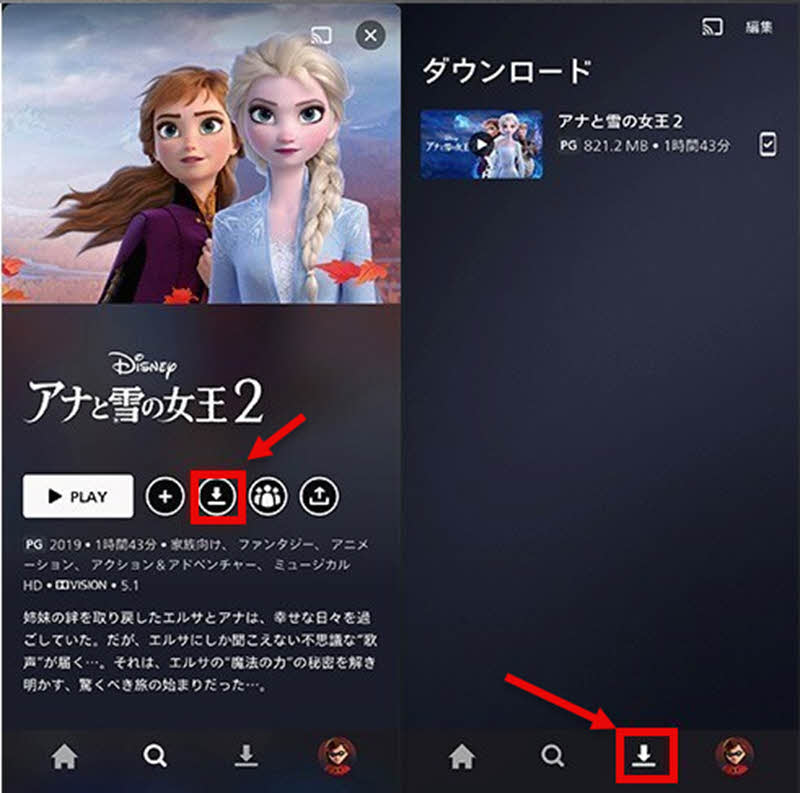
step 1Open the Disney+ app and go to the details page of the title you want to download. Downloadable titles include..."Download" buttonThis is displayed.
Step 2,"Download" buttonTapping it will automatically add it to your download list and start the download. Depending on your internet connection and video quality settings, it may take some time to complete.
Step 3Once the download is complete, you can find it in the menu at the bottom of the screen."download"Tapping the icon will allow you to view your downloaded content. This will enable you to play your saved Disney+ content offline.
The above provided a detailed explanation of how to play Disney+ content offline using the official download function. However, the official download function has many limitations and cannot be used on a computer. So, is there a way to play Disney+ content offline without any restrictions?
Therefore, I recommend this trick that allows you to play Disney+ videos offline without restrictions: StreamByte for VideoThis software allows you to permanently save Disney+ content and watch it offline anytime, anywhere. Even after your Disney+ subscription ends, you can still enjoy your saved videos. Furthermore,DRM protection removalThe functionality allows you to freely manage and move saved files, making it possible to transfer them to a USB drive or other device for playback on other devices.
StreamByte for Video
This is a video downloader that supports major streaming services such as Netflix, Amazon Prime, and YouTube. You can save and enjoy your favorite videos with high image quality up to 8K and Dolby Atmos audio.
"Why we recommend StreamByte for Video"
HereStreamByte for VideoThis guide explains how to download Disney+ content for offline playback using [this method].
step 1After registering for "StreamByte for Video," select "Disney+" from the list of streaming services displayed on the main screen and log in with your account.
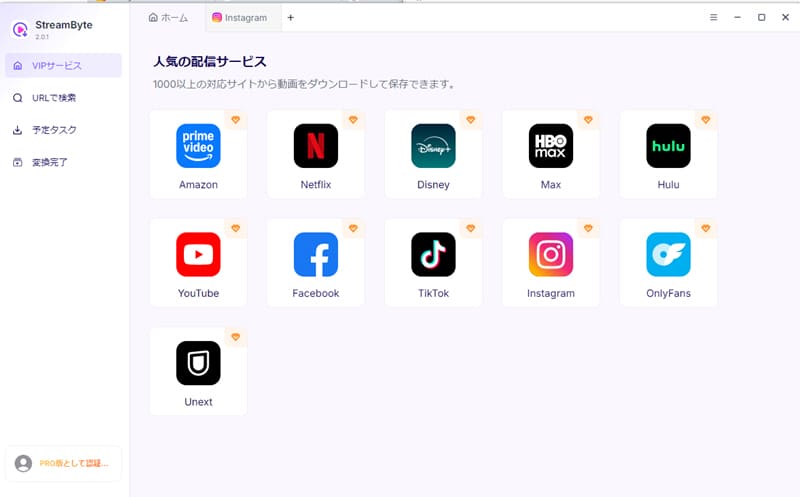
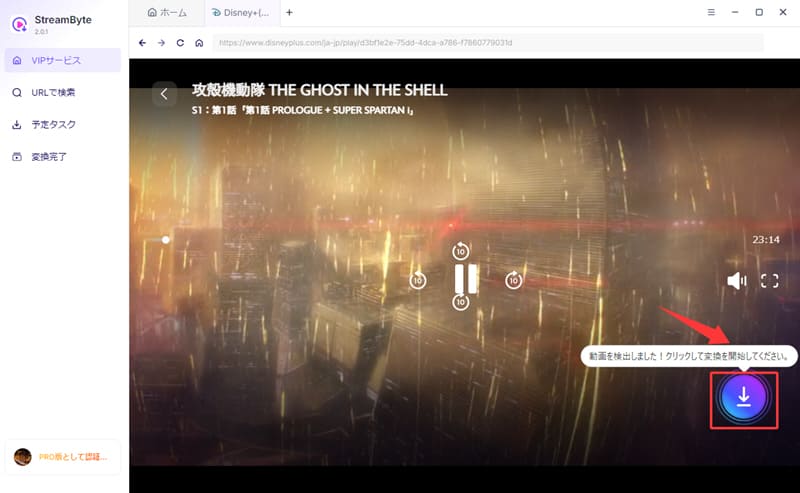
Step 2Open the page of the video you want to play offline, and the option will appear in the upper right corner.Blue download iconClick it. This will add the video to your download list.
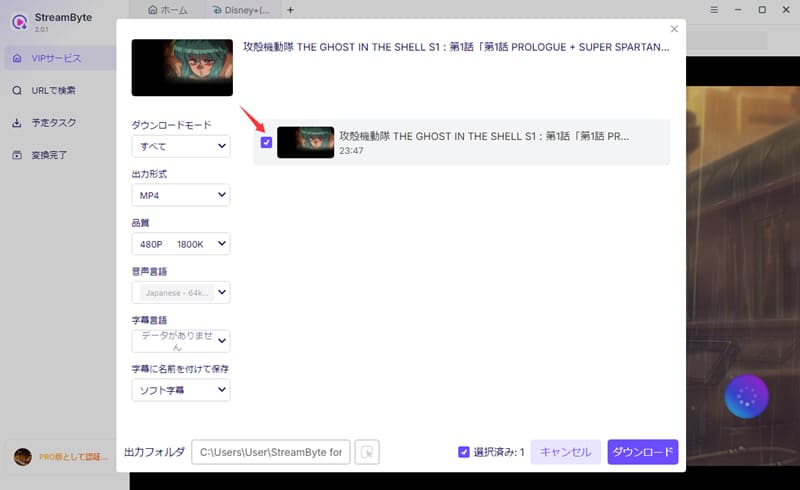
Step 3Then, on the download settings screen, select your preferred output format, audio, subtitles, etc. Once the settings are complete, click in the bottom right corner."download"Click the button.
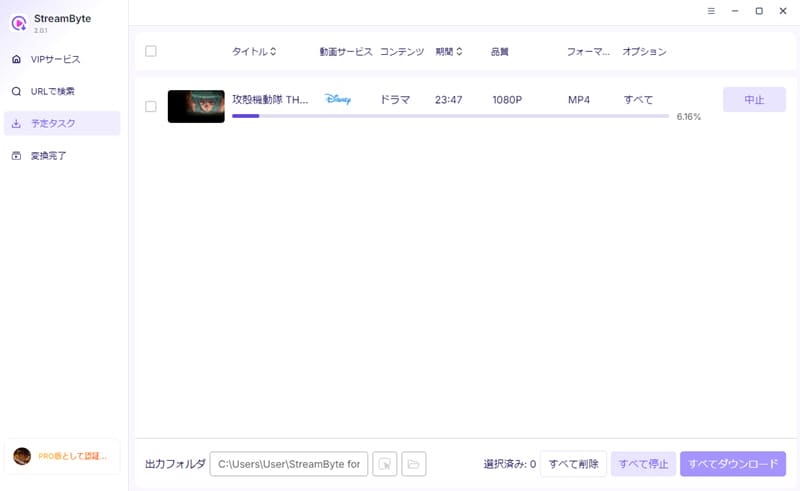
Step 4Pressing the "Download" button will start the video download. You can check the progress on the "Scheduled Tasks" screen. This will allow you to download Disney+ videos and play them offline.
"StreamByte for VideoWith this app, you can easily download Disney+ videos and play them offline. Its powerful DRM removal feature allows you to save Disney+ videos in common formats such as MP4, MKV, and MOV. This allows you to freely transfer and play them on your preferred device, such as a smartphone or tablet. Furthermore, it features a built-in web player, providing a smooth viewing experience even during downloads, just like the official app.
100% safe, virus-free
100% safe, virus-free
Disney+ allows you to watch downloaded content offline during your subscription period, provided you downloaded it before canceling. However, once your subscription ends, you will no longer be able to play downloaded content offline. If you want to permanently save your Disney+ content and play it offline anytime, you will need dedicated video download software.StreamByte for VideoWe recommend using ".
When downloading Disney+ content for offline playback, the required data size varies depending on the length and quality of the content. You can choose from "Standard," "Medium," and "High" quality. As a guideline, Standard quality requires approximately 0.5GB per hour, Medium quality requires about 1.5-2GB, and High quality requires about 3-4GB. For example, downloading a two-hour movie in HD quality will require approximately 3-4GB of storage, so it's recommended to check your device's available storage space before downloading.
There are several reasons why you might not be able to play content downloaded from Disney+. The main reasons are as follows:
This article first introduced Disney+'s official download function and then explained in detail how to use it for offline playback. However, this method has various limitations, including the fact that it cannot be used on a computer. Therefore, as a workaround to play Disney+ offline without any restrictions,StreamByte for Video" was introduced.
This software allows you to access Disney+ content.Save to your computer without restrictionsYes, you can. Its powerful DRM removal feature allows you to save in common formats like MP4, giving you the freedom to manage and edit your content. You can still play your content even after canceling your Disney+ subscription, and the 1080p high-definition quality will meet the needs of many users. This allows you to permanently save your Disney+ content and play it offline anytime, anywhere.
"StreamByte for Video"forFree trialThis feature is also available, so if you want to watch Disney+ offline, please give it a try.
100% safe, virus-free
100% safe, virus-free
Born in Tokyo in 1997. After graduating from a university in London, he worked at a major IT media company, writing articles about video streaming services, video downloaders, and digital content.More than 3 years of experience in editing, proofreading, and writing directionThe articles he has worked on have garnered over 5 million page views, and he is well-known for producing content that is carefully crafted from the reader's perspective.
Currently, as an editor and web writer at StreamByte, he works on creating articles that help users solve their problems, focusing on information related to video streaming services and downloads, with the aim of being "user-oriented, easy to understand, and immediately useful."
Read more articles together

Experts in supporting offline viewing of streaming video services
Subscribe to StreamByteCopyright © 2026 StreamByte. All rights reserved.



Get the latest news, product upgrades, information, guides, discounts and more about StreamByte.
Please enter a valid email address.

A highly capable video downloader:
StreamByte for Video
Even beginners can rest assured! You can try saving videos for free first!







 English
  Japanese
  Chinese (traditional)
  German