
- Online video downloader
- Streaming Products
- BD-DVD products
- Store
- Useful Articles
- support
Share this article!


Since its implementation on TikTok, TikTok Stories has been widely used by many users as a feature that allows for quick and easy sharing. However, the fact that they automatically disappear after 24 hours, while convenient, can be inconvenient for users who want to revisit them later. Therefore, there is a growing need to save favorite TikTok Stories so that they can be enjoyed anytime.
This article will provide a clear and detailed explanation of various methods for saving TikTok Stories. Please read to the end.
Related Posts:
TikTok Stories is a short-lived content feature implemented by TikTok in 2022 that automatically disappears 24 hours after posting. It allows users to share everyday moments and casual scenes with their followers, making it particularly suitable for younger users and those who want to easily share small everyday events.
This feature has led to increased interaction in short bursts, as well as improved real-time responses and attention. Unlike regular timeline posts, its appeal lies in its ease of use and the ability to share everyday snapshots as they are—a new form of communication.
Fun fact: Reasons why you might not be able to see TikTok Stories
If you can't see TikTok Stories, the first thing to check is whether 24 hours have passed since the post was made. TikTok Stories are automatically deleted 24 hours after they are posted, so if that time has already passed, you won't be able to view them.
Furthermore, the privacy settings that the poster has set are also an important point."friend"or"Only myself"If this setting is enabled, users who are not included in that range will not be able to view the story, which may cause it to not be displayed.
If you want to save TikTok stories, the first thing I would recommend is a dedicated video download software.StreamByte for Video"is.
This software allows you to permanently save TikTok Stories without a logo, while also preserving the original video quality as much as possible. Furthermore, the built-in web player lets you access the web version of TikTok directly from within the program, allowing you to complete everything from searching to saving with a single tool. This significantly saves time while providing an experience similar to the official feature.
Why StreamByte for Video is recommended
Here, "StreamByte for VideoThis explains how to easily save TikTok stories using [this method].
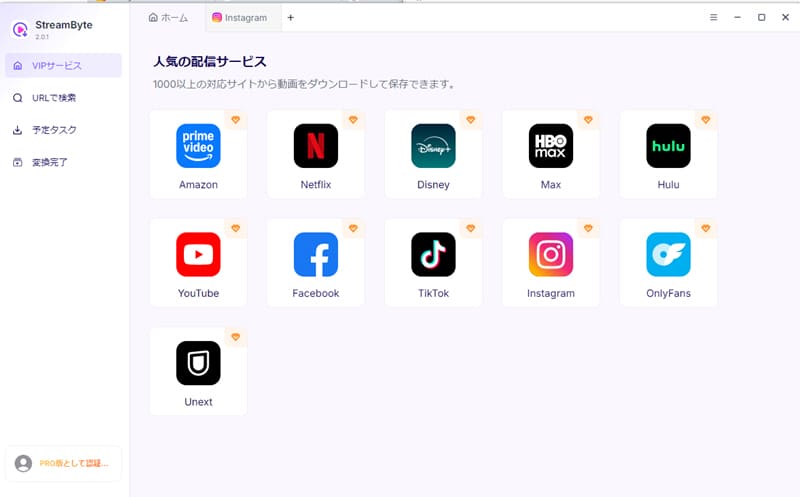
step 1"StreamByte for Video"RegistrationThen, a list of popular streaming services, including TikTok, will be displayed on the main screen. Select TikTok from the list.
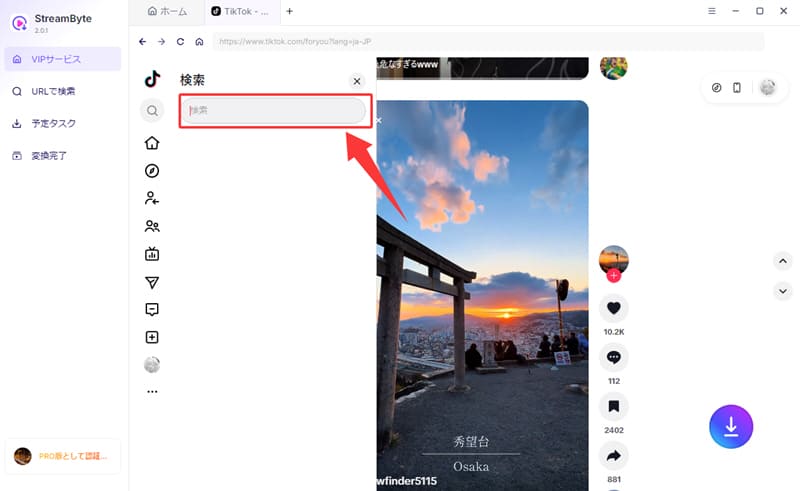
Step 2, TikTokLog inAfterward, search for or find the TikTok story you want to save from the list.
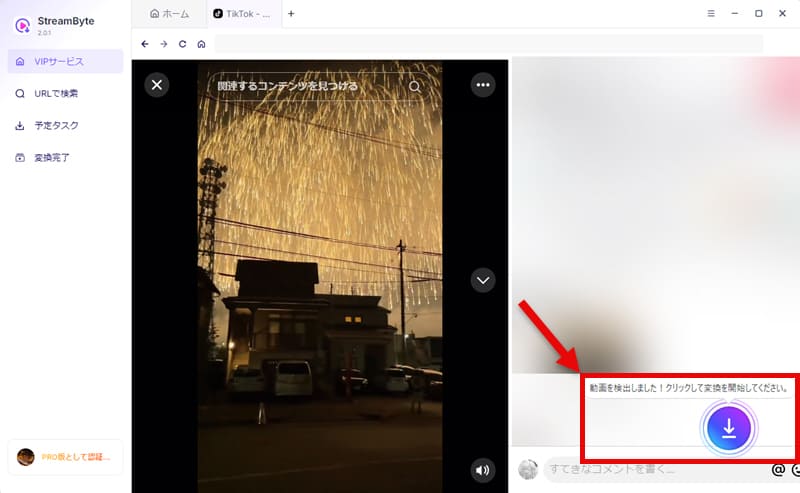
Step 3Once you find the TikTok story you're looking for, click the download icon that appears on the screen.Download ListAdd to this.
Step 4Then, adjust various settings such as output format, audio track, and subtitles as needed. After completing the settings, click in the bottom right corner."download"Clicking the button will start the process of saving your TikTok story.
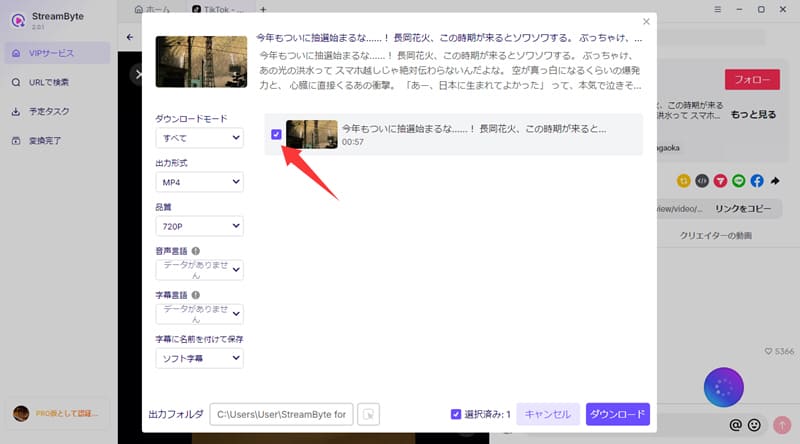
Step 5The download progress is"Scheduled Tasks" tabYou can check it in real time. After processing is complete, the video will automatically"Conversion Complete" tabMove to the output folder, and your TikTok story will be saved there.

"StreamByte for VideoUsing this software, you don't have to worry about download restrictions on TikTok Stories, and you can save them without the logo. Simply follow the steps above to easily save TikTok Stories to your device. Furthermore, it supports processing up to 8 times faster while maintaining high image quality, so even 1080p videos longer than one minute can be saved in just over ten seconds. If you're struggling to find a way to save TikTok Stories, this software is definitely worth trying.
100% safe, virus-free
100% safe, virus-free
Saving TikTok Stories using the official TikTok app features is a relatively easy and simple method. However, whether or not a story can be saved depends on the poster's settings; if download permission is turned off, it cannot be saved using the official features. Also, it's important to note that TikTok Stories saved using the official features often have a watermark of the poster's logo or name.
Now, let's explain how to save TikTok Stories using the official features.
step 1Open the TikTok app and find the TikTok story you want to save.
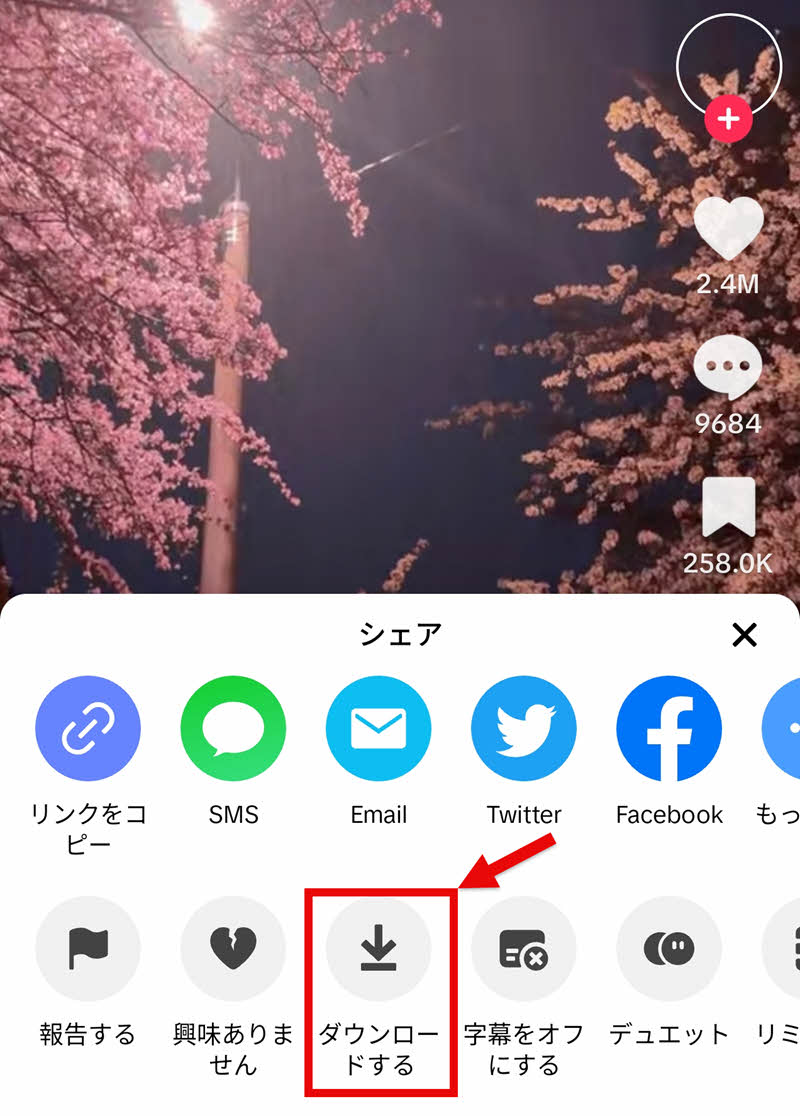
Step 2, in the lower right corner of the screenShare buttonTap, and from the pop-up menu..."download"Select
Step 3Once the download process is complete, TikTok Stories will be automatically saved to your smartphone's photo album.
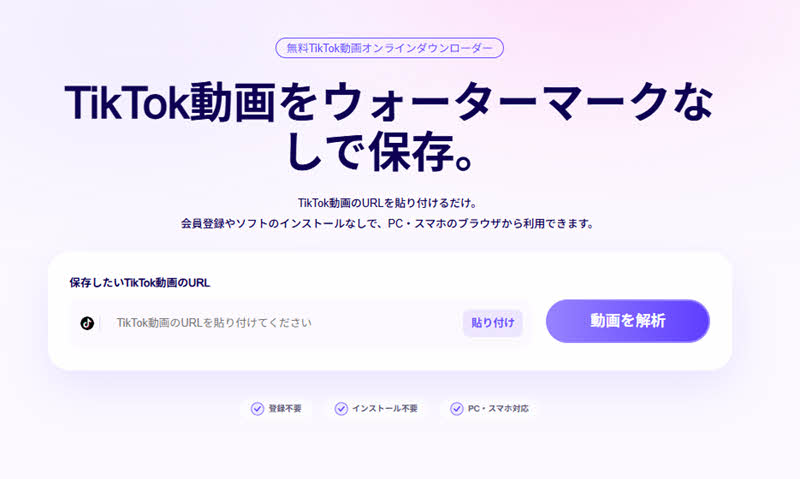
Currently, StreamByte has a dedicatedTikTok video online download toolWe offer this service. Therefore, it is one of the best options for those who want to save TikTok stories using an online site that does not require registration or installation. StreamByte's online tool analyzes and downloads faster than other similar tools, achieving a high success rate. Image quality is also well maintained, allowing you to smoothly save high-quality videos.
Here's how to save TikTok stories using StreamByte's online tool.
step 1To save a TikTok story, view the story you want to save and tap "Copy Link" from the "Share" menu to get the video URL.
Step 2Next, paste the copied URL into the input box on StreamByte's TikTok video download page and click the "Analyze Video" button.
Step 3Once the video analysis is complete, select the download button. Then, right-click on the displayed video and select "Save video as" to specify the save location. On smartphones and tablets, after pressing the download button, long-press the video playback screen and select "Download video" to save it.
To help you easily compare the different ways to save TikTok Stories, we've summarized the advantages and disadvantages of each method in the table below. Please use this as a reference when choosing a saving method.
| Official Features | StreamByte for Video | StreamByte Online TikTok Downloader | |
| Download Limit | can be | none | none |
| Download speed | usually | Up to 8 times faster | usually |
| advertisement | none | none | can be |
| success rate | expensive | expensive | Somewhat unstable |
| image quality | Lossless | Lossless | A little low |
| Safety | expensive | expensive | expensive |
| Recommendation | 4 stars: ★★★★ | 5 stars: ★★★★★ | 4 stars: ★★★★ |
As you can see from the comparison table above, TikTok's official feature is suitable for users who prioritize safety and want to easily save only supported stories. However, there are certain limitations on the content that can be downloaded, so it's not possible to save all TikTok stories.
Therefore, if you want to download TikTok stories without worrying about storage limits, it is recommended to use online sites or dedicated download software. However, online sites often have many advertisements, and there may be concerns about the success rate and security of downloads.
on the other hand,"StreamByte for VideoThis app not only offers a comfortable, ad-free experience, but also boasts high security and stable download performance. Furthermore, it supports high-speed downloads, making it an even better choice for those who want to efficiently save TikTok stories.
100% safe, virus-free
100% safe, virus-free
Even when using the official download function, online sites and dedicated software "StreamByte for VideoEven if you save using this method, the original poster will not be notified. Therefore, you don't have to worry about the other person finding out that you've saved it, and you can use it for personal use with peace of mind.
Saving TikTok Stories is generally fine for personal use. However, distributing or reposting saved content without permission may infringe on copyright and portrait rights, and you may be held legally responsible. When using TikTok Stories, be sure to comply with the laws and regulations of your local area.
When saving TikTok Stories using the official save function, the reason music is often missing is because the music used in the video is commercial music. Due to copyright protection, the audio of the saved video is automatically cut off, resulting in silence. If you want to save such TikTok Stories with music, you will need dedicated software that supports DRM removal.StreamByte for VideoYou will need to use "[this]".
This article provides an overview of TikTok Stories and explains various saving methods in detail. While the official saving function has limitations, online sites have drawbacks such as instability and excessive advertising. On the other hand, dedicated download software...StreamByte for VideoThis is a promising option for a more stable preservation method.
This software allows you to save TikTok Stories without a logo, while maintaining the highest possible image quality. Furthermore, its high success rate and ad-free environment ensure a smooth download experience. With a built-in browser, you can complete the entire process from searching to saving with a single tool, leading to increased productivity.
"StreamByte for VideoA free trial version is also available, so if you want to save TikTok stories, please give it a try!
100% safe, virus-free
100% safe, virus-free
Born in Tokyo in 1997. After graduating from a university in London, he worked at a major IT media company, writing articles about video streaming services, video downloaders, and digital content.More than 3 years of experience in editing, proofreading, and writing directionThe articles he has worked on have garnered over 5 million page views, and he is well-known for producing content that is carefully crafted from the reader's perspective.
Currently, as an editor and web writer at StreamByte, he works on creating articles that help users solve their problems, focusing on information related to video streaming services and downloads, with the aim of being "user-oriented, easy to understand, and immediately useful."
Read more articles together



Experts in supporting offline viewing of streaming video services
Subscribe to StreamByteCopyright © 2026 StreamByte. All rights reserved.



Get the latest news, product upgrades, information, guides, discounts and more about StreamByte.
Please enter a valid email address.

A highly capable video downloader:
StreamByte for Video
Even beginners can rest assured! You can try saving videos for free first!







 English
  Japanese
  Chinese (traditional)
  German