
- Streaming Products
- BD-DVD products
- Store
- Useful Articles
- support
Share this article!


YouTube is a globally popular streaming service offering a wide variety of video content. For those who want to watch their favorite videos anytime, anywhere, on their car navigation system or TV, saving YouTube videos to a USB is a very convenient method. However, many people don't know the exact steps to actually save YouTube videos to a USB.
So in this article, we'll explain in detail how to easily save YouTube videos to a USB. We've made it easy to understand so that even beginners can quickly understand, so please read to the end.
Related Posts:
Why do so many people want to save YouTube videos to a USB? In fact, saving YouTube videos to a USB has many benefits, not only for personal use but also in terms of convenience and practicality. Here are the main benefits:
Videos saved using YouTube's official download function are usually subject to digital copyright management. Therefore, the videos are saved in an encrypted state and cannot be moved, copied, or saved freely. As a result, YouTube videos cannot be easily saved to a USB.Bypass DRM restrictionsIs there a way to do this?
So, I would like to introduce a dedicated video download software that supports DRM restrictions, "StreamByte for VideoThis software allows you to save YouTube videos to common video formats such as MP4. By saving videos in a common format, you can edit, manage, and even move them to a USB drive without any restrictions. With a stable internet connection, a working PC, and a USB memory stick, you can easily save YouTube videos to a USB drive.
100% safe and virus free
100% safe and virus free
Why StreamByte for Video is recommended
Precautions to take before saving to USB
Here, "StreamByte for VideoWe will explain how to use " to easily download YouTube videos.
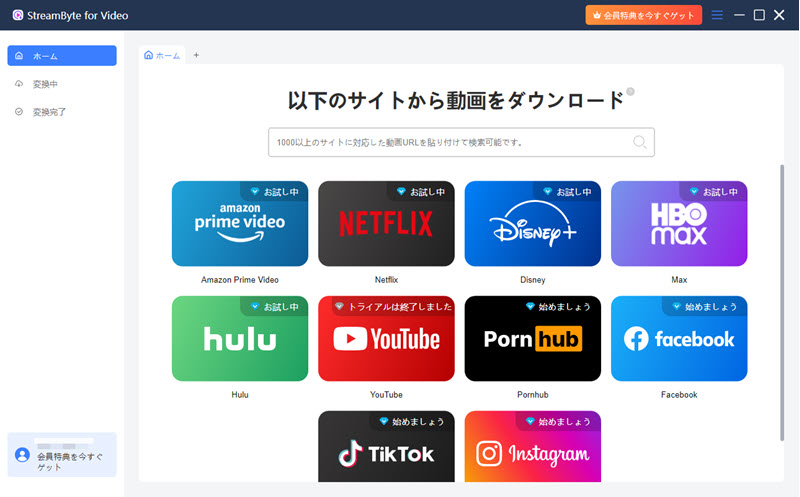
step 1"StreamByte for Video"RegistrationThen, select YouTube on the main screen of the software and log in with your YouTube account.
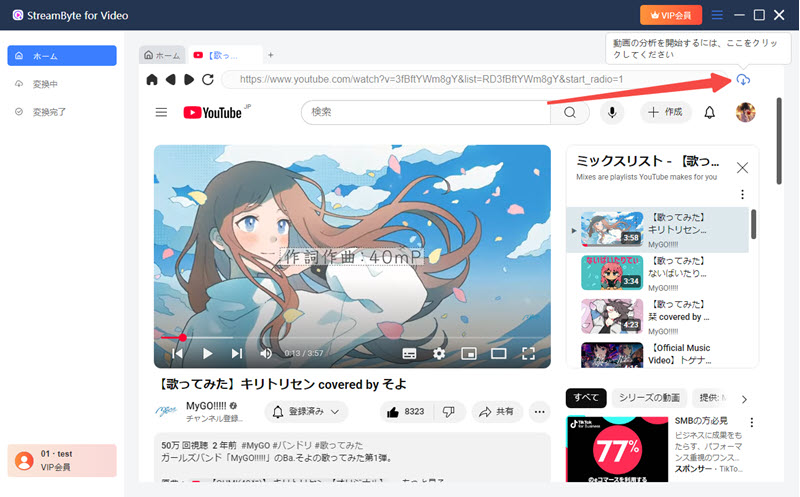
Step 2When you find a video you want to save,Top right iconClick to add the video to your download list.
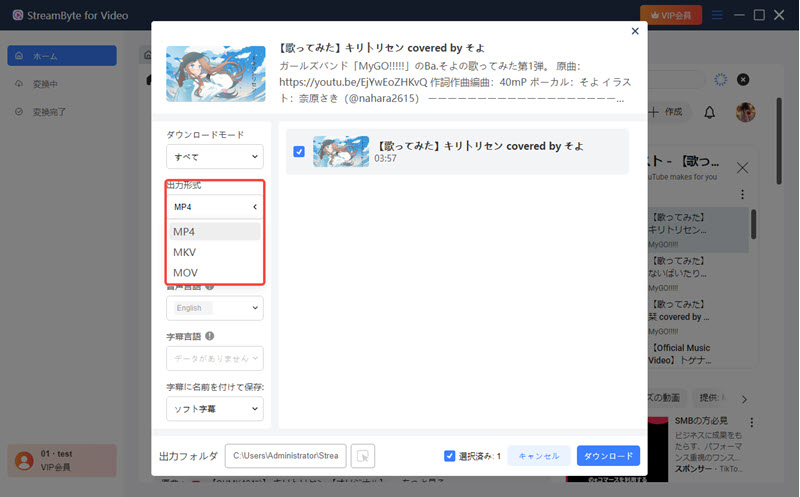
Step 3You can change the video output format, audio, subtitles, and other settings as needed.
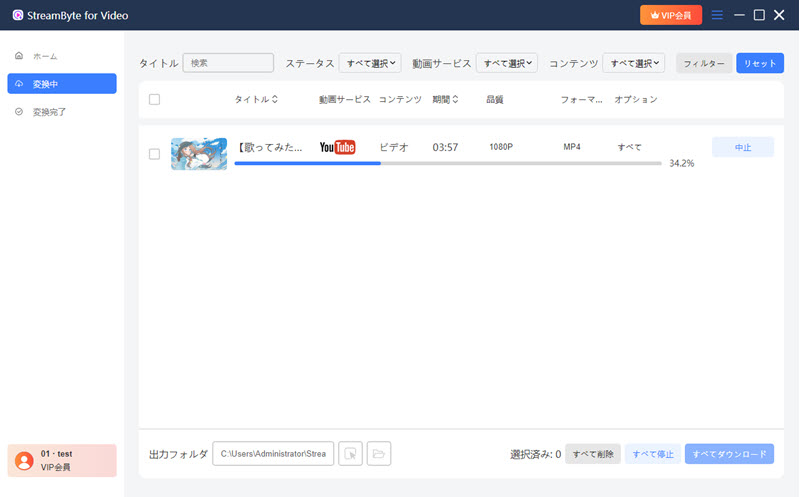
Step 4, after changing the settings, click"download"Clicking the button will start downloading your video. You can follow the download progress on the "Conversion in Progress" screen. Once the download is complete, your video will automatically move to the "Conversion Complete" screen, where you can immediately view your saved file.
Step 5Finally, connect the USB memory to your computer.Videos downloaded to your computerTransfer the file to a USB memory stick and you're done.
"StreamByte for VideoWith this software, you can save YouTube videos to your computer in up to 8K high-definition. Furthermore, thanks to its powerful DRM removal function, you can freely move and manage saved videos without encryption restrictions. This also makes transferring videos to USB memory smooth. This software also features a simple and easy-to-understand interface, making it intuitive even for beginners. If you're having trouble saving YouTube videos to USB, give it a try.
100% safe and virus free
100% safe and virus free
There are several reasons why you may not be able to play YouTube videos stored on a USB drive on your car navigation system, but the following three are the main reasons:
first,Unsupported file formatsMany car navigation systems only support common formats such as MP4 and AVI, so first check whether the video file format saved on the USB is supported by your navigation system.
Next, even if the file format is supported,Codec IssuesEven if the file is in the same MP4 format, compatibility may vary depending on the codec used, so please be aware of this.
lastly,High image quality and bit rateThis is one of the reasons. Because car navigation systems have limited processing power, high-quality, high-bitrate videos may not be able to withstand the playback load and may not play. In this case, we recommend lowering the image quality and saving the video again.
YouTube Shorts can be saved to a USB. However, like regular YouTube videos, they cannot be transferred directly to a USB from the official app. Therefore, to save them, you need toStreamByte for VideoYou will need to use dedicated video download software such as ".
It's also important to note that YouTube Shorts are vertical video formats, which means that they have different specifications than regular horizontal videos, and so when playing them on devices like car navigation systems and TVs, various playback issues may occur.
Saving YouTube videos to a USB drive is not necessarily illegal. However, downloading copyrighted videos without the permission of the rights holder may violate copyright law. In particular, saving commercially available movies or music content without permission or distributing it to third parties may be considered a violation of the law, so caution is advised.
On the other hand, there are not many cases where you will be held legally responsible for saving content for personal use. However, copyright regulations vary by country and region, so it is important to check the specific legal provisions that apply in your area.
You cannot directly transfer YouTube videos to a USB memory stick from the official YouTube website or app. This is because many YouTube videos are DRM protected. The official download function is limited to saving within the app, and you cannot freely move or manage video files. Therefore, if you want to save YouTube videos to a USB stick, you need to use the "StreamByte for VideoYou will need to use dedicated video download software such as ".
There are several possible reasons why a USB drive may not be recognized, but the main three are as follows:
First, there may be a loose connection in the USB port. In this case, try plugging it into a different USB port or unplugging it and then plugging it back in firmly.
Next, the USB memory itself may be faulty. If it is not recognized even when connected to another computer, the USB memory itself may be faulty.
Finally, it may be that the driver is not installed correctly. In this case, we recommend reinstalling the driver from Device Manager and then trying to connect again.
In this article, we first explained in detail the benefits of saving YouTube videos to USB. However, since many YouTube videos are DRM protected, saving them to USB requires not only a USB memory stick and a stable internet connection, but also a specialized video download tool. So, we would like to introduce a secret tool called "StreamByte for Video"is.
This software allows you to download YouTube videos to your computer and store them locally, allowing you to move and manage your video files freely. By transferring them to a USB memory stick, you can easily play them on your smartphone or car navigation system. You can also download YouTube videos in up to 8K high-definition and store them for long-term storage. You can use it with peace of mind, knowing that the image quality will be excellent.
"StreamByte for Video" offers a free trial version, so if you want to easily save YouTube videos to a USB, please feel free to give it a try!
100% safe and virus free
100% safe and virus free
Born in Tokyo in 1997. After graduating from a university in London, he worked at a major IT media company, writing articles about video streaming services, video downloaders, and digital content.More than 3 years of experience in editing, proofreading, and writing directionThe articles he has worked on have garnered over 5 million page views, and he is well-known for producing content that is carefully crafted from the reader's perspective.
Currently, as an editor and web writer at StreamByte, he works on creating articles that help users solve their problems, focusing on information related to video streaming services and downloads, with the aim of being "user-oriented, easy to understand, and immediately useful."
Experts in supporting offline viewing of streaming video services
Subscribe to StreamByteCopyright © 2026 StreamByte. All rights reserved.



Get the latest news, product upgrades, information, guides, discounts and more about StreamByte.
Please enter a valid email address.











 English
  Japanese
  Chinese (traditional)
  German