
- Online video downloader
- Streaming Products
- BD-DVD products
- Store
- Useful Articles
- support
Share this article!


Instagram has many videos and photos that cannot be saved directly within the app. Therefore, many people use screen recording to save them. However, a common concern when using screen recording is whether the other person will find out. In fact, many questions have been raised on sites like Yahoo! Answers regarding whether the other person is notified if their Instagram story is screen recorded or screenshotted.
This article will explain in detail when screen recording Instagram might reveal your activity, whether or not notifications are sent, and precautions to take when screen recording. Furthermore, we will also introduce methods for saving Instagram videos without the other person knowing, so please read to the end.
Related Posts:
Conclusion first
If you screen record your Instagram feed, there's a chance the other person will find out. This depends on the content you're recording; some content, especially photos and videos that disappear after a while, may trigger notifications or display alerts. While there are ways to minimize the risk of being caught screen recording, it's impossible to completely eliminate the possibility of being discovered.
If you want to save Instagram videos more easily and safely, use the dedicated video downloader "StreamByte for VideoWe recommend using "[this method]". Since it allows you to save videos without using screen recording, you can save Instagram videos without worrying about notifications from recording.
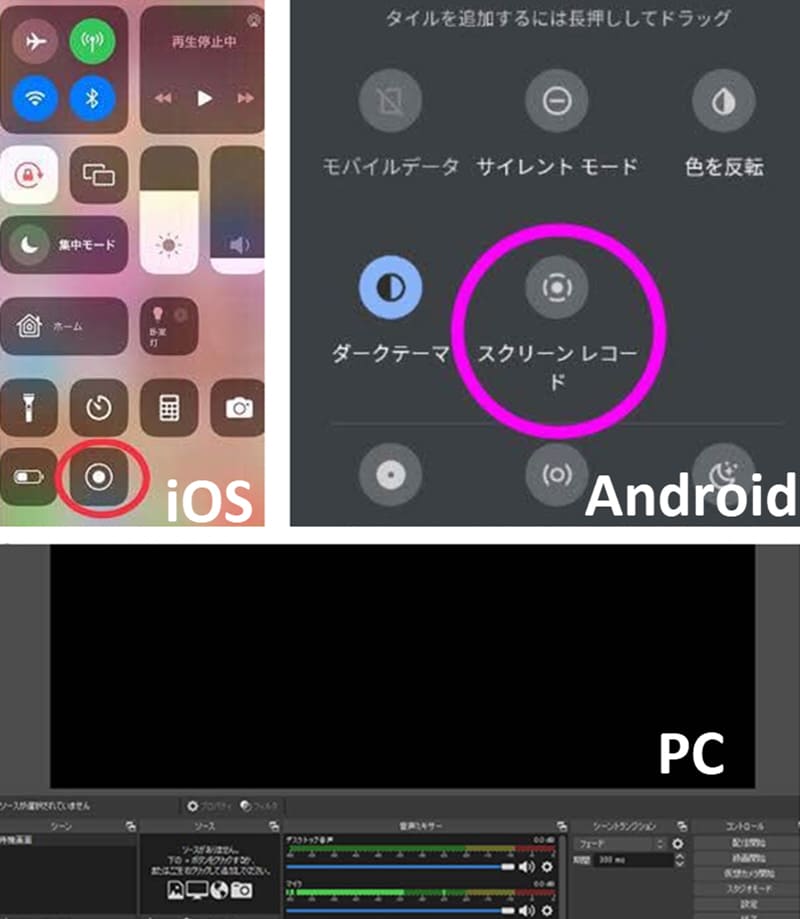
The method for screen recording Instagram varies depending on the device you use. On iPhones and Android smartphones, you can easily record Instagram videos and photos using the built-in screen recording function. On the other hand, when screen recording Instagram on a computer (Windows, Mac, etc.), you can use not only the built-in recording function but also recording software like OBS Studio or browser extensions. As you can see, screen recording Instagram is easy on a variety of devices.
After reviewing common methods for screen recording on Instagram, the next concern is whether the other person will find out. Many people worry about whether recording content like stories or direct messages will result in a notification. The next section will detail cases where screen recording on Instagram will reveal your activity, and which types of content can be screen recorded without being detected.
Whether or not someone will find out when you screen record their Instagram depends on the type of content you are recording.
Screen recording regular content such as feed posts, Reels, and Stories generally does not notify the poster. However, if you screen record a disappearing photo or video sent via DM with "View Once" or "Allow Replay," or content within "Disappearing Message Mode," the sender may be notified. Therefore, when screen recording Instagram content, it is important to check what type of content you are recording beforehand. The table below summarizes the types of content that may result in a notification and the types of content that can be recorded normally.
| content | The possibility of being found out |
| Contents within the "disappearing message mode" of DMs | can be |
| Disappearing photos and videos sent via DM | can be |
| Regular DM | none |
| Instagram Live | none |
| Instagram Story | none |
| Instagram post | none |
| InstaReel | none |
"Disappearing Message Mode" is a feature that allows you to temporarily view messages, photos, videos, and other content sent and received via Instagram Direct Messages (DMs). Content sent in this mode disappears once you close the chat window after reviewing it, making it a more private feature than regular DMs.
The Instagram app has a feature that can detect actions that save content within the disappearing messages mode. If a user takes a screenshot or screen-records the screen while in this mode, the Instagram app may detect the capture operation and notify the other person. In other words, screen-recording Instagram is one of the most common ways in which the other person might find out.
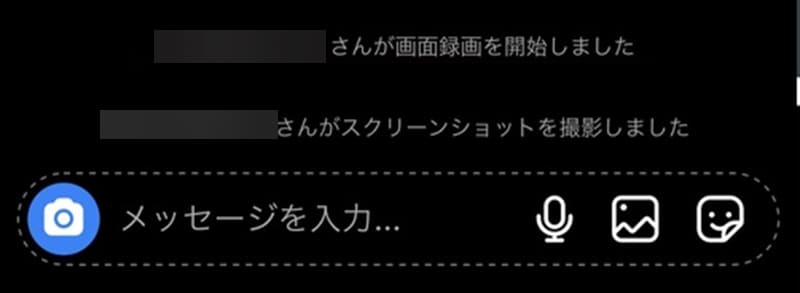
Additionally, "disappearing photos and videos" are a special sending feature available in Instagram's direct messages (DMs), allowing you to send photos and videos that the recipient can only view once. Unlike photos and videos sent via regular DMs, these automatically disappear after viewing, making them content that requires a higher level of privacy protection.
These disappearing photos and videos are also types of content that could be detected if you screen record them on Instagram. Instagram has a system in place to protect this content by detecting screen capture operations such as screenshots and screen recordings. Therefore, if you screen record the photos or videos in question, the Instagram app may detect the operation and a notification may be displayed to the sender.
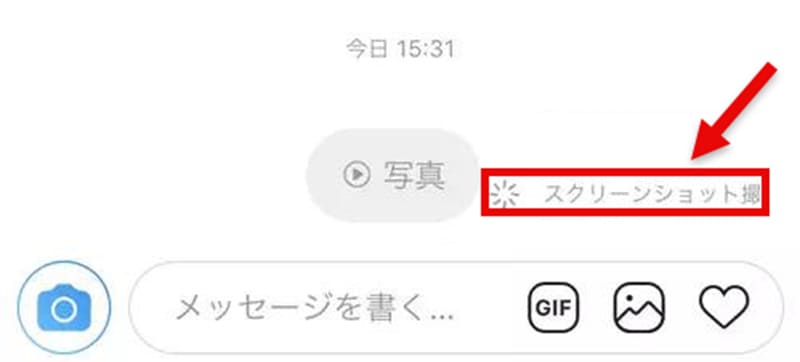
These disappearing photos and videos are also types of content that could be detected if you screen record them on Instagram. Instagram has a system in place to protect this content by detecting screen capture operations such as screenshots and screen recordings. Therefore, if you screen record the photos or videos in question, the Instagram app may detect the operation and a notification may be displayed to the sender.
In the previous section, we discussed content that will reveal your screen recording on Instagram and content that won't. However, in practice, it can be difficult to determine which content is being screen recorded. Therefore, we will introduce some tips to minimize the risk of being caught screen recording Instagram. If you want to save Instagram videos, please refer to this before screen recording.
If you're worried about the other person finding out if you screen record your Instagram, you can record the video using a different device. Normally, the Instagram app detects screen recordings and screenshots on the device running Instagram. Therefore, if you use the camera of another device, such as a smartphone or tablet, to record the screen, Instagram will not be notified that you are screen recording.
This method allows you to save videos without worrying about notifications when you screen record Instagram. However, if you record on a different device, the image and sound quality may be lower compared to directly recording the screen, so be careful if you want to save videos in high quality.
Turning on airplane mode is one way to prevent the other person from being notified when you screen record your Instagram. This reduces the risk of them finding out if you screen record your Instagram.
Generally, Instagram requires an internet connection to detect screenshots and screen recordings and send notifications. You can stop this notification process by turning on airplane mode and disconnecting your internet connection. Therefore, if the video or story you want to record is already loaded on your device, you can play it offline and screen record Instagram without the other person knowing. However, recording in airplane mode is limited to pre-loaded content. Make sure the video or story you want to record plays correctly before recording.
Generally, one reason why screen recording Instagram might be detected by the other person is that the app has built-in detection features for screenshots and screen recordings.
On the other hand, when using the browser version of Instagram from browsers such as Chrome or Edge, there is no mechanism for the browser to directly notify Instagram of the screen recording status on your computer. Therefore, it is said that notifications due to screen recording are less likely to occur when using the browser version of Instagram. If you want to minimize the risk of the other person finding out when you screen record Instagram, using the browser version of Instagram instead of the app version is one option.
By utilizing the previously mentioned tips for discreetly screen recording Instagram, you can reduce the likelihood of notifications being sent. However, screen recordings may have reduced image and sound quality, and there's a possibility of recording failure due to notifications or operational errors. Furthermore, Instagram may add notification features in the future due to changes in its specifications, so if you want to save videos without worrying about the other person finding out, it's recommended to consider methods other than screen recording.
Therefore, as a way to save Instagram videos more easily and safely, a dedicated video downloader "StreamByte for VideoLet me introduce you to this software. With this software, you don't need to screen record your screen; it analyzes the URL of Instagram videos and saves them directly. Therefore, you can save Instagram videos in common formats such as MP4 without worrying about being caught screen recording. Also, compared to screen recording, it saves videos losslessly, so you can enjoy videos in higher quality video and audio.
StreamByte for Video
This is a video downloader that supports major streaming services such as Netflix, Amazon Prime, and YouTube. You can save and enjoy your favorite videos with high image quality up to 8K and Dolby Atmos audio.
Why StreamByte for Video is recommended
Here, "StreamByte for VideoUsing "EasilyInstagram videoThis explains how to save the image in high quality.
step 1Launch "StreamByte for Video" and log in to your account. From the displayed list of streaming services...InstagramSelect this option and log in to your Instagram account.
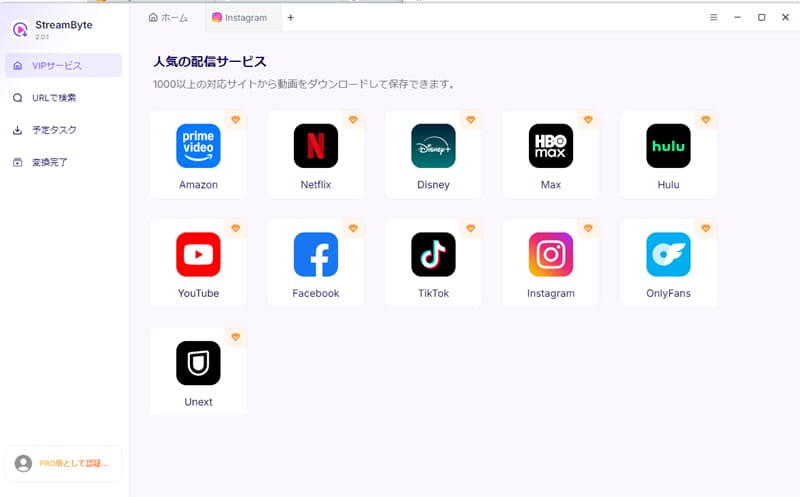
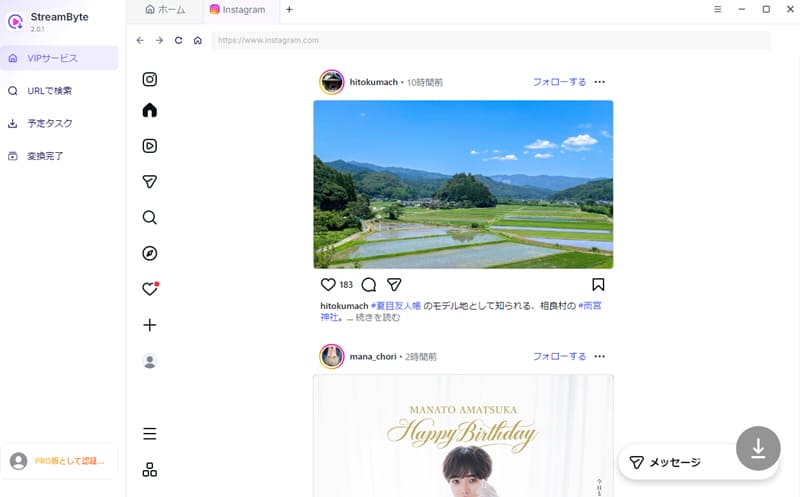
Step 2Search for the Instagram video you want to save and open the video's playback page. The video will be automatically analyzed.
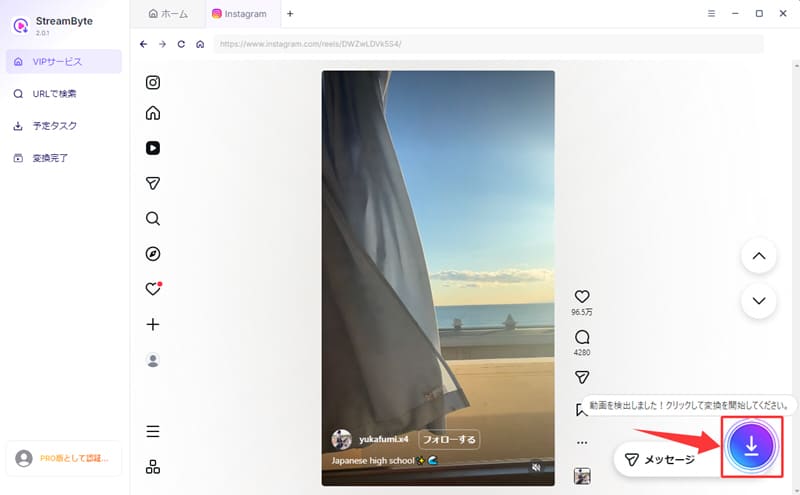
Step 3Once the analysis of the Instagram video is complete, click the button in the bottom right corner of the screen.Download iconClick to add the video to your save list.
Step 4If necessary, change the save settings such as output format, audio track, and subtitles. Once you have finished the settings, click in the bottom right corner."Download" buttonClick to start saving the Instagram video.
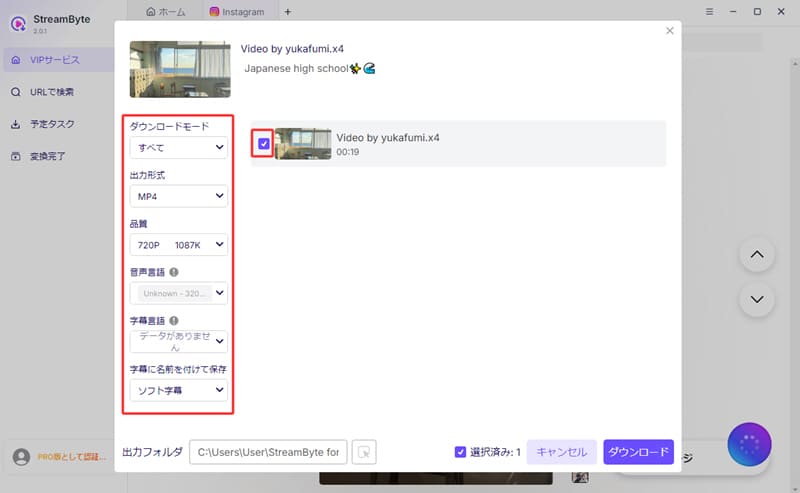
Step 5The download progress is as follows:"Scheduled Tasks" tabYou can check it anytime. Videos that have been saved will be automatically saved."Conversion Complete" tabYou can then quickly view your saved Instagram videos by moving to [this location].
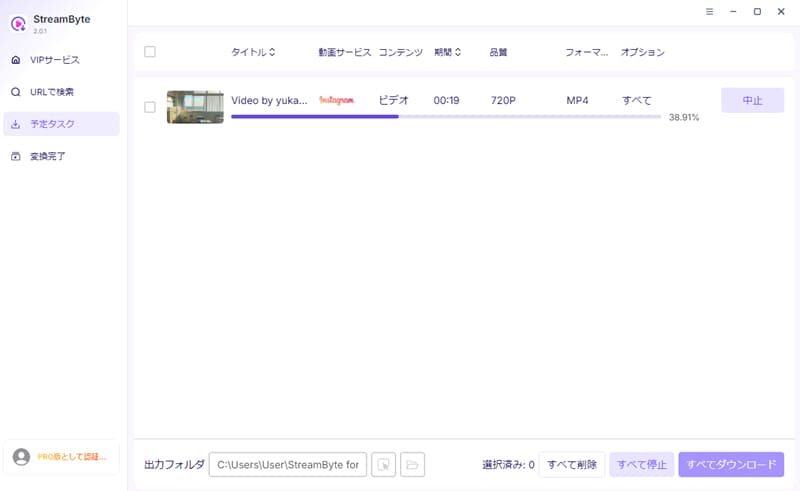
"StreamByte for VideoIf you use "",Save Instagram videos more easily and safelyYes, you can. Unlike screen recording, it doesn't require recording the video while it's playing, so you can save Instagram videos without worrying about the other person finding out. Furthermore, it supports high-speed downloads up to 8x faster, so a 20-second video can be saved in just a few seconds, significantly reducing saving time compared to screen recording. It also features a built-in web player and a simple, user-friendly interface, making it easy for even beginners to operate and use comfortably.
100% safe, virus-free
100% safe, virus-free
Screen recording on Instagram is not inherently illegal. As long as you use the recorded content for personal enjoyment and avoid unauthorized reproduction, redistribution, or commercial use, it is generally unlikely to cause any major problems. However, if you publish the recorded video without permission or use it for commercial purposes, you risk being held liable for copyright infringement. Therefore, when screen recording videos on Instagram, be sure to check the laws of your region and Instagram's terms of service and use the content within appropriate limits.
Recording an Instagram Live stream does not notify the streamer, so there is no need to worry about them finding out you recorded it. However, if you repost or commercially use the recorded content without permission, the original poster may find out, and copyright issues may arise. Therefore, please use the recorded videos within appropriate limits, such as for personal enjoyment.
Generally, recording an Instagram video call does not notify the other party, so there is no need to worry about them finding out that you have started screen recording. However, taking screenshots or recording may produce operation sounds or notification sounds on your device. Therefore, depending on the situation, the other party may notice, so please be careful when recording.
This article explains how to screen record Instagram, and then details the cases in which screen recording Instagram might be detected and whether or not notifications are sent. When saving Instagram videos by screen recording, be aware that some content may be detected by the other party.
Therefore, as an easier and safer way to save Instagram videos, a dedicated video downloader is available.StreamByte for VideoWe introduced this software. With this software, you don't need to record your screen; it analyzes the URL of Instagram videos and saves them directly, so you can easily save your favorite videos while avoiding the risk of notifications caused by screen recording. This eliminates the worry that you might get caught if you screen record Instagram.
"StreamByte for Video"forFree trialSince this feature is also available, if you're worried that the other person might find out if you screen record your Instagram, I recommend trying it out first.
100% safe, virus-free
100% safe, virus-free
Born in Tokyo in 1997. After graduating from a university in London, he worked at a major IT media company, writing articles about video streaming services, video downloaders, and digital content.More than 3 years of experience in editing, proofreading, and writing directionThe articles he has worked on have garnered over 5 million page views, and he is well-known for producing content that is carefully crafted from the reader's perspective.
Currently, as an editor and web writer at StreamByte, he works on creating articles that help users solve their problems, focusing on information related to video streaming services and downloads, with the aim of being "user-oriented, easy to understand, and immediately useful."
Read more articles together

Experts in supporting offline viewing of streaming video services
Subscribe to StreamByteCopyright © 2026 StreamByte. All rights reserved.



Get the latest news, product upgrades, information, guides, discounts and more about StreamByte.
Please enter a valid email address.

A highly capable video downloader:
StreamByte for Video
Even beginners can rest assured! You can try saving videos for free first!







 English
  Japanese
  Chinese (traditional)
  German