
- Online video downloader
- Streaming Products
- BD-DVD products
- Store
- Useful Articles
- support
Share this article!


Instagram is a popular social media platform where a large amount of high-quality content is shared daily, and Instagram Stories, in particular, are extremely popular. Many users want to save stories so they can be viewed again even offline. However, many people don't fully understand how to save them.
This article will clearly explain various ways to save Instagram Stories, and at the end, we'll also reveal a secret trick to save Instagram Story videos without any restrictions. Please read to the end.

Related Posts:
Instagram Stories is a feature on Instagram that allows you to easily share photos and videos in a slideshow format. Because you can post multiple images and videos at once, it makes sharing your life more intuitive.
A key feature of this Stories function is that posted content automatically disappears after 24 hours. Therefore, it's ideal for temporary sharing, such as snippets of everyday events or real-time information. Its ease of posting also makes it easier to foster natural communication with followers.
On the other hand, since stories automatically become unavailable after 24 hours, this can be inconvenient if you want to revisit your favorite posts or memorable Instagram stories later, or if you want to keep important information on hand.
In such cases, it's recommended to save your Instagram Stories beforehand. Saving them allows you to revisit them anytime, even after 24 hours, and they can be played offline. Therefore, the next section will explain in detail how to save Instagram Stories.
If you want to save Instagram Stories videos, use the dedicated video downloader "We recommend using "StreamByte for Video".
In such cases, it's recommended to save your Instagram Stories beforehand. Saving them allows you to revisit them anytime, even after 24 hours, and they can be played offline. Therefore, the next section will explain in detail how to save Instagram Stories.
StreamByte for Video
This is a video downloader that supports major streaming services such as Netflix, Amazon Prime, and YouTube. You can save and enjoy your favorite videos with high image quality up to 8K and Dolby Atmos audio.
Why StreamByte for Video is recommended
Here, "StreamByte for VideoThis explains how to easily save Instagram Stories in high quality using [this method].
step 1When you launch "StreamByte for Video," several video sites, including Instagram, will be displayed. After logging in, select Instagram and log in to your Instagram account.
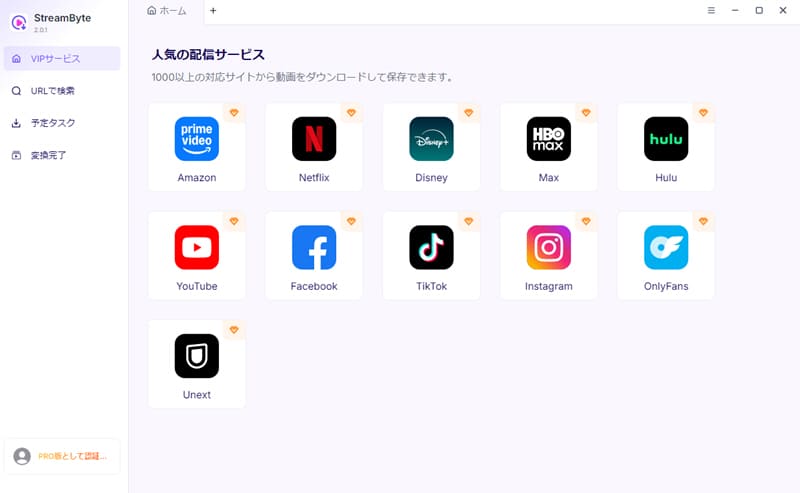
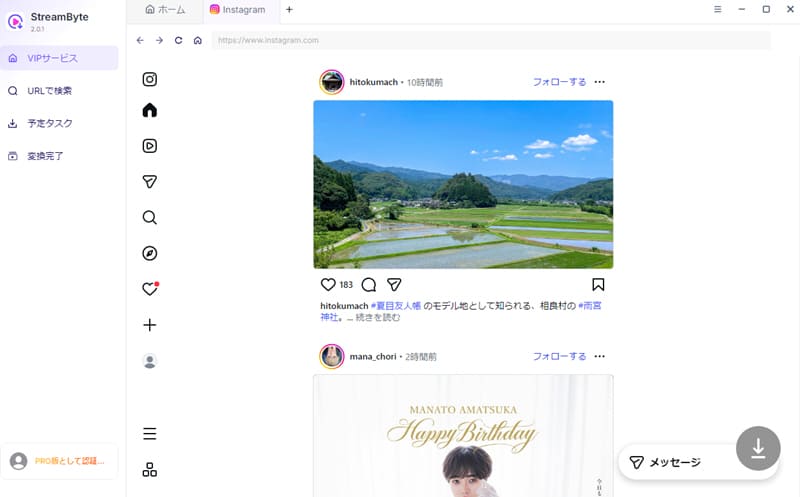
Step 2Simply use the built-in web player to search for the Instagram story you want to save, open the playback page, and the program will automatically analyze the video.
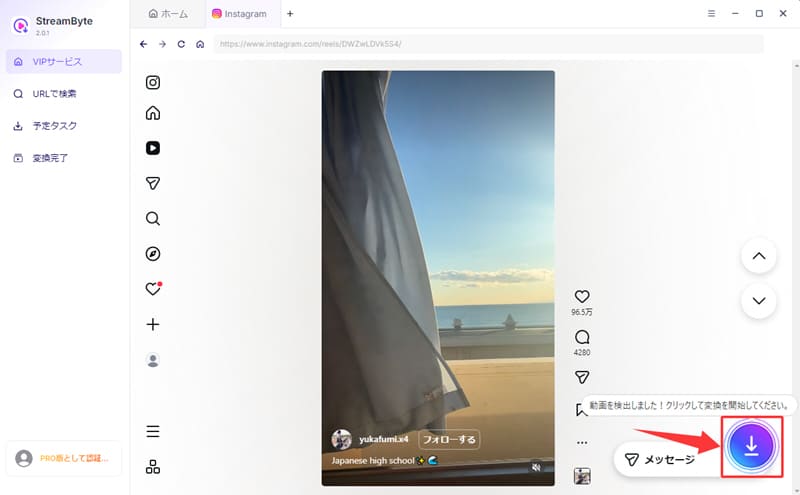
Step 3Once the analysis is complete, the activated button in the bottom right corner will appear."Download" buttonClicking this will start saving your Instagram story.
Step 4Then, set the output format, audio track, subtitles, etc. as needed. Once you have finished setting it up, click in the bottom right corner."Download" buttonClick
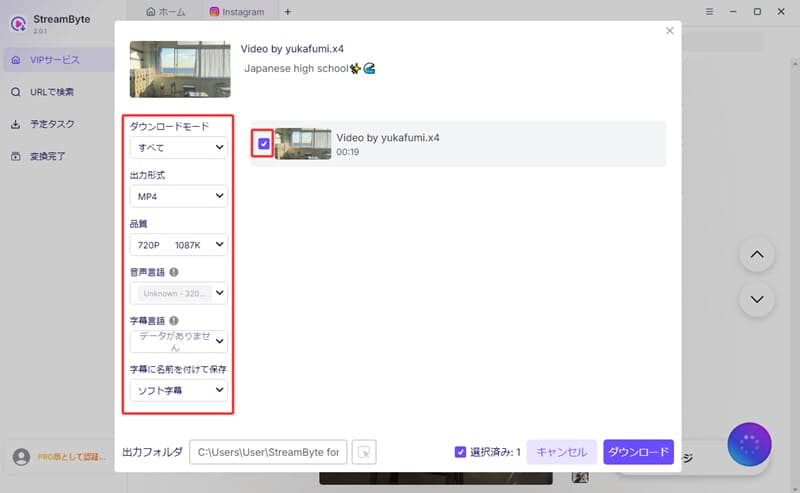
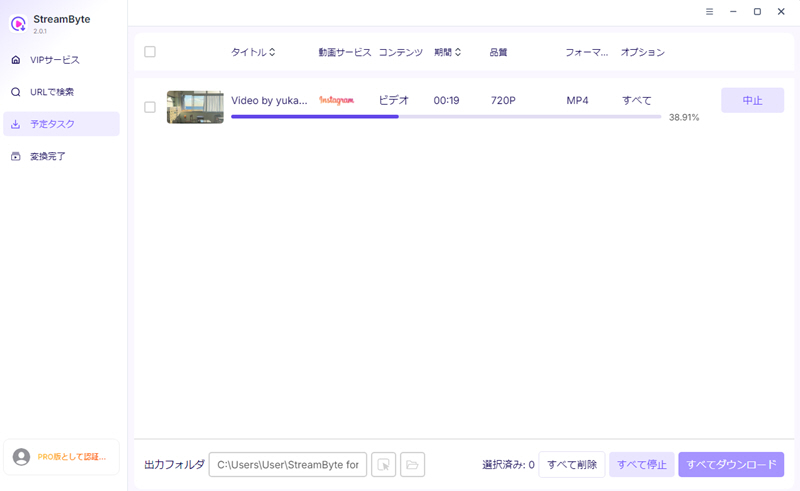
Step 5The download progress is"Scheduled tasks"You can check it anytime from the tab. Completed Instagram Stories will automatically"Conversion complete"You can go to the tab and quickly view the videos you've saved.
"StreamByte for VideoUsing this app, you can save Instagram Stories in high quality in common formats such as MP4, MKV, and MOV. Even stories that automatically disappear after 24 hours can be viewed offline once saved, allowing you to revisit precious memories and favorite content anytime. Furthermore, the built-in web player makes it easy to search, analyze, and download Instagram Stories in just a few steps, so even beginners can use it without any trouble. If you want to save Instagram Stories in high quality and without restrictions, please try this app.StreamByte for VideoTry this:
100% safe, virus-free
100% safe, virus-free
Instagram allows you to save stories using its in-app features, but you can only save stories you've posted or content you've edited before posting; you cannot save other people's stories. Therefore, this method is mainly suitable for users who want to save their own posts. On the other hand, if you want to save Instagram story videos posted by others, you should use the method described above.StreamByte for VideoIt is recommended to use a dedicated tool like the one shown above.
Now, let's take a detailed look at how to save Instagram Stories using the official features.
step 1First, open the Instagram story you want to save.
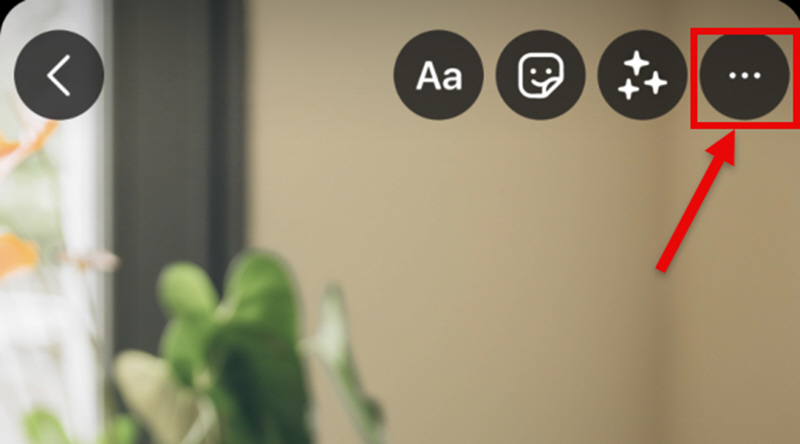
Step 2And, the screenThe three dots in the upper right corner (...)Tap the icon and select "Save".
Step 3,lastly,"Save photo"or"Save video"Tap this icon. This will allow you to save the Instagram story to your device.
Tip: How to automatically save your Instagram Stories after posting
If you want to automatically save your posted stories to your camera roll, follow these settings:
First, tap the three lines (≡) in the upper right corner of your profile screen."Settings and Privacy"Open it. Next,"Archive and Download"Select,"Save Stories to your camera roll"Turn on the switch. This will automatically save your posted Instagram Stories to your device.
Besides the official save function, there are other ways to save Instagram Stories using screenshots and screen recordings. The advantage of this method is that you can save without app restrictions, and you can also save other people's Instagram Stories.
Besides the official save function, there are other ways to save Instagram Stories using screenshots and screen recordings. The advantage of this method is that you can save without app restrictions, and you can also save other people's Instagram Stories.
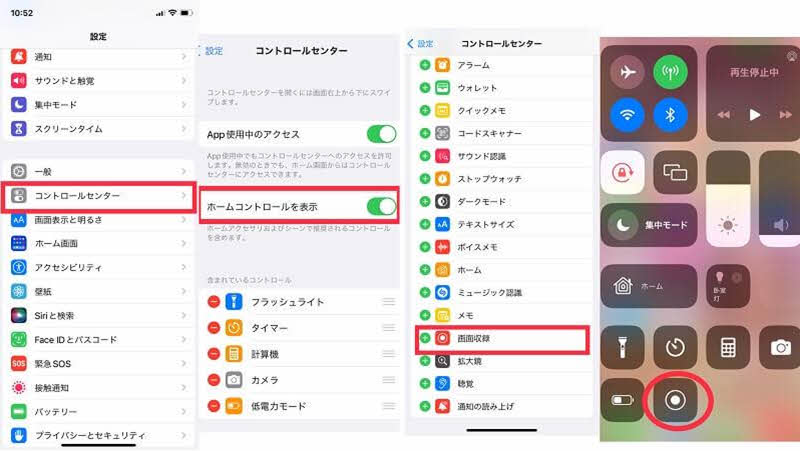
step 1,first"Control Center"Open it,"Screen recording"We will check if the function is available. If necessary,Settings appfrom"Control Center"I'll add it to that.
Step 2Once you're ready, launch the Instagram app and play the Instagram Story you want to save. Then, make sure you have the Control Center accessible.
Step 3Open the Control Center,"Screen recording"Tapping the icon will start recording. The story will play as is while recording, and to stop, tap the same icon again or stop the recording from the recording bar at the top of the screen.
If you want to save other people's Instagram stories or manage your own stories in one place, using an online site is a good option. Instagram story saving sites work by analyzing the URL of an Instagram story, allowing you to retrieve images and videos from that story.
However, some online services may have low operational stability and slow download speeds. Also, pop-up ads are often displayed, and there are certain security risks, so caution is necessary when using them. In that respect, the first one I mentioned...StreamByte for VideoThis app is ad-free and boasts excellent safety and stability, making it ideal for those who want to save Instagram Stories more comfortably.
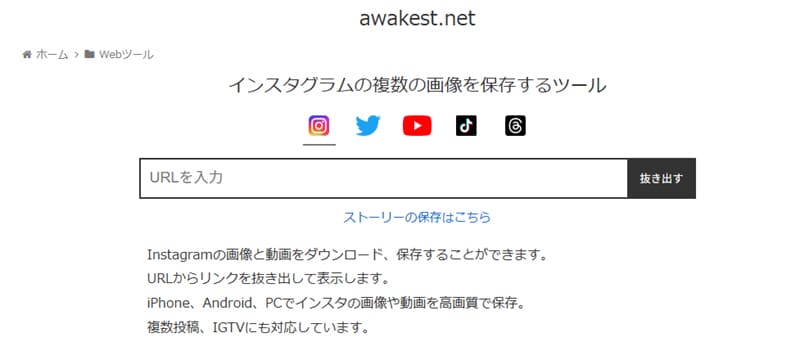
Now, using "Awakest" as an example, let's look at how to save Instagram Stories from online sites.
step 1Open the Instagram story page you want to save, then go to ProfileCopy URLI will.
Step 2Access "Awakest" and paste the copied URL into the input field on the top page."Extract" buttonClick
Step 3You can save content by selecting the desired content from the extracted list of images and videos and then playing or downloading it.
| Official Features | Screen Recording | Online site | StreamByte for Video | |
| Saveable items | Only my Instagram Stories | My own story and the stories of others | My own story and the stories of others | Story videos of yourself and others |
| Time required for storage | short | long | long | short |
| save speed | usually | slow | slow | Up to 8x speed |
| Video quality | Lossless | Image quality is degraded. | standard | Lossless |
| Safety | expensive | expensive | low | expensive |
| Stability | usually | usually | Unstable | expensive |
| Recommendation | 3 stars: ★★★ | 3 stars: ★★★ | 4 stars: ★★★★ | 5 stars: ★★★★★ |
As you can see from the table above, each method for saving Instagram Stories has its own unique characteristics. We recommend choosing the method that best suits your needs and purpose.
Saving only your own Instagram Stories is easiest with the official feature, but if you want to save someone else's Stories, you'll need a different method. However, screen recording tends to degrade the quality of Instagram Story videos, and online sites have issues with speed and security. Therefore, if you want to save Instagram Story videos in higher quality and more reliably,StreamByte for VideoUsing "[this option]" would be the most balanced choice.
100% safe, virus-free
100% safe, virus-free
Generally, regardless of the method used to save the content, the original poster will not be notified simply by saving it. Therefore, there is basically no need to worry about the original poster finding out if you save it for personal use within the normal scope. However, if you redistribute the saved content without permission or use it commercially, you may incur risks such as copyright infringement. For this reason, we recommend using it only within the scope of personal use.
There are several reasons why you might not be able to save your Instagram Stories, but there are mainly three. First, your smartphone may not have permission to access photos from Instagram. Without permission, you cannot save the data to your device. Second, the story may contain copyrighted music or stickers. In this case, saving may be restricted. Finally, the auto-save setting for "Archive and Download" may be turned off. If this setting is disabled, you will not be able to save the story.
Generally, when you save an Instagram Story using the official feature, it's saved in the "Photos" app on iPhones. On Android devices, it's typically saved in the "Recent" section of "Gallery" or "Google Photos."
Unfortunately, Instagram's official features only allow you to save stories you've posted yourself; you cannot download Instagram stories posted by other users. If you want to save Instagram stories posted by other users, you can use online saving sites or dedicated video downloaders. StreamByte for VideoIt is recommended to use "[this method]".
This article introduced various methods for saving Instagram Stories, from official features to online sites. However, there are limitations to the usual methods when you want to save stories from private accounts or other people's stories. Therefore, as a tool that allows you to save Instagram Stories without restrictions,StreamByte for Video" was introduced.
This program allows you to save not only your own Instagram stories but also story videos posted by others in high quality. Furthermore, its fast download speed and high success rate make it superior to screen recording or online sites in terms of usability. It also features a built-in web player, allowing you to download videos with a user experience similar to that of an official app.
"StreamByte for VideoWe offer a free trial version, so if you want to save Instagram Stories, please give it a try.
100% safe, virus-free
100% safe, virus-free
Born in Tokyo in 1997. After graduating from a university in London, he worked at a major IT media company, writing articles about video streaming services, video downloaders, and digital content.More than 3 years of experience in editing, proofreading, and writing directionThe articles he has worked on have garnered over 5 million page views, and he is well-known for producing content that is carefully crafted from the reader's perspective.
Currently, as an editor and web writer at StreamByte, he works on creating articles that help users solve their problems, focusing on information related to video streaming services and downloads, with the aim of being "user-oriented, easy to understand, and immediately useful."
Read more articles together


Experts in supporting offline viewing of streaming video services
Subscribe to StreamByteCopyright © 2026 StreamByte. All rights reserved.



Get the latest news, product upgrades, information, guides, discounts and more about StreamByte.
Please enter a valid email address.

A highly capable video downloader:
StreamByte for Video
Even beginners can rest assured! You can try saving videos for free first!







 English
  Japanese
  Chinese (traditional)
  German