
- Online video downloader
- Streaming Products
- BD-DVD products
- Store
- Useful Articles
- support
Share this article!


In recent years, we've seen a lot of questions and reviews about StreamFab Amazon Downloader online. This indicates that while many users are interested in the software, they also have concerns and questions about its functionality, security, and actual usability. Therefore, this article provides a thorough review of StreamFab Amazon Downloader's functionality, security, and reputation based on actual usage. Furthermore, we'll explain its advantages and disadvantages in detail and introduce recommended alternative software. Please read to the end.
Related Posts:
StreamFab Amazon Downloader is a video download software provided by DVDFab specifically for Amazon Prime Video. It allows you to save movies, dramas, and anime streamed on Amazon Prime Video to your PC, enabling you to watch them even without an internet connection. Furthermore, downloaded videos can be played on various devices such as smartphones and tablets. Here's a summary of the main features of StreamFab Amazon Downloader.
Features of StreamFab Amazon Downloader
Currently, StreamFab Amazon Downloader offers both a free and a paid version. The free version has limitations such as usage period and number of downloads, but the paid version removes these restrictions and allows you to use all features.
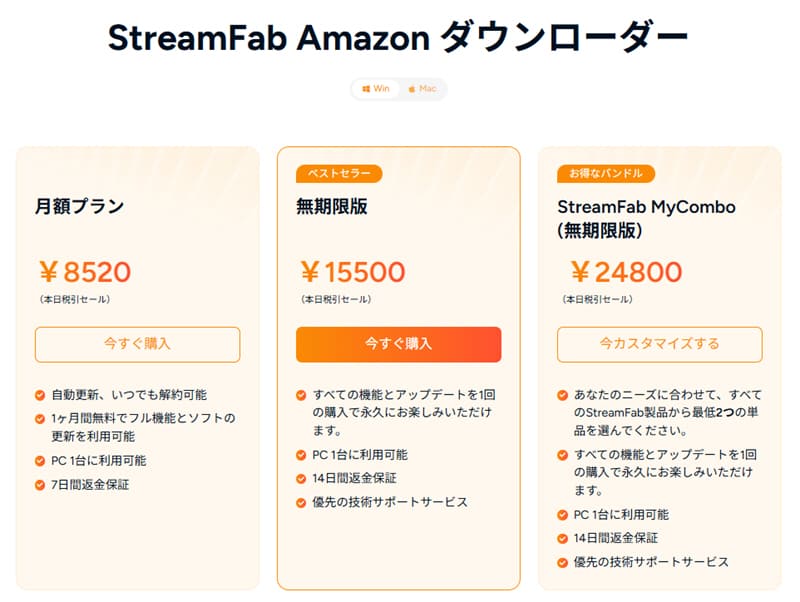
Also, the paid version includes"Monthly plan", "Unlimited version", "StreamFab MyCombo"Three types of plans are available. The monthly plan costs 8,520 yen and allows you to use all features and software updates during the contract period. On the other hand, the perpetual license is a one-time purchase of 15,500 yen and can be used continuously without additional charges after the initial purchase. Furthermore, "StreamFab MyCombo" is a customizable plan available from 24,800 yen, which allows you to freely select at least two individual StreamFab products from among multiple products.
However, these prices are by no means cheap, and are somewhat higher than those of typical video download software. Therefore, opinions on their cost-effectiveness may vary among users, and careful consideration is necessary depending on your intended use.
Please note that prices, plan details, and benefits are subject to change, so we recommend checking the latest information on the official website before purchasing.
We've covered the basics of StreamFab Amazon Downloader so far. Next, let's look at the steps to actually download videos from Amazon Prime Video.
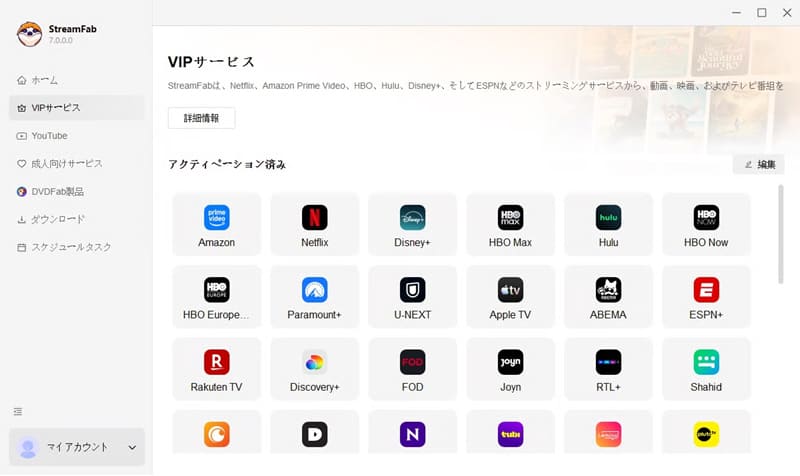
step 1To start StreamFab, launch the application and click "VIP Services" from the menu on the left. Then, from the list of supported services...Amazon iconPlease select one.
Step 2After logging into Amazon Prime Video, open the playback page of the video you want to download. Once the video analysis is complete,Amazon DownloaderA window will appear, allowing you to select settings such as resolution, audio, and subtitles.
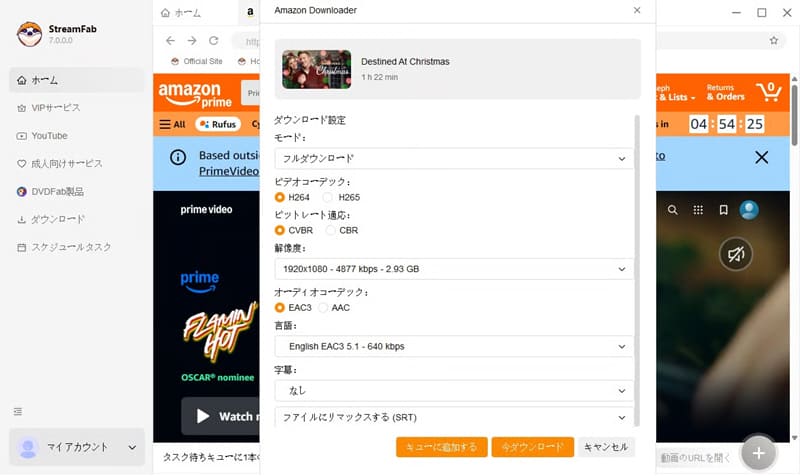
Step 3Once the setup is complete,Download NowClick "". The download progress is "Download nowYou can check this from the " tab. Once the download is complete, the video will be in the "downloadIt will be saved in the "" tab and can be viewed offline.
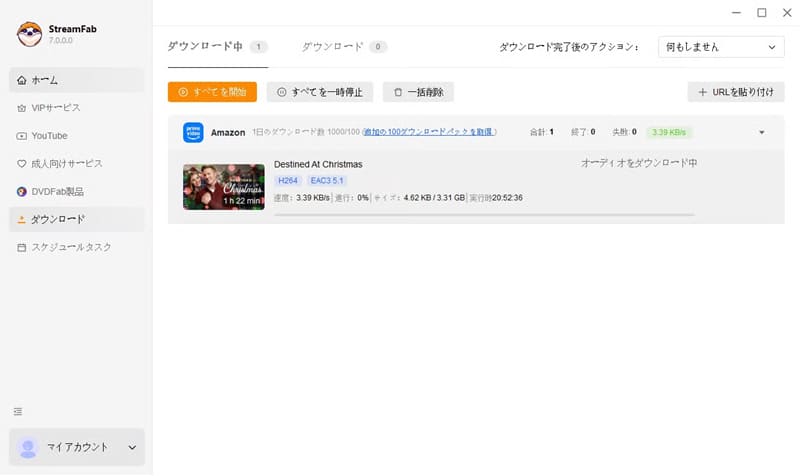
The security of StreamFab Amazon Downloader is a point of concern for many users. Therefore, we will examine its security from three perspectives: the security of the software itself, the presence or absence of advertisements, and the security of the account.
After using the StreamFab Amazon Downloader, downloaded from the official website, for an extended period, I did not encounter any warnings from security software such as Norton during installation or use. Therefore, it can be assumed that programs obtained from the official website offer a basic level of security.
However, downloading from unofficial websites or third-party distribution sites does not completely eliminate the risk of encountering tampered files or malware. For safe use, we strongly recommend downloading only from the official website.
Upon reviewing the StreamFab Amazon Downloader official website and the software itself, we found very few external advertisements or pop-up ads. Therefore, the risk of being redirected to suspicious sites or accessing fake download pages via advertisements is considered relatively low. We also did not observe the excessive advertising often seen in free software, so in this respect, it can be used with confidence.
Since using StreamFab Amazon Downloader requires logging into your Amazon account, account security is an important point to check. In my own testing, I did not encounter any problems such as unauthorized account use, data leaks, or login issues. However, there are some reports online of users having their Amazon accounts temporarily restricted after using the downloader.
It is unclear whether these cases are directly related to the use of the software, but it cannot be ruled out that they may be affected by changes in Amazon's terms of service or specifications. Therefore, we recommend checking the latest terms of service and notices before using the software.
So far, we've covered the features, usage, and security of the StreamFab Amazon Downloader. Many people considering purchasing it are curious about user reviews and ratings. User feedback and reviews are an important factor in determining the actual usability and satisfaction level of the software.
Trustpilot, an international review site, based its reviews on over 150 reviews.4.6/5.0It has received such high praise. Therefore, it can be seen that it is a software that generally provides a high level of satisfaction. Of course, not all users are satisfied, and there are some who have expressed dissatisfaction or requests for improvement.
Next, let's take a closer look at some representative opinions picked from actual user reviews.
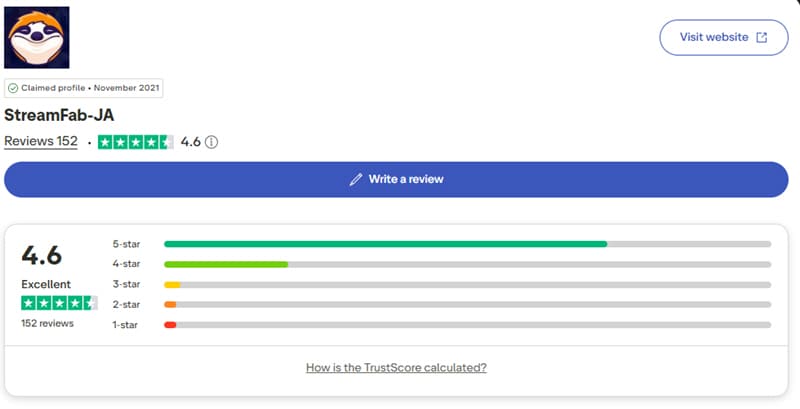
In summary, StreamFab Amazon Downloader has received high praise from many users for its functionality and ease of use, and its built-in browser and other features have also been met with positive feedback.
On the other hand, even among those with a 5-star rating, there are reports of the software occasionally becoming unresponsive, and in severe cases, the entire StreamFab system crashing. Furthermore, the user experience in Mac OS environments is not always good, with multiple reports of it not working properly.
Overall, while StreamFab Amazon Downloader excels in functionality and convenience, it still has room for improvement in terms of stability and support for the Mac platform.
While StreamFab Amazon Downloader is feature-rich, some users have expressed dissatisfaction with its stability and Mac compatibility. Furthermore, its relatively high price raises concerns about its cost-effectiveness. Therefore, many users are looking for a more stable and cost-effective alternative.
Therefore, I recommend the dedicated video downloader "StreamByte for VideoUnlike StreamFab Amazon Downloader, which targets only a single platform, this software supports multiple major streaming services, including Amazon Prime Video, Netflix, Disney+, YouTube, HBO, and Hulu. Therefore, its major feature is that it can download a wide range of videos all at once with a single software.
Furthermore, both the Windows and Mac versions offer comparable performance, ensuring a stable download experience even on a Mac. For users who prioritize both cost-effectiveness and a wide range of supported services, this is a strong option.
StreamByte for Video
This is a video downloader that supports major streaming services such as Netflix, Amazon Prime, and YouTube. You can save and enjoy your favorite videos with high image quality up to 8K and Dolby Atmos audio.
"Why we recommend StreamByte for Video"
HereStreamByte for VideoThis guide will show you how to download Amazon Prime Video using [this method].
step 1When you register for "StreamByte for Video," major streaming services will be displayed in a list on the main screen. From there,Amazon Prime VideoSelect "".
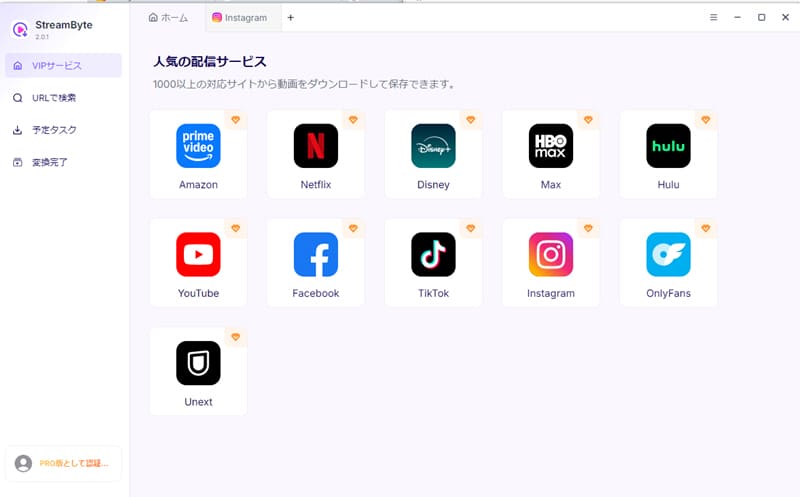
Step 2After selecting Amazon Prime Video, use your account informationLog inThen, open the playback page of the video you want to download and click the download icon that appears to add the video to your download list.
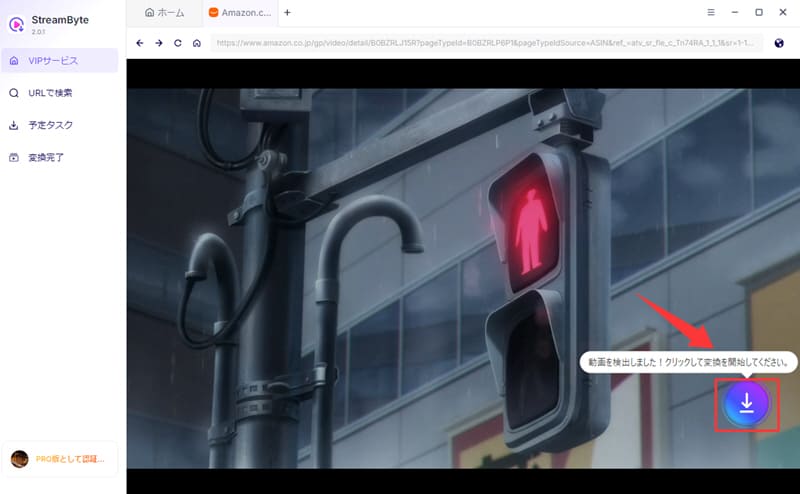
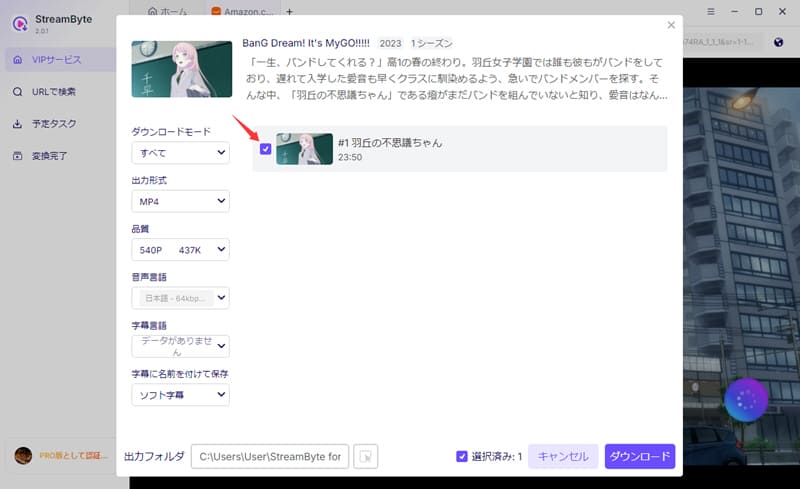
Step 3On the download settings screen, you can freely adjust the output format, audio, subtitles, and other settings to your liking.
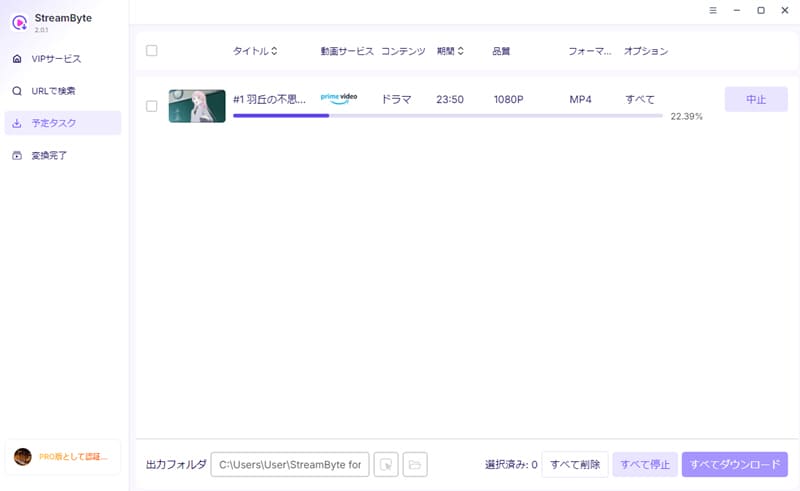
Step 4After the setup is complete,"download"Clicking the button will start the video download. You can check the progress on the "Scheduled Tasks" screen. This will allow you toSave Amazon Prime Video to your PCAnd you will be able to watch it offline.
"StreamByte for VideoUsing this software, you can save Amazon Prime Video videos in common formats such as MP4. Furthermore, like StreamFab Amazon Downloader, this software features a built-in web player, allowing you to download videos with a user experience similar to the official app. In addition, it offers higher stability and high-quality support dependent on the original video, resulting in a smooth and comfortable download experience.
100% safe, virus-free
100% safe, virus-free
To make the functions and features of both software programs easier to understand,StreamByte for VideoThe following comparison table summarizes the features of StreamFab and the Amazon Downloader. Please use it as reference information.
| Conversion tool | StreamByte for Video | StreamFab Amazon Downloader |
| price | Perpetual license ¥15,980 1-month license (50%OFF for the first month) ¥3,490 |
Perpetual license ¥15,500 1-month license: ¥8,520 |
| Supported services | Amazon Prime, Netflix, and other video streaming and sharing services such as TikTok | Amazon Prime Video only |
| Output Format | MP4, MKV, MOV | MP4, MKV |
| Maximum image quality | MP4, MKV, MOV | MP4, MKV |
| Maximum image quality | Based on the original video (up to 8K) | 1080p |
| Conversion speed | Up to 8x speed | standard |
| Stability | Stability | Unstable |
| success rate | expensive | standard |
| Built-in web player | 〇 | 〇 |
As you can see from the table, compared to StreamFab Amazon Downloader,StreamByte for Video"StreamByte for Video" offers superior cost performance. Unlike StreamFab Amazon Downloader, which only supports Amazon Prime Video, "StreamByte for Video" supports a wider range of video streaming platforms. Furthermore, it excels in stability, image quality, and output formats, making it a major feature that can meet a wider variety of user needs.
100% safe, virus-free
100% safe, virus-free
Downloading Amazon videos using StreamFab Amazon Downloader may violate copyright law and Amazon's terms of service. However, in most cases, you will not be held liable if the download is for personal viewing purposes. On the other hand, redistributing or commercially using downloaded videos carries the risk of copyright infringement, so be sure to comply with the laws and regulations of your local area.
Currently, when purchasing the StreamFab Amazon Downloader, you can use major credit cards such as Visa, Mastercard, Discover, and Diners Club. Depending on your region, additional payment methods such as PayPal may also be available. However, available payment methods vary by region and sales page, so please check the information displayed on the purchase screen for actual availability.
StreamFab Amazon Downloader offers both a free and a paid version, with the main differences being the available features and download limits. The free version includes a 30-day trial period during which you can download up to three videos. The paid version, on the other hand, has no download limits and offers all features.
If StreamFab fails to analyze Amazon videos, first check if the video plays correctly in your browser. If it plays without problems, copy the video's URL and paste it directly into the Amazon tab in StreamFab and try again.
If analysis still fails, it may be due to software compatibility issues or a temporary glitch. In that case, try the "StreamByte for VideoTrying this out is one option.
This article provides a detailed review of the features, security, and reputation of StreamFab Amazon Downloader. While StreamFab Amazon Downloader offers many advantages, such as high-quality video saving and user-friendly operation, it's important to note that it is relatively expensive and there are concerns regarding account security.
Therefore, as a recommended alternative software,StreamByte for VideoWe introduced "[Software Name]". This software supports not only Amazon Prime Video but also multiple major video streaming services such as Netflix and Disney+, allowing you to use a wide range of services without additional purchases. In addition to its excellent cost performance, it also boasts a wide range of output formats and a high download success rate, which are major attractions. Therefore, it is one of the first software programs you should consider if you are looking for an alternative to StreamFab Amazon Downloader.
"StreamByte for Video"forFree trial versionIt's also available. If you want to freely download Amazon Prime Video, please feel free to download the software and try it out.
100% safe, virus-free
100% safe, virus-free
Born in Tokyo in 1997. After graduating from a university in London, he worked at a major IT media company, writing articles about video streaming services, video downloaders, and digital content.More than 3 years of experience in editing, proofreading, and writing directionThe articles he has worked on have garnered over 5 million page views, and he is well-known for producing content that is carefully crafted from the reader's perspective.
Currently, as an editor and web writer at StreamByte, he works on creating articles that help users solve their problems, focusing on information related to video streaming services and downloads, with the aim of being "user-oriented, easy to understand, and immediately useful."
Read more articles together
Experts in supporting offline viewing of streaming video services
Subscribe to StreamByteCopyright © 2026 StreamByte. All rights reserved.



Get the latest news, product upgrades, information, guides, discounts and more about StreamByte.
Please enter a valid email address.

A highly capable video downloader:
StreamByte for Video
Even beginners can rest assured! You can try saving videos for free first!







 English
  Japanese
  Chinese (traditional)
  German