
- Online video downloader
- Streaming Products
- BD-DVD products
- Store
- Useful Articles
- support
Share this article!


Amazon Prime Video is a highly popular video streaming service used by many users. While it offers an official download function for offline playback, many users are unsure where downloaded videos are saved, or wish to change the save location.
This article will explain in detail how to check and change the download location for Prime Video. Furthermore, at the end of the article, we will introduce a secret trick that allows you to freely change the download location for Amazon Prime. Be sure to read to the end so you don't miss anything.

Related Posts:
Amazon Prime Video videos downloaded on iOS devices are stored in the app's internal storage. Therefore, they cannot be directly retrieved using iTunes backups or file management apps. Downloaded videos can only be managed and played within the app. You can view a list of already saved content by tapping "Downloads" in the app's menu bar.
On Android devices, downloaded Amazon Prime Video videos are saved to internal storage or an SD card. You can easily check where they are saved using the standard file management app. Specifically, the download folder is located at the following path:
File path:/data/com.amazon.avod.thirdpartyclient/files/downloads/
*Root access is required to access this folder. It cannot be accessed on non-rooted devices, and may not be displayed depending on the device's system.
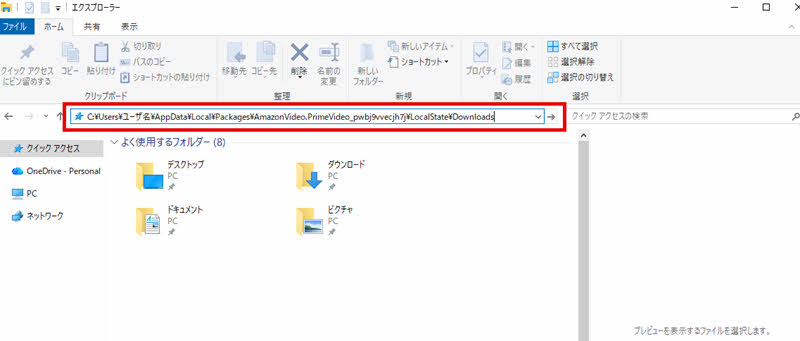
On Windows devices, when you save Amazon Prime Video to your PC, the downloaded videos are usually treated as hidden files. To see where they are saved, you first need to change your computer's settings to display hidden files. Please refer to the image below for specific instructions.

If your settings are already configured to show hidden files, you don't need to change them. Once you've finished configuring the settings, copy the following file path and paste it into the Task Manager search box. Then, click the "Go" button that appears on the right, and the download folder will be displayed immediately.
File path:C:/Users/username/AppData/Local/Packages/AmazonVideo.PrimeVideo_pwbj9vvecjh7j/LocalState/Downloads
*The video files in this folder are encrypted and cannot be played on smartphones or other players. Please note that they can only be played using the "Prime Video for Windows" app.
On Mac devices, just like on iOS devices, downloaded files are encrypted and saved only to the device's internal storage. These files are usually linked to the same path as the Amazon Prime Video app and can only be played within the Amazon Prime Video Mac app. Therefore, managing downloaded content is only possible within the official app on your Mac. You cannot choose the download location yourself, nor can you directly check or move the file location using Finder or other tools.
Unfortunately, on devices other than Windows, you cannot directly change the download location of Amazon Prime Video. Especially on Mac and iOS, managing the download location is only possible within the app. On Android devices, while you cannot change it completely freely, you can change it from the internal storage.Switch the save location to the SD card.It is possible to do so.
However, if you are using Windows 10 or later, you can change the save location. Here's how:
step 1Open the "Amazon Prime Video for Windows" app and go to the settings menu."Change storage location"Find it.
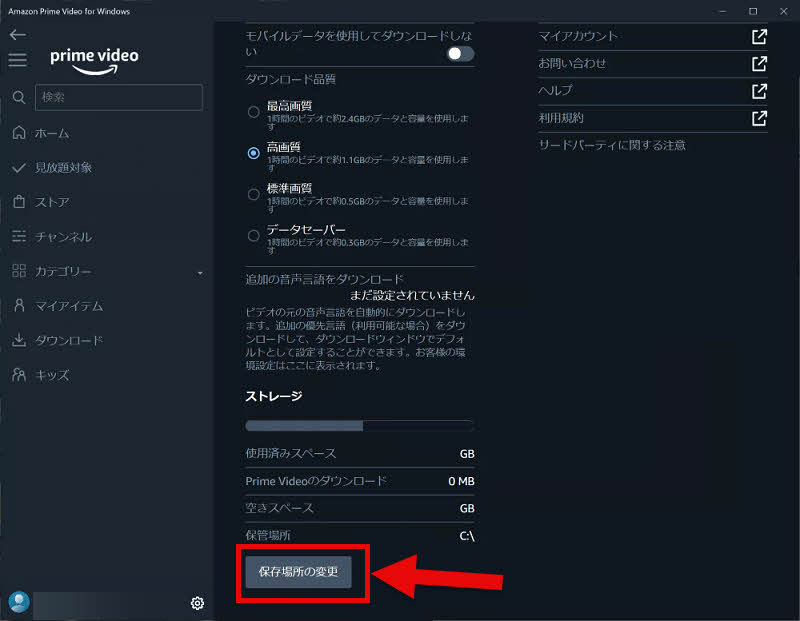
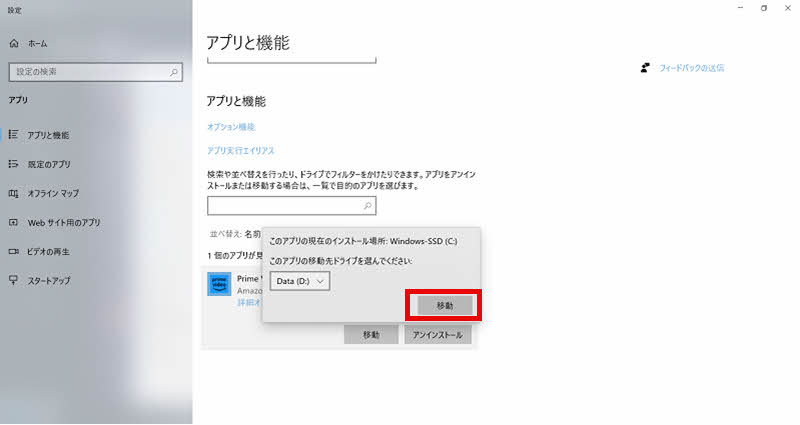
Step 2,"Change storage location"Clicking this will take you to the Windows app settings screen. Select the Amazon Prime Video app here.
Step 3,"Move" buttonClick and specify your desired save location folder. Once confirmation is complete, the Amazon Prime Video download location has been changed.
As mentioned earlier, Amazon Prime content is DRM protected, so downloaded files are also encrypted. Therefore, you cannot freely set the download location for Amazon Prime content on any device, which is very inconvenient. So, as a workaround that allows you to freely set the download location for Amazon Prime content,StreamByte for VideoI will introduce "[this]".
This software easily bypasses Amazon Prime's DRM protection, allowing you to download videos to your specified download location. Saved videos can be output losslessly in MP4, MKV, and MOV formats, and can be freely edited and moved after downloading. Transferring to USB drives or smartphones is also possible without any problems, and you can continue playing them offline even after your Amazon Prime subscription ends. If you want to freely customize your Amazon Prime download location, please give it a try.

StreamByte for Video
This is a video downloader that supports major streaming services such as Netflix, Amazon Prime, and YouTube. You can save and enjoy your favorite videos with high image quality up to 8K and Dolby Atmos audio.
"Why we recommend StreamByte for Video"
HereStreamByte for VideoThis guide explains how to use [this method] to save Amazon Prime Video to your designated download location.
step 1Once you register for "StreamByte for Video," major video streaming services, including Amazon, will appear on the main screen. Select "Amazon Prime Video" from the list and log in with your Amazon account.
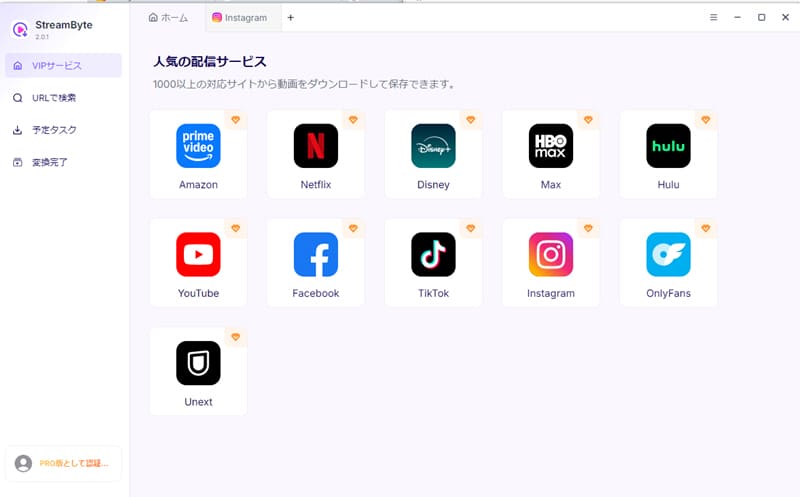
Step 2When you open the page of the video you want to download, the software will automatically analyze the video and enable the download icon. Clicking this icon will add the video to your download list.
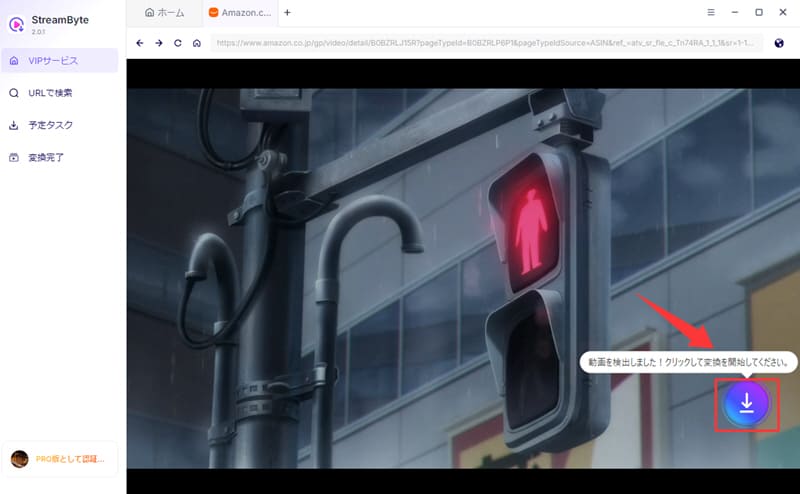
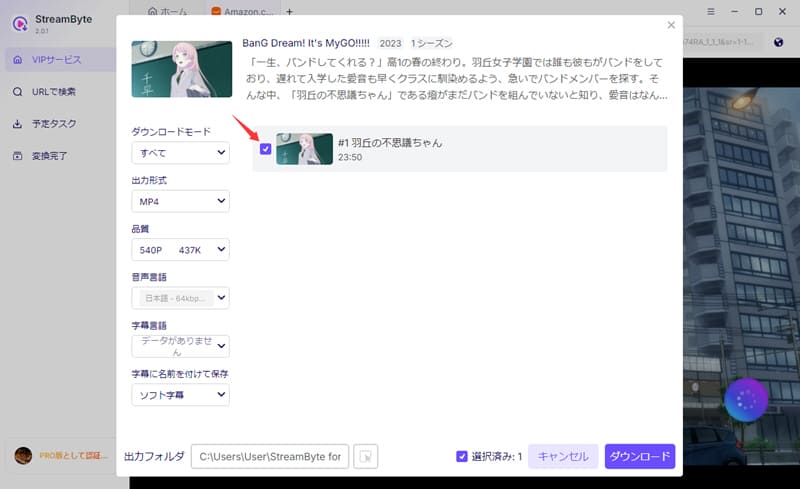
Step 3On the download settings screen, you can configure the output format, audio, subtitles, and other settings to your liking. You can also freely choose the download location.
Step 4Finally, clicking the "Download" button will start the video download. You can check the progress on the "Scheduled Tasks" screen, and then...Save Amazon Prime Video permanently to your computer.can.
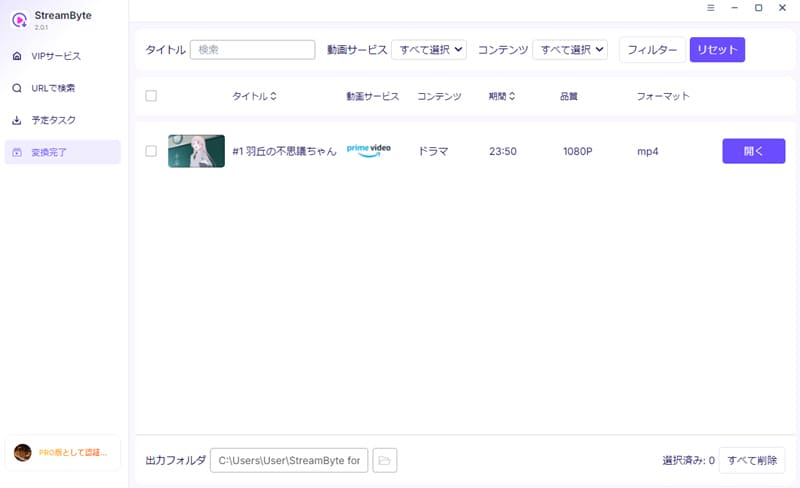
"StreamByte for VideoUsing this feature, you can easily change the download location of Amazon Prime Video and save videos to any folder you like. Its powerful DRM protection removal feature allows you to remove encrypted content.Save Amazon Prime Video videos in a general-purpose format such as MP4.This will enable you to do so. As a result, videos can not only be played and edited normally at the specified download location, but they can also be moved to USB drives or other devices.
100% safe, virus-free
100% safe, virus-free
If you are unable to change the download location on your computer, it may be because your operating system is not up to date or there is a temporary glitch. First, try updating your PC's operating system to the latest version and restarting it. If you still cannot change the save location, try using a dedicated video download tool.StreamByte for VideoBy using this feature, you can freely change the save location for Prime Video.
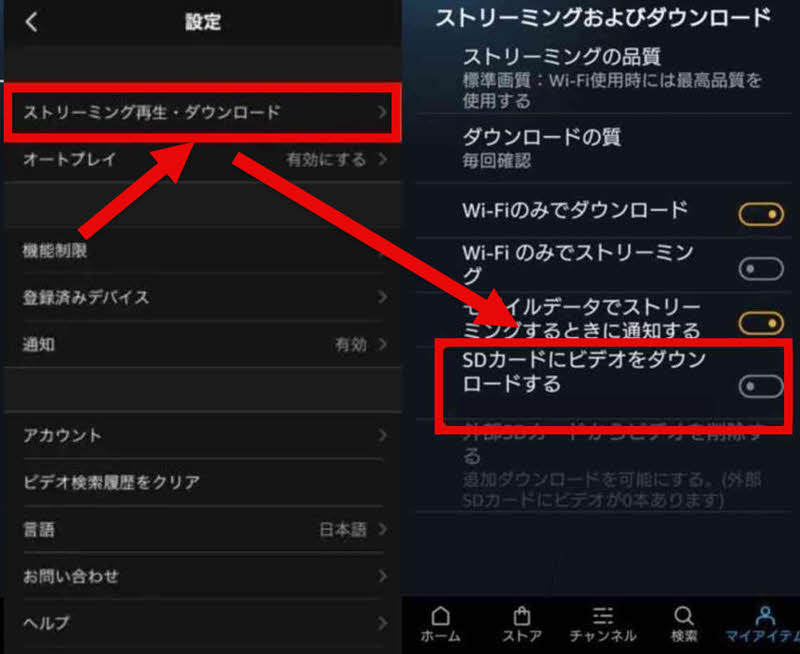
If you're using an Android smartphone, you can change the download location for Amazon Prime Video to your SD card. Open "My Items" in the Prime Video app settings, select "Streaming Playback," and check "Download videos to SD card" to save Amazon Prime Video downloads to your SD card.
Amazon Prime Video downloaded using the official function cannot be saved permanently. This is because downloaded content is DRM protected and can only be played within the official app. Therefore, you need to connect to the network regularly to authenticate. If you do not connect to the internet for more than 30 days, even downloaded videos may become unplayable.
If you want to permanently save Amazon Prime Video, you will need specialized video download software that supports DRM removal.StreamByte for VideoThere is a method that uses "[ ]".
By default, Amazon Prime Video downloads on Fire tablets are saved to internal storage. However, just like on Android smartphones, you can change the download location to the SD card by setting it to "Use as external storage." To do this, open "Storage" in the tablet's "Settings," and enable the SD card as external storage. This will allow you to save Prime Video videos to the SD card.
The download size for Amazon Prime Video is primarily determined by the video quality and length. Longer and higher-quality videos consume more storage space. For example, downloading one hour of HD quality video consumes approximately 0.7 to 1.5 GB of storage. In contrast, a low-quality video of one hour consumes only about 200 MB. The required storage space for each quality level of Amazon Prime Video is listed below.
| image quality | Download time | Required capacity |
| Low quality | Per hour | Approximately 200 MB |
| Standard Definition (SD) | Per hour | Approximately 300-700 MB |
| High Definition (HD) | Per hour | Approximately 0.7-1.5 GB |
| Ultra-high definition (UHD/4K) | Per hour | Approximately 1.5-3.5 GB |
This article explains in detail where Amazon Prime Video downloads are saved on smartphones and PCs. Because downloaded content is DRM protected, you cannot freely change the download location for Prime Video. Therefore, as a workaround to freely set the download location for Amazon Prime,StreamByte for Video" was introduced.
With this software,Remove DRM protection from Amazon Prime VideoFurthermore, you can save videos in common formats such as MP4. This allows you to freely change the download location for Amazon Prime Video without being restricted from playback or downloads. In addition, saved videos are permanently stored and can be watched offline anytime, anywhere without needing to connect to the internet regularly.
"StreamByte for Video"forFree trial versionIt's also available. If you want to freely set the download location for Amazon Prime Video and save your favorite videos wherever you like, please feel free to download the software and try it out.
100% safe, virus-free
100% safe, virus-free
Born in Tokyo in 1997. After graduating from a university in London, he worked at a major IT media company, writing articles about video streaming services, video downloaders, and digital content.More than 3 years of experience in editing, proofreading, and writing directionThe articles he has worked on have garnered over 5 million page views, and he is well-known for producing content that is carefully crafted from the reader's perspective.
Currently, as an editor and web writer at StreamByte, he works on creating articles that help users solve their problems, focusing on information related to video streaming services and downloads, with the aim of being "user-oriented, easy to understand, and immediately useful."
Read more articles together

Experts in supporting offline viewing of streaming video services
Subscribe to StreamByteCopyright © 2026 StreamByte. All rights reserved.



Get the latest news, product upgrades, information, guides, discounts and more about StreamByte.
Please enter a valid email address.

A highly capable video downloader:
StreamByte for Video
Even beginners can rest assured! You can try saving videos for free first!







 English
  Japanese
  Chinese (traditional)
  German