
- Online video downloader
- Streaming Products
- BD-DVD products
- Store
- Useful Articles
- support
Share this article!


Disney+ is a popular video streaming service offered by Disney, and it has garnered support from many users for its abundant and high-quality content. However, many users probably want to not only watch online, but also download and save Disney+ videos to their PCs so they can enjoy them anytime, anywhere. That said, many people are struggling because they don't know how to actually download content.
This article will provide a comprehensive and detailed explanation of how to download videos from Disney+, from the official download function to convenient software and tools. You're sure to find a method that suits you, so please read to the end.
Related Posts:
For those looking for a way to download Disney+ videos, there is a dedicated download software called "StreamByte for VideoUsing "[this method]" is the most recommended method.
This softwareRemove DRM protectionThis software has the functionality to permanently save Disney+ videos to your PC. Compared to other download methods, it maintains high-quality 1080p resolution while ensuring stable downloads and a high success rate. It's also highly efficient, rarely failing to download dozens of videos at once. Furthermore, its simple and user-friendly interface makes it easy for beginners to use. It's an excellent option for downloading Disney+ videos.
StreamByte for Video
This is a video downloader that supports major streaming services such as Netflix, Amazon Prime, and YouTube. You can save and enjoy your favorite videos with high image quality up to 8K and Dolby Atmos audio.
Why StreamByte for Video is recommended
HereStreamByte for VideoThis guide will show you how to download Disney+ content to your computer for offline playback using [a specific method/tool].
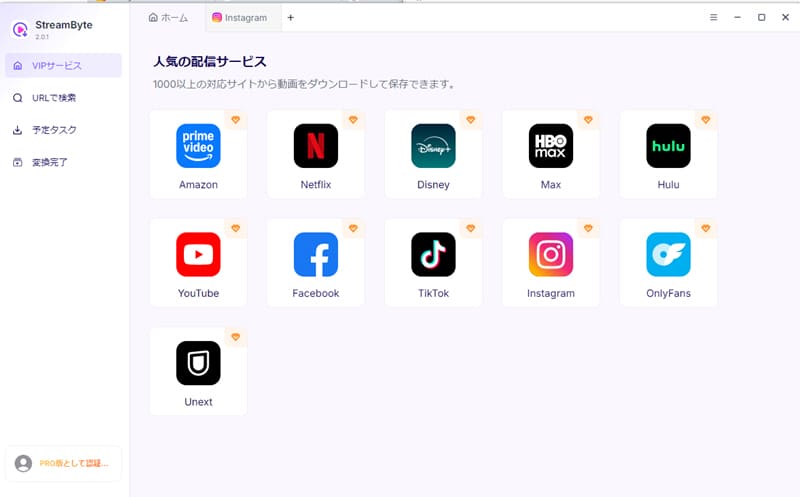
step 1After registering for "StreamByte for Video," select "Disney+" from the list of streaming services displayed on the main screen.
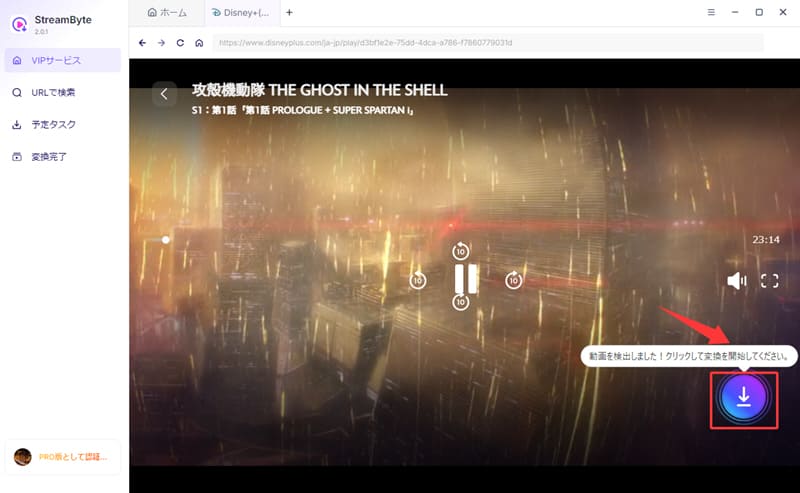
Step 2After logging into your account, find the video you want to save to your computer. It will be displayed in the upper right corner.Download iconClicking this will add the video to your download list.
Step 3After setting the output format, audio, subtitles, etc. on the download settings screen, click in the bottom right corner."download"Clicking the button will start the video download.
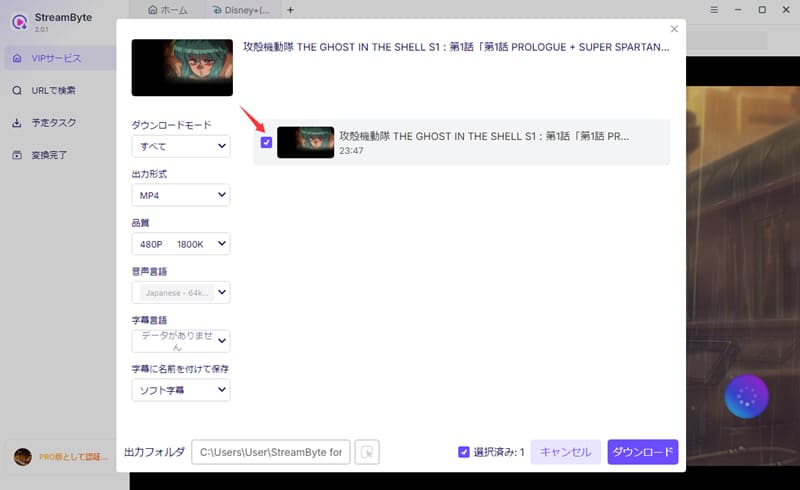
Step 4You can check the progress on the "Scheduled Tasks" screen. After a short wait, the download will be complete. That's it! Play Disney+ videos offlineYou will be able to do so.
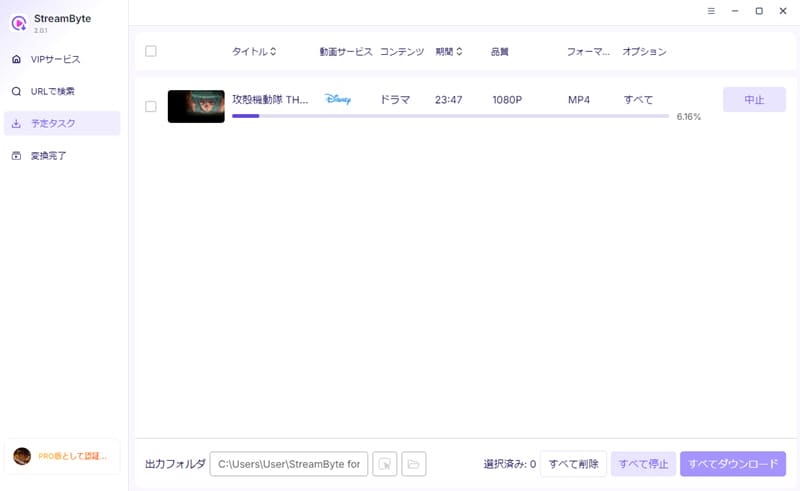
"StreamByte for VideoUsing this app, you can easily download Disney+ videos to your computer. Not only is it easy to use, but it also features a built-in web player, providing an official viewing experience even during downloads. A major advantage is that you can complete the download in one stop without needing to use other software or frequently switch screens. Furthermore, it supports high-definition up to 1080P, achieving a quality that will satisfy even those who are particular about picture quality.
100% safe, virus-free
100% safe, virus-free
The official Disney+ app includes a download function for paid subscribers. This allows you to save videos safely and easily without using external tools. However, the official download function is limited to paid subscribers and has various restrictions. Also, note that downloads are not possible on a computer.
The steps to download Disney+ videos using the official download function are as follows:
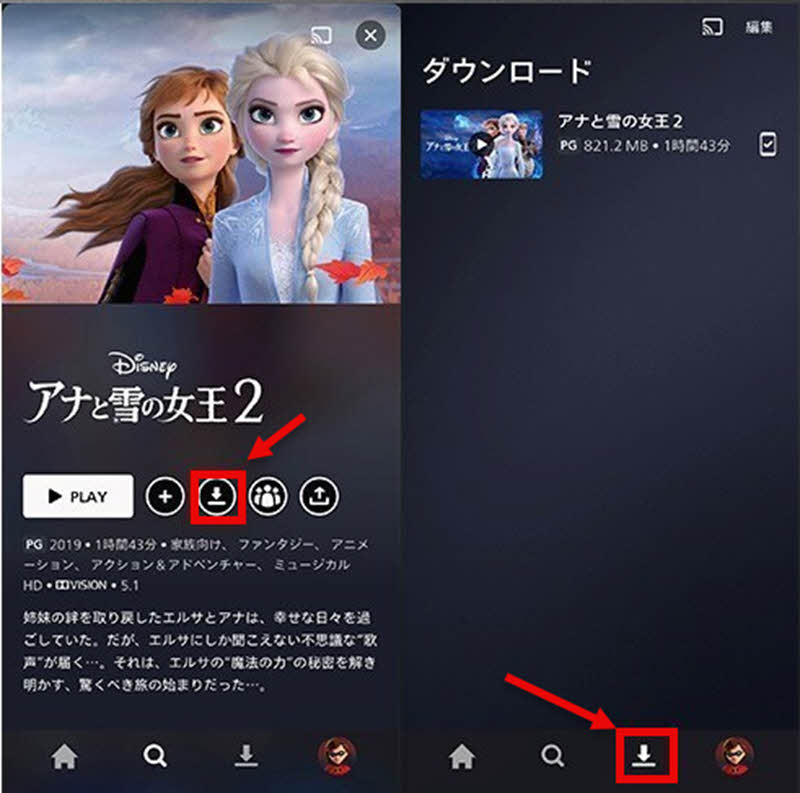
step 1,Launch the Disney+ app and open the details page for the title you want to save."Download" buttonwill be displayed.
Step 2,When you press the "Download" button, the work will be automatically added to your download list and the download will begin.
Step 3,Once the download is complete, select from the menu at the bottom of the screen.Download iconSelecting this option will allow you to view your saved titles. You can now download Disney+ videos to your computer using the official features.
Advantages:
Cons:
Most Disney+ videos are DRM-protected, which imposes various restrictions on saving and playing them. Therefore, we've compiled some important points to keep in mind when downloading videos using the official features. Please refer to this guide when downloading.
Compared to the method described above,Free Online Video Downloader"or"Disney Video ConverterIt is possible to download Disney+ videos to your computer from online sites such as [website name]. However, most online sites have a lot of ads, unstable connections, and slow download speeds. In particular, they pose a high risk in terms of security, so if security is a priority, [website name]StreamByte for VideoWe recommend using "[this service]".
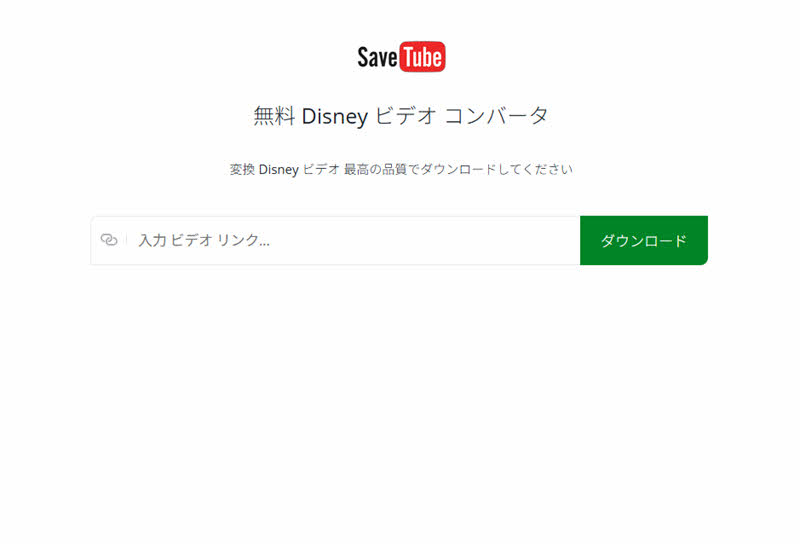
Here, we'll briefly explain how to download Disney+ videos from online sites using "Disney Video Converter" as an example.
Step 1,Go to the official Disney+ website and copy the link of the video you want to download.
Step 2,Paste the copied video link into the input field of "Disney Video Converter" and click the "Download" button.
Step 3,Once the video details are automatically displayed in "Disney Video Converter," you can change the output settings as needed, and then download the Disney+ video to your computer via the online site.
Advantages:
Cons:
While online sites are free to use and are not subject to Disney+'s official download restrictions, there are significant security concerns. However, using browser extensions like those for Google Chrome can provide a degree of security while maintaining convenience. These extensions are generally security-verified by Google and are therefore safe.
However, it's important to note that the procedure is somewhat complex and more suitable for advanced users than beginners; it's not always possible to obtain a URL for all videos; and there are some limitations, such as the possibility of saving failing due to encryption or protection of certain content, and restrictions on downloadable video quality and formats.
Below, we'll show you how to download Disney+ videos using a browser extension, "Video DownloadHelper," as an example.
step 1, Open Chrome and go to the Chrome Web Store"Video DownloadHelper"Search for and install it.
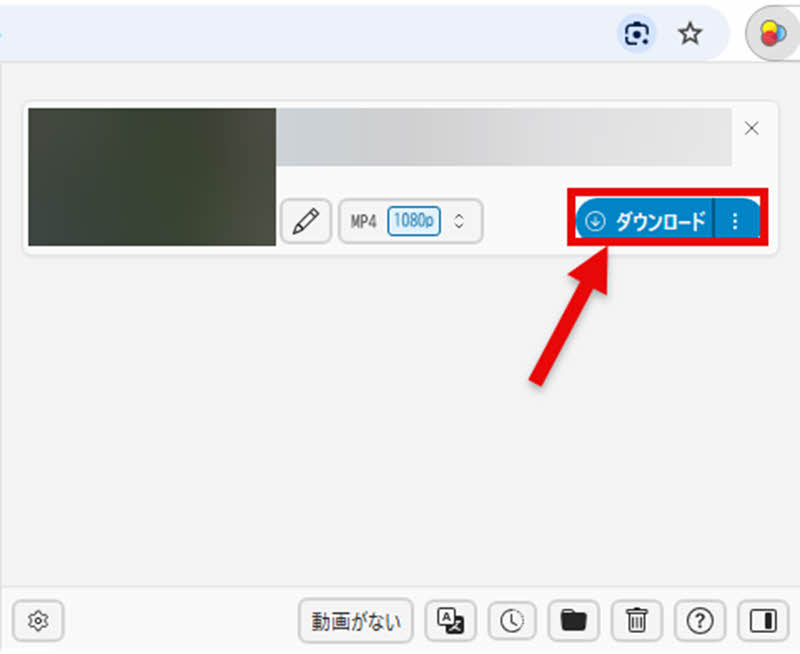
Step 2, Play the Disney+ video you want to download, then open "Video DownloadHelper" from the extension icon in the upper right corner of your browser.
Step 3, The extension will automatically analyze the video. After that,"Download" buttonClicking this will allow you to save Disney+ videos to your computer.
Advantages:
Cons:
To help you better understand the differences between each method of downloading Disney+ videos, we have summarized the advantages and disadvantages of each in the table below. Please refer to it.
| Official Features | StreamByte for Video | Online site | Browser extensions | |
| Video management and editing | Not possible | Possible | Possible | Possible |
| Download Limit | can be | none | none | none |
| Download speed | usually | Up to 8 times faster | slow | usually |
| success rate | expensive | expensive | Unstable | Unstable |
| advertisement | none | none | can be | none |
| image quality | Lossless | Lossless | Image quality is degraded. | Up to 1080p |
| Safety | expensive | expensive | low | expensive |
| Recommendation | ★★★★ | ★★★★★ | ★★★ | ★★★★ |
As this table shows, for those who prioritize image quality and stability, the official function is ideal as it offers high security, no loss of image quality, and no worries about ads or download failures. On the other hand, for those who only download occasionally and only need a few videos, downloading from online sites or browser extensions is recommended.
However, if you also want to manage and edit videos, and if you also want to prioritize safety and success rate, then you should definitely consider "StreamByte for VideoThis is the best option. Like the official feature, it's ad-free and highly secure. Furthermore, just like online sites and browser extensions, you can manage and edit videos, and there are no download restrictions. This is a method I highly recommend for anyone who wants to download Disney+ videos.
100% safe, virus-free
100% safe, virus-free
Downloading Disney+ videos through unofficial means is illegal. However, if you only use the content for personal use and do not redistribute or use it commercially, you will rarely face legal consequences. However, copyright is a very sensitive area, so ultimately, you will need to make a judgment based on the laws of your local area.
If the download button does not appear when using the official download function, it is highly likely that the content is not available for download. Due to distribution rights and licensing issues, some titles on Disney+ are not available for download. In such cases, if you wish to save the video, please consider the other methods introduced in this article.
Generally, when you try to record Disney+ videos using the standard recording function on your smartphone or PC, you'll almost always only get audio and a black screen. This is because the video is encrypted with DRM protection, making it impossible for recording software to capture it properly. Therefore, if you want to save the video to your PC,StreamByte for VideoIt is recommended to use dedicated downloadable software such as "[software name]".
Unfortunately, the current official Disney+ download function does not allow you to freely change the save location. Downloaded videos are protected by digital rights management and are encrypted. Therefore, they cannot be freely moved or edited and can only be played within the Disney+ app.
Even if you cancel your Disney+ subscription, you can still play downloaded videos as long as your subscription is still active. However, once your subscription ends, you will no longer be able to play downloaded videos. If you want to save Disney+ videos long-term,StreamByte for VideoYou can use methods such as saving in a general-purpose format like MP4.
This article provides a detailed explanation of various methods for downloading Disney+ videos, including the official download function and online sites. Among these, the most recommended method is using dedicated download software.StreamByte for VideoThis involves using "[...].
This software allows you to save Disney+ videos to your PC in common formats such as MP4, enabling offline playback even after your subscription expires. Furthermore, it offers greater stability and success rate compared to online sites and browser extensions, making it less likely to fail even when downloading multiple videos at once. Its simple, ad-free interface also makes it a comfortable and convenient tool to use.
"StreamByte for VideoWe offer a free trial version, so if you'd like to try downloading Disney+ videos, please feel free to give it a go.
100% safe, virus-free
100% safe, virus-free
Born in Tokyo in 1997. After graduating from a university in London, he worked at a major IT media company, writing articles about video streaming services, video downloaders, and digital content.More than 3 years of experience in editing, proofreading, and writing directionThe articles he has worked on have garnered over 5 million page views, and he is well-known for producing content that is carefully crafted from the reader's perspective.
Currently, as an editor and web writer at StreamByte, he works on creating articles that help users solve their problems, focusing on information related to video streaming services and downloads, with the aim of being "user-oriented, easy to understand, and immediately useful."
Read more articles together

Experts in supporting offline viewing of streaming video services
Subscribe to StreamByteCopyright © 2026 StreamByte. All rights reserved.



Get the latest news, product upgrades, information, guides, discounts and more about StreamByte.
Please enter a valid email address.

A highly capable video downloader:
StreamByte for Video
Even beginners can rest assured! You can try saving videos for free first!







 English
  Japanese
  Chinese (traditional)
  German