
- Online video downloader
- Streaming Products
- BD-DVD products
- Store
- Useful Articles
- support
Share this article!


Many users are complaining online that they can't download TikTok videos, and it's incredibly frustrating when you can't save your favorite videos. This article will explain the causes and solutions for downloading TikTok videos, and also offer a more fundamental solution. Please read to the end.
Related Posts:
Reasons why TikTok videos cannot be downloaded
You may be unable to save videos using TikTok's official download function. The main reasons for this include the uploader not allowing downloads, copyright restrictions, an unstable network connection, insufficient access permissions for the photo app, insufficient device storage space, or a temporary glitch on TikTok's end.
However, many of these issues cannot be resolved by TikTok's official download function alone. Therefore, if you want to save videos with download restrictions or TikTok videos that cannot be saved using the official function,Dedicated video downloaderUsing this method is effective.
TikTok has an official download function, but videos saved using this function will always display the TikTok logo. Furthermore, it's only possible to save TikTok videos that the uploader has allowed to be downloaded. Since the saving method differs between the app and a browser, this article explains how to download TikTok videos using each method.
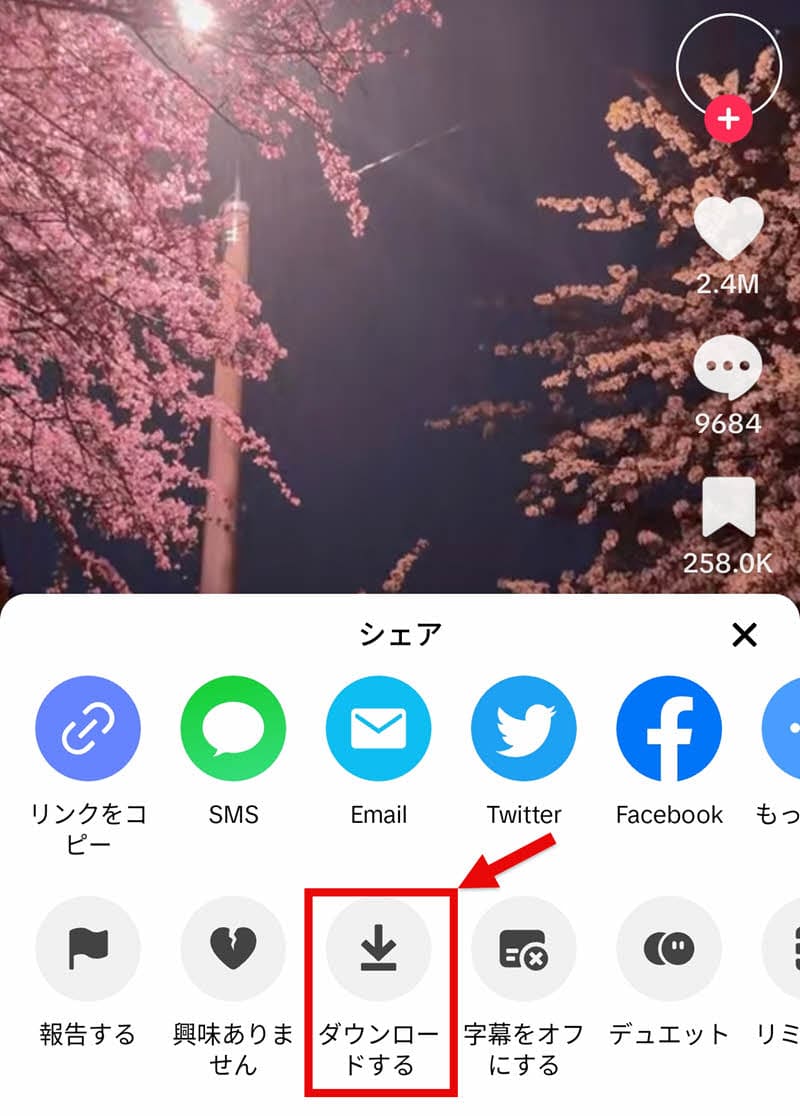
step 1Next, open the TikTok app and select the TikTok video you want to save.
Step 2, bottom right of the screenShare buttonTap, and from the menu that appears..."download"Select
Step 3Once the download is complete, the TikTok video will be automatically saved to your smartphone's photo album.
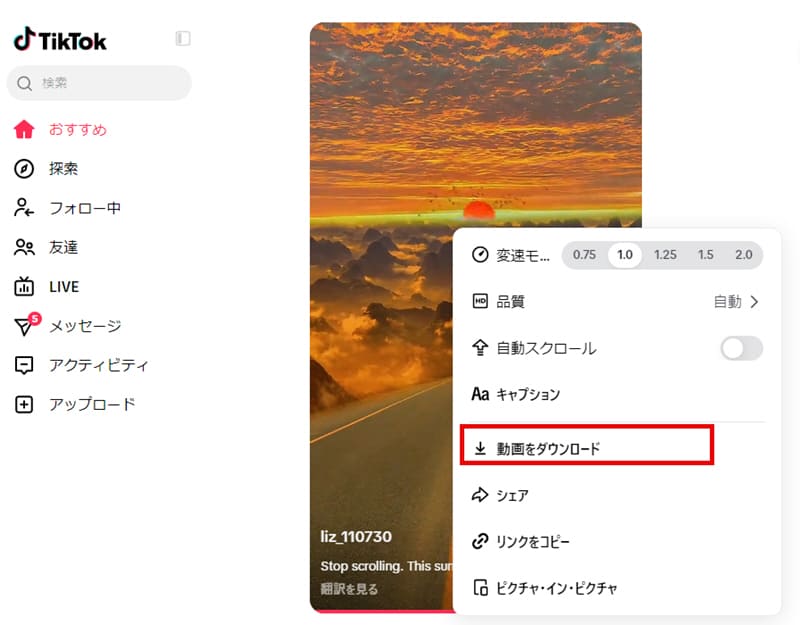
step 1Open the TikTok app and search for the video you want to save.
Step 2Play the target TikTok video and on the screen"Download video" buttonClick
step 1Select the save location,"Save" buttonClicking this will allow you to download the TikTok video.
The stability of your network environment greatly affects whether you can successfully download videos from TikTok. If your connection is unstable, you may experience problems such as downloads stopping midway or buttons becoming unresponsive, which can prevent TikTok video downloads from completing successfully.
SolutionFirst, if you are using a VPN or proxy, please turn it off and try again. These services can sometimes affect TikTok's server connection. Next, disconnect and reconnect to your internet connection and try downloading again. If you are using Wi-Fi, restarting your router or moving to a location with a stable signal may also be effective.
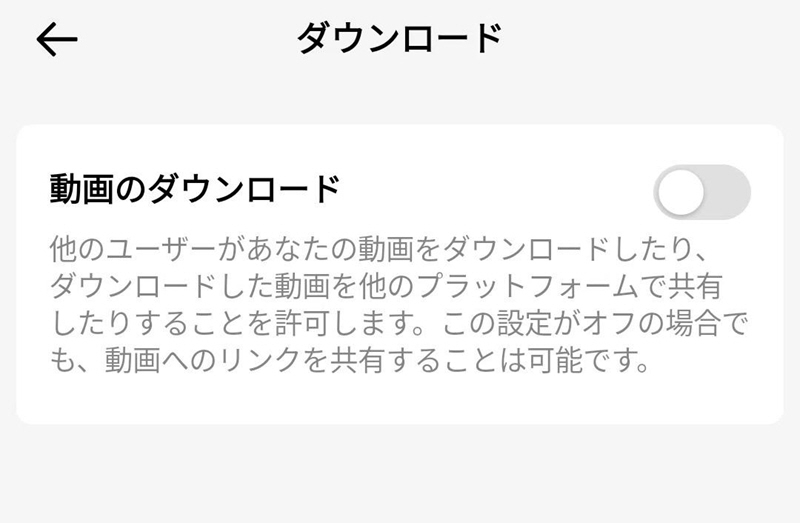
On TikTok, not all videos can be downloaded; only videos for which download permission has been enabled when posted can be saved. Therefore, if the download button is not displayed and you cannot download a video on TikTok, it is possible that the download permission setting for that video has been turned off.
SolutionVideos that have download permission turned off when posted cannot be saved using the official function. In that case,StreamByte for VideoYou will need to use specialized tools such as [tool name] to save the file.
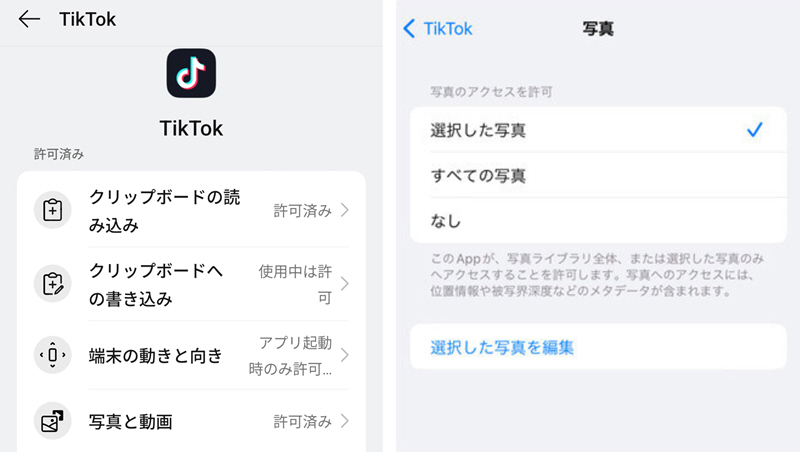
If you're using the TikTok app, you need to grant access to your Photos app to save videos to your device. Usually, a permission request pop-up will appear the first time you try to download a video; if you don't grant permission at this point, you may be unable to download videos from TikTok.
SolutionIf you accidentally denied access to the Photos app during the initial saving process, or if the setting is disabled, please manually enable permission from your device's settings.
iOSFor those who prefer, open the Settings app.TikTokSelect this option, and then in the Photos section, choose either "Selected Photos" or "All Photos".
AndroidFor those users, open the app list from the Settings app, select TikTok, and then in the Permissions section..."Photos and videos"Access"Permission granted"I will change it to this.
TikTok may occasionally experience temporary glitches on its service side, which can cause the video download function to malfunction. App glitches or server issues can suddenly cause downloads to stop midway, or buttons to become unresponsive, making it impossible to download videos from TikTok.
SolutionIn such cases, there are limited actions users can take, and you will generally need to wait until the problem is resolved. Additionally, you can contact the official support desk to check the latest status and whether a solution is available.
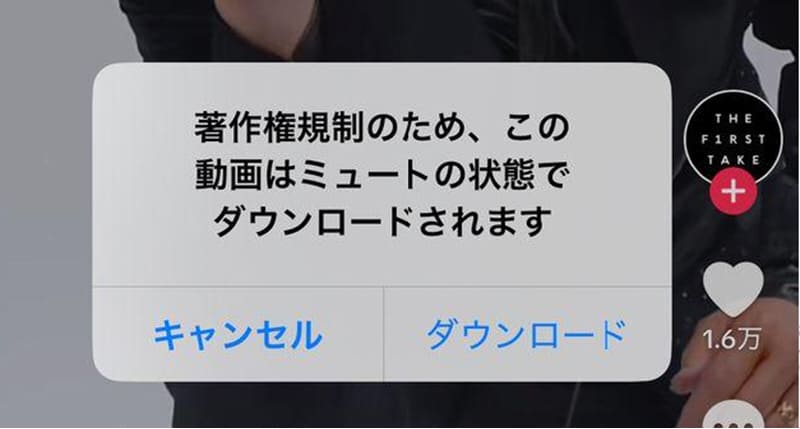
On TikTok, some videos may use copyrighted music, which can sometimes prevent the audio from playing in downloaded videos. Additionally, you may encounter errors such as "Video cannot be saved due to copyright restrictions," preventing you from downloading videos from TikTok.
SolutionIf you are unable to download due to copyright restrictions, TikTok's official functions do not allow saving, so our options are limited. If you want to watch offline,StreamByte for VideoThere are methods to save the files using a dedicated downloader like the one mentioned above.
To download videos from TikTok, you first need sufficient free space on your device. If you don't have enough space, you may encounter problems downloading videos from TikTok, as the videos may not save properly. Therefore, please check the available space on your device before downloading.
SolutionIf you are unable to download videos from TikTok due to insufficient storage space on your device, please delete unnecessary files and apps to free up enough space. Also, try changing the local disk location where you want to save the videos and then try downloading again.
We have explained in detail the main reasons why you may not be able to download videos from TikTok. Many of these are due to settings or restrictions, and there are many cases where the official download function alone is insufficient. Therefore, as a way to fundamentally solve the problem of not being able to download videos from TikTok,StreamByte for VideoThere is a use for this.
This software is a professional video downloader that can output videos in multiple formats, including MP4, MKV, and MOV. It supports not only publicly available TikTok videos but also videos where the uploader has disabled downloads, making it easy to download videos that cannot be saved using the official download function.
Furthermore, even for videos where the audio doesn't play after saving due to copyright protection using the official function, this feature allows you to save both the video and audio together, enabling comfortable viewing even after downloading. As a result, you can comfortably watch TikTok videos even in an offline environment.

StreamByte for Video
This is a video downloader that supports major streaming services such as Netflix, Amazon Prime, and YouTube. You can save and enjoy your favorite videos with high image quality up to 8K and Dolby Atmos audio.
Why StreamByte for Video is recommended
Here, "StreamByte for VideoThis guide will show you how to easily download TikTok videos using [this method].
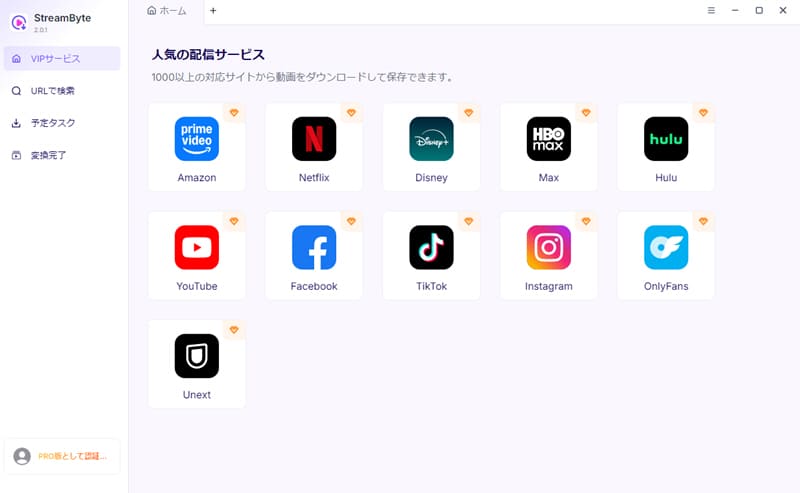
step 1Launch "StreamByte for Video" and log in to your account. The home screen will display various popular streaming services, including TikTok, so select TikTok from the list.
Step 2After logging into TikTok, search for or play the video you want to save. Once playback begins, the software will automatically analyze it.
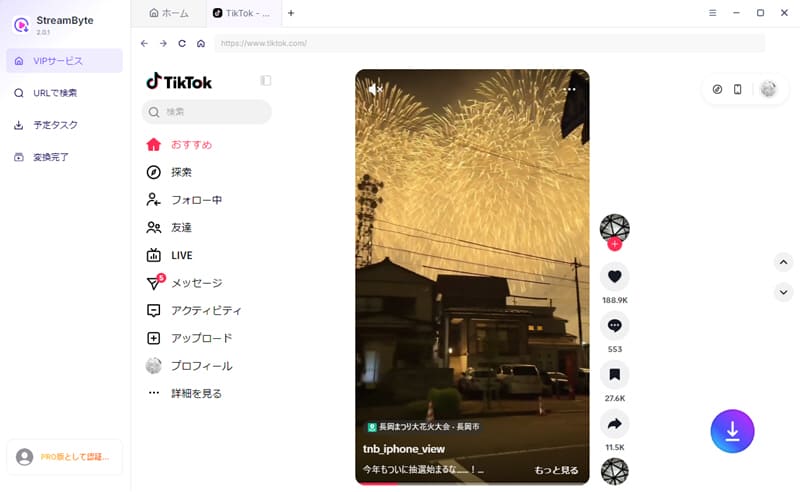
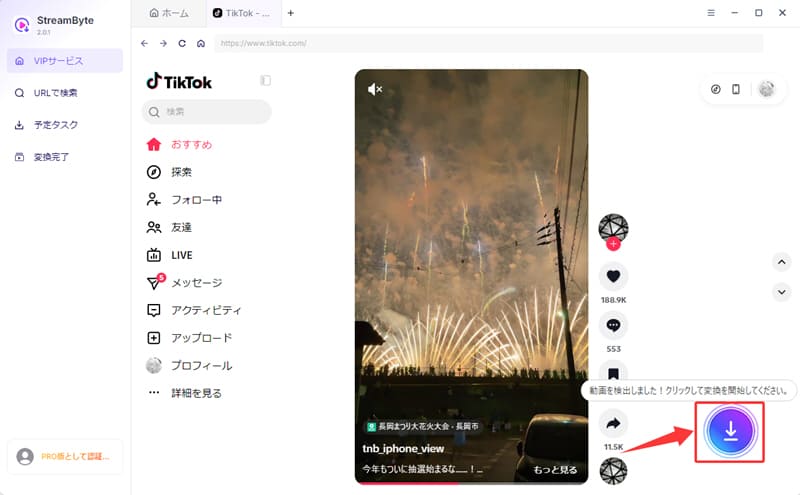
Step 3Once the analysis is complete, the bottom right"Download" buttonThis will be enabled. Clicking that button will take you to the video download list screen.
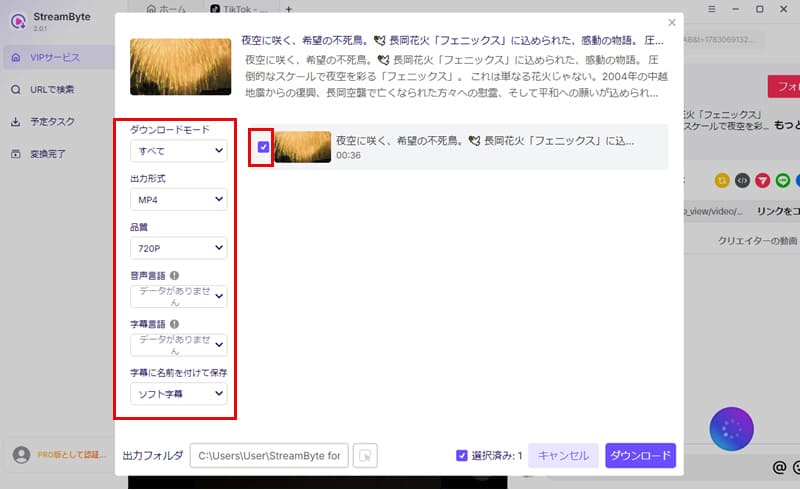
Step 4On the download screen, you can freely set the image quality, output format, etc. After completing the settings, click in the bottom right corner."Download" buttonClicking this will start the saving process.
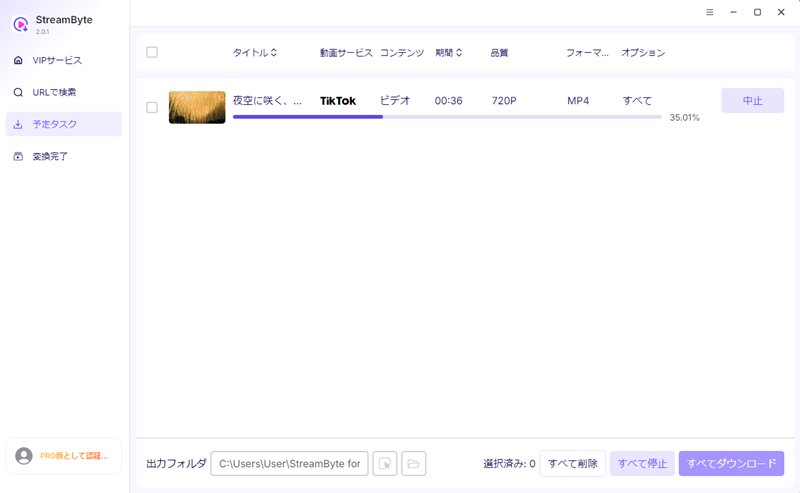
Step 5You can check the download progress in the "Converting" tab. Once the video is finished, it will automatically move to the "Conversion Complete" tab, where you can immediately view your saved video. This allows you to save your favorite TikTok videos.
"StreamByte for VideoUsing this app, you can download videos from TikTok in lossless format. It boasts a high success rate of nearly 99%, and it's extremely rare for TikTok videos to fail to download even with prolonged use. Furthermore, it supports high-speed downloads up to 8x faster, so a 30-second video at 720p can be saved in just 4-5 seconds. This significantly reduces waiting time, allowing you to comfortably enjoy your saved TikTok videos anytime, anywhere.
100% safe, virus-free
100% safe, virus-free
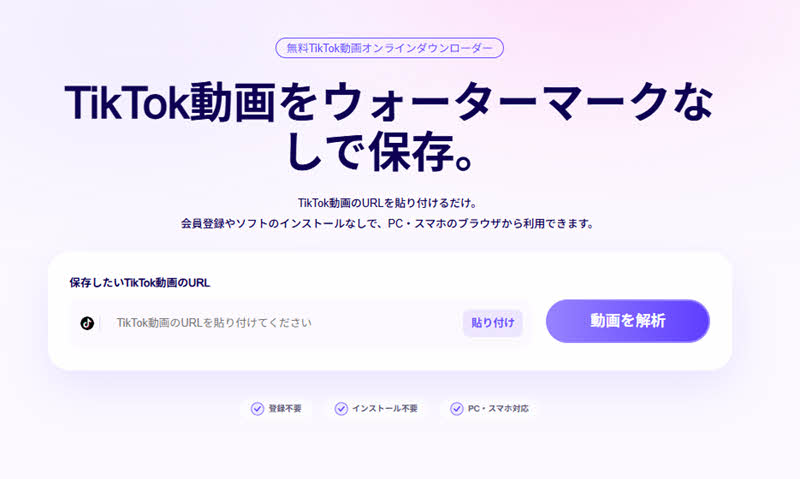
If you want to save TikTok videos without installing any software, StreamByte offersOnline TikTok video download toolAnother method is to use this service. Even videos that cannot be saved using TikTok's official download function can be easily analyzed and saved by simply copying and pasting the video URL. This method is especially recommended for those who only want to save a small number of videos or who want to save TikTok videos easily.
From here, we will explain in detail how to save TikTok videos that cannot be downloaded using a TikTok video download tool.
step 1To save a TikTok video, open the video and select "Copy link" from the "Share" or "Share" options.
Step 2Next, paste the copied URL into the input field at the top of the StreamByte TikTok video online download page and click "Analyze video".
Step 3Click the download button that appears after the analysis is complete. On a computer, right-click on the video and select "Save video as". On a smartphone or tablet, after pressing the download button, long-press the video playback screen that appears and select "Download video" to save it.
When using the official download function, you cannot remove the logo from TikTok videos. If you want to save them without the logo, you can use online download sites that can remove watermarks, orStreamByte for VideoYou will need to use compatible software such as "[software name]".
Regardless of how you download the video, the uploader will not be notified that you have saved the TikTok video, so there is no need to worry about being found out. However, unauthorized reposting or commercial use of saved videos may constitute copyright infringement, so it is important to abide by relevant rules and laws and use them within appropriate limits.
The reason downloaded TikTok videos have no sound is because the music used in the video is copyrighted. TikTok videos that use copyrighted music, such as commercial music, may have restrictions on saving to your device or outputting to an external source. As a result, the audio may be automatically muted when you save the video.
This article briefly introduces how to download TikTok videos, and then explains in detail the reasons why TikTok videos may not download and how to resolve them. Furthermore, to reduce the burden on users, we will introduce a secret trick that can fundamentally solve the problem of not being able to download TikTok videos.StreamByte for VideoWe will also introduce "[...]."
This software allows you to save TikTok videos in common formats such as MP4 without sacrificing quality. This avoids download restrictions imposed by the app, allowing you to watch saved videos anytime you want. Even videos without download permission can be analyzed and saved. Once saved, they can be played back comfortably offline, regardless of your internet connection.
"StreamByte for VideoA free trial version is also available, so if you're having trouble downloading TikTok, please give it a try!
100% safe, virus-free
100% safe, virus-free
Born in Tokyo in 1997. After graduating from a university in London, he worked at a major IT media company, writing articles about video streaming services, video downloaders, and digital content.More than 3 years of experience in editing, proofreading, and writing directionThe articles he has worked on have garnered over 5 million page views, and he is well-known for producing content that is carefully crafted from the reader's perspective.
Currently, as an editor and web writer at StreamByte, he works on creating articles that help users solve their problems, focusing on information related to video streaming services and downloads, with the aim of being "user-oriented, easy to understand, and immediately useful."
Read more articles together



Experts in supporting offline viewing of streaming video services
Subscribe to StreamByteCopyright © 2026 StreamByte. All rights reserved.



Get the latest news, product upgrades, information, guides, discounts and more about StreamByte.
Please enter a valid email address.

A highly capable video downloader:
StreamByte for Video
Even beginners can rest assured! You can try saving videos for free first!







 English
  Japanese
  Chinese (traditional)
  German