
- Online video downloader
- Streaming Products
- BD-DVD products
- Store
- Useful Articles
- support
Share this article!


Hulu is a highly popular video streaming service loved by many users. However, complaints about being unable to download Hulu videos are frequently seen online. This means that many people are unable to enjoy Hulu videos offline. This article will explain in detail the main reasons why Hulu videos cannot be downloaded and provide specific solutions. Furthermore, we will also introduce a secret trick to completely solve the problem of not being able to download Hulu videos, so please read to the end.
This article will answer this question in detail and also introduce a trick for watching Netflix on your Switch that even beginners can try right away. Please read to the end.

Related Posts:
Currently, Hulu's official download function is only available through its smartphone app; video downloads are not supported on computers or TVs.
SolutionIf you want to save Hulu videos on your computer or TV, there is currently no official method, butStreamByte for VideoYou can save or move these videos using specialized video download software such as [software name].
If your device is not supported or your OS version is outdated, you may not be able to download Hulu videos properly. Based on my testing, the probability of downloading videos using the Hulu app is particularly high on iOS 14 and earlier, and Android 9 and earlier. Therefore, users of older versions should be aware of this.
The main environments currently supported by the Hulu app are as follows:
SolutionIf you are unable to download due to an outdated operating system on your device, please update to the latest OS version from your settings screen. After the update is complete, please try downloading again.
Network stability significantly impacts the download of Hulu videos. In particular, network problems can prevent you from downloading Hulu videos, resulting in error messages such as error code 8401 or "We're sorry, the download failed. Please try again."
SolutionPlease ensure a stable network connection by restarting your router or reconnecting to the network. Also, please verify that your download speed is 6Mbps or higher before attempting the download again.
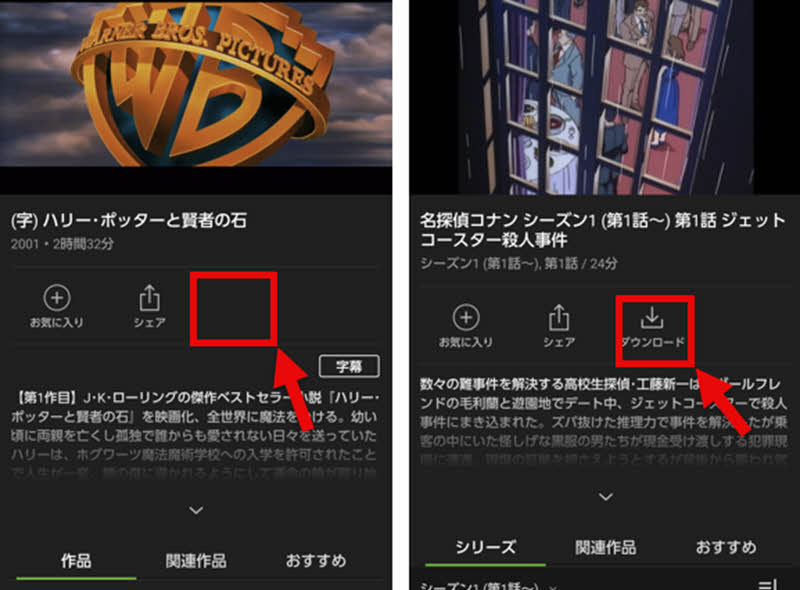
Not all videos on Hulu are available for download. Due to rights restrictions and other reasons, videos that do not display a download button are not available for download. Therefore, if you cannot download a Hulu video because the download button is not displayed, it is highly likely that the video is not available for download.
SolutionFor titles that are not eligible for download, you cannot save them using only the functions of the official Hulu app. In this case,StreamByte for VideoYou can save videos by using specialized video download software such as [software name].
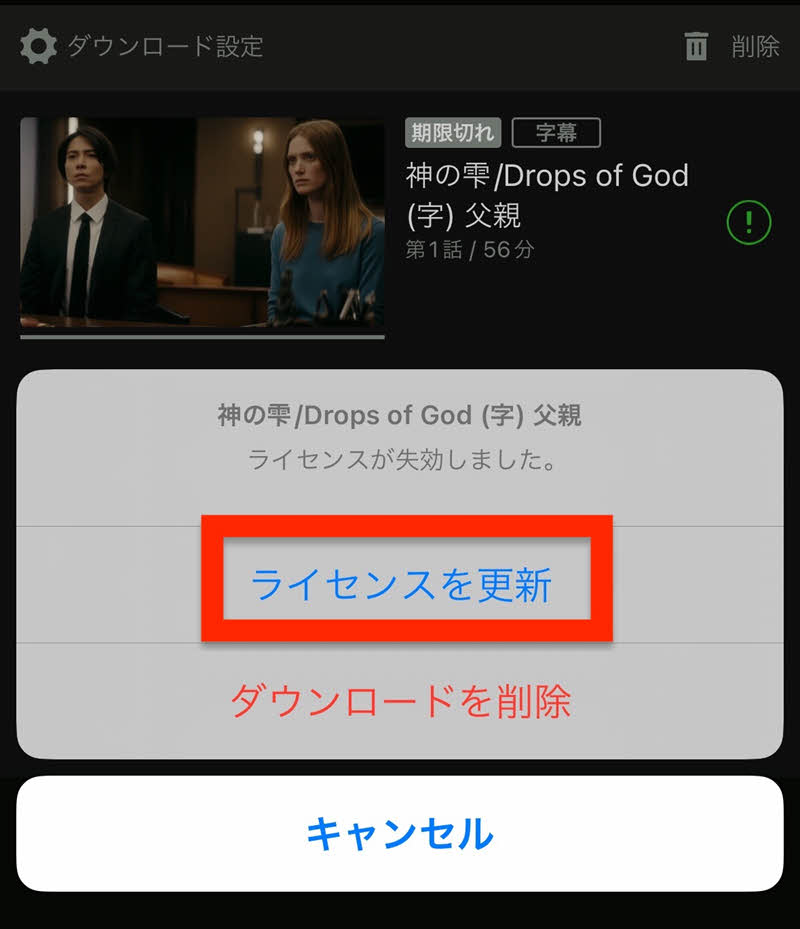
If you are logged out of the Hulu app or your subscription has expired, you may see a "License has expired" message and be unable to download Hulu videos. This is because all Hulu videos are DRM protected, and periodic license checks are required to play or download them. Once your license expires, you will no longer be able to play videos you have already saved.
SolutionFirst, please check that you are successfully logged into your Hulu account and that your subscription is active. If you are unable to play videos you have already saved, please press the "!" button to the right of the video and select "Renew License" to reacquire your license. After that, please try playing or downloading Hulu videos again.
Hulu's download function allows you to save a total of 25 titles per account. If you exceed this limit of 25 titles, you will receive an error message such as, "The number of downloadable titles has exceeded the limit. Please delete some downloaded titles and try again," and you will no longer be able to download Hulu videos.
SolutionIf you have reached your download limit, please delete any unnecessary downloaded works. You can delete works by going to the "Downloads" screen from "My List" at the bottom of the home screen, swiping the work you want to delete to the left, and tapping "Delete." Once the deletion is complete, please try downloading again.

Hulu's download feature has a limit on the number of devices that can be used per account, currently set at two. If you see a message saying "You can only download on two devices" or error code 29060 or 2405, it means you are already using the download feature on two devices and cannot download any new Hulu videos.
SolutionIf you wish to download on a different device, please log in to the Hulu website, open "Manage your devices" from your owner profile in the upper left corner, and deregister any device you are currently using. Then, please try downloading again.

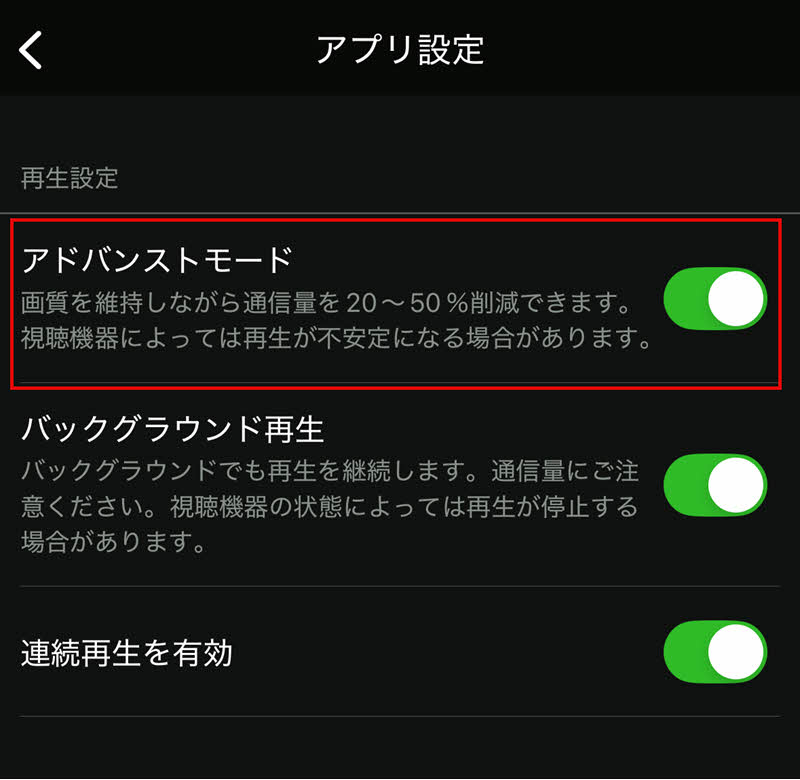
Advanced Mode is a setting designed to reduce data usage while watching content, saving on data consumption. However, depending on your device, enabling Advanced Mode may cause unstable downloads and prevent you from downloading Hulu videos properly.
SolutionIn this case, tap "Account" in the lower right corner of the home screen, and then turn off the function in the "Advanced Mode" section under "App Settings." After that, please try downloading Hulu videos again.
Some Hulu content has age restrictions, and viewing may be limited depending on your age. Therefore, you may not be able to download videos if your profile does not meet the age requirement.
SolutionPlease check your profile's age settings and parental controls and change them as needed. If you are unable to download due to age restrictions, please try downloading again with a profile that has the restrictions removed.
The above explains in detail the main reasons why you might not be able to download Hulu videos and how to deal with them. As you can see, many of these issues stem from various restrictions on playback and downloading on Hulu's end. So, is there a way to solve these problems from the root? Here, we will discuss a method that can fundamentally resolve the problem of not being able to download Hulu videos:StreamByte for VideoI will introduce "[this]".
This software is a dedicated tool that allows you to download content from streaming video services.Save Hulu videos in MP4 formatcan.Remove DRM protectionBecause it supports this feature, downloaded videos are not affected by Hulu's various restrictions and can be played offline anytime, anywhere. Furthermore, you can continue to watch saved videos even after your subscription expires, and you don't have to worry about restrictions such as the number of downloads or the number of devices on which you can watch them.

StreamByte for Video
This is a video downloader that supports major streaming services such as Netflix, Amazon Prime, and YouTube. You can save and enjoy your favorite videos with high image quality up to 8K and Dolby Atmos audio.
"Why we recommend StreamByte for Video"
Here, "StreamByte for VideoWe will briefly explain how to use it to easily download Hulu videos in MP4 format.
step 1,To "StreamByte for Video"Log inThen, major streaming services, including Hulu, will be displayed on the main interface. Select Hulu.
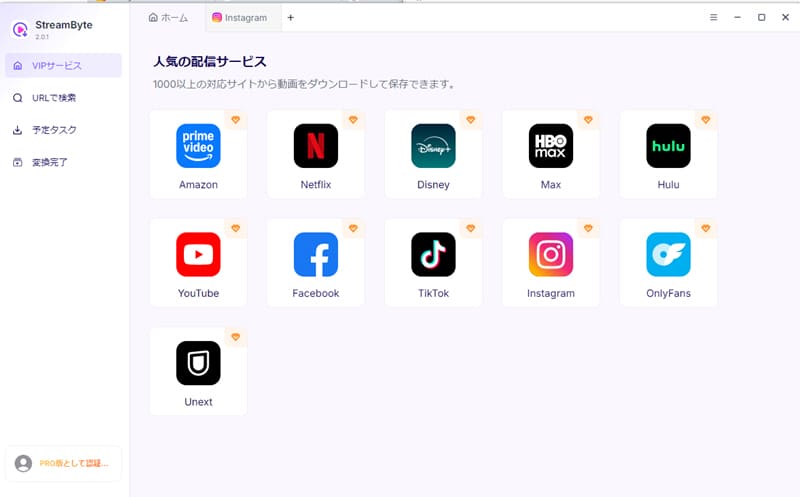
Step 2,After accessing the Hulu official website using the built-in browser, click on the upper right corner of the screen:Log inClick the button to log in to your Hulu account.

Step 3,To download Hulu videos as MP4 files, open the page of the video you want to save. The software will analyze the video, and the download icon will become active. (You can also paste the video's URL into the interface to search.)
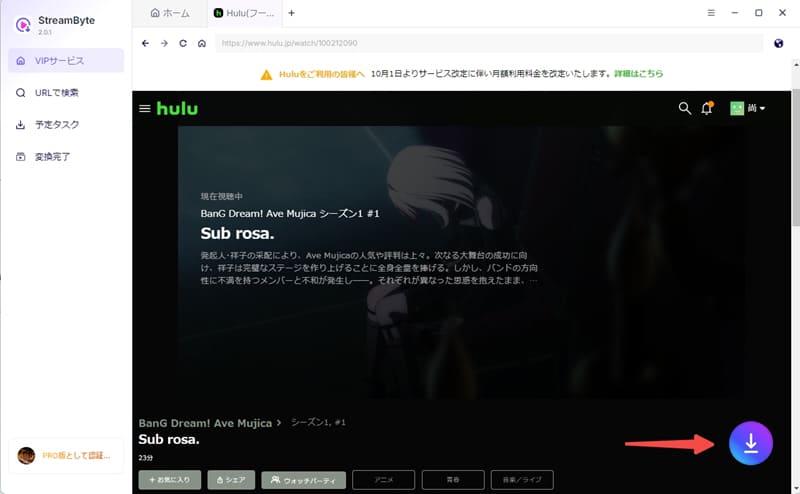
Step 4,Cloud IconClick to select MP4 format as output format to download Hulu videos to MP4. You can also change settings like audio, subtitle, etc. according to your convenience.
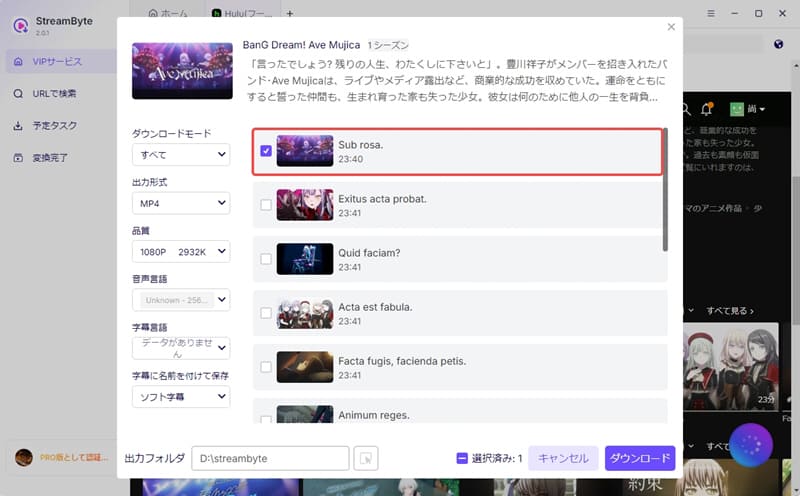
Step 5,Finally, you can download the video by clicking the "Download" button. You can check the download progress on the "Scheduled Tasks" screen. Once the download is complete,Save Hulu videos to your computerYes, and you can play it offline without limits.

By following the steps above, you can fundamentally resolve most of the problems you encounter when trying to download Hulu videos with just a few simple steps. You don't have to worry about Hulu's download limits or encryption, and you can download Hulu videos without limits and play them on various players. It also features a built-in web player, providing an experience similar to the official app. With a simple and intuitive interface, even beginners can easily download their favorite Hulu videos and enjoy them comfortably offline.
100% safe, virus-free
100% safe, virus-free
Even after canceling your Hulu subscription, you may still be able to play downloaded videos within the official app as long as your subscription period is still active. However, once your subscription expires, you will no longer be able to watch downloaded content.Delete the Hulu account itself.This will prevent you from accessing not only your viewing history and profile information, but also your saved video data.
If you want to watch Hulu videos offline after your subscription ends, instead of using the official app's temporary save function, you should use a dedicated video download software that allows you to save videos in a general format such as MP4.StreamByte for VideoAnother method is to use "[...]".
Downloading Hulu videos in formats such as MP4 is illegal from a copyright perspective. However, there are cases where it falls into a gray area under copyright law. Generally, saving videos for personal learning or viewing purposes is unlikely to result in legal repercussions. However, redistribution or commercial use significantly increases the risk of copyright infringement. Therefore, when downloading and using Hulu videos, be sure to check the laws of your region and Hulu's terms of service, and use them only within reasonable limits.
Videos downloaded from the Hulu app are not permanently saved. Downloaded videos are protected by DRM and can only be played within the Hulu app. Therefore, you need to connect to the internet regularly to authenticate. If you do not connect to the network for more than 30 days, even videos you have already downloaded will become unplayable.
Generally, Hulu's data consumption varies depending on the video quality being played. For example, standard definition consumes approximately 0.6GB of data per hour. High definition can reach approximately 1.0GB per hour. Therefore, if you plan to watch offline, it is recommended to download videos in advance.
Videos downloaded using the official Hulu app are DRM-protected and saved in an encrypted state in a dedicated folder within the app. Therefore, it is generally not possible to access them directly from outside the app or change their storage location.
If you want to save videos externally and manage and move them freely, you will need dedicated video download software.StreamByte for VideoBy using this method, you can save Hulu videos in common formats such as MP4. This allows you to freely specify the save location and move them between devices, bypassing the limitations of the official app.
This article has explained in detail the main reasons why you might not be able to download Hulu videos and how to deal with them. However, since there are many reasons why you might not be able to download Hulu videos, it can take time for many users to pinpoint the specific cause. Therefore, this article will introduce a secret trick to fundamentally solve the problem of not being able to download Hulu videos:StreamByte for Video" was introduced.
This software allows you to easily bypass the DRM restrictions on Hulu videos and save them in common formats such as MP4. This fundamentally avoids the problem of "not being able to download Hulu videos" by eliminating the various download and playback restrictions associated with Hulu. Furthermore, saved videos can be played anytime, anywhere, even after canceling your Hulu subscription.
"StreamByte for VideoWe offer a free trial version, so if you're having trouble downloading Hulu videos, please feel free to give it a try.
100% safe, virus-free
100% safe, virus-free
Born in Tokyo in 1997. After graduating from a university in London, he worked at a major IT media company, writing articles about video streaming services, video downloaders, and digital content.More than 3 years of experience in editing, proofreading, and writing directionThe articles he has worked on have garnered over 5 million page views, and he is well-known for producing content that is carefully crafted from the reader's perspective.
Currently, as an editor and web writer at StreamByte, he works on creating articles that help users solve their problems, focusing on information related to video streaming services and downloads, with the aim of being "user-oriented, easy to understand, and immediately useful."
Read more articles together



Experts in supporting offline viewing of streaming video services
Subscribe to StreamByteCopyright © 2026 StreamByte. All rights reserved.



Get the latest news, product upgrades, information, guides, discounts and more about StreamByte.
Please enter a valid email address.

A highly capable video downloader:
StreamByte for Video
Even beginners can rest assured! You can try saving videos for free first!







 English
  Japanese
  Chinese (traditional)
  German