
- Online video downloader
- Streaming Products
- BD-DVD products
- Store
- Useful Articles
- support
Share this article!


"I want to save Facebook videos, but how do I do that?" This kind of question is frequently seen on Yahoo! Answers. Many users want to download Facebook videos, but they don't know how. Therefore, this article will explain various methods for downloading Facebook videos in a clear and detailed manner. Please read to the end.
Related Posts:
Many users are wondering whether Facebook has an official download function. When you open the video menu, you may see an item called "Save Video," which at first glance looks like a download function.
However, this feature is not actually a download function; it's simply a way to save videos as favorites. Saved videos are only added to a playlist within the app and are not saved as files on your device. Therefore, Facebook does not currently offer a true video download function.
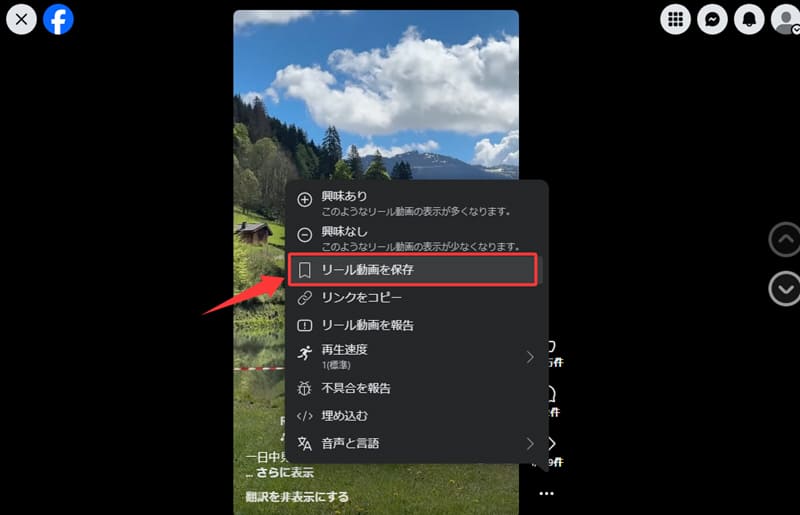
As explained above, Facebook currently does not offer a download function to save videos to your device. So, what methods can you use if you want to download Facebook videos?
This section will introduce specific methods for downloading Facebook videos. Using these methods, you can save Facebook videos to your device and watch them anytime, anywhere. Before explaining the detailed steps for each method, we have summarized their features and differences in the table below. Please use this as a reference when choosing the method that best suits your purpose and environment.
| method | Features | Recommendation |
| StreamByte for Video | It enables high-quality and stable storage and can be used for a variety of purposes. | 5 stars: ★★★★★ |
| Online site | No software installation is required, making it easy to use. | 3 stars: ★★★ |
| Extensions | It can be easily saved from browsers such as Chrome. | 4 stars: ★★★★ |
| Smartphone app | You can save videos using only your smartphone. | 3 stars: ★★★ |
If you want to download Facebook videos, the first thing I recommend is the dedicated video downloader "StreamByte for Video". With this software, you can save Facebook videos in lossless quality in common formats such as MP4, MKV, and MOV. It boasts fast and stable download performance, and a 1080p video of about 20 seconds can be saved in just 5-6 seconds.
Furthermore, it features a built-in web player compatible with Facebook, allowing you to complete everything from searching for videos to downloading them within the software. There's no need to switch browsers repeatedly, making it easy to use even for beginners. For those who prioritize image quality, speed, and ease of use, this is the most recommended method for downloading Facebook videos.
Why StreamByte for Video is recommended
Here, "StreamByte for VideoThis explains how to download Facebook videos using [this method].
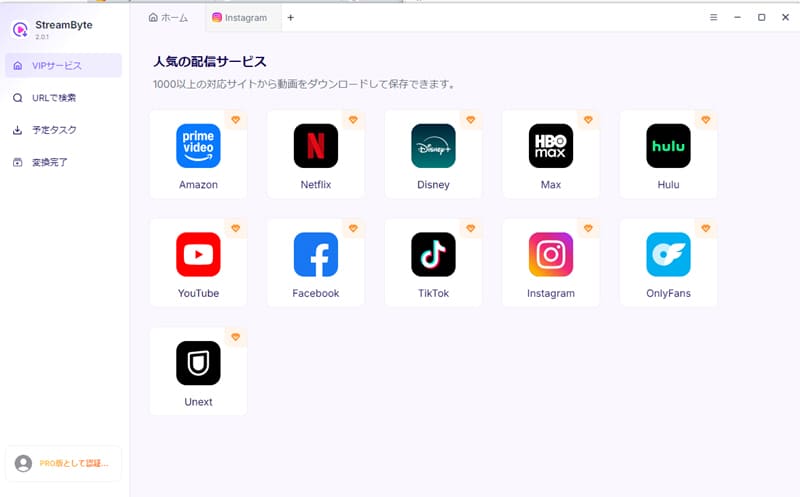
step 1After launching "StreamByte for Video" and logging in, select Facebook from the list of supported services displayed on the home screen and access the official Facebook website.
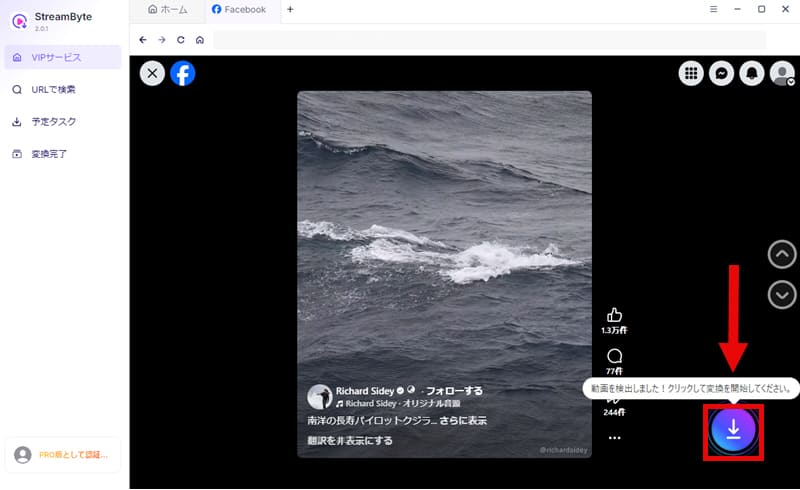
Step 2, to Facebook accountLog inNext, open the playback page of the Facebook video you want to download. The video will be automatically analyzed, and once the analysis is complete, it will be displayed on the screen.Download iconClick
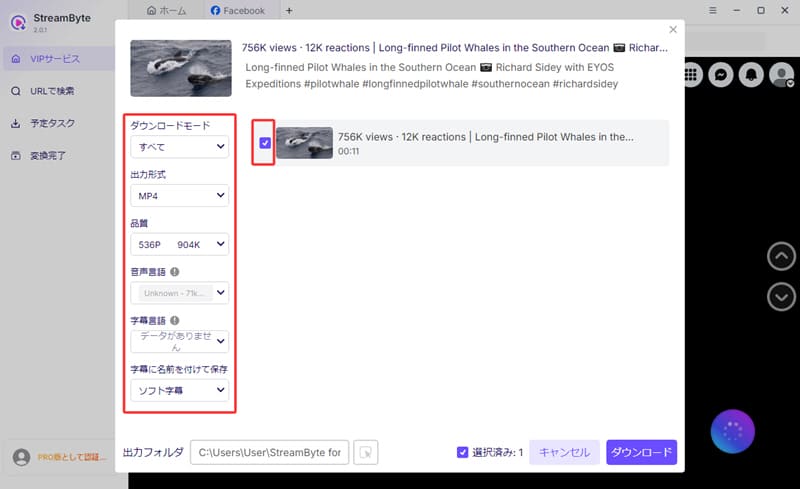
Step 3On the download screen, set the video output format, audio, subtitles, etc., as needed. Once you have finished setting it, click in the bottom right corner."Download" buttonClicking this will start saving the Facebook video.
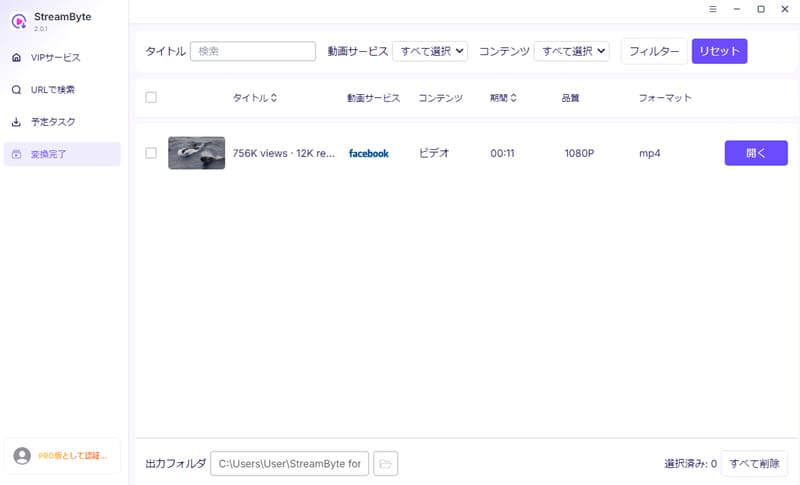
Step 4The download progress is"Scheduled Tasks" screenYou can check it there. Once saving is complete, the video will automatically"Conversion complete"You can then go to [this location] and immediately play the downloaded Facebook video.
"StreamByte for VideoUsing this tool, you can easily download Facebook videos with just the steps outlined above. Its simple and user-friendly interface makes it easy for even beginners to use. Furthermore, the download success rate is a very high 99%, meaning you'll rarely encounter failures even when downloading 20-30 Facebook videos consecutively. In addition, a wide variety of video quality and output formats are available, allowing for comfortable playback on various devices such as smartphones, TVs, and car navigation systems.
100% safe, virus-free
100% safe, virus-free
One way to download Facebook videos is,StreamByte for VideoIn addition to dedicated software like "[software name]", you can also use online sites such as "FDownloader" and "SaveFrom". This method is easy to use because you only need to copy and paste the URL of the Facebook video you want to download, and there is no need to install any software.
On the other hand, some online sites display a lot of advertisements, and there are concerns about their safety and stability. Therefore, those who prioritize safety are advised to use them with caution.
Now, using "SaveFrom" as an example, I will show you how to download Facebook videos from an online site.
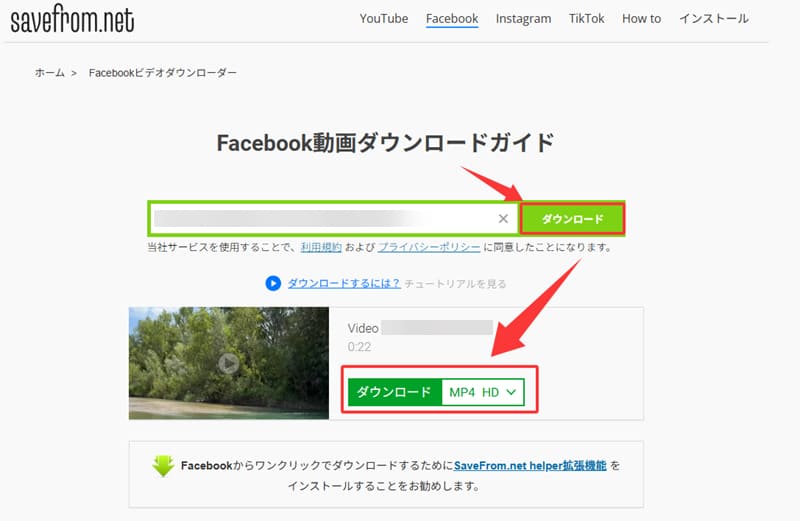
step 1Open the Facebook video you want to download,"Copy link"Select it and copy the video URL.
Step 2Then, access "SaveFrom" and paste the copied video URL into the input field. After that, on the right side..."Download" buttonClick
Step 3Once the video analysis is complete, select the desired video quality and download the Facebook video.
If you're using a desktop browser like Chrome, you can also download Facebook videos using extensions such as "ClipSave" or "Video Saver for Facebook." Compared to online websites, extensions available on the Chrome Web Store undergo a certain level of review, making them relatively safe to use.
On the other hand, extensions are susceptible to changes in browser specifications and updates from Facebook, which can sometimes lead to unstable operation. Therefore, in terms of stability,StreamByte for VideoIt doesn't compare to dedicated video download software like "[...]."
Now, let's look at how to download Facebook videos using an extension, specifically "Video Saver for Facebook," as an example.
step 1Search for "Video Saver for Facebook" in the Chrome Web Store and install it. Once the installation is complete, the extension will be automatically enabled.
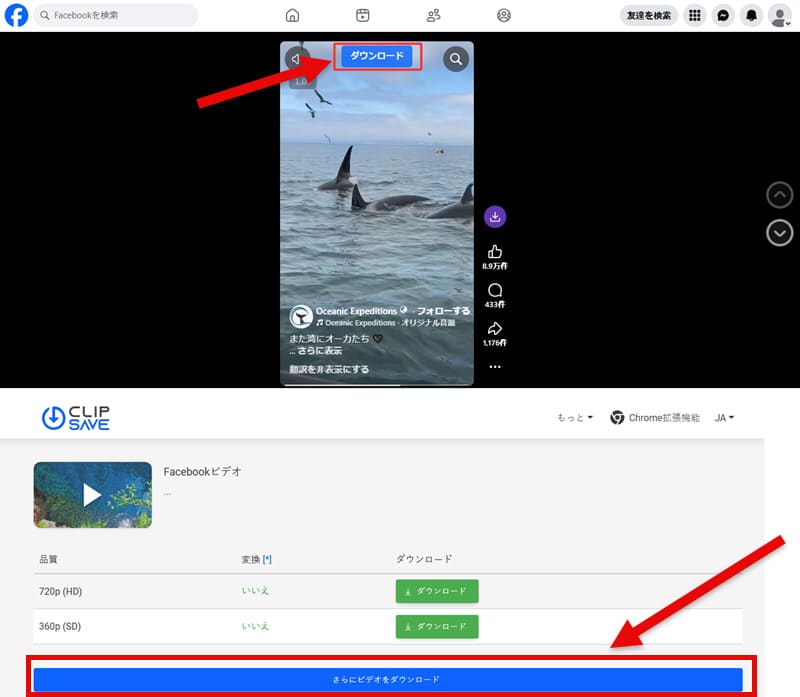
Step 2Open the playback page of the video you want to download on Facebook. Once the video analysis is complete, the following will appear on the screen."Download" buttonIt will be displayed automatically.
Step 3, "Download" buttonClick here to proceed to the download page. Select the desired video quality, and you can download the Facebook video.
All the methods described so far require a computer. So, is there a way to download Facebook videos on a smartphone?
Actually, you can download Facebook videos on your smartphone using dedicated apps such as "iCap" or "Clipbox+". However, this method involves somewhat complicated setup and operation, and is not highly recommended for beginners. Therefore, if you are using it for the first time,StreamByte for VideoIt's easier to download Facebook videos and then transfer them to your smartphone.
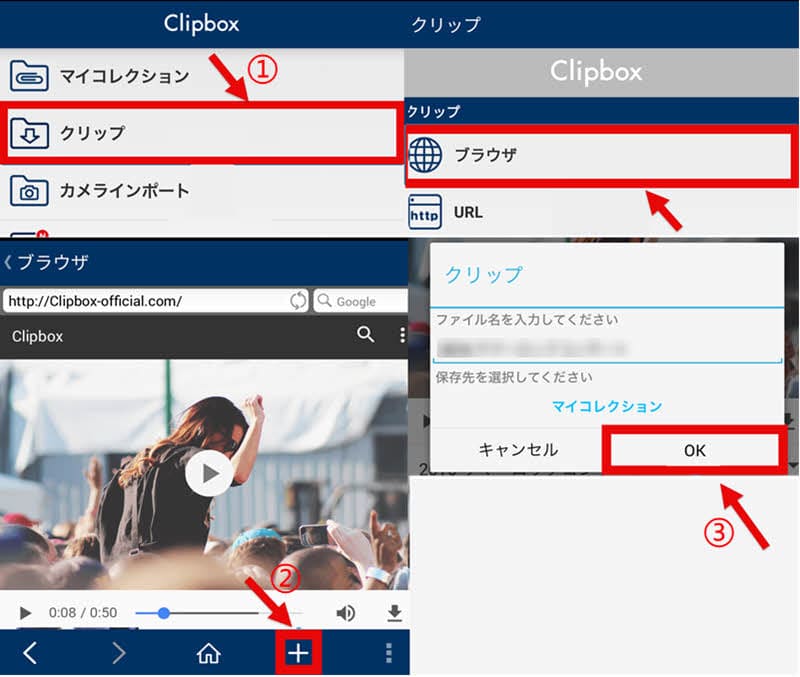
Here, we'll show you how to download Facebook videos on your smartphone using "Clipbox+", which is compatible with both iOS and Android, as an example.
step 1Install "Clipbox+" from the App Store or Google Play and launch the app.Browser functionUse this method to access Facebook and open the playback page of the Facebook video you want to download.
Step 2When you display the video page,"+" iconTapCopy URLSelect it. Then,"URL" tab on the "Search" screenPaste the copied URL into the box and analyze the video.
Step 3Once the analysis is complete, select the destination folder.Tap "OK"The download will begin, and once complete, you can play Facebook videos offline from within the app.
Generally, downloading a Facebook video does not notify the uploader. Therefore, it is generally understood that the uploader will not know that you have downloaded their video. However, Facebook's specifications and features may change in the future, so it is best to check the latest information before using it.
Downloading Facebook videos using external tools is not necessarily illegal. Generally, if the purpose is for personal viewing, it is unlikely that you will be immediately held legally responsible. However, redistributing downloaded videos without permission or using them commercially may constitute copyright infringement. Therefore, it is important to check the laws of your region and use them within appropriate limits before using them.
Not all Facebook videos can be downloaded. Generally, only videos with a "public" setting are downloadable. On the other hand, Facebook also has videos that are set to "private" or "friends only," and because viewing and access to these are restricted by privacy settings, they generally cannot be downloaded.
This article explained various methods for downloading Facebook videos, including online sites and browser extensions. However, online sites can be unsafe, and browser extensions can be unstable as they depend on specific browsers. If you want to download Facebook videos while maintaining both safety and stability, we recommend using a video downloader.StreamByte for VideoUsing "[this method]" is highly recommended.
This software allows you to save Facebook videos losslessly in common formats such as MP4, and manage and play them freely in your local environment. It is more secure than online sites and operates more stably than extensions, so you can use it with peace of mind. In addition, its simple and easy-to-understand interface makes it easy for even beginners to use right away.
the current"StreamByte for VideoA free trial version is also available, so if you want to download Facebook videos, please give it a try.
100% safe, virus-free
100% safe, virus-free
Born in Tokyo in 1997. After graduating from a university in London, he worked at a major IT media company, writing articles about video streaming services, video downloaders, and digital content.More than 3 years of experience in editing, proofreading, and writing directionThe articles he has worked on have garnered over 5 million page views, and he is well-known for producing content that is carefully crafted from the reader's perspective.
Currently, as an editor and web writer at StreamByte, he works on creating articles that help users solve their problems, focusing on information related to video streaming services and downloads, with the aim of being "user-oriented, easy to understand, and immediately useful."
Read more articles together


Experts in supporting offline viewing of streaming video services
Subscribe to StreamByteCopyright © 2026 StreamByte. All rights reserved.



Get the latest news, product upgrades, information, guides, discounts and more about StreamByte.
Please enter a valid email address.

A highly capable video downloader:
StreamByte for Video
Even beginners can rest assured! You can try saving videos for free first!







 English
  Japanese
  Chinese (traditional)
  German