
- Online video downloader
- Streaming Products
- BD-DVD products
- Store
- Useful Articles
- support
Share this article!


Instagram Stories are a unique posting format where the public viewing period automatically ends after 24 hours. Therefore, if you want to save your favorite videos for a longer period, it's recommended to save them using a method that allows you to do so. However, many people online are struggling to save Instagram Stories. This article will explain in detail the main reasons why you might not be able to save Instagram Stories, as well as specific solutions. Furthermore, we will introduce a more reliable and fundamental solution, so please read to the end.

Related Posts:
Currently, the Instagram Stories that can be saved using Instagram's official features are basically limited to those you have posted yourself. It is possible to save stories you are editing before posting, or to save stories you have posted afterwards.Save Instagram StoryIf you wish to do so, please refer to the following steps.
step 1To save an Instagram story, display the story you want to save and open the corresponding Instagram story screen.
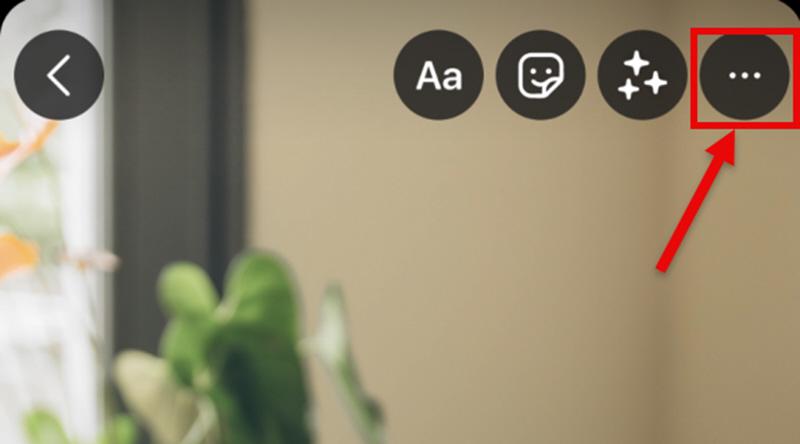
Step 2, in the upper right corner of the screen"…"menuTap it, and then select "Save" from the displayed options.
Step 3,lastly,"Save photo"or"Save video"Tap this icon. This will allow you to save the Instagram story to your device.
Furthermore, if you want to automatically save the Instagram stories you post, you can change your settings to automatically save your stories to your camera roll. The specific steps are as follows:
step 1, the three in the upper right corner of your profile screenMain line (≡)Tap
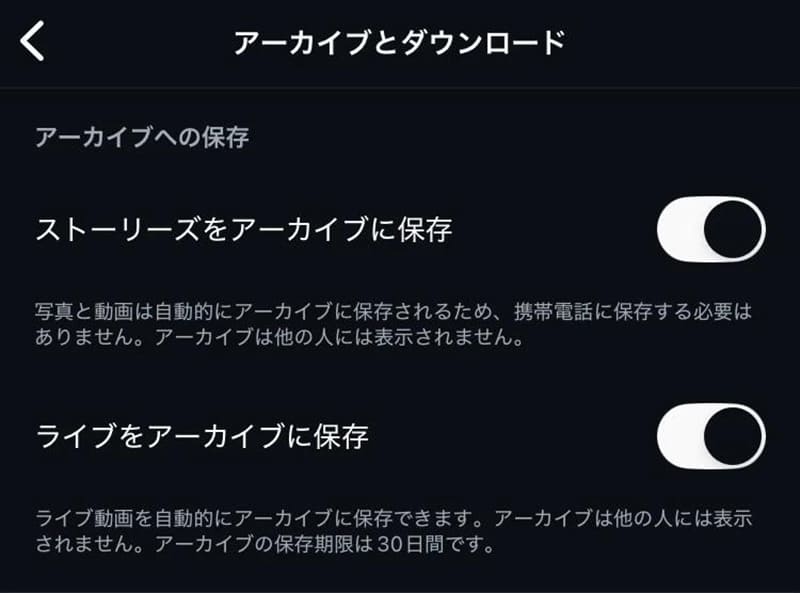
Step 2,"Settings and Privacy"Open it,"Archive and Download"Select
Step 3,"Save Stories to your camera roll"Turning this switch on will automatically save the Instagram stories you post.
While Instagram offers features to save your own stories and stories you're creating, there's no official function to save stories posted by other users. Therefore, even if you want to save a story that another user has made public, you can't do so using only Instagram's standard features.
SolutionIn this case, it's due to Instagram's specifications, and you cannot save Instagram Stories using only official functions. If you want to save Instagram Stories posted by others, you can use compatible online download sites. Also, if the story is in video format,StreamByte for VideoIt is also possible to save the video using a video downloader like the one shown.
A poor network connection is one of the reasons why you might not be able to save your Instagram Stories. If your internet connection is unstable, tapping the save button may result in extremely slow saving speeds or the loading screen getting stuck. As a result, you may not be able to save the story properly, and you may be unable to save your Instagram Stories at all.
SolutionIf you're unable to save your Instagram Stories due to network connection issues, first check the status of your Wi-Fi or mobile data connection. Disconnecting and reconnecting, or moving to a location with a more stable connection, may resolve the issue. Also, if you're using a VPN or proxy, temporarily disable it and try saving again.
Currently, the ability to save Instagram Stories is limited to the Instagram app for smartphones. Therefore, if you are using the browser version of Instagram on your computer, you cannot save Stories, let alone post them.
SolutionIf you can't save Instagram Stories in your browser, first save the story from the Instagram app and save it to your smartphone's camera roll. You can then transfer the saved videos and images to your computer.

Unlike regular posts, Instagram Stories are a special posting format with a limited visibility period of 24 hours. After 24 hours, the visibility period automatically ends, and the story disappears from your profile and story list. Therefore, Instagram Stories older than 24 hours cannot be saved.
SolutionIf you have enabled Instagram's "Stories Archive" feature for your own Instagram Stories, you can save past stories. Additionally, by saving them in advance using a video downloader like "StreamByte for Video," you can watch Instagram Stories that have been deleted after 24 hours.
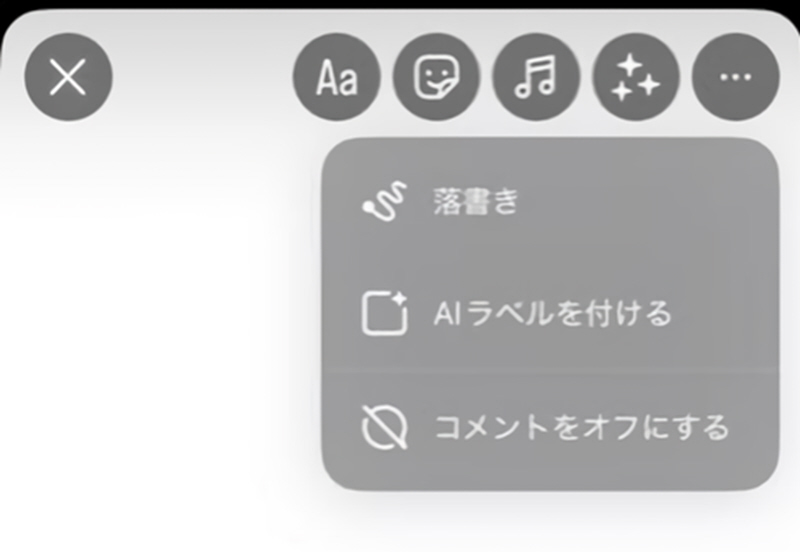
In some cases, tapping the "..." menu in the upper right corner of the screen may not display the "Save" button. In this state, you cannot save your Instagram story. Possible causes include using an outdated version of the Instagram app or a temporary glitch in the app. These issues may prevent the save function from displaying correctly.
SolutionIf the "Save" button doesn't appear and you can't save your Instagram story, first check if your Instagram app is up to date. If you're using an older version, updating to the latest version may resolve the issue. Also, if the problem is due to a temporary glitch in the app, try closing and restarting the Instagram app, or reinstalling the app, and then try saving again.
As you can see from the causes described above, the main reasons why you can't save Instagram Stories are due to Instagram's specifications or temporary glitches. In particular, you cannot save Instagram Stories posted by other people using Instagram's official functions. Therefore, as a solution when you cannot save Instagram Stories due to Instagram's restrictions, a professional video downloader "StreamByte for VideoI will introduce "[this]".
This software features a built-in web player, allowing you to search for and save Instagram story videos directly. It avoids issues like glitches in the Instagram app or the inability to save videos via the browser version, achieving a 99% success rate in downloading Instagram story videos. Even when downloading dozens of Instagram story videos at once, failures are rare, so you no longer have to worry about not being able to save Instagram stories.

StreamByte for Video
This is a video downloader that supports major streaming services such as Netflix, Amazon Prime, and YouTube. You can save and enjoy your favorite videos with high image quality up to 8K and Dolby Atmos audio.
Why StreamByte for Video is recommended
Here, "StreamByte for VideoThis explains how to easily save Instagram Stories using [this method].
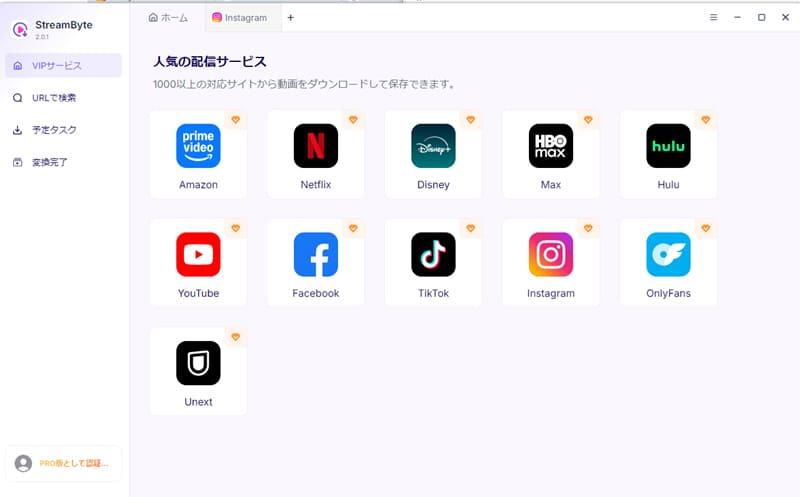
step 1When you launch "StreamByte for Video," a list of supported video services will be displayed. Select Instagram from the list and follow the on-screen instructions to access your Instagram account.Log inI will.
Step 2Search for the Instagram story you want to save using the built-in web player. When you open the target video page, the video information analysis will start automatically.
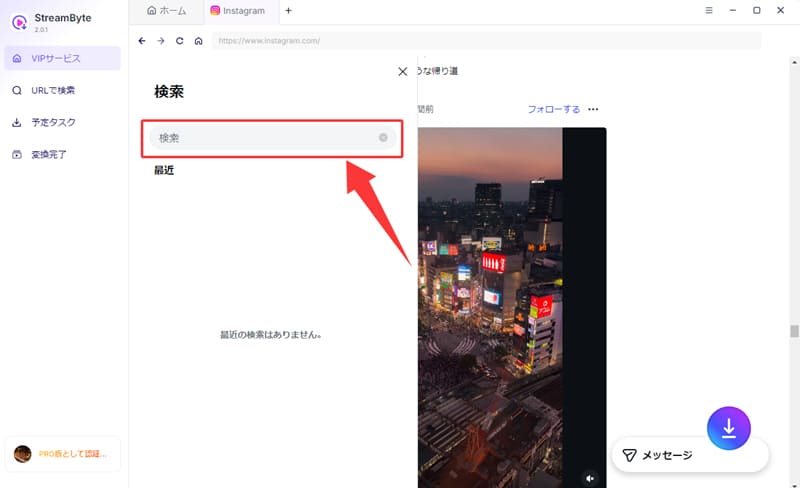
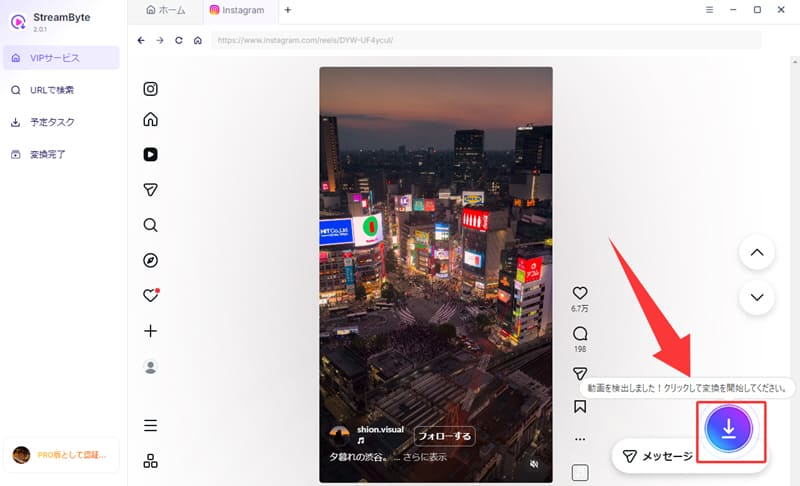
Step 3Once the video analysis process is complete, click the enabled "Download" button that appears in the lower right corner of the screen. This will take you to the Instagram Story video saving settings screen.
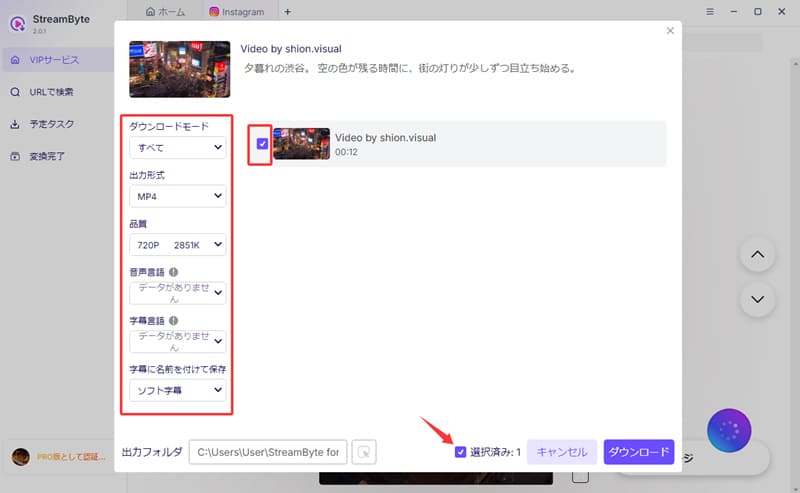
Step 4You can change settings such as output format, audio track, and subtitles in the settings screen as needed. After checking each item, click in the bottom right corner."Download" buttonClick to begin saving.
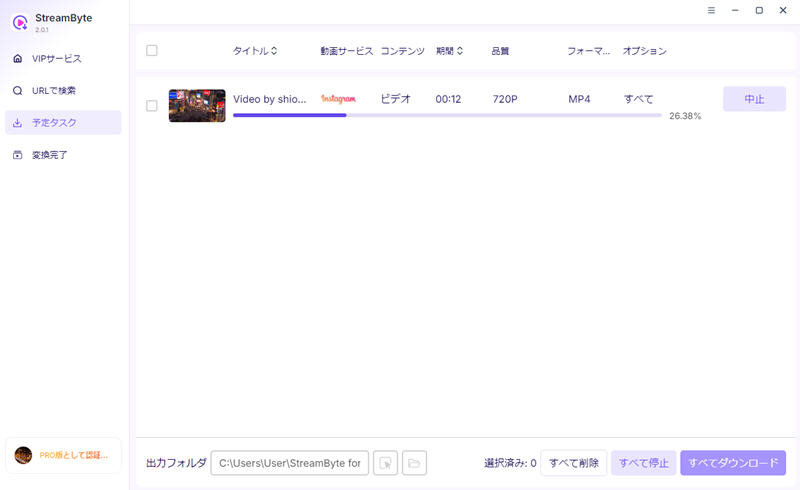
Step 5The download status is,"Scheduled Tasks" tabYou can check it there. If you're worried that you won't be able to save your Instagram story, you can check the processing status at any time. Instagram stories that have been processed will automatically"Conversion Complete" tabYou can quickly view your saved videos by moving to [this location].
"StreamByte for VideoUsing this method, you can easily save Instagram Story videos by following the steps above. You can save not only your own Instagram Story videos but also those posted by other users in high quality, without worrying about issues such as being unable to save Instagram Stories due to Instagram's restrictions. Furthermore, even stories that disappear after 24 hours can be enjoyed anytime you like by saving them.
100% safe, virus-free
100% safe, virus-free
Viewing or saving Instagram Stories, or saving posts such as Highlights and Reels, will not notify the poster. Therefore, you don't have to worry about them finding out. However, some content, such as disappearing photos and videos sent via DM, may trigger a notification.
Saving someone else's Instagram story isn't necessarily illegal. Generally, if you use the saved content for personal enjoyment, you're unlikely to be held liable. However, if you redistribute the saved content or use it commercially, you may be violating copyright law and could be held liable. Therefore, please use the saved content within appropriate limits.
Unfortunately, Instagram's official feature only allows you to save Instagram Stories on the smartphone app; you cannot save them directly from a PC. Therefore, if you want to save Instagram Stories on your computer, you will need a professional video downloader.StreamByte for VideoUsing methods such as "[...]" is recommended.
This article explains how to save Instagram Stories, and then details the main reasons why you might not be able to save them and how to fix them. Many of the reasons why you might not be able to save Instagram Stories are due to Instagram's specifications, limitations, or temporary glitches. Therefore, to allow you to save Instagram Story videos more freely, we recommend using a professional video downloader.StreamByte for Video" We introduced it as "
This software allows you to save not only your own Instagram Story videos, but also stories posted by other users that cannot be saved using the official function. You can keep Instagram Story videos on hand without worrying about the limitations imposed by Instagram's specifications. Furthermore, even Instagram Stories that were posted more than 24 hours ago can be enjoyed anytime you like if you save them.
"StreamByte for VideoA free trial version is available, so if you're having trouble saving Instagram Story videos, please give it a try.
100% safe, virus-free
100% safe, virus-free
Born in Tokyo in 1997. After graduating from a university in London, he worked at a major IT media company, writing articles about video streaming services, video downloaders, and digital content.More than 3 years of experience in editing, proofreading, and writing directionThe articles he has worked on have garnered over 5 million page views, and he is well-known for producing content that is carefully crafted from the reader's perspective.
Currently, as an editor and web writer at StreamByte, he works on creating articles that help users solve their problems, focusing on information related to video streaming services and downloads, with the aim of being "user-oriented, easy to understand, and immediately useful."
Read more articles together



Experts in supporting offline viewing of streaming video services
Subscribe to StreamByteCopyright © 2026 StreamByte. All rights reserved.



Get the latest news, product upgrades, information, guides, discounts and more about StreamByte.
Please enter a valid email address.

A highly capable video downloader:
StreamByte for Video
Even beginners can rest assured! You can try saving videos for free first!







 English
  Japanese
  Chinese (traditional)
  German