
- Online video downloader
- Streaming Products
- BD-DVD products
- Store
- Useful Articles
- support
Share this article!


Amazon Prime Video is a popular video streaming service widely used by many users. In recent years, there have been many questions about how to download Amazon Prime Video to an SD card, reflecting a growing need to comfortably enjoy videos while on the go.
Saving videos to an SD card allows you to manage them without burdening your device's storage, making it a convenient method for users struggling with insufficient storage space. Therefore, this article will clearly explain how to download and save Amazon Prime Video to an SD card. Please read to the end.
Related Posts:
Amazon Prime Video supports downloading to SD cards, but because much of the content is DRM-protected, there are various restrictions on using it after downloading. Therefore, it is important to understand the points to note before actually performing the operation. Here are some of the key points.
When downloading Amazon Prime Video to an SD card on a PC, you can use the official Windows app "Amazon Prime Video for Windows," but SD cards are not generally considered a standard download location, and you may not be able to freely specify them as the save location. Therefore, if you want to flexibly manage the save location, you should use a dedicated video download tool.StreamByte for VideoUsing "[this method]" is an effective approach.
This allows you to manage your videos freely, choosing your storage location without being restricted by the official app, and efficiently transfer data from your computer to an SD card. This saves storage space on your device while allowing you to comfortably enjoy videos even offline. Furthermore, you can play saved videos on compatible devices such as car navigation systems via the SD card, enabling you to enjoy Amazon Prime Video in a wider range of situations.

StreamByte for Video
This is a video downloader that supports major streaming services such as Netflix, Amazon Prime, and YouTube. You can save and enjoy your favorite videos with high image quality up to 8K and Dolby Atmos audio.
Why StreamByte for Video is recommended
HereStreamByte for VideoThis guide will show you how to download Amazon Prime Video to an SD card using [this method].
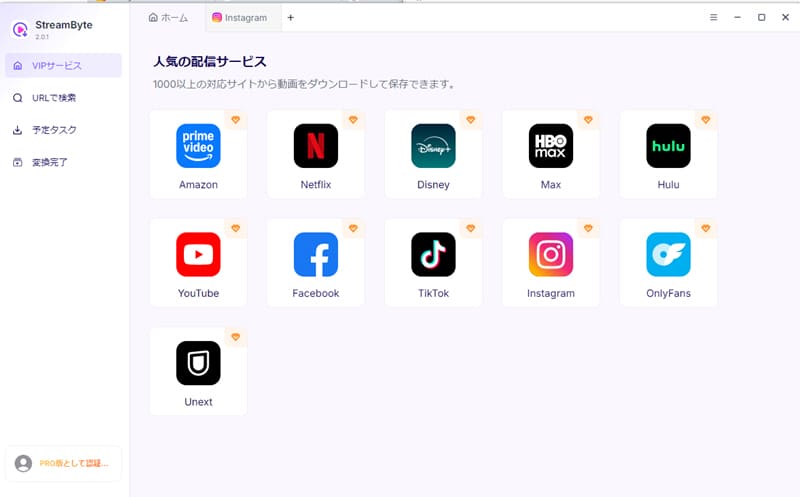
step 1"StreamByte for Video"RegistrationThen, major video streaming services, including Amazon Prime Video, will be displayed in a list on the main screen. Please select "Amazon Prime Video" from the list.
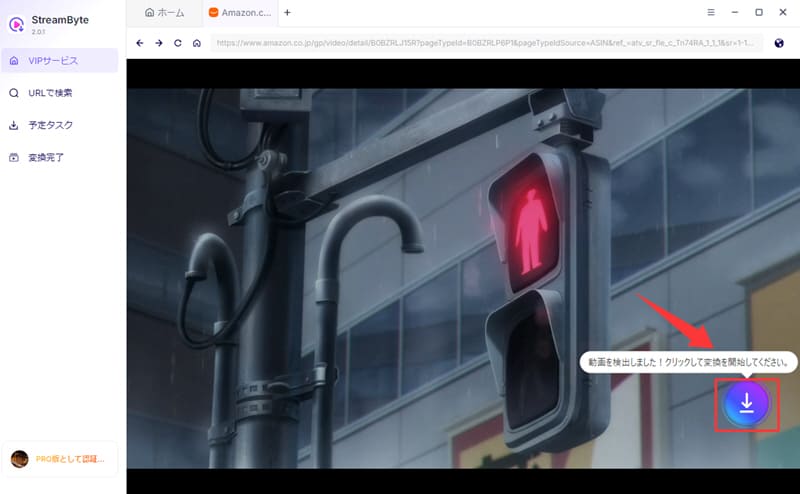
Step 2With your Amazon accountLog inAfter that, access the details page of the video you want to download. Then, click on the download button displayed on the screen.iconClicking this will add the selected video to your download list.
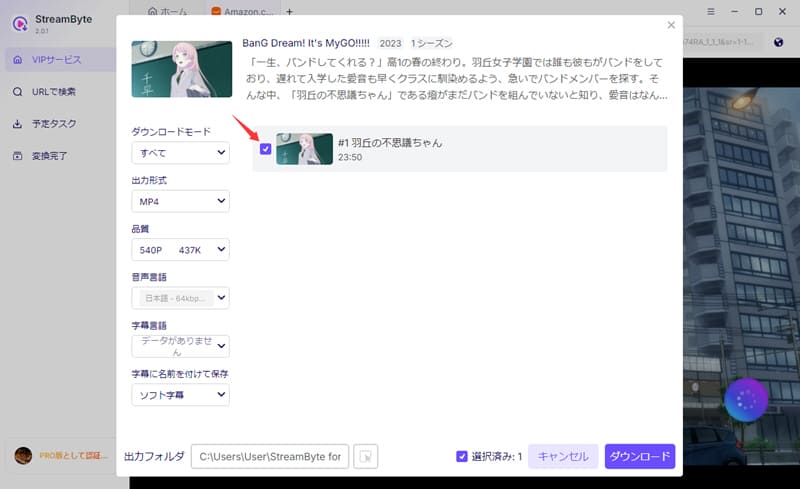
Step 3Once the video is added to the download list, you can freely change various settings such as output format, audio track, and subtitles. After completing the settings, first connect the SD card to your computer, and then switch the save location to the SD card to save the video directly.
Step 4,lastly"downloadClicking the "" button will start the video download. The progress is as follows:"Scheduled Tasks" screenYou can verify this and then download Amazon Prime Video to your SD card.
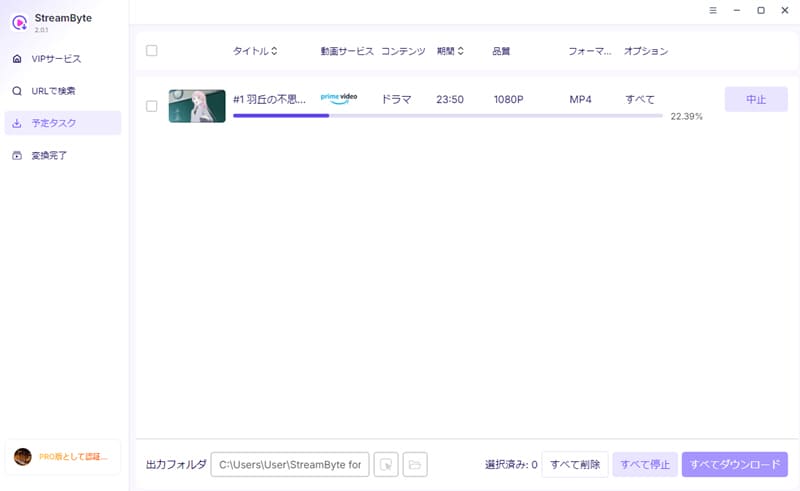
"StreamByte for VideoIf you use ", you can get powerfulDRM protection removal functionThis allows you to freely save Amazon Prime Video content in formats such as MP4 and move it to an SD card or various devices.Mapla content is permanently saved.It allows you to play content anytime, anywhere, and you can continue watching even after your membership period ends. Furthermore, near-lossless image quality and high-speed download performance provide a comfortable offline playback experience. If you save it to an SD card, you can also play it on compatible devices such as car navigation systems.
100% safe, virus-free
100% safe, virus-free
When downloading Amazon Prime Video to an SD card on your smartphone, it's important to note that iOS devices do not allow you to change the download location to an external storage device such as an SD card. Therefore, currently, only Android devices primarily support saving to an SD card.
Taking these limitations into consideration, this article will explain the specific steps for downloading Amazon Prime Video to an SD card, primarily focusing on Android devices.
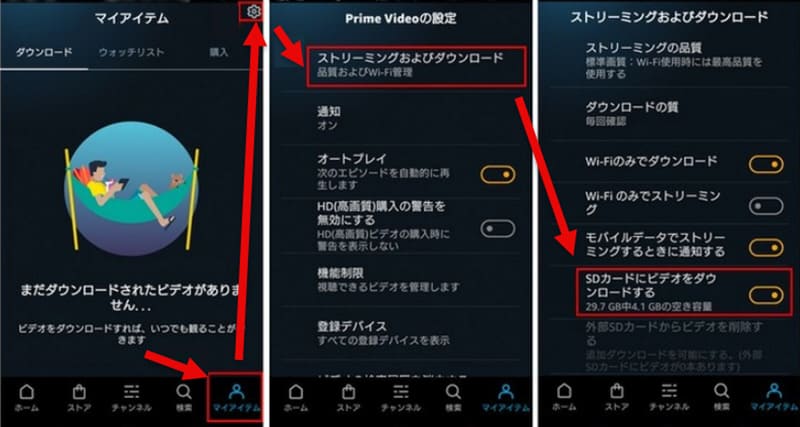
step 1First, launch the Amazon Prime Video app and click the "My ItemsTap .
Step 2,next"Prime Video settingsOpen the screen,Streaming and downloadSelect "".
Step 3"Download video to SD cardFind the item labeled "[ ]" and turn it on. Once the setting is complete, the download save location will automatically change to the SD card, and you will be able to save Amazon Prime Video to the SD card.
Videos saved to an SD card using Amazon Prime Video's official download function are managed in an encrypted state, and playback requires license authentication within the app. Therefore, you can watch them while your Prime membership is active, but after cancellation or when your membership expires, you will no longer be able to play even saved content. If you wish to store content for a long period or continue using it in an offline environment, please use the dedicated download tool that supports DRM protection.StreamByte for VideoYou will need to use tools such as "[...]."
If you cannot set the save location to the SD card on your PC, it may be due to system environment issues or a temporary operational error. First, check if your OS is up to date, update it if necessary, and then restart your device. If the problem persists, it may be due to limitations of the standard functions. In that case, try using a video download tool that supports specifying the save location.StreamByte for VideoBy using this feature, you can change the download save location to the SD card.
If the menu to select the SD card as the save location does not appear, the main reason is likely that the app's permissions have not been granted correctly. In such cases, open the Amazon Prime Video app from your device's settings screen and enable access to storage. Restarting the app after granting permissions often resolves the issue and allows the save location menu to appear correctly.
This article first briefly explains important points to know before downloading Amazon Prime Video to an SD card, and then introduces specific saving methods for different devices. However, currently, iOS does not support downloading to SD cards, and there are various limitations on saving and playback on Android devices and computers.
Therefore, if you want to circumvent these restrictions and manage your videos more flexibly, a dedicated download tool that supports DRM protection, "StreamByte for VideoThis is the software.Save Amazon Prime Video videos in common formats such as MP4.This allows for smooth transfer to SD cards and other devices. This means you can enjoy videos in various environments without worrying about in-app playback restrictions.
"StreamByte for Video"forFree trial versionIt's also available. If you want to download Amazon Prime Video to your SD card, please give it a try.
100% safe, virus-free
100% safe, virus-free
Born in Tokyo in 1997. After graduating from a university in London, he worked at a major IT media company, writing articles about video streaming services, video downloaders, and digital content.More than 3 years of experience in editing, proofreading, and writing directionThe articles he has worked on have garnered over 5 million page views, and he is well-known for producing content that is carefully crafted from the reader's perspective.
Currently, as an editor and web writer at StreamByte, he works on creating articles that help users solve their problems, focusing on information related to video streaming services and downloads, with the aim of being "user-oriented, easy to understand, and immediately useful."
Read more articles together


Experts in supporting offline viewing of streaming video services
Subscribe to StreamByteCopyright © 2026 StreamByte. All rights reserved.



Get the latest news, product upgrades, information, guides, discounts and more about StreamByte.
Please enter a valid email address.

A highly capable video downloader:
StreamByte for Video
Even beginners can rest assured! You can try saving videos for free first!







 English
  Japanese
  Chinese (traditional)
  German