
- Streaming Products
- BD-DVD products
- Store
- Useful Articles
- support
Share this article!


Y2mate is a popular online service that allows you to easily download videos and audio from YouTube without installation. However, when using it, many people have questions such as, "How do I use Y2mate?" and "Is Y2mate really safe?"
This article provides a thorough review of Y2mate's features, safety, and usage for those interested in using it. For users concerned about its risks and reliability, we provide detailed virus testing and reviews from actual users. We also introduce safe and stable alternative software for those who are unable to download YouTube videos or music with Y2mate.
If you are considering using Y2mate, please refer to this article.
Related Posts:
Y2mate is a popular online site that allows you to download videos in MP3 and MP4 formats from services like YouTube, Facebook, TikTok, Instagram, and Dailymotion. It's completely free and can be accessed directly from your browser, with no installation or registration required. It supports a variety of video and audio formats, including MP4, MP3, M4V, and WEBM, and you can download and save YouTube videos in up to 1080p resolution (some in 4K).
Y2mate functions and features
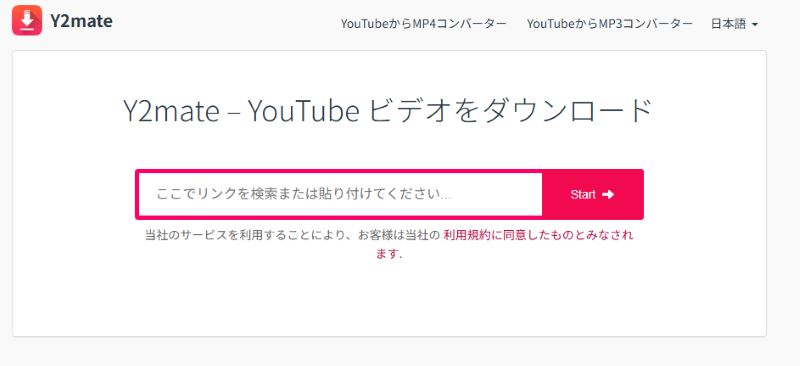
Many people considering using y2mate.com have questions about safety, such as "Is Y2mate safe?", "Does it contain viruses?", and "Does it display suspicious advertisements?". It is true that some free online sites accessed directly from a browser can be dangerous, carrying the risk of infection by viruses or malware, unauthorized collection of personal information, and tracking of device information.
If you are concerned about the risk of virus or malware infection, you can use website safety check services such as "gred" or "aguse." Verification by these services has reported that no viruses or malware have been detected on the official Y2mate website.
However, while Y2mate does not detect viruses, it may display suspicious advertisements and links, and if you click on them by mistake, there is a risk that your device or personal information may be leaked. Therefore, when using the service, you should be careful not to click on pop-up advertisements or suspicious links.
No risk from online sites! Use safe video download software!
100% safe and virus free
100% safe and virus free
There are 50 reviews of Y2mate on Trustpilot, with an average score of 2.3 points, which is low. While some users have given it five stars, the majority have given it one star. Below, we will summarize the advantages and disadvantages of Y2mate based on these user ratings.
From the above user reviews of Y2mate, we can see that although this online site is easy to use and free, it has shortcomings in terms of safety, functionality, and stability, such as displaying advertisements and download failures.
It makes up for these shortcomings of Y2mate and is a professional video downloader with high conversion success rate and reliability.StreamByte for Video" is recommended. Also, if you want to convert YouTube music to MP3 etc. stably, we recommend the music conversion software "StreamByte for Music" is the best choice.
If you want to comfortably store streaming videos and music, be sure to try StreamByte products!
Here we will introduce step by step how to convert and download YouTube videos to MP4/MP3 with Y2mate. The operation is simple and easy even for beginners, so please try following the manual below.
step 1, Copy the URL of the video you want to download from YouTube.
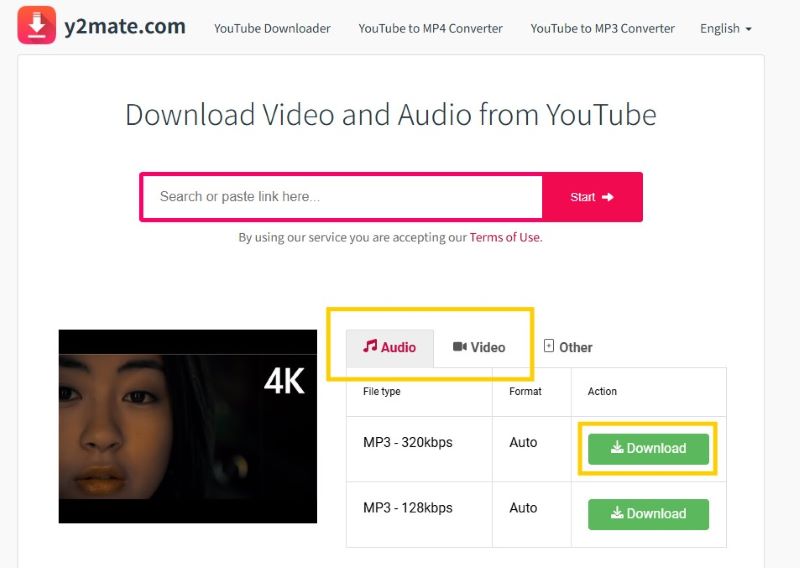
Step 2,Y2mate official websiteGo to, paste the video link into the search box and click "Start".
Step 3, The video will be analyzed automatically. If you want to save YouTube videos in MP4 format, select the "Video" tab and choose the quality you need to download the video file. If you want to save MP3 audio files, select the quality you need to download the audio file in the "Audio" tab.
Y2mate is a convenient YouTube download site that requires no installation, but it often encounters errors such as "can't download videos," "saved files can't be played," and "format conversion failed." Furthermore, due to changes in YouTube specifications, the Y2mate server itself may no longer be able to support downloads.
In such cases, the best solution is to use professional video and music download software.
If you are looking for safe and high-quality video download software,StreamByte for Video" is our top recommendation. Unlike Y2mate, it doesn't display pop-up ads and has a clean design, making it safe to use. YouTube videos can be downloaded with a high conversion success rate and saved quickly while maintaining the original audio quality. In addition to saving YouTube videos, you can also extract and save audio in MP3 format.
It supports over 1,000 video sites, including YouTube, Netflix, Amazon Prime Video, and Hulu. It also features the convenience of being able to search and download videos directly using the built-in web player. Be sure to download "StreamByte for Video" and try out its features.

StreamByte for Video
This is a video downloader that supports major streaming services such as Netflix, Amazon Prime, and YouTube. You can save and enjoy your favorite videos with high image quality up to 8K and Dolby Atmos audio.
StreamByte for Video features and advantages
How to download YouTube videos/audio using StreamByte for Video
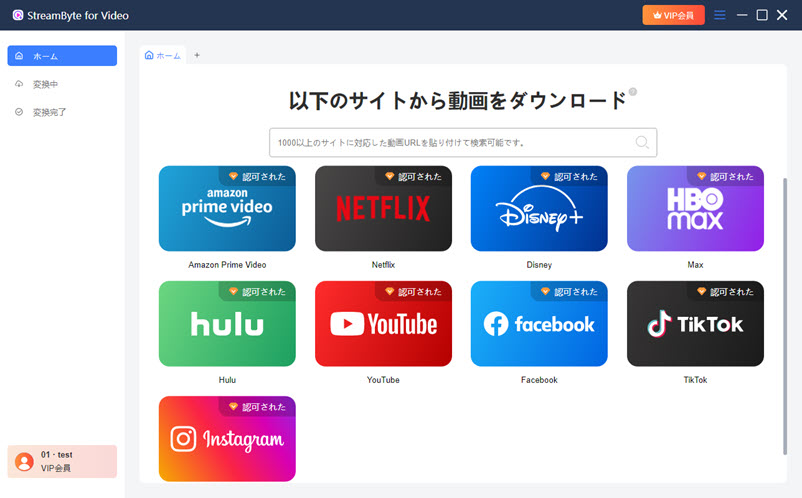
Step 1: Select YouTube
Install and launch "StreamByte for Video" on your computer. Click the YouTube icon on the main screen.
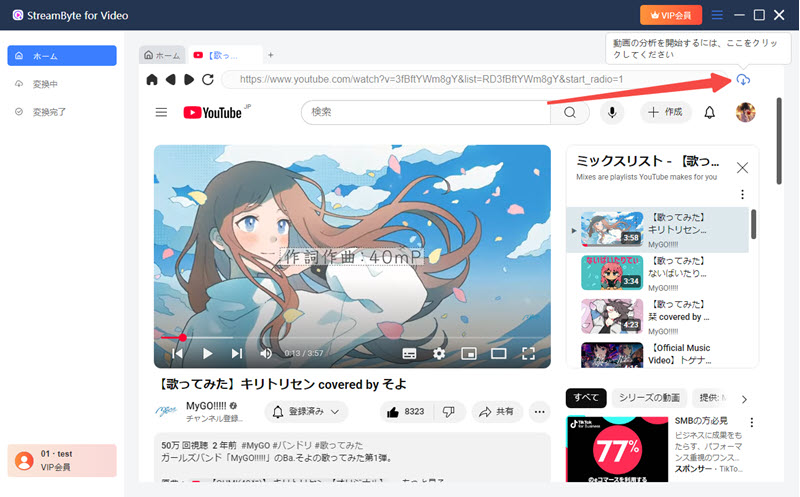
Step 2: Analyze the video you want to download
Log in to YouTube. Search for the video you want to download and enter the playback screen. Click the cloud icon in the upper right corner to automatically start analyzing the video.
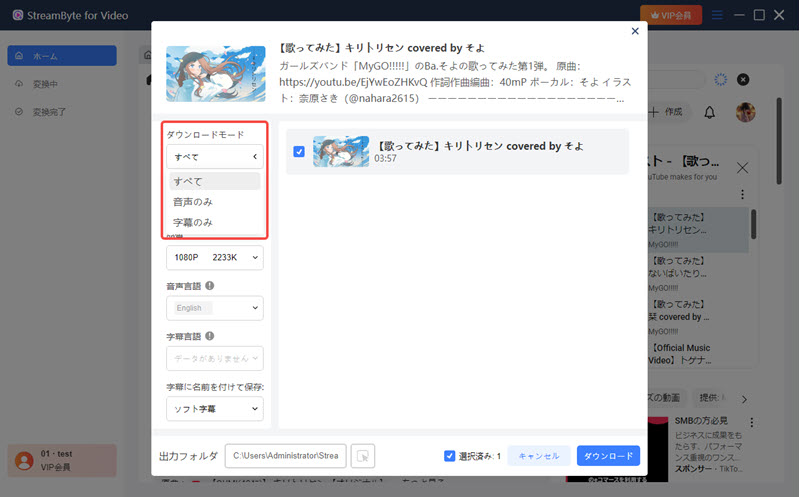
Step 3: Adjust output settings
After the video analysis is complete, you will be directed to the output settings screen. You can freely select the video episode, download mode, output format, video quality, subtitles, etc. If you only want to download the audio from a YouTube video, select "Audio only" in the download mode and output it as MP3.
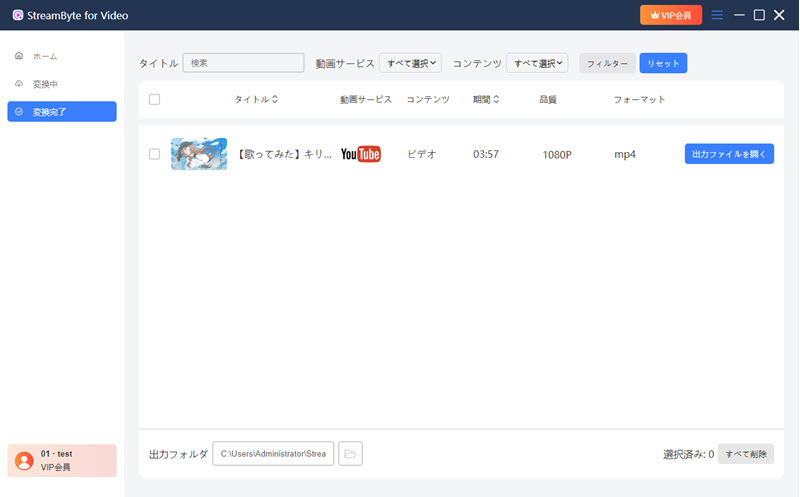
Step 4: Download YouTube videos
Once you've completed all the output settings, click the "Download" button at the bottom right and the YouTube video will be downloaded to the specified destination. You can view the downloaded video in the "Converted" tab.
"StreamByte for Video" allows you to reliably download and save videos and audio from YouTube in just 4 steps. It also has convenient features such as batch download, subtitle saving, and metadata saving. It is a reliable and more stable and secure alternative to Y2Mate.YouTube Video DownloaderWe currently offer a free trial version, so if you are having trouble downloading with Y2Mate, please download and try it out.
100% safe and virus free
100% safe and virus free
"StreamByte for Music" is specialized software for converting and downloading YouTube music. It features powerful DRM removal capabilities and supports a wide range of audio formats, including MP3, WAV, AAC, and FLAC. It can be used for a variety of purposes, including music editing, background music creation, and alarm sound settings. It quickly adapts to changes in YouTube specifications, ensuring smooth conversion and downloading. It also automatically saves ID3 tag information, such as song title, artist name, and album name, making music library management convenient.
It supports not only YouTube Music, but also many other music services such as Spotify, Apple Music, LINE MUSIC, and Deezer. Please try the free trial version of "StreamByte for Music".
100% safe and virus free
100% safe and virus free
StreamByte for Music: What You Should Know
How to Download YouTube Music to MP3 with StreamByte for Music
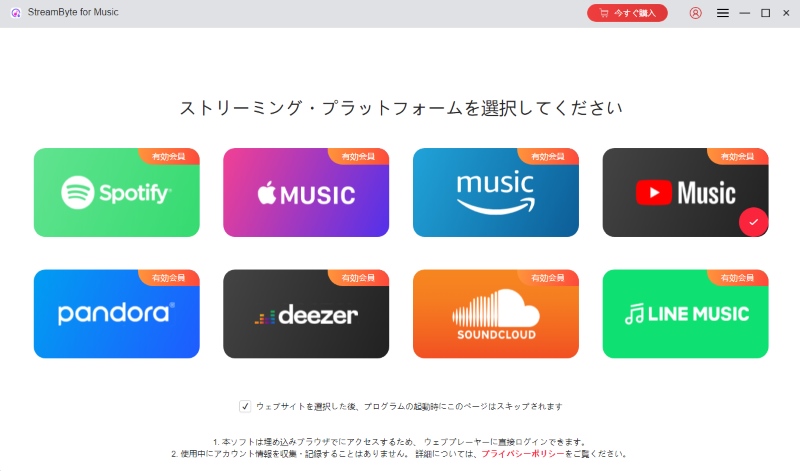
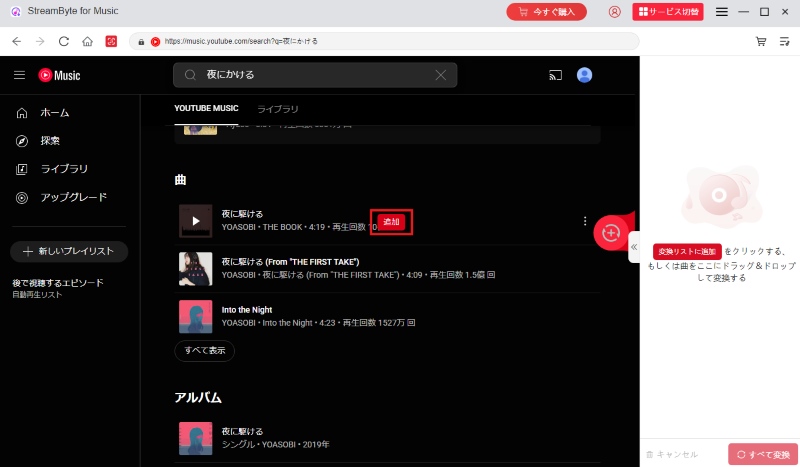
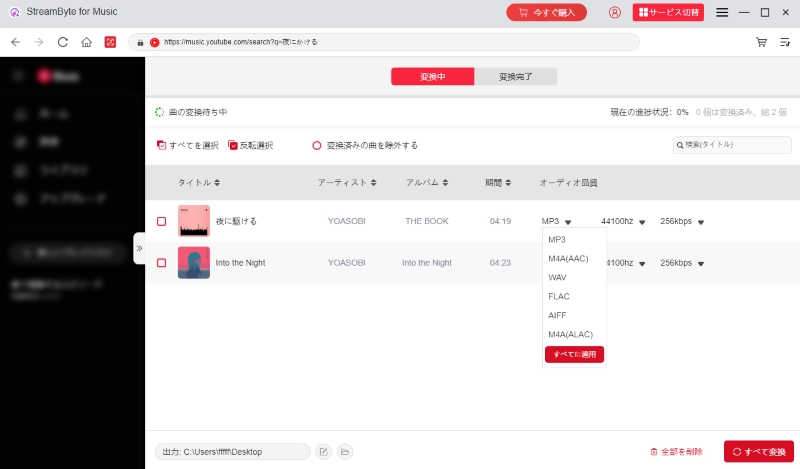
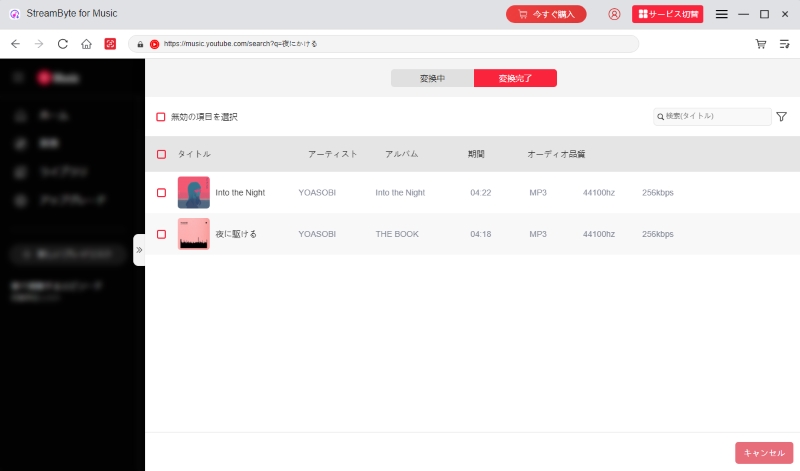
Step 1: Select YouTube Music
Launch "StreamByte for Music" on your computer. Access YouTube Music's built-in browser and log in.
Step 2: Add music
Search for the music you want to download in the search box on the top right and click the "Add" button that appears to add it to the conversion list.
Step 3: Adjust output settings
Open the conversion list screen and customize the output format, bit rate, and sampling rate of YouTube music as needed.
Step 4: Save YouTube music
Click "Convert All" at the bottom right to start downloading YouTube music. You can check the music saved on your computer in the "Converted" tab.
If you follow the above steps,StreamByte for MusicYou can convert and download YouTube Music songs to MP3 and other popular formats using this app. You can also use the same process to save songs from services like Spotify, Amazon Music, and Apple Music. Once the DRM is removed, you can save the music permanently, allowing you to easily enjoy your favorite music on the go.
If you want to enjoy streaming music offline, we recommend you try "StreamByte for Music."
Y2mate itself is safe to use. Tests using virus checking tools have not detected any viruses or malware. Therefore, downloading YouTube videos with Y2mate is relatively safe. However, this online site is not completely free of security risks. Y2Mate may display fake download buttons or pop-up ads, and clicking them by mistake could take you to an advertising site where your personal information may be leaked. To use Y2mate safely, it is important to be mindful of avoiding accidental clicks.
The legality of Y2mate depends on the intended use. Downloading YouTube videos for personal viewing is generally not a problem. However, if you save a video owned by a copyright holder and upload it to social media for commercial purposes or sell it commercially, you may be violating copyright law. To avoid legal issues, please limit your use of YouTube videos to personal enjoyment only.
This article provides a thorough explanation of Y2mate's features, dangers, and how to use it. Y2mate is a completely free video download site that allows you to save YouTube videos in MP3/MP4 format. However, it has some drawbacks, such as a lack of security and stability.
Instead of Y2mate, professional video download software "StreamByte for VideoWe recommend using ". It has a wide range of functions and is easy to use.Save YouTube videos to your computerYes, you can. It supports a wide range of formats, including MP4, MKV, MOV, and MP3, expanding the range of uses for saved videos. It is safe, ad-free, and has a high conversion success rate. Please download and try it out.
100% safe and virus free
100% safe and virus free
If you want to download YouTube music comfortably,StreamByte for Music" is also a great option. It can convert losslessly to a variety of formats, including MP3, AAC, and WAV, and it allows for fast, bulk downloads while maintaining the original quality. It supports not only YouTube, but also major music streaming services such as Spotify, Apple Music, and LINE MUSIC. Try it for free.
Born in Tokyo in 1997. After graduating from a university in London, he worked at a major IT media company, writing articles about video streaming services, video downloaders, and digital content.More than 3 years of experience in editing, proofreading, and writing directionThe articles he has worked on have garnered over 5 million page views, and he is well-known for producing content that is carefully crafted from the reader's perspective.
Currently, as an editor and web writer at StreamByte, he works on creating articles that help users solve their problems, focusing on information related to video streaming services and downloads, with the aim of being "user-oriented, easy to understand, and immediately useful."
Read more articles together
Experts in supporting offline viewing of streaming video services
Subscribe to StreamByteCopyright © 2026 StreamByte. All rights reserved.



Get the latest news, product upgrades, information, guides, discounts and more about StreamByte.
Please enter a valid email address.










 English
  Japanese
  Chinese (traditional)
  German